Tag: Security Audit Software

  • Fire Watch Log: The Complete Guide to Compliance

    Fire Watch Log: The Complete Guide to Compliance

    I’ve seen fire watch logs handled two completely different ways. One kind gets pulled out during an inspection and the inspector barely glances at it before moving on. The other kind gets picked apart line by line and the facility manager standing there realizes halfway through that they’re in trouble. The difference almost never comes down to bad luck. It comes down to whether the person filling out the fire watch log understood why each line existed in the first place.

    This guide walks through everything you need to know about keeping a compliant fire watch log, not just the checklist version.

    Start with what a fire watch log is actually standing in for

    Every building with a fire suppression system is relying on automation. A sprinkler head senses heat and activates. A detector senses smoke and triggers an alarm. None of that requires a person to notice anything.

    The moment that system goes offline, even temporarily, the building loses that automatic response. A fire watch exists to replace it with a human one. A trained person walks the space, uses their senses instead of a sensor and is ready to pull an alarm or grab an extinguisher if something starts.

    A fire watch log is the only thing that proves that human backup was actually functioning during the gap. Nobody can retroactively prove they were paying attention during a window that’s already passed. The log is the substitute for that proof, which is why an accurate fire watch log matters as much as the watch itself.

    Real scenarios where a fire watch log is required

    It helps to think through actual situations rather than abstract rules.

    A restaurant’s kitchen suppression system needs annual servicing. The technician is on site for four hours doing the inspection and recharge. Depending on local code, that might fall under a window where a fire watch log isn’t required at all, or it might require one if the servicing runs long or if hot cooking equipment stays in use during the work.

    A mid-rise apartment building under construction has framing done on floors one through six, but the standpipe system for the fire department connection isn’t hooked up yet. Workers are doing electrical rough-in with power tools that create sparks near stored lumber. This is a textbook case where a fire watch log isn’t optional, according to guidance published by the National Fire Protection Association on construction and demolition fire safety.

    A hospital wing has its sprinkler system impairment shut down overnight for a valve replacement. Patients are still in adjacent rooms. This is one of the highest scrutiny situations you can be in, because occupant safety concerns stack on top of property concerns and fire marshals tend to inspect a healthcare facility’s fire watch log with a finer comb than almost any other occupancy type.

    A warehouse is hosting a private event with string lighting, a stage and folding chairs set up in a way that partially blocks two of the sprinkler zones. Even though the system is technically operational, the physical obstruction can trigger a fire watch requirement in some jurisdictions because the sprinklers can’t do their job through a blocked zone.

    Each of these looks different on the surface, but the underlying question is the same. Is there a period when the automatic protection can’t do its job and is a fire watch log being kept to document the person filling that gap?

    Getting the trigger conditions right

    This is the part people guess on most often and guessing wrong is expensive in either direction. Assume you need a fire watch log when you don’t and you’re paying for staffing that wasn’t required. Assume you don’t need one when you do and you’re sitting on a violation waiting to be discovered.

    The baseline framework in the US comes from NFPA 1, the Fire Code and NFPA 241, which covers construction and demolition specifically. Both give general guidance on impairment durations and hot work precautions that determine when a fire watch log becomes mandatory. But the actual enforcement sits with your local Authority Having Jurisdiction and that office can be stricter than the NFPA baseline. Some cities require a fire watch log the moment a system goes down, regardless of expected duration. Others give a grace window, commonly four hours, before one becomes mandatory. The U.S. Fire Administration also publishes general fire prevention guidance worth reviewing if you’re setting up a policy for the first time.

    Calling your local fire marshal’s office before starting any impairment work isn’t excessive caution. It’s the only way to know which version of the rule actually applies to your address and which fire watch log requirements apply to your specific occupancy type.

    What the entries in a fire watch log need to contain

    Break this down entry by entry rather than treating it as one lump requirement.

    Timestamp for every single round. If your required interval is 30 minutes, sixteen rounds happen across an eight-hour shift. Sixteen separate timestamps should exist in the fire watch log, not four broad time blocks.

    Signature per entry, not one signature covering the whole log. Individual accountability for each specific round matters if anything is ever questioned later.

    Named locations, specific enough that someone reading the fire watch log later could retrace the exact path. “Checked mechanical room, loading dock and east stairwell” holds up. “Checked building” does not.

    Genuine observations. This is the one people skip the most. If a round was uneventful, write down what was specifically checked and confirmed clear, not just the word “clear.” If something was slightly off, a space heater running unattended, an exit door propped open with a trash can, note it and note what was done about it.

    Equipment status per round or at reasonable intervals depending on your local requirements. Extinguishers present and accessible. Exits unobstructed. Alarm pulls undamaged and reachable.

    Communication method confirmed working. Whoever’s on watch needs an actual way to call for help immediately and that should be verified rather than assumed.

    Irregularities were logged even when nothing came of them. A pattern across several watches, the same door getting propped open every week, a storage area slowly accumulating boxes near a heat source, is often more valuable information in a fire watch log than any single clean round.

    Total watch period start and end times are tracked separately from the individual round timestamps.

    The reason for the watch is documented specifically. A permit number for hot work. A work order number for the impaired system. Vague reasons like “system down” without a reference number make the fire watch log harder to tie back to an actual authorized event.

    Supervisor sign-off at whatever interval your jurisdiction requires, commonly at the end of the shift or the end of the full watch period.

    (Related reading: see our guide on hot work permit requirements and our fire alarm system impairment checklist for related compliance steps.)

    The failure that catches people off guard

    Missing one round doesn’t just cost you that round. It tends to undermine the credibility of the entire fire watch log.

    Picture an eight-hour watch with a required 30-minute interval. If there’s a 90-minute stretch where nothing was logged, an inspector reviewing that fire watch log after an incident isn’t going to read it as “97 percent compliant.” They’re going to read it as evidence that the watch broke down at some point and that undermines the reliability of everything else on the page, even the rounds that were done correctly.

    There’s a second failure that’s less obvious but just as damaging. A fire watch log where every single entry says “all clear” in identical wording, shift after shift, starts to look manufactured rather than lived. Real buildings have small variations. Different foot traffic at different hours. A door that sticks sometimes and not others. Weather affects how a space feels. When a log shows zero variation across dozens of entries, it reads like it was filled out from memory or copied from a previous shift rather than walked in real time and that’s the exact impression that invites deeper scrutiny.

    Paper logs versus digital fire watch log tools, honestly compared

    Paper is nearly free and requires no training. The trade-off is that a paper fire watch log depends entirely on discipline. It is genuinely easy, on a slow overnight shift with nothing happening, to fill in the last three rounds from memory at 2am instead of walking them as they occur. Handwriting inconsistencies, a smudged timestamp, a page that got left in a truck instead of being filed properly, all of these are common paper-specific failures that show up during real audits.

    Digital fire watch log tools timestamp the moment an entry is submitted, which removes the ability to backfill rounds after the fact. Some tools use location verification to confirm the watch person was actually in the area they logged. The Occupational Safety and Health Administration also recommends documented monitoring procedures as part of a broader workplace fire safety program, which digital tools tend to make easier to maintain consistently.

    Neither format automatically wins in an inspector’s eyes. A meticulously kept paper fire watch log beats a careless digital one every time. But digital tools remove a lot of the human shortcuts that create problems, which is why larger facilities and construction sites increasingly default to them.

    What actually happens when a fire watch log falls short

    Fines are the most visible consequence and the range varies enormously by jurisdiction and severity, sometimes a few hundred dollars, sometimes into the thousands for repeat or serious violations.

    Construction sites face something often worse than a fine: a stop-work order. Every day of delay on an active job site can cost far more than any fine attached to the original violation.

    The insurance side tends to be the largest financial risk in the long term. If a fire happens during an impairment period and the fire watch log is missing, incomplete or clearly falsified, the insurer has a real basis to deny the claim outright, which can mean the facility absorbs the full cost of the damage with no coverage at all.

    Whoever supervised the watch can also face personal liability questions, particularly in a case involving injury, where negligence gets examined in detail by investigators and potentially in court.

    And there’s a compounding effect on future inspections. Fire marshals keep records of past violations at a given address and a facility with a documented fire watch log failure tends to get inspected more closely and more often going forward.

    Building a fire watch log system that holds up over time

    None of this requires a complicated system, just a consistent one.

    Pick one format, paper or digital and use it every time without exception. Inconsistency between shifts or between different staff members is where gaps in a fire watch log tend to open up.

    Train the actual watch person on hazard recognition, not just paperwork. Someone who doesn’t know what a fire risk looks like can produce a perfectly formatted fire watch log that misses everything that matters.

    Treat the interval requirement as fixed. If it’s 30 minutes, that stands regardless of how uneventful the shift feels.

    Retain completed fire watch logs for whatever period your local authority requires, commonly one to three years, sometimes longer for higher-risk occupancy types like healthcare or high-rise residential.

    Go back through old fire watch logs periodically instead of only filing them. Recurring small issues across multiple watches are often the earliest warning signs of a bigger hazard forming.

    (For a deeper dive into staff training requirements, see our fire safety training for facility staff guide.)

    A basic fire watch log template

    DateTimeArea CheckedObservationsEquipment StatusWatch Person Signature

    An eight-hour watch with a 30-minute interval should produce sixteen individual rows in the fire watch log, not one summary line at the end of the shift.

    Common questions people ask about fire watch logs

    Does a fire watch need to be a dedicated person or can existing staff rotate through it? This depends on your local code and the specific situation. Some jurisdictions allow existing staff to take on the role as long as they’re properly trained and it doesn’t pull them away from other safety duties. Others require a dedicated person with no other responsibilities during the watch. Check with your AHJ before assuming either way.

    How long does a fire watch log need to be kept after the watch ends? Most jurisdictions require one to three years, but certain occupancy types, especially healthcare and high-rise residential, sometimes require longer. Confirm with your local authority rather than assuming a standard timeframe applies everywhere.

    Can a fire watch log be handwritten and still hold up during an audit? Yes, as long as it’s filled out accurately and in real time. Handwritten fire watch logs are only a problem when they show signs of being filled out after the fact, inconsistent handwriting, timestamps that don’t match a plausible sequence of events or gaps that suggest rounds were skipped.

    What’s the difference between a fire watch log for an impaired system and one for hot work? An impairment fire watch log covers a period when an automatic system, sprinklers or alarms are offline. A hot work fire watch log covers the period during and often after welding, cutting or similar work, since sparks and heat from that work can ignite something nearby well after the actual work has stopped. The reason for the watch should always be documented clearly since the two situations sometimes carry different durations and monitoring requirements.

    Where this leaves you

    The rules themselves aren’t complicated once you’ve walked through them. What actually separates a fire watch log that holds up from one that falls apart under review comes down to the same handful of details every time. A real timestamp on every round. Observations that describe what was actually checked instead of a repeated phrase. Discipline to keep the intervals consistent even on the quietest shift of the month.

    Get those right and your fire watch log does its job the one time it’s actually needed. Skip them and you end up with a stack of paper that looks like compliance from a distance but won’t hold up the moment someone actually reads it closely.

    For information, visit our website https://avessecurity.com/

    FAQ

    How long does a fire watch log need to be kept after the watch ends? Most jurisdictions require one to three years, but certain occupancy types, especially healthcare and high-rise residential, sometimes require longer. Confirm with your local authority rather than assuming a standard timeframe applies everywhere.

    Can a fire watch log be handwritten and still hold up during an audit? Yes, as long as it’s filled out accurately and in real time. Handwritten fire watch logs are only a problem when they show signs of being filled out after the fact, inconsistent handwriting, timestamps that don’t match a plausible sequence of events, or gaps that suggest rounds were skipped.

    What’s the difference between a fire watch log for an impaired system versus one for hot work? An impairment fire watch log covers a period where an automatic system, sprinklers or alarms, is offline. A hot work fire watch log covers the period during and often after welding, cutting, or similar work, since sparks and heat from that work can ignite something nearby well after the actual work has stopped. The reason for the watch should always be documented clearly since the two situations sometimes carry different duration and monitoring requirements.

    How often does a fire watch log need to be filled out? Most codes require a new entry every 30 minutes, though some higher-risk occupancies or more severe impairments call for more frequent rounds, sometimes every 15 minutes. The exact interval depends on your local fire code and the nature of the hazard, so confirm with your AHJ rather than assuming 30 minutes applies universally.

    Who is legally responsible if a fire watch log is incomplete or inaccurate? Responsibility typically falls on whoever was assigned to conduct the watch, along with the supervisor or facility manager who signed off on it. In serious incidents, both parties can face liability questions, which is part of why signature and sign-off requirements exist at multiple levels of the log.

    Does a fire watch log need to be notarized or certified in any way? Generally no. A fire watch log doesn’t need notarization, but it does need to be signed by the person conducting each round and typically countersigned by a supervisor. Some jurisdictions may require the log to be available for review by the fire marshal on request, but formal certification isn’t standard practice.

    Can one person cover a fire watch for multiple buildings or zones at once? This depends entirely on local code and the size and layout of the area involved. Some jurisdictions allow one person to cover multiple adjacent zones if they can complete the required rounds within the mandated interval. Others require a dedicated watch per building or per zone, especially in higher-risk occupancies. Never assume one person can cover more ground than the interval realistically allows.

    What’s the difference between a fire watch log and a fire watch permit? A fire watch permit is often issued alongside a hot work permit and authorizes the watch to take place, sometimes required before work can even begin. A fire watch log is the ongoing record of what happened during that authorized watch period. Some jurisdictions require both, so check whether your permit process and your logging requirements are handled by the same office or separately.

    Do fire watch log requirements apply to residential buildings, or just commercial ones? Fire watch requirements can apply to residential buildings too, particularly high-rise apartments or buildings undergoing construction or major system impairment. Occupied residential buildings often face stricter scrutiny because life safety concerns are higher, so don’t assume residential properties are exempt just because they aren’t commercial or industrial.

    What should happen if a hazard is discovered during a fire watch round? The immediate priority is addressing the hazard directly, whether that means removing a combustible item, correcting a propped-open door, or in a serious case, evacuating and calling emergency services. The fire watch log should document what was found, what action was taken, and the time it happened. A hazard that gets fixed but never logged leaves no record that the watch was actually doing its job.
  • Shift Handover Software: Close the Gap Between Guard Shifts

    Shift Handover Software: Close the Gap Between Guard Shifts

    Here’s what nobody tells you when you’re shopping for shift handover software: the calendar was never your problem. If you run a security company, you already know the moment. A guard finishes a shift, hands things over in a rush and the next guard walks in half blind. Nobody’s sure which keys got passed on, what happened during the last two hours or whether that “minor incident” near the loading dock actually got written down anywhere.

    You’re not here for a definition of staff scheduling software. You’ve probably Googled that term ten times already. What you actually want to know is simpler and harder at the same time. Will staff scheduling software fix the chaos on your site or will it just hand your team a new tool to learn and ignore?

    That’s the real question. It deserves a real answer.

    Why Shift Handovers Quietly Break Security Operations

    Most security firms don’t lose money because of one big disaster. They lose it in small, boring ways that pile up.

    A guard forgets to mention a broken camera. The next shift has no idea a visitor badge never got returned. A key goes missing and nobody can say who had it last. None of this looks like a crisis on any given day. Give it a month, though, and it becomes a pattern your clients start noticing before you do.

    Paper logbooks and WhatsApp threads feel fast, but they’re fragile. They live in one person’s memory or one phone’s chat history. The moment that person takes leave, gets sick or just forgets, the information is gone with them. Closing that exact gap is what decent staff scheduling software is for.

    Here’s what most articles skip. Guards aren’t careless. Verbal handovers just depend entirely on human memory during the most rushed five minutes of a shift and memory is a terrible place to store operational data.

    What Shift Handover Software Is Actually Solving

    People talk about shift handover software like it’s just shift calendars and roster planning. Sure, that’s part of it. But that framing sells short what good staff scheduling software does for security operations specifically.

    A proper shift scheduling app earns its keep in three ways.

    It tells you who’s supposed to be where and when. It builds a clean digital record of what actually happened on each shift. And it forces the outgoing and incoming teams to talk to each other instead of assuming the other person already knows.

    That third piece is where most staff scheduling software quietly fails. Plenty of tools nail the calendar side. Almost none build a structured handover process that fits how security teams actually work on the ground. If you’re evaluating staff scheduling software for a guarding or patrol business, check this feature first, not last.

    The Mistake Most Buyers Make First

    Here’s something you won’t find in most comparison articles. The biggest mistake first-time buyers make is picking staff scheduling software based on the calendar alone and treating shift handovers as an afterthought.

    That backfires fast. A calendar tells you who was on duty. It doesn’t tell you what they handed over, whether the keys came back or whether that 3 a.m. incident ever made it into the morning briefing.

    If your team works in physical security, guarding, patrolling or facility management, the handover is where the real risk lives. Picking staff scheduling software without checking how it handles this part is like buying a car and skipping the test drive on the brakes.

    What a Digital Shift Handover Should Actually Look Like

    Easier to show than explain. Here’s what a structured handover looks like inside shift handover software built for security teams, using Aves as the working example.

    When a guard finishes a shift, they open Create Handover and get prompted to fill in the specifics. Date, outgoing shift, incoming shift are already structured fields, so nothing gets left to memory.

    From there, the form asks for the details that actually matter on the ground. Keys handed over, listed one by one. Equipment handed over, so nothing quietly disappears between shifts. Related incidents, linked directly instead of buried in a separate chat somewhere. Remarks, for the context that doesn’t fit into a checkbox. Attachments, so a photo of damage or a signed slip lives on record instead of getting lost in someone’s camera roll.

    Once submitted, the handover doesn’t just vanish into a folder. It sits under My Handovers, tracked by status. You can see what’s Submitted and what’s been Acknowledged, which gives you a clear digital trail showing the incoming officer actually reviewed it. Not just that a form got filled out somewhere.

    That closes the exact gap paper logs and group chats leave wide open. There’s no ambiguity anymore about whether the next shift knew about the broken lock or the visitor who never checked out.

    The Honest Trade-Offs Nobody Mentions

    Digital shift handovers aren’t magic. shift handover software is only as good as the habit sitting behind it.

    If your guards fill in the form carelessly just to move on, you end up with a digital version of the exact same problem you had on paper. Software gives you structure. It doesn’t give you discipline. That still has to come from how you train your team and how your supervisors follow up.

    Expect a short adjustment period too. Guards used to scribbling a quick note need a week or two to get comfortable with a structured form. That’s normal. Most teams settle into new staff scheduling software faster than owners expect, especially when the form itself is short and specific instead of a long questionnaire nobody wants to fill out.

    Then there’s cost, the part nobody wants to talk about honestly. Staff scheduling software with real shift handover features isn’t free and you shouldn’t judge it against doing nothing. Judge it against what a single missed incident report or a disputed missing-equipment claim already costs you in client trust.

    What This Actually Fixes for a Growing Security Company

    Once you’re managing more than a handful of guards across even one or two sites, verbal handovers stop scaling almost immediately. This is usually the exact moment teams start searching for staff scheduling software in the first place.

    A structured system fixes three things that quietly hurt security operations more than anything else.

    Accountability stops being assumed and starts being visible. You can see exactly who submitted a handover and who acknowledged it, which matters the second a client asks what happened during a specific shift.

    Incident history stops living in someone’s head. Related incidents attached to a handover build a searchable record over time instead of a story that shifts slightly every time someone retells it.

    Client trust improves without you doing much extra. Pull up a clean digital record showing keys, equipment and incidents tracked shift by shift and it signals a level of operational maturity paper logs simply can’t fake.

    Choosing the Right Shift Handover Software Without Overthinking It

    You don’t need the shift handover software with the longest feature list. You need the one that matches how your team actually works on site.

    Look for security guard scheduling that fits real shift patterns, not a generic weekly calendar borrowed from an office job. Look for a digital shift handover process built specifically for security work, covering keys, equipment and incidents, not a notes field lifted from some HR tool. And look for a clear acknowledgment trail, so you’re never left guessing whether the next shift actually saw what got handed to them.

    Find one piece of shift handover software that covers scheduling and handovers together and your team stops juggling two or three separate apps just to run a single shift properly.

    Where to Go From Here

    You don’t need to overhaul your whole operation overnight. Start with one site or one team. Run shift handovers digitally for two weeks and compare what you see against your old paper logs or chat messages.

    Most owners describe the same reaction once they watch staff scheduling software work the way it should. It’s not that the software does anything dramatic. It’s that the gaps they’d gotten used to living with simply stop happening.

    If you want to see how this looks for a team your size, Aves Security’s staff scheduling software walks through exactly this workflow, built specifically for guard operations instead of adapted from generic office software.

    CONTACT US

    Website : https://www.avessecurity.com

    Linkedin: https://www.linkedin.com/company/aves-security-management-system/

    Instagram: https://www.instagram.com/avessecurity/

  • Security Supervisor Daily Report: 5 Proven Ways to Roll Up Every Site Without Missing a Thing

    Security Supervisor Daily Report: 5 Proven Ways to Roll Up Every Site Without Missing a Thing

    By Nithish, AVES Security Management.

    Here is something nobody tells you when you move from guard to supervisor.

    The job does not get harder because of the sites. It gets harder because of the paperwork that is supposed to make sense of them.

    A guard has one shift to account for. You have five sites, twelve guards, three client contacts who want updates by 8am and a pile of daily reports that all look slightly different because nobody agreed on a format when the company started.

    The security supervisor daily report is supposed to solve that. Most of the time, it just adds to the pile. Getting the security supervisor daily report right is not about working harder; it is about knowing what the report is actually for and building it the right way from day one.


    Nobody Taught You This Part

    When you were a guard, your daily activity report covered your shift. Your post, your patrols, your incidents. Simple enough.

    The moment you became a supervisor, the expectation changed. Now you are supposed to produce a security supervisor daily report that covers everything across every site, makes sense to a client who was not there and still lands in the inbox before the next shift starts.

    What most supervisors actually do is stitch together bits from each guard’s report, add a few lines at the top and call it done. That is not a supervisor’s report. That is a compilation. And there is a real difference between the two.

    A compilation tells you what happened. A proper security supervisor daily report tells you what mattered, who is handling it and what tomorrow looks like because of it.

    According to ASIS International, documented supervisor oversight is one of the core requirements for security operations seeking compliance certification. A daily roll-up that covers exceptions, actions and outcomes is the practical version of that requirement.


    What the Security Supervisor Daily Report Is Actually For

    Before fixing the format, get clear on who reads this and what they need from it.

    Your operations manager needs to know if anything blew up overnight and whether it is handled. They do not want to read six pages to find out.

    Your client needs to know their site was covered, that anything unusual was caught and that someone is on top of it. They are not interested in what happened at your other accounts.

    You need a record that protects you if something from last Tuesday becomes a legal question next month.

    One security supervisor daily report has to serve all three purposes. That is why the format matters more than most supervisors think. You can read more about how shift-level records connect to the supervisor roll-up in our guide on the security daily activity report.


    1. Lead With What Went Wrong, Not What Went Right

    Most security supervisor daily reports are written like everything is fine until you get to the part where it was not.

    Flip that. Open with anything that broke pattern today. A guard who did not show. A checkpoint that was skipped. An incident is still open. A piece of equipment that was flagged and not yet fixed.

    If there is nothing in that list, say so in one line and move on. If there is something, it goes first. Not because you want to lead with bad news, but because that is what everyone reading the report actually needs to know.

    Burying a problem in paragraph four of the Site 3 section is how things get missed. A client who skims the security supervisor daily report, which most of them do, should not have to hunt for the part that affects them.

    The International Foundation for Protection Officers notes that supervisor reporting failures are most commonly traced back to poor prioritisation critical information buried behind routine updates rather than leading the document.


    2. Write by Site, Not by Guard

    This one sounds obvious, but almost nobody does it right.

    A well-structured security supervisor daily report is organised by site, not by individual guard. If you manage fifteen guards across five sites, you do not write fifteen summaries. You write five. One per site, covering the same four things each time: who showed up, whether patrols were completed, what incidents occurred and what is still open from a previous day.

    That structure means anyone reading the security supervisor daily report can go straight to the site they care about. It also means you stop spending time on guard-level detail that belongs in the individual DAR, not in your roll-up. For a clear picture of what belongs in a guard-level DAR versus a supervisor report, see our breakdown of shift handover checklists.

    A client managing a logistics warehouse does not need to know that the guard on the night shift at your retail account went home early. They need to know what happened at their site. Keep it that way.


    3. Every Problem Needs an Owner

    A security supervisor daily report that lists problems without saying who is fixing them is just a complaint log.

    For every open item, put one line underneath it. Who is handling it and when will it be resolved?

    That is it. No long explanation. No defensive justification. Just accountability in writing.

    When you do this consistently, two things happen. Clients stop asking follow-up questions because the answer is already there. And your own team gets used to the idea that if something is flagged in the security supervisor daily report, someone’s name goes next to it.

    That is how you stop the same problem from appearing in the report three days in a row with no movement.


    4. The Client Version Is Not the Same as Your Internal Version

    Everything goes in the internal security supervisor daily report. Guard performance issues, roster gaps, operational problems across accounts, anything you need for your own records.

    The client gets a filtered version. Their site, their coverage, their incidents and the resolution timeline for anything that affected them. Nothing about your other accounts. Nothing about internal staffing conversations.

    This is not about hiding things. It is about relevance. A client reading a security supervisor daily report, full of information about accounts they have nothing to do with, stops trusting that you know what is important.

    With AVES, this is not a manual process. The supervisor sees everything across all sites in the dashboard. The client report pulls only what is relevant to them and exports as a PDF. You are not rewriting the report. You are just choosing who sees which part of it. The same approach applies when you structure your daily briefings: internal detail stays internal, client communication stays clean.


    5. The Report Is Only as Good as the Data Going Into It

    This is the part most people do not want to hear.

    If your guards are filling in their daily reports at the end of a twelve-hour shift from memory, your security supervisor daily report is built on guesswork. Times get rounded. Small things that happened at 3am do not make it in because nobody wrote them down when they happened.

    When entries are logged in real time, patrol rounds are confirmed by checkpoint scanning, incidents are recorded on the spot with a photo and visitor passes are entered at the gate rather than remembered later, the roll-up you build from that is accurate. Not approximately accurate. Actually accurate.

    A client who asks what happened at 2am on a specific night gets a timestamped answer from a live record, not a best reconstruction from a tired guard’s memory. That difference is the entire reason digital reporting exists.

    The Security Industry Association consistently highlights real-time data capture as the single biggest driver of reporting quality in modern security operations. Use it.


    One Last Thing

    The security supervisor daily report does not have to take an hour every day. With the right structure and real-time data feeding it, ten minutes is realistic.

    What a good security supervisor daily report has to do is give the people reading it exactly what they need, without making them dig for it. That is not a complicated ask. It just requires being deliberate about what goes in, what gets left out and who the security supervisor daily report is actually written for.

    Get that right and the report stops being the part of the job you resent. It becomes the thing that proves you are on top of it.

    Q: What is a security supervisor daily report?
    A: It is the end-of-day document a supervisor puts together covering every site they are responsible for. Not a copy of the guard reports. A review of what happened, what needs attention and who is handling what. Think of it as the view from one level up.


    Q: How is it different from a guard’s daily activity report?
    A: A guard writes about one shift at one site. A supervisor writes about all shifts across all sites. Same day, completely different scope. If you are just forwarding guard reports to a client, that is not a supervisor report. That is just email forwarding.


    Q: How long should it be?
    A: Long enough to cover what matters, short enough that someone actually reads it. Most well-run operations land between one and two pages. If yours is running five or six pages every day, you are including things that do not belong in a supervisor-level document.


    Q: How often should a security supervisor daily report be submitted?
    A: Every day. Not when something happens. Not when a client asks. Every day, whether the shift was quiet or chaotic. A report that only appears when something went wrong is not a reporting system. It is damage control.


    Q: Do clients get the same report as internal management?
    A: They should not. Internal reports carry everything: staffing issues, performance notes and problems across other accounts. Clients only need to know about their site. Their coverage, their incidents, anything open that affects them. Mixing the two in one document is how you create confusion and erode trust.


    Q: What is the biggest reason supervisor reports fail?
    A: The data going into them. A report built from guard entries that were filled in from memory at the end of a twelve-hour shift is not accurate. It is the best guess written when everyone is tired. Real-time logging fixes this. Not partially, completely.


    Q: Can software actually help with this or is it just another tool to manage?
    A: Depends on the software. If it just stores reports digitally, it saves paper and not much else. If it timestamps entries as they happen, confirms patrol rounds through checkpoint scanning, and lets you generate a client-facing PDF without rewriting everything manually, it saves real time and produces a report you can actually stand behind when a client asks a hard question.

    FOR MORE INFORMATION, VISIT OUR WEBSITE: https://avessecurity.com/

    NEED FASTER UPDATES FOLLOW US ON LINKEDIN: https://www.linkedin.com/company/aves-security-management-system

  • Supplier Management Guide for Companies

    Supplier Management Guide for Companies

    A truck pulls up at the gate. Driver hands over a box, gets a signature, drives off. Nobody writes down what arrived, when or who signed for it. Feels like nothing. Barely worth pausing the shift for.

    Three weeks later a client calls asking where their shipment went. And you realize… nothing was ever actually tracked. Just a chain of handoffs that nobody wrote down.

    If that’s why you’re reading this, you’re not alone and you’re definitely not behind. Most security companies find this gap the same way after something’s already gone wrong, when it’s too late to fix that one incident but not too late to fix everything after it.

    So let’s get into what real supplier management looks like for a security operation, why the gap matters more than people assume and how you close it without dumping extra work on your guards.

    Why Supplier Management Gets Overlooked Until It’s a Problem

    Most security teams treat access control and incident reports as the “real” job. Deliveries? That’s the side task. The thing that gets handled, not managed.

    Understandable, honestly. A driver shows up, drops something, leaves. Doesn’t feel like the kind of moment that needs paperwork the way an incident does.

    But here’s the thing an unlogged delivery is the same gap as an unrecorded key handover. Same gap as an unrecorded shift. If a client disputes what arrived, if something goes missing between the gate and its final stop or an invoice doesn’t line up with what actually showed up, your only defense is a timestamped record with a name on it. Nothing else holds up.

    This is exactly why supplier management deserves to be a real priority, not something bolted on later. Sites with strict receiving windows. Offices that won’t take deliveries outside business hours. Facilities where weekend or holiday drop-offs need extra eyes. These places feel the gap hardest. No system and you’re leaning on a guard’s memory and a driver’s word, months after it happened.

    What You’re Probably Worried About Right Now

    First time looking into supplier management? A few worries are probably sitting in the back of your head, even if you haven’t said them out loud.

    Will this slow my guards down. Is this yet another system to learn. Will people actually use it or will it end up like every other form filled out halfway, then forgotten.

    Fair worries. They deserve real answers, not just reassurance. Doing this right doesn’t mean more work. It means the same handoff your guards already do, just captured in a way that actually holds up months later.

    How Supplier Management Actually Works in Practice

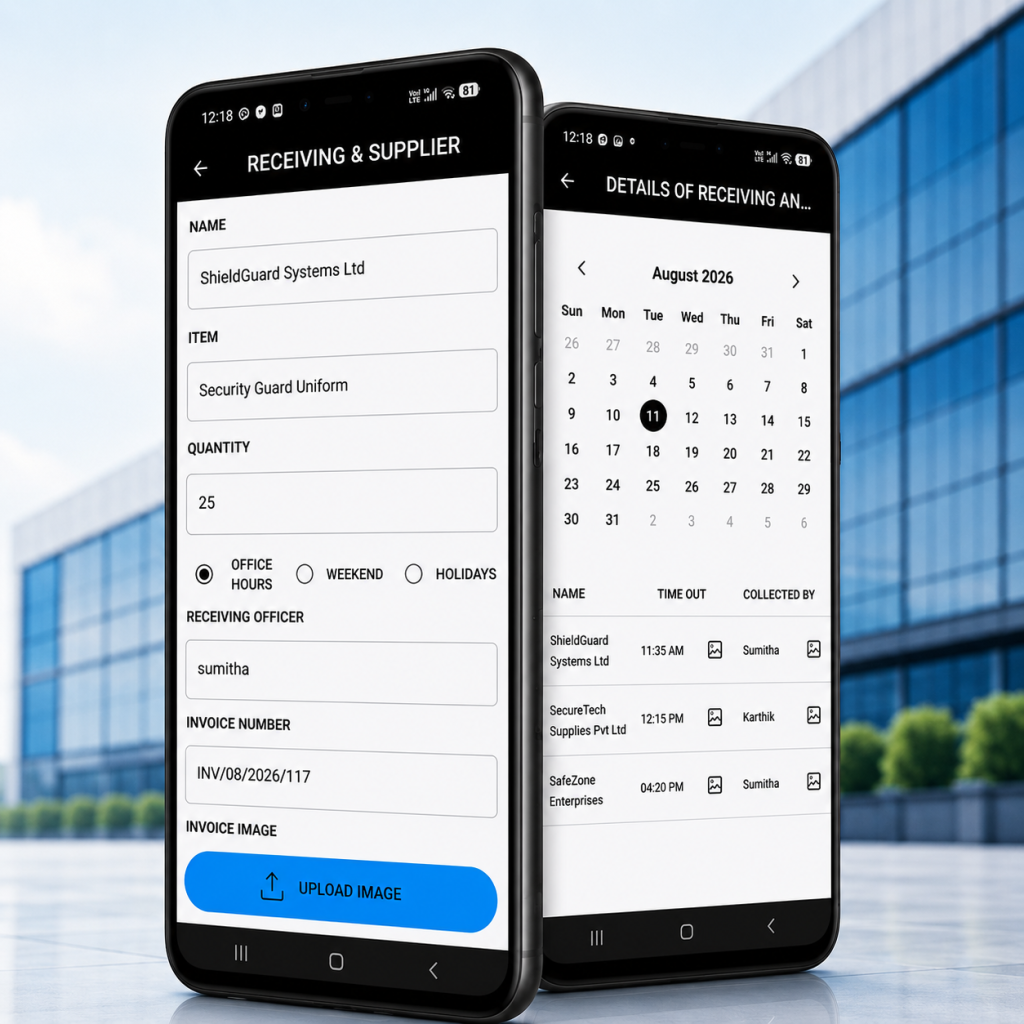
    In AVES, this sits under a module called Receiving Supplier. Two actions, that’s it: Create and Records.

    Create is where a guard logs a delivery as it happens name of the person or company delivering, the item, the quantity and a time-window selector (Office Hours, Weekend, Holidays) so anything unusual gets flagged right away instead of slipping through. The Receiving Officer field fills itself in based on who’s logged into the app, so there’s no guessing later about who actually took the delivery. Add an Invoice Number field and the option to snap a photo of the invoice and that’s the record.

    Records is basically a calendar. Pick a date, see whatever got logged that day. Nothing there? It tells you straight up no data available for the selected date instead of leaving you wondering if the app just broke.

    Think about the difference between a guard’s memory and an actual paper trail. Memory shifts. It softens details, fills gaps without meaning to, changes a little every time it gets retold. A dated record with a name, an invoice number and a photo attached doesn’t do any of that. It just sits there, exactly as it was.

    What Good Supplier Management Doesn’t Include and Why That’s Fine

    Let’s be straight about this, because overselling helps nobody. This is a receiving and delivery log. Not a full vendor management system. No contracts, no purchase orders, no approved supplier lists living in here.

    You won’t find fields for ongoing vendor relationships, payment terms or supplier performance reviews. If your business needs that level of procurement machinery, what you’re getting here is the physical receiving side of things. Not the contractual side.

    Knowing that going in saves you from expecting something that was never meant to be there. Good supplier management, for a security company, means proof of what happened at the gate. Not running your whole purchasing department.

    The Mistakes That Undermine Supplier Management Even When the Tool Is Right

    Having the right tool doesn’t automatically mean good supplier management. The habits around it matter just as much, maybe more.

    Logging the delivery late is probably the most common one. Records pull by date, so an entry made hours later or the next morning, quietly misrepresents when the thing actually showed up. This only works as evidence if the timestamp is real.

    Skipping the invoice photo when there’s one available. Takes a few extra seconds and it’s the first thing that gets dropped when people are busy. Funny enough, it’s also usually the exact piece of paper a dispute ends up hinging on.

    Treating small deliveries like they don’t count. An envelope feels too tiny to log, until it’s the one thing someone’s asking about three weeks from now. Consistency means logging everything. Not just the stuff that feels important at the time.

    Not checking the receiving officer field. It auto-fills based on whoever’s logged in, which sounds convenient until a shared device or a borrowed login quietly puts the wrong name on a delivery.

    And then there’s the big one: treating a verbal handoff like it counts as a record. It doesn’t. If it never made it into the system, as far as your process is concerned, it never happened. Doesn’t matter how well everyone remembers it.

    Building Confidence Before You Commit

    Still on the fence about formalizing this? Here’s the honest trade-off. A little discipline now, a few extra seconds per delivery, buys you real protection later. Almost always a good trade.

    The cost of skipping supplier management shows up when you least expect it. Most weeks, nothing happens and the whole thing feels like overkill. Then one dispute, one missing item, one client asking pointed questions and suddenly the entire investment pays for itself in a single conversation.

    You don’t need to rebuild your whole operation to get here. You need one habit: log the delivery the second it happens. And a system simple enough that your guards actually keep doing it.

    Frequently Asked Questions

    What is supplier management for security companies?


    It means tracking deliveries, vendors and goods received on-site creating a record of what arrived, when and who accepted it, instead of relying on informal handoffs at the gate.

    How does AVES handle supplier management and deliveries?


    Through a Receiving Supplier module with two views: Create, where a guard logs delivery details like item, quantity, time window and invoice and Records, a calendar showing everything logged for a given date.

    Can I attach an invoice to a supplier management record in AVES?


    Yes. The Create form has an Invoice Number field plus the option to upload a photo of the invoice, so the documentation lives right there with the record.

    Does supplier management in AVES flag deliveries outside normal hours?


    Yes the Create form includes a time-window selector for Office Hours, Weekend or Holidays, so your team can categorize and later review anything outside standard hours.

    Is this a full vendor management system?


    No. It logs physical deliveries and receiving details. No contract management, no purchase orders, no ongoing vendor relationship tracking.

    How do I check what was received on a specific day?


    Head to Records. It’s a calendar pick a date and it shows what was logged or tells you plainly if nothing was recorded.

    What to Expect in the First Few Weeks

    Rolling out supplier management for the first time usually goes through a predictable pattern, and knowing it in advance removes a lot of the anxiety.

    Week one feels awkward. Guards forget to log a delivery here and there, not out of resistance, just because it’s a new habit competing with everything else they’re already tracking. This is normal, and it doesn’t mean the system has failed.

    By week three, most teams settle into a rhythm where logging becomes automatic, the same way checking a badge or signing a visitor in became automatic once. The friction that felt real in week one fades once supplier management stops being a new task and becomes just part of how deliveries happen.

    The companies that struggle long-term are usually the ones that gave up in week one, right when the habit was still forming. If you commit to the first month, consistent supplier management tends to take care of itself after that.

    Where This Leaves You

    Supplier management doesn’t have to be complicated and it shouldn’t slow your team down. It just needs to be consistent and it needs to produce a record that actually holds up the day someone questions it.

    AVES keeps it in the same system your guards already use for shifts, incidents and attendance so a delivery record is something you pull up in seconds, invoice photo included, instead of trying to piece it together from a driver’s word weeks later.

    Want to see how AVES handles supplier management and delivery records in practice? You can explore the platform and request a demo at avessecurity.com.

    CONTACT US

    Website : https://www.avessecurity.com

    Linkedin: https://www.linkedin.com/company/aves-security-management-system/

    Instagram: https://www.instagram.com/avessecurity/

  • Security Guard Performance Management Guide

    Security Guard Performance Management Guide

    A security guard performance review is not supposed to feel like a trip to the dentist. But that’s exactly how most security company owners run it. They dig up a dusty generic template, scribble a couple of half-hearted notes, sign the bottom and shove it in a filing cabinet for the next twelve months. That lazy habit is the actual reason your turnover keeps climbing.

    Here’s what that officer actually deals with. Twelve hours alone at a client site. Aggressive visitors at the gate. Access control. A 2 a.m. alarm going off with nobody around to back them up. And then you hand them a review that says “good job.” That’s it. That tells them nobody’s watching, nobody cares. Good guards pick up on that fast and they don’t stick around, they go find a company that treats them like it matters. If you want a security guard performance review process that actually works, forget the corporate HR playbook. Look at what the job really involves.

    Why traditional appraisals fail security teams

    Most evaluation templates were built for someone sitting at a desk under office lights. It’s a bit like scoring a race car driver on typing speed, the metrics just don’t apply. A perimeter fence or a lobby desk doesn’t behave like a cubicle. Judge a mobile patrol officer with corporate benchmarks and the whole security guard performance review feels fake before you’ve even asked the first question.

    Guards know within a minute whether you understand their job. If you don’t, they check out mentally right there and good luck getting honest engagement after that. It kills your credibility as a manager instantly. A strong security guard performance review keeps good people, because it’s built around what the work actually looks like, not what a handbook says it should look like.

    Most managers just inherited whatever system was already in place. Annual check-ins, because that’s tradition. But security isn’t an industry where you can afford to wait a year. One missed patrol turns into a break-in or a client walking away entirely. By the time the annual review comes around, bad habits are already baked in and your best officers have already mentally quit.

    The core framework of a security guard performance review

    A real security guard performance review or security guard evaluation, sticks to objective, observable behavior. You can’t grade someone’s vibe or general attitude. You grade what they actually did. A solid framework captures daily reliability and how someone handles a crisis, in equal measure.

    Start with operational reliability: punctuality at shift handover and how strictly someone follows post relief protocol. A guard who shows up ten minutes late forces the outgoing officer to stay late too and that quietly poisons morale across the whole roster. Let tardiness slide long enough and it becomes the norm and your most reliable people start to resent it.

    Next comes tour execution. Are your guards actually hitting checkpoint scans on schedule or are they pencil-whipping the log from inside the guard shack? Patrol integrity is what your client contract is built on. Skip checkpoints and the client is paying for protection they’re not getting.

    You also need to look at incident documentation, meaning how fast and how accurately reports get filed. A report riddled with spelling errors and missing timestamps can wreck your legal standing the moment a case goes to court. Round out your security guard performance review with professional conduct: uniform, grooming and how officers actually talk to clients and visitors.

    Tracking the guard performance metrics that matter

    A real security guard performance review runs on numbers you can actually track week over week, not vague advice about working harder. One of the most important security guard KPIs to start with is tour completion rate. Anything below ninety-five percent on scheduled checkpoint scans and you’ve got a problem worth investigating.

    Incident response time matters too. How long does it take an officer to acknowledge an alarm or check out something suspicious on the property? When someone unauthorized is already inside, minutes are the whole ballgame.

    Report accuracy is another one worth watching, specifically how often a supervisor sends a report back for corrections. If your supervisor’s spending half their morning rewriting other people’s paperwork, that’s not a discipline issue, that’s a training gap that needs fixing.

    Numbers strip out the bias. Nobody can argue with a system showing they missed twelve checkpoints last Tuesday, that’s just what happened. It turns what used to be a tense, emotional conversation into a coaching session grounded in fact. Officers trust a security guard performance review built on data a lot more than one built on whatever mood their supervisor happened to be in.

    Ditching the paper trail for digital tracking

    Paperwork slows everything down and eventually something gets lost. Try running a security guard performance review across dozens of officers using logbooks and scattered spreadsheets and watch how fast the whole system collapses. A dedicated platform removes that headache entirely. Every hour spent digging through last month’s attendance sheet is an hour that should’ve gone toward training or client calls.

    Paper gets coffee stains. It gets left in a glove compartment. It disappears into a filing cabinet somewhere and never resurfaces. Digital tracking keeps everything tied to the right officer’s profile from day one, no exceptions. Cutting the physical logbook out of the process turns admin work from a scavenger hunt into something manageable.

    Walk through the life cycle of a typical paper incident report. An officer scrawls it on a clipboard mid-shift. Hands it to the supervisor at change of shift. It gets tossed into a folder in the back of a patrol car. Weeks go by. Eventually it lands on someone’s desk back at the office and now an assistant’s squinting at bad handwriting trying to figure out what actually happened. By the time management sees it, the incident’s already two weeks old. A digital system just deletes that whole broken chain.

    How AVES Security Management changes the game

    Bring everything into one place and the whole equation changes. AVES Security Management System builds your security guard performance review process, scheduling and incident reporting into a single platform. Inside the performance module, managers log employee periods and departments in a matter of seconds. Pick the name, set the development period, that’s it. No spreadsheet juggling required.

    Supervisors get a structured space to log development goals and flag concerns instead of hunting through a filing cabinet for last month’s notes. You set an agreed improvement action and a clear success measure directly inside the app. Reviews stop being that once-a-year panic because the notes are already there, logged continuously as the year goes on.

    Once daily activity connects directly to long-term development tracking, the culture around here starts to shift. With a proper security guard performance review system in place, supervisors aren’t guessing what happened three months ago anymore. They open the profile, look at real completion numbers and have an honest conversation backed by actual data instead of fuzzy memory.

    Setting goals that actually change behavior

    A security officer performance plan without a deadline attached to each goal is just a wish. Target start and end dates give remedial training or a promotion track, an actual timeline to work against. The AVES calendar lets you set exact dates for any goal in a couple of taps. Officer struggling with report writing? Give them thirty days and pair it with focused training in the app.

    Measurable success criteria tell you, plainly, whether the error rate actually dropped over that window. Continuous feedback, tracked through the calendar, means notes get logged as things happen rather than everyone scrambling to remember details once a year. Real growth comes from small, steady corrections, not one giant overhaul once every twelve months.

    Tell someone to “be more professional” and you’ve told them nothing useful. Tell them “complete every checkpoint scan within ten minutes for the next thirty days” and now there’s an actual target. That’s the difference between vague advice and something a person can actually act on.

    Overcoming pushback from field supervisors

    Roll out a new security guard performance review system and somebody’s going to push back, usually a supervisor claiming they don’t have time for more paperwork. Fair enough, honestly, paperwork pulls them away from the site. Moving to digital cuts that friction down to almost nothing since entry takes seconds, not an afternoon. Officer skepticism around the review process fades too once it’s tied to metrics instead of whatever mood a supervisor’s in that day.

    Trust in the security guard performance review process comes from transparency.. When officers see their completion rate connecting directly to actual career growth, accountability just becomes part of how things work, not a rule being forced on them. Supervisors stop acting like enforcers and start acting like mentors who actually want their people to do well.

    Getting veteran supervisors on board really comes down to showing them the upside. Once they realize a review takes five minutes on a phone instead of a weekend buried in paper, most of the resistance just disappears on its own.

    Your next move

    A proper security guard performance review process turns your security team from a line-item cost into your biggest asset. Pair clear expectations with digital tracking and the administrative mess across your organization starts to clear up on its own. Stop relying on messy paperwork and habits that were never built for this job in the first place. Streamline your performance tracking and build a stronger team with the AVES Security Management System.

    CONTACT US

    Website : https://www.avessecurity.com

    Linkedin: https://www.linkedin.com/company/aves-security-management-system/

    Instagram: https://www.instagram.com/avessecurity/

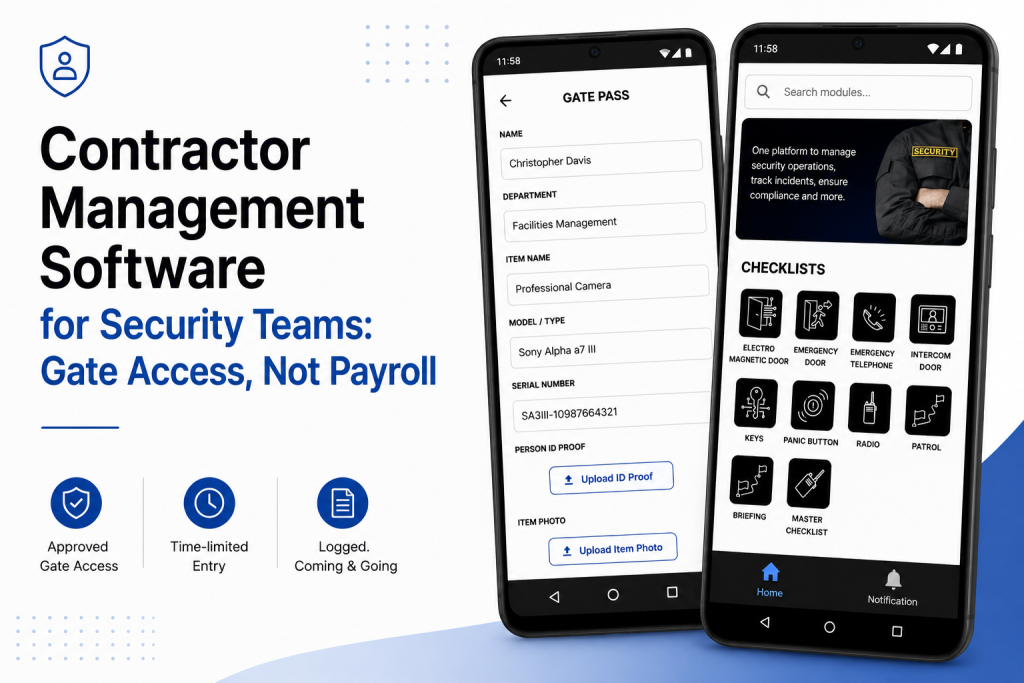
  • Contractor Management Software for Security Teams: Gate Access, Not Payroll

    Contractor Management Software for Security Teams: Gate Access, Not Payroll

    By Nithish, AVES Security

    Why “contractor management software” searches lead you to the wrong tool

    If you’re searching for contractor management software as a security team, you’ve probably already noticed the results don’t match what you need.

    I get this question a lot from site managers: “We searched for contractor management software and none of it does what we need. Is that normal?”

    Yes. Completely normal and worth explaining, because it’ll save a few wasted demo calls.

    Type “contractor management software” into Google and you’ll get Deel, Workday, a handful of HR-compliance platforms and a Capterra listicle comparing all of them.

    Every one of these tools is built for the same job: onboarding a contractor as a worker.

    Collecting their W-9, checking that their insurance is current, paying them in the right currency, tracking whether a certification expires next month.

    According to OSHA’s contractor safety guidance, that side of contractor management is real and regulated. It’s just not what a guard at a gate needs at 7am when a plumber shows up claiming he has a job order for Building C.

    Two different questions, one confusing search term

    “Is this person allowed to be here right now?” and “Is this person set up correctly as a vendor in our system?” are not the same question, even though both are called contractor management software.

    A security team almost never cares about the second one, which is payroll and legal’s job.

    A guard cares about the first and most contractor management software marketed under this term doesn’t answer it at all.

    What actually matters at the gate

    Ask a guard what goes wrong with contractors and the same handful of things come up, over and over.

    The contractor arrives and nobody at the gate knew they were coming, so someone’s calling around trying to find whoever approved it.

    The job finished two days ago, but access was never switched off because turning it off required someone to remember to do it.

    There’s no record of when the contractor actually left, just a guess based on when the truck was gone.

    A contractor wanders into an area they weren’t supposed to be in because nothing stopped them and nobody was watching that door.

    A client asks for a report of every contractor visit last month and someone has to dig through a logbook where three different guards updated it inconsistently.

    None of these are payroll problems. Their access problems are closer to what our gate pass management system already handles for one-off visitors.

    They need a system built around the gate, not the vendor file.

    What good contractor management software for security actually looks like

    Pretty simple, honestly. A contractor’s visit is scheduled and approved in advance, not improvised at the barrier.

    Access has a start and an end and it expires automatically rather than relying on someone to revoke it.

    Entry and exit both get logged the same way our geofence attendance tracking timestamps a guard’s location on a round.

    That means a contractor who checked in but never checked out shows up as exactly that: an open question, not a closed record.

    If a job needs an escort or is restricted to one part of the site, the system knows that and flags it rather than leaving it to memory.

    That’s the whole job. Not glamorous.

    But it’s the difference between a guard answering “who’s on site right now and why” in ten seconds, versus fifteen minutes of phone calls.

    Where this sits next to gate pass

    If you already use a gate pass format, contractor site access is basically the same mechanism.

    It’s applied to people who come back regularly and often need specific rules attached to inductions, restricted zones and a longer access window than a one-off visitor would get.

    Same underlying event, different shape.

    What we’re not claiming

    This doesn’t replace a real HR or compliance platform and it shouldn’t try to.

    It won’t issue a 1099. It won’t chase down an expired insurance certificate covered under something like OSHA’s recordkeeping rules.

    If that’s the gap you’re trying to close, you want Deel, Workday or something in that category.

    The two tools solve different problems and most teams end up needing both eventually.

    The bottom line

    If you went looking for contractor management software because you wanted to know who’s allowed on your site and when, you were in the right neighborhood but the wrong building.

    What you actually need is contractor management software built around the gate approved before arrival, time-limited, logged coming and going, visible to whoever’s asking.

    For More Details: https://avessecurity.com/

    Visit Our visit: https://www.linkedin.com/company/aves-security-management-system

    FAQs

    Isn’t contractor management software just for HR and payroll stuff?
    Most of what shows up under that name, yes, W-9s, insurance certs, payments. That’s a real need, just not a security one. If you’re trying to answer “who’s on my site right now and why,” you need something built around the gate, not the vendor file.

    We already use Deel/Workday for our contractors. Do we still need this?
    Probably, if security is a concern. Deel and Workday tell you that a contractor is set up correctly as a vendor. Neither one tells your guard whether that plumber at the gate is actually supposed to be there today. Different jobs and most sites end up needing both.

    What happens if a contractor forgets to check out?
    It stays open on the record instead of getting quietly closed. No guessing based on when the truck left the lot; if there’s no exit log, the system shows it as unresolved so someone can actually follow up.

    Can we restrict a contractor to certain areas of the site?
    Yes. If a job only needs access to one zone or needs an escort, that gets attached to the visit when it’s approved, not left to whoever’s at the gate that day to remember.

    How is this different from your regular gate pass system?
    Mechanically, it’s close. Contractor access is usually recurring, tied to inductions and open for a longer window than a one-time visitor pass. Same underlying idea, just shaped for people who come back.

    Can we pull a report of every contractor visit for a client or audit?
    Yes and it’s the same log the guards are already using at check-in and check-out, not a logbook that three different shifts filled in differently.

    Does this handle things like expired insurance or certifications?
    No. That’s still HR/compliance territory. OSHA-covered stuff like insurance and certs belongs with a platform like Deel or Workday. This tool answers “are they allowed on site right now,” not “are they legally compliant to be a vendor.”

  • Medical Incident Reporting Software: What Actually Matters

    Medical Incident Reporting Software: What Actually Matters

    You’re probably here because a paper form failed you. A worker got hurt, maybe, and the incident report took three days to land on the right desk. Or a hospitalization case got logged with half the details missing.

    Medical incident reporting software exists to close exactly that gap. But before you spend money on a platform, you need to know what actually separates a real system from a glorified digital form.

    Call it a medical incident report, an injury report, or medical incident reporting software, the underlying problem doesn’t change. That gap has a name. Medical incident reporting software, and most sites still don’t have it. That’s what this guide covers, no sales pitch attached.

    Why Paper Still Fails Even When Everyone Tries Hard

    Nobody sets out to lose an incident report. It happens because paper depends on someone remembering to fill it out completely, then physically carrying it to the right desk.

    A guard writes down that someone got injured. Forgets the injured body part. Forgets whether the person was hospitalized. Three weeks later, someone asks for the medical clearance date, and nobody can find it.

    Not a training problem. A structural one. Paper has no required fields, no timestamps, no way to flag a case as still open. That’s the exact gap medical incident reporting is supposed to close, and it’s the failure point medical incident reporting software was built to eliminate.

    What Real Medical Incident Reporting Software Actually Tracks

    Here’s where most buyers get surprised. Proper incident reporting software doesn’t just capture “what happened.” It captures the entire medical and legal trail around an injury.

    Personal details. Who was involved, their role, their department. Sounds basic. It’s also the first thing that goes missing on a rushed paper form. Healthcare incident reporting software should never let this field go blank.

    Incident details. What happened, when, where. Specific enough that someone reading it six months later understands the full picture without guessing. This is where medical incident reporting software actually earns its keep.

    Observance data. Condition of the scene, whether the person appeared intoxicated, what they were wearing, their movement at the time, any witnesses present. Most software skips this section entirely, and it’s often the first thing lawyers ask about. Most cheap medical incident reporting software skips it too.

    Personal injury classification. A checklist covering exact injury types, bruises and lacerations through concussions and chemical burns, mapped to a front and back body diagram showing exactly where the injury occurred. A body diagram like that is the clearest sign you’re looking at real medical incident reporting software.

    Hospitalization and case tracking. Whether the person was hospitalized, how many medical certificate days got issued, which hospital or clinic treated them, the date they returned to work, the ambulance or transport number used. Non-negotiable, in any serious medical incident reporting software.

    Accountability fields. Who was in charge at the time, whether that person got notified, whether the case is still open, whether a police report was filed. Medical incident reporting software without accountability tracking is only half a system.

    Skip any one of these six and you’re not looking at real healthcare incident reporting software. You’re looking at a form builder wearing a healthcare label.

    The Fear You Are Not Saying Out Loud

    You’re probably worried this is going to be complicated to roll out. Your team already resists paperwork, and you’re picturing another system nobody actually uses.

    That fear is reasonable. Most failed rollouts happen because the tool asks guards or staff to enter data in a format that doesn’t match how the incident actually unfolded in real life.

    The fix isn’t more training. It’s choosing software structured the way an actual incident happens. Scene first. Injury second. Medical outcome third. Not one giant form with fifty fields dumped onto a single screen. Good medical incident reporting software is built to prevent exactly that rollout failure.

    What Beginners Get Wrong When Choosing a Platform

    The most common mistake: picking software based on how clean the incident form looks in a demo, without checking whether it captures hospitalization and return-to-work data at all. Honestly, this is the single biggest mistake buyers make when shopping for medical incident reporting software.

    A close second: assuming any generic incident reporting software will work for medical cases. Generic tools usually skip the personal injury body diagram, the intoxication field, the police report status, because those are healthcare and workplace-safety specific, not general security fields. Generic tools rebranded as medical incident reporting software rarely hold up under real use.

    Third mistake, and a sneaky one: not checking whether photos attach directly to the injury record. If your incident reporting software makes you email photos separately, you’ve already lost your single source of truth. Photo attachment is a baseline requirement in medical incident reporting software, not a bonus feature.

    Fourth mistake, and people usually only discover this one after something’s already gone wrong: not checking whether the software tracks case status over time. An injury doesn’t end the moment the form gets submitted. Someone needs to know if the case is still open, if the person’s returned to work, if a police report is still pending weeks later. A tool that only captures the initial report and nothing after is solving half the problem. Ongoing case tracking is what separates real medical incident reporting software from a one-time form.

    What This Looks Like in AVES

    AVES is a working example of healthcare incident reporting software built around how real incidents actually unfold, through its Medical Report module.

    An officer opens the Medical Report screen and works through five sections in order: Report, Personal Details, Incident Details, Observance, Personal Injury. Each section expands only when needed, so the form never feels overwhelming.

    The Personal Injury section uses a front and back body diagram. Tap the injured area, select the injury type from a checklist covering everything from abrasions to electrocution, add a written reason if needed.

    Hospitalization gets its own dedicated fields. Hospital or clinic name, number of medical certificate days, date of return to work, ambulance or transport number. Nothing buried inside a generic notes field.

    Accountability’s built in too. In-charge name, whether that person got notified, current case status, whether a police report exists, all sitting as clear yes-or-no fields instead of something someone has to remember to mention out loud.

    Photos attach directly through an upload button, so evidence stays tied to the exact case it belongs to instead of floating in a separate folder somewhere.

    What Good Actually Looks Like Once This Is Running

    This is the actual payoff of switching to real medical incident reporting software. A site running it properly doesn’t feel more complicated day to day. It feels calmer, because nobody’s chasing paperwork after the fact.

    Supervisors stop reconstructing incidents from memory weeks later. HR stops asking guards to recall details from a shift that happened a month ago. Legal teams get a clean, timestamped record instead of a stack of inconsistent notes.

    That’s the real return on switching to medical incident reporting software. Not fewer incidents. Zero incidents quietly disappearing from the record because nobody logged them properly the first time.

    Frequently Asked Questions

    What is medical incident reporting software?


    A digital system, sometimes called medical incident reporting software, that captures the full details of a workplace injury or medical incident, personal details, incident details, injury classification, hospitalization status, and accountability information, all in one searchable record.

    How is it different from general incident reporting software?


    General incident reporting software usually covers security events like theft or trespassing. Medical incident reporting software adds medical-specific fields, injured body part diagrams, hospitalization tracking, medical certificate days, police report status.

    What information should a medical incident report always include?


    At minimum, personal details of the injured person, incident details, scene observance, injury classification, hospitalization and treatment information, plus accountability fields like in-charge notification and case status.

    Can photos be attached to a medical incident report?


    Yes. A proper system lets you upload photos directly into the report record, so visual evidence stays attached to the exact case it documents.

    Is this only useful for large organizations?


    No. Even a small team benefits, because the alternative, relying on memory and scattered paper notes, fails regardless of company size the moment a case gets questioned later.

    Where This Leaves You

    You don’t need to overhaul your entire operation to fix this. You need one piece of medical incident reporting software that captures an incident the way it actually happens: scene, injury, treatment, accountability, in that order.

    Get that in place and you stop losing details to memory. You stop scrambling when a case gets questioned months later. And you finally have a record you can actually stand behind. That’s what proper medical incident reporting software gives you. Nothing more, nothing less.

    If you want to see how AVES handles medical incident reporting, injury tracking, and case accountability in one dashboard visit AVES security and request a demo https://master.avessecurity.com/book-demo.

    CONTACT US

    Website : https://www.avessecurity.com

    Linkedin: https://www.linkedin.com/company/aves-security-management-system/

    Instagram: https://www.instagram.com/avessecurity/

  • Security Guard Audit Checklist: What Site Inspectors Actually Check

    Security Guard Audit Checklist: What Site Inspectors Actually Check

    By Nithish, AVES Security

    A security audit checklist is what separates a clean inspection from an awkward one. I’ve sat across the table during audits that went fine and audits that went badly and the difference was almost never the guards. It was the paperwork. An inspector asks for last month’s patrol records and someone digs out a stack of registers a few gaps here, a guessed time there, one page where the ink’s gone faint enough you can’t read it. Nobody’s accusing anyone of skipping rounds. The client just wanted proof and there wasn’t any sitting ready.

    That’s really what a security audit checklist is for. Not “did the guard do the job,” that part’s usually fine, but “can you show someone who wasn’t there that it happened.”

    What is a security audit checklist actually for

    A security audit checklist like this ends up in front of three kinds of people and they’re not all looking for the same thing.

    A client’s compliance officer is checking the contract got delivered right number of patrols, right intervals, incidents logged and closed. A regulator wants to see statutory requirements actually followed, not just claimed on paper. And your own supervisor doing a spot-check is trying to catch a site that’s slipping before the client notices it first.

    Different people, same underlying test though: does this record match something that actually happened and when.

    What a security audit checklist actually covers

    Every site has its own quirks, but pull those aside and most audits client, regulatory, internal, doesn’t matter end up checking the same seven things.

    Attendance and shift coverage. Was someone actually on site every hour they were supposed to be, no unexplained gaps between shifts.

    Patrol completion. Were the rounds walked, in the right order, not just marked done at the end of the night.

    Incident handling. Logged when it happened, escalated if it needed escalating, closed with an actual outcome not left open.

    Key and access control. Who had which key, when they took it, when it came back.

    Visitor and contractor movement. Who came in, when and who approved it?

    Equipment and defect reporting. Faults and damage flagged when they’re found ideally before the client spots them first.

    Training records. Can you actually show who was trained on what and when?

    An inspector isn’t expecting a perfect site. They’re expecting a record for each of those seven, produced without anyone scrambling to reconstruct it from memory the night before.

    Where a security audit checklist usually finds gaps

    It’s rarely the first item that trips a site up. It’s usually somewhere in the middle a patrol that got logged but has no timestamp to prove it was on schedule or a visitor with an entry time and no exit time. Any one of those looks minor on its own. Line up a month of them and that’s the gap between a clean audit and a follow-up visit.

    The worst version of this is when two records that should match don’t. A key register showing a guard holding keys during a shift, the attendance log says they weren’t even on site that’s not a gap, that’s a records problem and it’s a lot harder to explain away than a missing entry.

    How a security audit checklist changes on audit day

    None of this means guards do more work. It means the same seven categories get captured once, when they happen, tied to a timestamp and a name instead of written up later from memory. When a client or regulator wants the last quarter, that’s a filtered report instead of someone flipping through binders looking for the right week.

    It’s the same shift that’s already happened with patrol verification, key custody and occurrence logging on individual sites. A security audit checklist stops being a scramble before an inspection and just becomes a byproduct of the daily paperwork being accurate to begin with.

    Regulatory bodies like ASIS International publish general standards for physical security audits and most client contracts in this space borrow the same core structure coverage, incident handling and access control, at minimum.

    Preparing your security audit checklist before an inspection

    Don’t try to backfill history inspectors can usually tell a record written at the time from one written last week to cover a gap. Better to pull those seven categories from your duty roster and gate pass records for the last thirty days and see where the actual holes are that’s usually where a security audit checklist review starts anyway. Most of the time it’s one or two, not all seven. Fix the process from here, be straight about it if asked and treat the audit as the thing that told you where the weak spot actually was.

    The bottom line on your security audit checklist

    A security audit checklist isn’t a form you fill in before someone visits. It’s a check on whether the records you’re already keeping can stand on their own, without you in the room explaining what really happened. The sites that get through audits without drama aren’t the ones with the thickest file they’re the ones where the paperwork was right the first time it was written.


    Frequently asked questions

    What is a security audit checklist? A security audit checklist is a list of the records and controls an inspector checks to confirm a site’s security operations are actually happening as reported attendance, patrols, incidents, keys, visitor movement, equipment condition and training records.

    Who typically requests a security audit checklist? Three groups usually ask for it: a client’s compliance officer verifying contract terms are met, a regulator or licensing body confirming statutory requirements and a company’s own supervisor running an internal spot-check.

    How often should a security audit checklist be reviewed? Most sites review it monthly at minimum, with a fuller pass before any scheduled client or regulatory audit. Waiting until an audit is announced to check your records usually means finding the gaps too late to fix them.

    What’s the difference between a security audit checklist and a daily guard checklist? A daily guard checklist covers what happens during a single shift gear checks, rounds, handover. A security audit checklist looks backward across a period of time to confirm those daily records are complete, consistent and provable.

    Can a security audit checklist be done digitally instead of on paper? Yes. A digital checklist ties each entry to a timestamp and the person who logged it, which is what most inspectors are actually looking for a record they don’t have to take on trust.

    What happens if gaps show up during a security audit? A gap on its own usually isn’t fatal to an audit. What matters more is whether the company can explain it and show the process has since been fixed, rather than trying to backfill records after the fact.

    For more details visit our website: https://avessecurity.com/

  • Training Management System for Security Guards: The Essential Guide to Tracking Training and Records

    Training Management System for Security Guards: The Essential Guide to Tracking Training and Records

    A training management system is supposed to fix one simple problem: training that nobody wrote down might as well not have happened. Ask most security companies how they track guard training, though, and you’ll hear the same answer nine times out of ten. A folder somewhere. A supervisor’s memory. Maybe a spreadsheet nobody’s touched since spring.

    A guard sits through a class. Nobody logs it anywhere searchable. Fast forward three months, a client wants proof that every officer on their site completed fire safety training, and now you’re digging through old attendance sheets and screenshots from a group chat, trying to reconstruct something a proper training management system would’ve handed you in thirty seconds.

    Here’s what most companies don’t want to face: training nobody wrote down doesn’t count, not to a client, an auditor, or an insurance adjuster. That’s the exact gap a training management system exists to close, and before you convince yourself your current setup is “fine,” it’s worth understanding what a good one actually looks like.

    Why a Training Management System Matters More Than Most Companies Realize

    Two reasons this matters, and most companies only ever think about one of them.

    First, client trust. When a client asks whether your guards are trained for their site, handing them dates and records from a real system builds a lot more confidence than “yeah, we handle that.” Contracts these days increasingly expect proof upfront, not a vague promise that training happens somewhere in the background.

    Second, and this is the one that really catches people off guard: liability. If something goes wrong on a shift and training becomes a question, a training management system that shows exactly what an officer completed and when is the difference between a defensible position and pure guesswork. Lawyers and insurers don’t ask fuzzy questions. “We train our guards” won’t cut it. A dated record will.

    Without one behind you, both of those things ride entirely on someone’s memory holding up months, maybe years, after the fact. That’s a bad place to be standing when it counts.

    How a Training Management System Works in AVES

    AVES builds its training management system into the Staff Development section of the mobile app, right next to Performance Development Plan. Open Training and two paths show up: All Trainings and Records. They do very different jobs, so it helps to know which one you’re actually in.

    All Trainings is where sessions get built and managed. You can add or update training programs here, and, this part matters, assign them to specific users or departments instead of blasting them out to the whole team. Not every guard needs every training. Fire marshal certification might apply to one shift only. A first-aid refresher might just be for one department. Being able to target instead of broadcast keeps the list something people actually pay attention to, instead of noise they scroll past.

    Records, labeled Security Trainings, is the other half, and it works nothing like the first. Picture a calendar. You flip through months, land on a day, and see whatever got logged for that date. Nothing there? It just says so: no data available for that date. That’s the piece that turns a one-off event into something you can actually revisit later. Instead of asking a supervisor “hey, when was that class again,” you click the date and there’s your answer.

    One thing you won’t find here: a certification-expiry tracker, or anything resembling a compliance-scoring dashboard. If tracking exact expiry dates and renewal reminders matters to your business, that detail lives inside the individual training entry itself. The list and calendar views don’t surface it automatically.

    Getting Real Value Out of Your Training Management System

    A training management system is only as good as the habits around it. A few habits separate a training record that’s actually useful from one that just looks fine sitting there.

    Name your sessions like they mean something. “class1” tells you nothing six months later, not even to the person who typed it in. “Fire Safety Refresher, Site 4, Q3” tells a whole story the moment someone opens it.

    Only assign by department when the entire department genuinely needs it. It’s tempting to go broad “just in case,” but that buries the training under noise for everyone who didn’t need it, and makes it harder to spot who actually still has to complete it.

    Log it the day it happens. Records sorts by date, so a session entered three days late lands under the wrong day. It chips away at accuracy quietly, until you notice it during an audit and it’s too late to fix.

    Check Records regularly. Not just when a client comes asking. A monthly look catches gaps while you can still do something about them.

    The Mistakes That Undo a Training Management System

    Same handful of mistakes, over and over, even at companies with a solid system already sitting in their pocket.

    Vague naming tops the list. A training log full of “class1,” “class2” technically counts as a record. It just fails the actual point, which is answering a real question later, quickly and without guesswork.

    Over-assigning is next. Push a single-department training out company-wide and you bury the people who actually need to act on it under a pile of people who don’t.

    Then there’s confusing scheduled with logged, a subtler trap. A session sitting in someone’s calendar or a group chat thread isn’t proof of anything. Only an entry under Records, for that date, counts.

    And the big one: waiting for a client to ask before you check your own records. By then you’re not reviewing, you’re scrambling. Scrambling almost never produces a clean answer.

    Where a Training Management System Fits Into the Bigger Picture

    It doesn’t live on its own island. It ties directly into your duty roster and shift assignments, because whether a guard was actually qualified for a given post on a given shift depends partly on their training record. It sits right beside Performance Development Plan too, both feeding into a documented picture of how ready your team really is, not just how ready you assume they are.

    A training session nobody logged is a session you can’t prove happened. In this line of work, what you can prove tends to matter more than what you simply know to be true. AVES keeps checklists and dated training records in one training management system your guards already use for shifts and attendance, with the option to assign precisely instead of blasting everything to everyone by default.

    If you want to see how AVES handles this as a training management system in practice, you can explore the platform and request a demo at avessecurity.com.

    Frequently Asked Questions

    What is a training management system for security guards?

    A training management system for security guards is a software that helps you keep track of the training that security guards have completed. It is a place where you can log, assign and track the training of security guards, which’s better than using paper sign-in sheets or trying to remember who did what. This system gives you a record of who completed what training and when which’s very useful.

    Why do security companies need a training management system for security guards?

    Security companies need a training management system for security guards because clients and insurers often ask for proof of training. A training management system for security guards gives you the proof you need so you can give them an answer instead of just guessing.

    How is training assigned in a training management system like AVES?

    In a system like AVES training can be assigned to security guards or to entire departments. This means that each security guard only sees the training that’s relevant to them instead of seeing a long list of training that does not apply to their job or the site they work at.

    Does a training management system track certification expiry dates?

    Not all training management systems track certification expiry dates automatically. For example in AVES you have to look at the training entry to see the expiry and renewal details. So if you need to keep track of these dates for compliance you should check them directly.

    How often should I check my training management systems records?

    You should check your training management systems records at once a month. If you do this you can catch any gaps in the training schedule. Fix them before it is too late. This is better than finding out about the gaps during an audit when it is already too late to do anything about them.

    Can a training management system prevent liability issues?

    A training management system for security guards cannot prevent incidents from happening. It can help protect you after an incident occurs. If someone asks about the training that security guards received during an investigation a training management system for security guards gives you a record of the training that you can use to defend yourself. This is much better, than guessing what training was completed.

    CONTACT US

    Website : https://www.avessecurity.com

    Linkedin: https://www.linkedin.com/company/aves-security-management-system/

    Instagram: https://www.instagram.com/avessecurity/

  • Lone Worker App: 3 Steps to Duty of Care

    Lone Worker App: 3 Steps to Duty of Care

    A lone worker app exists to answer one question: if a guard on a night patrol, a technician on a remote site visit or a caregiver doing a solo home visit runs into trouble, how quickly does anyone else find out? Duty of care doesn’t mean eliminating that risk; it means building a system that notices quickly if something’s gone wrong and gets help moving before too much time passes.

    A lone worker app is built from three pieces: a way to check in, a way to raise an alarm and a clear path for what happens next.

    This piece walks through what each of those three pieces should do in a lone worker app and why the gaps between them are usually where duty-of-care programs actually fail not in any single feature, but in the seams connecting them.

    Why a lone worker app isn’t one feature

    It’s tempting to think of a lone worker app as a single button press it, help comes. In practice it’s a chain: something has to prompt a check-in or accept a manual alert, something has to notice if that check-in doesn’t happen, someone has to be notified and someone has to actually respond.

    A lone worker app that’s strong on the alert button but has no defined escalation path leaves a worker’s safety depending entirely on them successfully pressing a button while in distress which is exactly the scenario the app is meant to cover for.

    Check-ins: what a lone worker app should log

    The simplest and most common layer is a scheduled or location-triggered check-in a worker confirms they’re safe at set intervals or a system logs their presence automatically as they move through defined zones.

    Geofence-based attendance is one practical way to do this: a check-in is recorded automatically when a worker enters or exits a defined area, tied to their shift and location rather than relying on them to remember to tap something on a schedule.

    AVES supports this model today geo-verified attendance that ties a worker’s location to their roster, so presence at a site is a timestamped, auditable fact rather than a guard’s word.

    That’s a genuinely useful foundation for duty of care: it gives a supervisor a record of where someone was and when, which is the raw material any escalation decision depends on.

    What it doesn’t do on its own is tell anyone that a check-in was missed and automatically start a countdown toward escalation that’s a distinct piece of logic, covered below.

    Manual alerts: what a lone worker app needs beyond check-ins

    The second layer is the one a worker triggers themselves when they know something’s wrong a duress or SOS alert. AVES provides this as a standing feature: real-time SOS alerts and notifications that fire the moment someone raises them, rather than waiting for a shift-end report.

    This is the layer that matters most in the seconds after an incident, because it doesn’t depend on a scheduled check-in cycle catching up it’s immediate and it’s under the worker’s control.

    The honest caveat here is that a manual alert only works if the worker is conscious, free and physically able to reach a device which is precisely the situation that fails after a fall, an assault or a medical event.

    That’s the gap that automated detection layers (below) are built to close and it’s worth knowing whether that gap matters for your specific risk profile before assuming a manual SOS button alone is sufficient duty of care.

    What a lone worker app should escalate to and what’s confirmed here

    This is where a genuine duty-of-care program typically adds two more pieces and it’s also where we want to be precise about what AVES currently offers versus what’s standard across the broader lone-worker category:

    • Missed check-in escalation if a scheduled or expected check-in doesn’t happen, the system automatically notifies a supervisor or escalation contact after a defined grace period, without anyone having to notice the absence manually.
    • Man-down / no-motion detection using device sensors to detect a fall, an impact or a prolonged period without movement and triggering an alert automatically, with no action required from the worker at all.

    Both of these are common in dedicated lone-worker platforms and both close the gap that manual SOS alerts and simple attendance check-ins leave open.

    As of this writing, we haven’t found either of these confirmed as a current AVES feature the site documents SOS alerts and geo-verified attendance clearly, but doesn’t describe automated missed-check-in escalation or motion-based man-down detection.

    If your program specifically needs those two capabilities, that’s worth confirming directly rather than assuming they’re bundled in.

    What duty of care asks of a lone worker app

    Setting aside any specific product, a defensible lone worker app generally needs to be able to answer a few questions after the fact, not just in the moment:

    • Who was working alone, where and during what window? this is what shift and roster data, tied to geo-verified check-ins, gives you.
    • Was there a way for that person to raise an alarm and did it reach someone in real time? this is what an SOS/alert feature answers.
    • If they couldn’t raise an alarm themselves, would anyone have known? this is the question that missed-check-in escalation and man-down detection exist to answer and it’s the one worth pressure-testing against whatever system you’re evaluating.
    • Is there a record of all of it afterward? for compliance and for reviewing what worked or didn’t after an incident.
    • Duty of care for lone and isolated workers isn’t just good practice in many jurisdictions it’s a legal obligation. In the US, the OSHA General Duty Clause requires employers to provide a workplace free from recognized hazards, which extends to workers operating without direct supervision.
    • In the UK, the HSE’s guidance on lone workers sets out specific expectations for risk assessment and monitoring. A lone worker app is one way to operationalize that obligation but the obligation exists independent of whichever tool you choose to meet it.

    Building the escalation path into a lone worker app

    Whatever combination of check-in and alert features a lone worker app provides, the escalation path itself is a policy decision that sits on top of the tooling, not inside it:

    • Define the grace period how long after a missed check-in before someone is notified. Too short and you get alert fatigue; too long and the point of the system is lost.
    • Name a real escalation contact, not “security” as an abstraction a specific role that’s staffed and reachable during the hours lone workers are actually out.
    • Set a secondary escalation tier if the first contact doesn’t acknowledge within a set window, who’s next.
    • Decide what “resolved” looks like a check-in resuming, a supervisor physically confirming the worker’s status or an explicit stand-down. Don’t leave an open alert quietly aging out.

    Where this leaves you

    If your lone worker exposure is mostly about knowing where people were and giving them a fast way to call for help, geo-verified check-ins paired with real-time SOS alerts both of which AVES supports today cover a meaningful part of that duty-of-care picture.

    If your risk profile specifically requires automatic detection when someone goes silent or goes down without pressing anything, that’s a distinct capability worth confirming directly before you build a program around the assumption it’s already there.

    FAQ

    What is a lone worker app?
    It’s software that keeps tabs on employees working alone a night guard, a field technician, someone doing a solo home visit. Check-ins, an alert button and someone on the other end who actually responds.

    What features matter most?
    A way to log that someone’s okay (usually location-based check-ins), a button they can press if something’s wrong and a plan for what happens if neither of those things checks out.

    Can the app handle everything on its own?
    Not really. The app can send alerts, but someone still has to decide the grace period, who gets called first and when an alert counts as closed. That part’s on the organization.

    Is this legally required?
    Often, yes. OSHA’s General Duty Clause in the US and HSE guidance in the UK both put the responsibility on employers to protect workers who aren’t directly supervised.

    Does AVES have this?
    AVES does geo-verified check-ins and real-time SOS alerts. Automatic missed-check-in escalation and man-down detection we’d check with AVES directly before assuming those are included.