Tag: Security Operations Software

  • Security Guard Audit Checklist: What Site Inspectors Actually Check

    Security Guard Audit Checklist: What Site Inspectors Actually Check

    By Nithish, AVES Security

    A security audit checklist is what separates a clean inspection from an awkward one. I’ve sat across the table during audits that went fine and audits that went badly and the difference was almost never the guards. It was the paperwork. An inspector asks for last month’s patrol records and someone digs out a stack of registers a few gaps here, a guessed time there, one page where the ink’s gone faint enough you can’t read it. Nobody’s accusing anyone of skipping rounds. The client just wanted proof and there wasn’t any sitting ready.

    That’s really what a security audit checklist is for. Not “did the guard do the job,” that part’s usually fine, but “can you show someone who wasn’t there that it happened.”

    What is a security audit checklist actually for

    A security audit checklist like this ends up in front of three kinds of people and they’re not all looking for the same thing.

    A client’s compliance officer is checking the contract got delivered right number of patrols, right intervals, incidents logged and closed. A regulator wants to see statutory requirements actually followed, not just claimed on paper. And your own supervisor doing a spot-check is trying to catch a site that’s slipping before the client notices it first.

    Different people, same underlying test though: does this record match something that actually happened and when.

    What a security audit checklist actually covers

    Every site has its own quirks, but pull those aside and most audits client, regulatory, internal, doesn’t matter end up checking the same seven things.

    Attendance and shift coverage. Was someone actually on site every hour they were supposed to be, no unexplained gaps between shifts.

    Patrol completion. Were the rounds walked, in the right order, not just marked done at the end of the night.

    Incident handling. Logged when it happened, escalated if it needed escalating, closed with an actual outcome not left open.

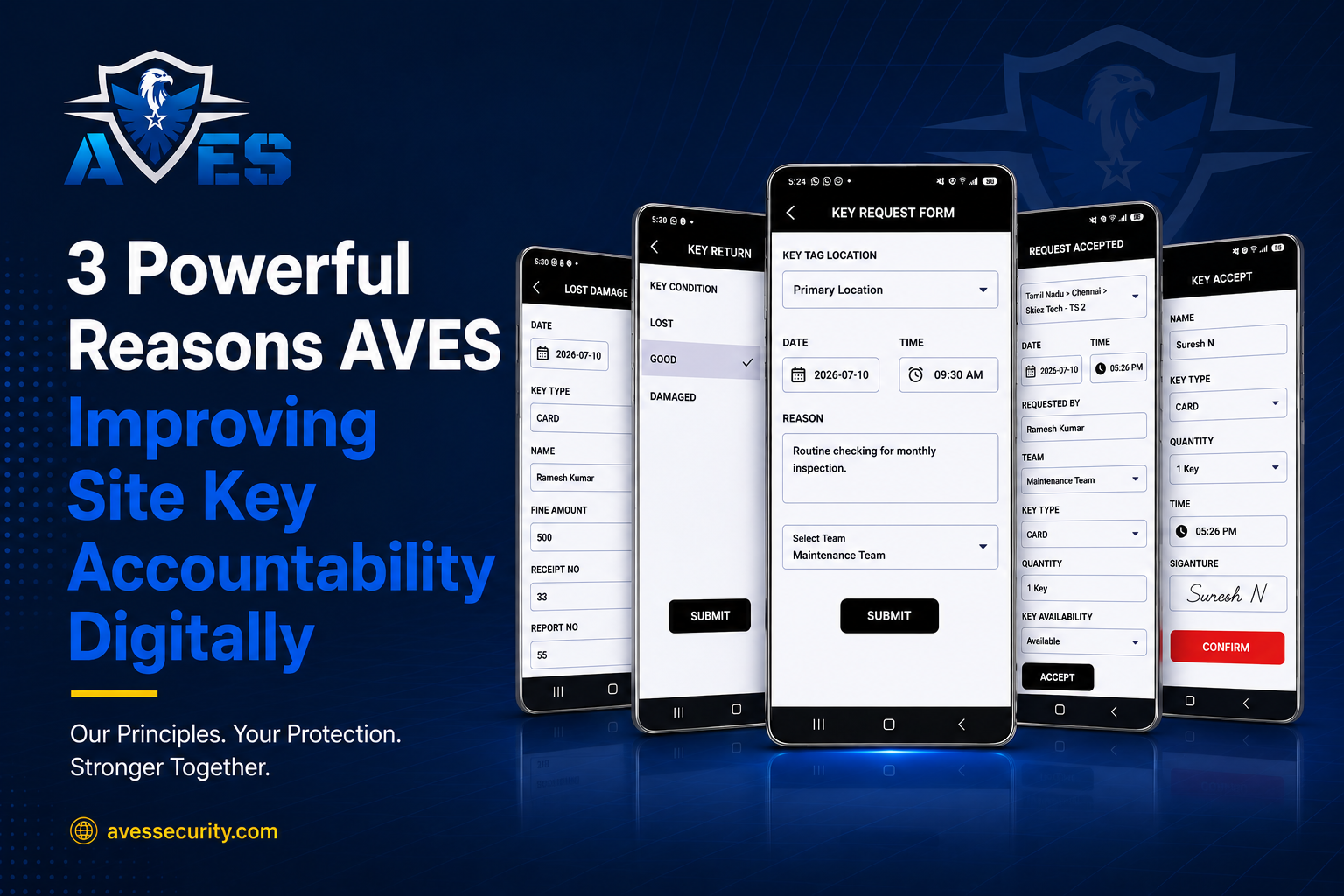
    Key and access control. Who had which key, when they took it, when it came back.

    Visitor and contractor movement. Who came in, when and who approved it?

    Equipment and defect reporting. Faults and damage flagged when they’re found ideally before the client spots them first.

    Training records. Can you actually show who was trained on what and when?

    An inspector isn’t expecting a perfect site. They’re expecting a record for each of those seven, produced without anyone scrambling to reconstruct it from memory the night before.

    Where a security audit checklist usually finds gaps

    It’s rarely the first item that trips a site up. It’s usually somewhere in the middle a patrol that got logged but has no timestamp to prove it was on schedule or a visitor with an entry time and no exit time. Any one of those looks minor on its own. Line up a month of them and that’s the gap between a clean audit and a follow-up visit.

    The worst version of this is when two records that should match don’t. A key register showing a guard holding keys during a shift, the attendance log says they weren’t even on site that’s not a gap, that’s a records problem and it’s a lot harder to explain away than a missing entry.

    How a security audit checklist changes on audit day

    None of this means guards do more work. It means the same seven categories get captured once, when they happen, tied to a timestamp and a name instead of written up later from memory. When a client or regulator wants the last quarter, that’s a filtered report instead of someone flipping through binders looking for the right week.

    It’s the same shift that’s already happened with patrol verification, key custody and occurrence logging on individual sites. A security audit checklist stops being a scramble before an inspection and just becomes a byproduct of the daily paperwork being accurate to begin with.

    Regulatory bodies like ASIS International publish general standards for physical security audits and most client contracts in this space borrow the same core structure coverage, incident handling and access control, at minimum.

    Preparing your security audit checklist before an inspection

    Don’t try to backfill history inspectors can usually tell a record written at the time from one written last week to cover a gap. Better to pull those seven categories from your duty roster and gate pass records for the last thirty days and see where the actual holes are that’s usually where a security audit checklist review starts anyway. Most of the time it’s one or two, not all seven. Fix the process from here, be straight about it if asked and treat the audit as the thing that told you where the weak spot actually was.

    The bottom line on your security audit checklist

    A security audit checklist isn’t a form you fill in before someone visits. It’s a check on whether the records you’re already keeping can stand on their own, without you in the room explaining what really happened. The sites that get through audits without drama aren’t the ones with the thickest file they’re the ones where the paperwork was right the first time it was written.


    Frequently asked questions

    What is a security audit checklist? A security audit checklist is a list of the records and controls an inspector checks to confirm a site’s security operations are actually happening as reported attendance, patrols, incidents, keys, visitor movement, equipment condition and training records.

    Who typically requests a security audit checklist? Three groups usually ask for it: a client’s compliance officer verifying contract terms are met, a regulator or licensing body confirming statutory requirements and a company’s own supervisor running an internal spot-check.

    How often should a security audit checklist be reviewed? Most sites review it monthly at minimum, with a fuller pass before any scheduled client or regulatory audit. Waiting until an audit is announced to check your records usually means finding the gaps too late to fix them.

    What’s the difference between a security audit checklist and a daily guard checklist? A daily guard checklist covers what happens during a single shift gear checks, rounds, handover. A security audit checklist looks backward across a period of time to confirm those daily records are complete, consistent and provable.

    Can a security audit checklist be done digitally instead of on paper? Yes. A digital checklist ties each entry to a timestamp and the person who logged it, which is what most inspectors are actually looking for a record they don’t have to take on trust.

    What happens if gaps show up during a security audit? A gap on its own usually isn’t fatal to an audit. What matters more is whether the company can explain it and show the process has since been fixed, rather than trying to backfill records after the fact.

    For more details visit our website: https://avessecurity.com/

  • Shift Handover Checklist: What Every Outgoing Guard Must Log

    Shift Handover Checklist: What Every Outgoing Guard Must Log

    Most accountability failures on a security site don’t happen during a shift. They happen in the ninety seconds between shifts.

    Staff a sharp guard on days, an equally sharp one on nights you can still end up with a gap nobody can explain. A missing key. A pending incident nobody flagged to the next person. A visitor who signed in and nobody remembers signing out. Neither guard was careless here. That’s exactly the gap a shift handover checklist is built to close. The handover itself just has no structure, so whatever gets said in that ninety-second exchange is whatever the outgoing guard happens to remember right then.

    A shift handover checklist fixes exactly this. Not the shift. The changeover.

    Why the Handover Moment Is the Real Risk Point

    Think of a relay race. Two fast runners can still lose if the baton drops during the exchange, doesn’t matter how clean each leg was run individually. Races get won or lost in the handoff, every single time.

    Guard duty’s no different. Morning shift runs clean, night shift runs clean and the site still ends up exposed because the exchange between them was verbal, rushed or just skipped when the incoming guard rolled in two minutes late.

    A shift handover checklist that isn’t written down isn’t really a handover. It’s a conversation one person may or may not remember correctly six hours later, when a client wants to know exactly what happened.

    What Actually Belongs on a Shift Handover Checklist

    A good handover checklist isn’t long, it’s specific. Four things need to move from outgoing guard to incoming guard, every single time and none of them should ride on memory. Skip any one of these on your shift handover checklist and you’ve built a hole straight into it.

    Keys and access items. Every key, fob or access card checked out at shift start gets checked back in or physically handed over, with both people confirming the count matches. Sounds obvious, until you’ve chased a missing master key three weeks later and nobody can say which shift lost it. Some teams run this as its own key control checklist inside the larger handover works fine, as long as it still gets logged and timestamped. This is item one on every shift handover checklist, for good reason.

    Pending incidents. Something happened during the shift and it hasn’t been closed out, resolved or escalated? It doesn’t just vanish when the shift ends. Write it down. Hand it over as an open item, with enough detail that the next guard actually knows what to watch for. No shift handover checklist is complete without this logged.

    Visitor logs. Anyone who entered during the shift and hasn’t formally exited needs flagging. Matters even more at sites running contractors or maintenance crews outside normal visitor hours they’re the ones who slip through a verbal handover every time.

    Equipment condition. Radios, torches, patrol devices, whatever hardware the post depends on. Something’s low on battery, damaged or missing? The incoming guard needs to know before the round starts, not halfway through when the radio dies on them mid-patrol. Equipment checks close out the shift handover checklist and it’s usually the first thing forgotten.

    Those four form the core of any real security handover register. Weather notes, general site observations that’s optional context. These four aren’t.

    How AVES Turns This Into a Register, Not a Guessing Game

    Here’s what most people get wrong: writing your shift handover checklist on a paper register doesn’t solve the problem, it just delays it. Pages go missing. Logs get lost. And there’s no way to prove after the fact that a handover even happened, let alone what got said during it.

    AVES is built to make your shift handover checklist enforceable, not just documented. That happens through its digital Books and Checklist modules. Officers log handover entries right through the app and every entry gets timestamped automatically the second it’s created. That timestamp is what actually makes the register useful during an audit or a client dispute nobody’s relying on anyone’s word for when something got logged.

    The Reports module ties in for pending incidents specifically. An incident that hasn’t closed out by end of shift stays visible in the system instead of living only in someone’s memory and it can carry photo or video evidence attached from when it was first logged. The Pass & Permit module handles visitor tracking the same way a searchable record of who entered and whether they’ve formally exited, instead of a paper sign-in sheet that only tells you half the story.

    None of this is about extra paperwork. It’s about making the handover something you can actually check, not something you just have to trust blindly.

    Mistakes That Quietly Break a Handover

    A few habits quietly break even a well-designed shift handover checklist.

    The handover happens verbally, nothing written down anywhere, so the only record of what was said is whatever both guards happen to remember. That record disappears the second either one forgets.

    The incoming guard skips physically verifying keys and equipment, just takes the outgoing guard’s word for it. This right here is how a missing item goes unnoticed for days.

    Pending incidents get mentioned in passing instead of logged as open items, so they fall straight off the radar the moment the outgoing guard walks out the door.

    And the classic one: the handover gets rushed because the incoming guard is running late, so both of them cut corners on the exact checklist built to stop corners from being cut.

    None of this is complicated to fix. It just means treating the handover as its own step, with its own checklist, not an afterthought wedged between two shifts.

    Frequently Asked Questions

    What is a shift handover checklist?
    A shift handover checklist is a fixed set of items an outgoing guard confirms and logs before leaving post keys, pending incidents, visitor status, equipment condition so the incoming guard starts with the full picture instead of a verbal summary.

    Why does the handover matter more than the shift itself?
    Because it’s the one point where information can actually get lost and once it’s lost, the incoming guard has no idea what they’re missing. A clean shift followed by a sloppy handover still leaves the site exposed.

    What’s the difference between a handover checklist and a handover register?
    The checklist is what gets confirmed at handover. The register is the ongoing record of every handover that’s happened timestamped, searchable, the thing that actually gets pulled up during an audit.

    Can a handover checklist be done on paper?
    Sure, but paper registers get lost easily and can’t be timestamped reliably. A digital log through something like AVES gives you the same checklist backed by a record you can actually verify later.

    Who is responsible for confirming the handover happened correctly?
    Both guards. Outgoing guard logs everything accurately. Incoming guard verifies it physically instead of just nodding along to a verbal summary.

    Where This Leaves You

    A shift handover checklist isn’t about piling on process for its own sake. It’s about closing the one gap in your operation that has nothing to do with how good your guards are individually and everything to do with what happens in the handoff between them.

    Get that ninety-second exchange right, backed by a real security handover register and most of the accountability gaps plaguing 24/7 sites just stop happening on their own. This connects directly to how your rotation gets structured in the first place and it runs alongside live key control at the post too worth looking at both together rather than separately. Build your shift handover checklist once, enforce it every shift and the gaps stop showing up.

    Want to see how AVES handles handover logging, incident tracking and visitor management in one dashboard? Visit AVES Security Guard Management and request a demo.

    CONTACT US

    Website : https://www.avessecurity.com

    Linkedin: https://www.linkedin.com/company/aves-security-management-system/

    Instagram: https://www.instagram.com/avessecurity/

  • Training Management System for Security Guards: The Essential Guide to Tracking Training and Records

    Training Management System for Security Guards: The Essential Guide to Tracking Training and Records

    A training management system is supposed to fix one simple problem: training that nobody wrote down might as well not have happened. Ask most security companies how they track guard training, though, and you’ll hear the same answer nine times out of ten. A folder somewhere. A supervisor’s memory. Maybe a spreadsheet nobody’s touched since spring.

    A guard sits through a class. Nobody logs it anywhere searchable. Fast forward three months, a client wants proof that every officer on their site completed fire safety training, and now you’re digging through old attendance sheets and screenshots from a group chat, trying to reconstruct something a proper training management system would’ve handed you in thirty seconds.

    Here’s what most companies don’t want to face: training nobody wrote down doesn’t count, not to a client, an auditor, or an insurance adjuster. That’s the exact gap a training management system exists to close, and before you convince yourself your current setup is “fine,” it’s worth understanding what a good one actually looks like.

    Why a Training Management System Matters More Than Most Companies Realize

    Two reasons this matters, and most companies only ever think about one of them.

    First, client trust. When a client asks whether your guards are trained for their site, handing them dates and records from a real system builds a lot more confidence than “yeah, we handle that.” Contracts these days increasingly expect proof upfront, not a vague promise that training happens somewhere in the background.

    Second, and this is the one that really catches people off guard: liability. If something goes wrong on a shift and training becomes a question, a training management system that shows exactly what an officer completed and when is the difference between a defensible position and pure guesswork. Lawyers and insurers don’t ask fuzzy questions. “We train our guards” won’t cut it. A dated record will.

    Without one behind you, both of those things ride entirely on someone’s memory holding up months, maybe years, after the fact. That’s a bad place to be standing when it counts.

    How a Training Management System Works in AVES

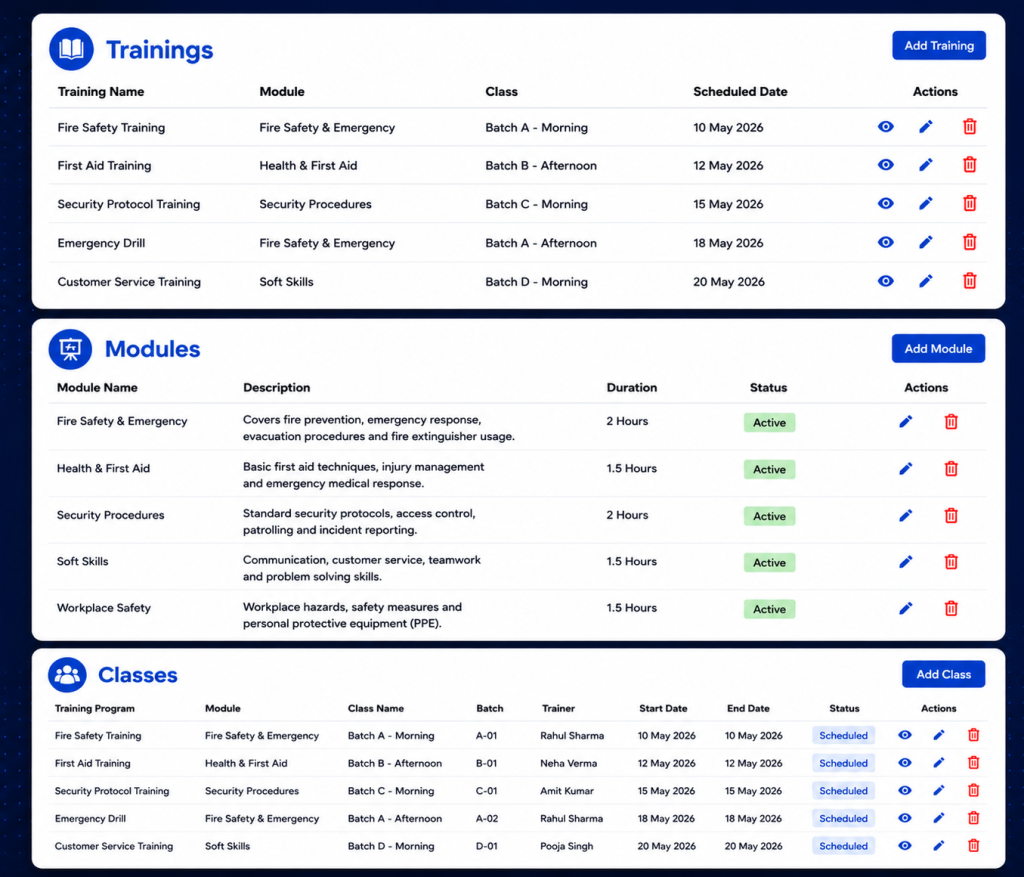
    AVES builds its training management system into the Staff Development section of the mobile app, right next to Performance Development Plan. Open Training and two paths show up: All Trainings and Records. They do very different jobs, so it helps to know which one you’re actually in.

    All Trainings is where sessions get built and managed. You can add or update training programs here, and, this part matters, assign them to specific users or departments instead of blasting them out to the whole team. Not every guard needs every training. Fire marshal certification might apply to one shift only. A first-aid refresher might just be for one department. Being able to target instead of broadcast keeps the list something people actually pay attention to, instead of noise they scroll past.

    Records, labeled Security Trainings, is the other half, and it works nothing like the first. Picture a calendar. You flip through months, land on a day, and see whatever got logged for that date. Nothing there? It just says so: no data available for that date. That’s the piece that turns a one-off event into something you can actually revisit later. Instead of asking a supervisor “hey, when was that class again,” you click the date and there’s your answer.

    One thing you won’t find here: a certification-expiry tracker, or anything resembling a compliance-scoring dashboard. If tracking exact expiry dates and renewal reminders matters to your business, that detail lives inside the individual training entry itself. The list and calendar views don’t surface it automatically.

    Getting Real Value Out of Your Training Management System

    A training management system is only as good as the habits around it. A few habits separate a training record that’s actually useful from one that just looks fine sitting there.

    Name your sessions like they mean something. “class1” tells you nothing six months later, not even to the person who typed it in. “Fire Safety Refresher, Site 4, Q3” tells a whole story the moment someone opens it.

    Only assign by department when the entire department genuinely needs it. It’s tempting to go broad “just in case,” but that buries the training under noise for everyone who didn’t need it, and makes it harder to spot who actually still has to complete it.

    Log it the day it happens. Records sorts by date, so a session entered three days late lands under the wrong day. It chips away at accuracy quietly, until you notice it during an audit and it’s too late to fix.

    Check Records regularly. Not just when a client comes asking. A monthly look catches gaps while you can still do something about them.

    The Mistakes That Undo a Training Management System

    Same handful of mistakes, over and over, even at companies with a solid system already sitting in their pocket.

    Vague naming tops the list. A training log full of “class1,” “class2” technically counts as a record. It just fails the actual point, which is answering a real question later, quickly and without guesswork.

    Over-assigning is next. Push a single-department training out company-wide and you bury the people who actually need to act on it under a pile of people who don’t.

    Then there’s confusing scheduled with logged, a subtler trap. A session sitting in someone’s calendar or a group chat thread isn’t proof of anything. Only an entry under Records, for that date, counts.

    And the big one: waiting for a client to ask before you check your own records. By then you’re not reviewing, you’re scrambling. Scrambling almost never produces a clean answer.

    Where a Training Management System Fits Into the Bigger Picture

    It doesn’t live on its own island. It ties directly into your duty roster and shift assignments, because whether a guard was actually qualified for a given post on a given shift depends partly on their training record. It sits right beside Performance Development Plan too, both feeding into a documented picture of how ready your team really is, not just how ready you assume they are.

    A training session nobody logged is a session you can’t prove happened. In this line of work, what you can prove tends to matter more than what you simply know to be true. AVES keeps checklists and dated training records in one training management system your guards already use for shifts and attendance, with the option to assign precisely instead of blasting everything to everyone by default.

    If you want to see how AVES handles this as a training management system in practice, you can explore the platform and request a demo at avessecurity.com.

    Frequently Asked Questions

    What is a training management system for security guards?

    A training management system for security guards is a software that helps you keep track of the training that security guards have completed. It is a place where you can log, assign and track the training of security guards, which’s better than using paper sign-in sheets or trying to remember who did what. This system gives you a record of who completed what training and when which’s very useful.

    Why do security companies need a training management system for security guards?

    Security companies need a training management system for security guards because clients and insurers often ask for proof of training. A training management system for security guards gives you the proof you need so you can give them an answer instead of just guessing.

    How is training assigned in a training management system like AVES?

    In a system like AVES training can be assigned to security guards or to entire departments. This means that each security guard only sees the training that’s relevant to them instead of seeing a long list of training that does not apply to their job or the site they work at.

    Does a training management system track certification expiry dates?

    Not all training management systems track certification expiry dates automatically. For example in AVES you have to look at the training entry to see the expiry and renewal details. So if you need to keep track of these dates for compliance you should check them directly.

    How often should I check my training management systems records?

    You should check your training management systems records at once a month. If you do this you can catch any gaps in the training schedule. Fix them before it is too late. This is better than finding out about the gaps during an audit when it is already too late to do anything about them.

    Can a training management system prevent liability issues?

    A training management system for security guards cannot prevent incidents from happening. It can help protect you after an incident occurs. If someone asks about the training that security guards received during an investigation a training management system for security guards gives you a record of the training that you can use to defend yourself. This is much better, than guessing what training was completed.

    CONTACT US

    Website : https://www.avessecurity.com

    Linkedin: https://www.linkedin.com/company/aves-security-management-system/

    Instagram: https://www.instagram.com/avessecurity/

  • Lone Worker App: 3 Steps to Duty of Care

    Lone Worker App: 3 Steps to Duty of Care

    A lone worker app exists to answer one question: if a guard on a night patrol, a technician on a remote site visit or a caregiver doing a solo home visit runs into trouble, how quickly does anyone else find out? Duty of care doesn’t mean eliminating that risk; it means building a system that notices quickly if something’s gone wrong and gets help moving before too much time passes.

    A lone worker app is built from three pieces: a way to check in, a way to raise an alarm and a clear path for what happens next.

    This piece walks through what each of those three pieces should do in a lone worker app and why the gaps between them are usually where duty-of-care programs actually fail not in any single feature, but in the seams connecting them.

    Why a lone worker app isn’t one feature

    It’s tempting to think of a lone worker app as a single button press it, help comes. In practice it’s a chain: something has to prompt a check-in or accept a manual alert, something has to notice if that check-in doesn’t happen, someone has to be notified and someone has to actually respond.

    A lone worker app that’s strong on the alert button but has no defined escalation path leaves a worker’s safety depending entirely on them successfully pressing a button while in distress which is exactly the scenario the app is meant to cover for.

    Check-ins: what a lone worker app should log

    The simplest and most common layer is a scheduled or location-triggered check-in a worker confirms they’re safe at set intervals or a system logs their presence automatically as they move through defined zones.

    Geofence-based attendance is one practical way to do this: a check-in is recorded automatically when a worker enters or exits a defined area, tied to their shift and location rather than relying on them to remember to tap something on a schedule.

    AVES supports this model today geo-verified attendance that ties a worker’s location to their roster, so presence at a site is a timestamped, auditable fact rather than a guard’s word.

    That’s a genuinely useful foundation for duty of care: it gives a supervisor a record of where someone was and when, which is the raw material any escalation decision depends on.

    What it doesn’t do on its own is tell anyone that a check-in was missed and automatically start a countdown toward escalation that’s a distinct piece of logic, covered below.

    Manual alerts: what a lone worker app needs beyond check-ins

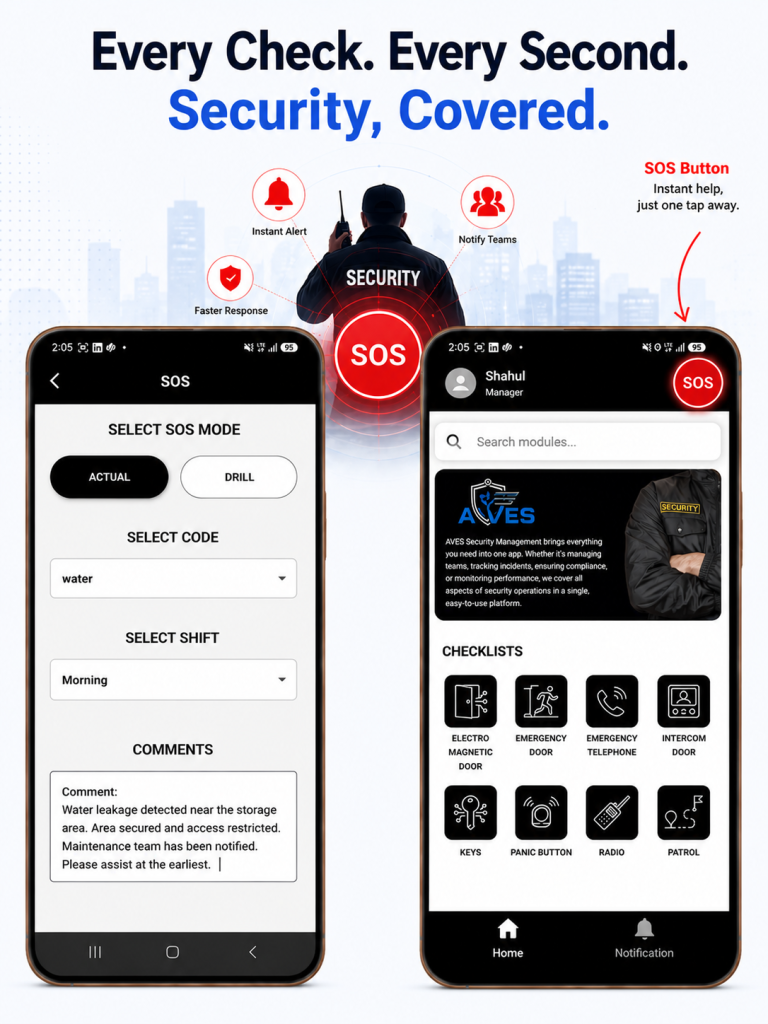
    The second layer is the one a worker triggers themselves when they know something’s wrong a duress or SOS alert. AVES provides this as a standing feature: real-time SOS alerts and notifications that fire the moment someone raises them, rather than waiting for a shift-end report.

    This is the layer that matters most in the seconds after an incident, because it doesn’t depend on a scheduled check-in cycle catching up it’s immediate and it’s under the worker’s control.

    The honest caveat here is that a manual alert only works if the worker is conscious, free and physically able to reach a device which is precisely the situation that fails after a fall, an assault or a medical event.

    That’s the gap that automated detection layers (below) are built to close and it’s worth knowing whether that gap matters for your specific risk profile before assuming a manual SOS button alone is sufficient duty of care.

    What a lone worker app should escalate to and what’s confirmed here

    This is where a genuine duty-of-care program typically adds two more pieces and it’s also where we want to be precise about what AVES currently offers versus what’s standard across the broader lone-worker category:

    • Missed check-in escalation if a scheduled or expected check-in doesn’t happen, the system automatically notifies a supervisor or escalation contact after a defined grace period, without anyone having to notice the absence manually.
    • Man-down / no-motion detection using device sensors to detect a fall, an impact or a prolonged period without movement and triggering an alert automatically, with no action required from the worker at all.

    Both of these are common in dedicated lone-worker platforms and both close the gap that manual SOS alerts and simple attendance check-ins leave open.

    As of this writing, we haven’t found either of these confirmed as a current AVES feature the site documents SOS alerts and geo-verified attendance clearly, but doesn’t describe automated missed-check-in escalation or motion-based man-down detection.

    If your program specifically needs those two capabilities, that’s worth confirming directly rather than assuming they’re bundled in.

    What duty of care asks of a lone worker app

    Setting aside any specific product, a defensible lone worker app generally needs to be able to answer a few questions after the fact, not just in the moment:

    • Who was working alone, where and during what window? this is what shift and roster data, tied to geo-verified check-ins, gives you.
    • Was there a way for that person to raise an alarm and did it reach someone in real time? this is what an SOS/alert feature answers.
    • If they couldn’t raise an alarm themselves, would anyone have known? this is the question that missed-check-in escalation and man-down detection exist to answer and it’s the one worth pressure-testing against whatever system you’re evaluating.
    • Is there a record of all of it afterward? for compliance and for reviewing what worked or didn’t after an incident.
    • Duty of care for lone and isolated workers isn’t just good practice in many jurisdictions it’s a legal obligation. In the US, the OSHA General Duty Clause requires employers to provide a workplace free from recognized hazards, which extends to workers operating without direct supervision.
    • In the UK, the HSE’s guidance on lone workers sets out specific expectations for risk assessment and monitoring. A lone worker app is one way to operationalize that obligation but the obligation exists independent of whichever tool you choose to meet it.

    Building the escalation path into a lone worker app

    Whatever combination of check-in and alert features a lone worker app provides, the escalation path itself is a policy decision that sits on top of the tooling, not inside it:

    • Define the grace period how long after a missed check-in before someone is notified. Too short and you get alert fatigue; too long and the point of the system is lost.
    • Name a real escalation contact, not “security” as an abstraction a specific role that’s staffed and reachable during the hours lone workers are actually out.
    • Set a secondary escalation tier if the first contact doesn’t acknowledge within a set window, who’s next.
    • Decide what “resolved” looks like a check-in resuming, a supervisor physically confirming the worker’s status or an explicit stand-down. Don’t leave an open alert quietly aging out.

    Where this leaves you

    If your lone worker exposure is mostly about knowing where people were and giving them a fast way to call for help, geo-verified check-ins paired with real-time SOS alerts both of which AVES supports today cover a meaningful part of that duty-of-care picture.

    If your risk profile specifically requires automatic detection when someone goes silent or goes down without pressing anything, that’s a distinct capability worth confirming directly before you build a program around the assumption it’s already there.

    FAQ

    What is a lone worker app?
    It’s software that keeps tabs on employees working alone a night guard, a field technician, someone doing a solo home visit. Check-ins, an alert button and someone on the other end who actually responds.

    What features matter most?
    A way to log that someone’s okay (usually location-based check-ins), a button they can press if something’s wrong and a plan for what happens if neither of those things checks out.

    Can the app handle everything on its own?
    Not really. The app can send alerts, but someone still has to decide the grace period, who gets called first and when an alert counts as closed. That part’s on the organization.

    Is this legally required?
    Often, yes. OSHA’s General Duty Clause in the US and HSE guidance in the UK both put the responsibility on employers to protect workers who aren’t directly supervised.

    Does AVES have this?
    AVES does geo-verified check-ins and real-time SOS alerts. Automatic missed-check-in escalation and man-down detection we’d check with AVES directly before assuming those are included.

  • Duty Roster Format in Excel: Templates and Why Teams Outgrow Them

    Duty Roster Format in Excel: Templates and Why Teams Outgrow Them

    By NITHISH, AVES Security

    A duty roster Excel file is usually the first thing any growing security team builds and also the first thing that quietly starts causing problems. A supervisor I know keeps three versions of the same one on her laptop: “Roster Final,” “Roster Final v2,” and one just called “Roster Final USE THIS ONE.” She’s not disorganized. She’s just been burned enough times by an overwritten cell that she started keeping backups out of habit.

    That’s basically the story of every duty roster Excel sheet once it’s been in use for more than a few months. It works, mostly, until the day it doesn’t and then everyone remembers why they should have saved a copy.

    Here’s a format that holds up better than most and the honest version of where it eventually stops being enough.

    Duty Roster Excel Columns That Actually Matter

    Skip the fancy templates for a second. Most duty roster Excel templates you’ll find online look great in a preview and fall apart the first time a relief guard needs to check them at 5:45 in the morning, half asleep, on a phone screen.

    What actually needs to be in there:

    Guard name and ID first names alone get confusing fast, especially once you’ve got two or three guys named Kumar on the same site roster.

    Which post or gate are they assigned to? Sounds obvious. It keeps getting skipped and no one’s sure who was supposed to be covering the loading dock last Thursday.

    The date and the shift code, plus the actual start and end times written out. Please don’t ask anyone to decode “B2” from memory.

    A column for the relief guard, if there is one. Handovers that only exist in someone’s head tend to fall apart exactly when you need them not to.

    Leave, weekly off, overtime, one column, clearly marked. This alone stops a good chunk of payroll arguments before they start.

    And somewhere, a sign-off from a supervisor. Even something as basic as a checkbox saying “reviewed” catches mistakes before they become someone’s underpaid paycheck.

    Use color if you want, shift types in blue, night shifts in grey, whatever makes sense to your team. Just don’t rely on it alone. Somebody’s going to open this on a phone in bad lighting and need the text to tell the real story.

    Keep Your Duty Roster Excel Layout Boring

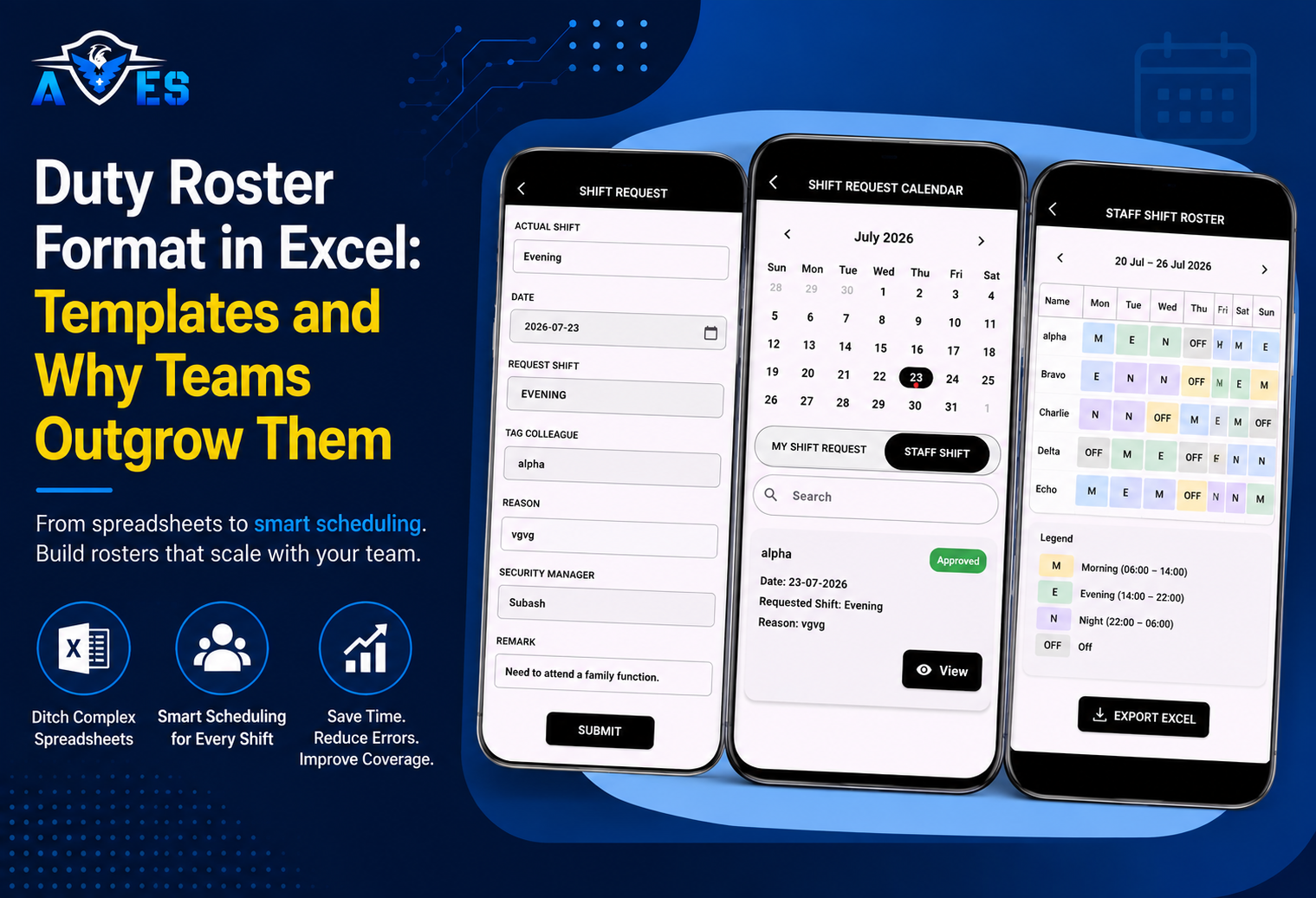
    The rosters that actually survive week to week are the boring ones. Guards down the side, dates across the top, shift code in each box, a little legend underneath explaining what everything means.

    That’s genuinely it.

    Where things go sideways is when someone gets clever. Formulas that try to auto-balance the shifts. Conditional formatting was stacked five layers deep because it looked neat in a tutorial video. A macro that only the person who built it two years ago actually understands and that person is now on maternity leave.

    A roster needs to make sense to a tired supervisor who just walked in at 6am. It doesn’t need to impress anyone with spreadsheet wizardry.

    Duty Roster Excel Mistakes That Show Up Almost Every Time

    If you’re setting up a duty roster Excel sheet for the first time, a few mistakes show up again and again.

    One master file, no backups, no version history. Someone types over last Tuesday’s entry and three weeks later, there’s no way to prove what the roster actually said when a guard disputes their hours.

    Confusing the roster with attendance. These are not the same thing, even though they are treated like they are constantly. The roster says who’s supposed to show up. It has zero connection to who actually did it.

    No legend or an outdated one. A new supervisor inherits the file and has no idea what “C2” or “N1” means, so they either guess or bother someone to explain it.

    Every site builds its own version separately. Nobody standardizes early and six months in, none of the sheets match up when someone tries to pull it all together.

    Where a Duty Roster Excel Sheet Actually Breaks Down

    None of this is really Excel’s fault, to be fair to it. It just wasn’t built to be a live operational record. It’s a planning tool and it does that part fine. The trouble starts when a growing operation quietly starts asking it to do more.

    There’s no audit trail once a cell gets overwritten. That old value is just gone. So when a guard says, “I worked that Saturday night,” and the current version of the sheet says he didn’t, there’s no way to check who’s right. That’s not a comfortable spot to be in when a client’s asking the same question.

    The sheet also has no idea what’s happening right now. It’ll show you the plan, sure, but it has no clue that the guy scheduled for the 10 pm gate shift hasn’t actually turned up yet. Somebody usually finds that out the hard way, after the gap has already existed for a while.

    And attendance is a whole separate problem; the roster was never built to touch. Who was scheduled and who actually clocked in are two different questions and in most Excel setups, somebody’s manually cross-referencing two files at the end of the month trying to make the numbers agree.

    When You’ve Outgrown a Duty Roster Excel Sheet

    There’s no magic number of guards where this suddenly becomes a crisis. It depends more on how many sites you’re juggling and how much proof clients expect from you these days.

    A few things worth paying attention to:

    You’re keeping the roster, the attendance log and the leave tracker as three separate files and matching them up by hand every month.

    A client asked who was on duty on a specific night and the honest answer is it took you longer than it should have to be sure.

    Shift swaps are happening over WhatsApp faster than anyone is updating the actual file.

    There’s been more than one payroll argument that traced back to “well, the sheet said something different.”

    If none of that rings a bell yet, stick with the duty roster Excel format above. It’ll do the job for a while longer.

    If it does sound familiar, the fix isn’t really about ditching Excel. It’s about the three things it was never going to be able to give you on its own: a real audit trail, a live picture of who’s actually covering a post right now and a direct link between the plan and what’s actually happening on the ground. This is exactly the gap AVES closes for security teams who’ve outgrown a spreadsheet.


    For the full breakdown on shift patterns and statutory rest rules, see security guard duty rosters. To see what a live coverage view actually looks like, check out geofence attendance or the AVES Security Guard Management System.

    Frequently Asked Questions

    1. What is a duty roster in Excel, really?

    Just a spreadsheet showing who’s working, when and where. That’s it. Small teams gravitate toward it because everyone already has Excel open half the day anyway.

    2. Does Excel actually hold up for security guard scheduling?

    For a small crew on one site, sure, it does the job. Things start slipping once you’ve got more guards, more sites, more moving pieces. Someone forgets to save the latest version, another supervisor edits a different copy and suddenly nobody’s sure which file is current.

    3. What actually needs to be in the template?

    The basics, nothing fancier:

    • Name and ID
    • Date, shift timing
    • Which post are they covering
    • Relief guard, if there’s one
    • Leave or weekly off
    • Overtime
    • A sign-off from whoever’s supervising

    That’s genuinely all it needs. People overbuild these things and it backfires.

    4. Isn’t the roster basically the attendance sheet?

    No and mixing these two up causes more headaches than people expect. The roster is the plan. Attendance is what actually happened. A guard being scheduled doesn’t mean he showed up and that gap is exactly where a lot of payroll arguments start.

    5. Why do companies eventually ditch Excel?

    Usually not because Excel did anything wrong. It’s more than the operation grows past what a spreadsheet can reasonably track. A few supervisors editing the same file, shift swaps happening every other day, a client asking who was posted last Tuesday and needing an answer fast. Excel just wasn’t built for that pace.

    6. Can one file cover multiple sites?

    You can try. In practice, it gets messy. Every site tends to build its own version and six months in, none of them match. If you’ve got more than one location, standardizing the format sooner rather than later saves a lot of pain.

    7. How often should it be updated?

    Weekly or monthly for the regular schedule. But leave approvals, emergency swaps, last-minute replacements? Those need updating right away. Sitting on it even for a day creates confusion nobody asked for.

    8. When’s it time to stop using Excel altogether?

    If you’re spending real time untangling version conflicts, chasing payroll disputes or digging through old files just to answer “who was on shift that night,” that’s usually your answer. That’s the point where a proper system with live tracking starts paying for itself.

    9. Does going digital actually help with compliance?

    It does more than people expect when they go in. You get an actual history of changes instead of a memory of what probably happened. When a client or auditor wants proof, you’re not stitching it together from three different files at the last minute.

    10. Is a duty roster the same as shift scheduling?

    Close, but not quite. Scheduling is the thinking part, working out who covers what and when. The roster is what you end up with once that thinking is done: the actual document that says who’s where.

    For more details, visit our LinkedIn AVES

  • Essential Gate Pass Format: Material, Vehicle and Returnable Pass Templates

    Essential Gate Pass Format: Material, Vehicle and Returnable Pass Templates

    By NITHISH KUMAR, AVES Security

    If you’ve ever stood at a gate trying to figure out whether a laptop bag leaving the building actually belongs to the person carrying it, you already know why gate pass formats matter more than people give them credit for. It’s not glamorous paperwork. It’s the difference between a security guard being able to make a confident call in ten seconds and one who has to wave someone through because the form in front of them doesn’t ask the right questions.

    Most gate pass templates you find online are either far too generic a single box that says “item description” and nothing else or borrowed from a completely different industry and never adjusted. What actually works is a handful of purpose-built gate pass formats, one for each kind of thing crossing the gate, because a laptop leaving for repair and a delivery truck leaving with raw material are not the same problem.

    This piece stays on the formats themselves. The approval workflow, digital logging and serial-number tracking behind them are covered in our gate pass management system guide. Here’s what each gate pass format actually needs to capture.

    Material Gate Pass Format

    This is the one guards use most often and the one that goes wrong most often too – usually because the form doesn’t force enough specificity.

    A material pass needs, at minimum: the item description (not “electronics,” but “Dell laptop, serial ending 4471”), quantity, the department or person releasing it, the destination and a clear returnable or non-returnable flag right at the top, not buried in a footnote. Add a column for the expected return date if it’s returnable and a signature block for both the releasing authority and the gate guard checking it out.

    Every pass a guard checks off should also be logged somewhere the shift can review later most sites already do this in their security guard logbook, so the gate pass and the logbook entry point back to the same event instead of living as two disconnected records.

    The detail that gets skipped most often is a place for the guard to note discrepancies. If the pass says three boxes and only two show up at the gate, there needs to be a spot to write that down before the vehicle leaves, not after someone notices it’s missing three days later.

    Vehicle Gate Pass

    Vehicle passes fail for a different reason – people treat a vehicle gate pass format like a material pass with a number plate bolted on. They need their own fields: vehicle number, driver name and ID proof type, purpose of visit, time in and time out and – this one’s easy to forget – odometer reading on entry and exit if the vehicle is carrying goods. That single field catches more discrepancies than any other on the form.

    If the vehicle is a regular vendor delivery, a separate “frequency” tick box (one-time vs. recurring) saves the gate from re-verifying the same transport contractor’s documents every single day.

    When the driver or occupants are also entering the premises rather than just dropping off goods at the gate, the vehicle pass should hand off to your regular visitor management process – the two shouldn’t be tracked as if they’re the same event.

    Returnable Gate Pass

    This is really a variant of the material gate pass format, but it deserves its own template because the failure mode is different. Returnable items – laptops for repair, tools sent out for servicing, equipment on loan to another site – get lost in the system because nobody’s tracking the “return” half of the transaction.

    A returnable pass needs everything a material pass has, plus a due-back date and ideally a simple log elsewhere (a register, a spreadsheet, whatever the site uses) that gets checked weekly for overdue items. The pass itself is only half the control. The other half is someone actually following up when an item doesn’t come back on time.

    Non-Returnable Gate Pass

    Simpler by design – this non-returnable gate pass format covers scrap, waste material or genuine gifts and donations leaving the site. The key fields here are approval authority (this usually needs sign-off one level higher than a routine material pass) and a clear statement that the item will not return, so nobody chases it later thinking it’s overdue.

    Gate Pass Format Checklist: What Every Type Should Get Right

    Serial numbers on the pass itself, not just the register. A pass without its own serial number is hard to trace back to a specific gate entry later, especially across shifts.

    Legible approval, not just a signature. A scrawled signature next to a printed name is worth far more at 11 p.m. when someone’s trying to verify who actually approved an exit.

    One pass, one purpose. Don’t let a material pass double as a vehicle pass because someone’s in a hurry. Combining fields to save paper usually means neither set of fields gets filled in properly.

    None of these gate pass formats need special software to implement – they work perfectly well as printed pads or simple digital forms. What matters is that the fields on the page actually match the questions a guard needs answered in the moment, rather than a generic template that technically has a box for everything and useful information for nothing.

    At AVES, our gate pass format was built around exactly this principle – separate fields for material, vehicle and returnable passes, rather than one generic form stretched to cover all three.

    For a deeper look at how gate pass approval workflows, digital logging and serial-number tracking work end-to-end, see our gate pass management system page – this piece deliberately stays at the template level, since that system already covers the process side in full.


    Frequently Asked Questions

    What is a gate pass format?

    At its core, a gate pass format is just the set of fields a guard uses to record what’s moving through a gate an item, a vehicle or a person along with who authorized it and whether it’s coming back. Get the fields wrong and the format stops doing its job the moment something unusual happens.

    What are the different types of gate pass formats?

    Four, in practice: material gate pass (items and equipment), vehicle gate pass (transport in and out), returnable gate pass (things expected to come back, like a laptop sent for repair) and non-returnable gate pass (scrap, waste, donations, anything leaving for good). Trying to squeeze all four into one generic form is usually where things start going wrong.

    What should a material gate pass format include?

    A specific item description not “electronics,” but the actual make and serial number quantity, who’s releasing it, where it’s going, a returnable/non-returnable flag and signatures from both the releasing authority and the gate guard. If it’s returnable, add an expected return date too.

    Is a returnable gate pass different from a non-returnable one?

    Yes and they fail differently if you mix them up. A returnable pass needs a due-back date and someone actually following up when it’s overdue. A non-returnable pass usually needs one level higher approval, since whatever’s leaving isn’t coming back.

    Do vehicle gate passes need their own format?

    They do. A vehicle number, driver ID, time in and out and an odometer reading, if goods are involved, none of that lives on a standard material pass, which is exactly why bolting a vehicle entry onto a material form tends to leave gaps.

    Can a gate pass system work on paper or do I need software?

    Paper works fine for a lot of sites a printed pad with the right fields will hold up. Software mostly earns its place when you need serial-number tracking across sites, automatic alerts on overdue returnable passes or a gate pass tied directly into visitor records and the shift logbook.

    For a deeper look at how gate pass approval workflows, digital logging and serial-number tracking work end-to-end, see our gate pass management system page. This piece deliberately stays at the template level, since that system already covers the process side in full.

  • Geofence Attendance: How Location-Verified Guard Check-In Works (2026)

    Geofence Attendance: How Location-Verified Guard Check-In Works (2026)

    Quick Answer

    Geofence attendance is a clock-in method that uses a virtual boundary drawn around a site’s GPS coordinates. A guard can only mark attendance when their phone confirms they are physically inside that boundary, so the record shows not just when someone started a shift but where they were standing when they did.

    What Geofence Attendance Actually Is

    A geofence is a circle — occasionally a polygon — drawn on a map around a fixed point. In security operations that point is a site: a gate, a lobby, a plant entrance, a residential tower. The geofence is the area within an agreed distance of it.

    Geofence attendance ties the act of marking attendance to that boundary. When a guard opens the app and taps to start their shift, the phone reports its coordinates. If those coordinates fall inside the fence, the check-in is accepted and stored with a timestamp and a location. If they fall outside it, the check-in is refused, or accepted and flagged, depending on how the system is configured.

    That is the whole mechanism. It is not complicated, and its simplicity is the point. The difference between a paper muster roll and a geofenced check-in is not sophistication — it is that one of them is a claim and the other is a record.

    Why “attendance” and “patrol” are not the same thing

    This distinction matters and gets blurred constantly, including by vendors.

    Patrol verification answers: did the guard walk the rounds? It works through checkpoint scans distributed across a site — NFC tags, QR codes, GPS waypoints — each scan producing a timestamped record at a specific location. It is about coverage over the course of a shift.

    Attendance answers a narrower question: did the guard turn up, when, and did they stay for the contracted hours? It is about presence at the boundaries of the shift.

    You need both, and they produce different evidence. A guard can pass every checkpoint and still have arrived ninety minutes late. A guard can clock in perfectly on time and never leave the guardhouse. Systems that treat attendance as a by-product of patrol data tend to under-serve payroll and over-serve operations. If you are being billed or billing on hours, attendance needs to stand on its own.

    For the patrol side of this, our guide to the guard tour system covers checkpoint verification in detail, and the security guard tracking system piece covers real-time alerting on missed rounds.

    The Problem It Was Built to Solve

    Ask anyone who has run a multi-site guarding contract what their attendance disputes look like and you will hear a version of the same four stories.

    Buddy punching

    One guard marks attendance for another. On a paper register this requires nothing more than a second signature and a cooperative colleague. On a shared biometric device at a single gate it is harder but not impossible. With a personal device inside a geofence it becomes materially more difficult, because the phone has to be physically at the site — though, as covered below, it does not become impossible, and any vendor telling you otherwise is overselling.

    The retrospective muster roll

    The register gets filled in at the end of the week from memory. Every entry is neat, every time is a round number, and none of it is evidence of anything. This is the most common failure and the least dramatic — nobody is committing fraud, they are catching up on admin. It still produces records that collapse the moment a client questions them.

    The late start nobody records

    A guard due at 06:00 arrives at 06:40. The supervisor knows, the guard knows, and the register says 06:00 because writing anything else creates a conversation neither of them wants. Over a month across forty guards this is a substantial and completely invisible number of unworked hours — hours the client is being invoiced for.

    The disputed exit

    A guard leaves early. Two weeks later the client asks why the site was unmanned at 21:15 on a Thursday. Without a check-out record there is no way to establish what happened, and the contractor absorbs the doubt.

    None of these are exotic. They are the ordinary friction of running a labour operation on paper, and they all share a root cause: the attendance record is produced by the same person whose attendance is in question, with nothing independent attached to it.

    How a Geofence Attendance System Works, Step by Step

    The flow is short. Complexity here is a warning sign, not a feature.

    1. The site is mapped. An administrator sets the site’s coordinates and a radius. This is usually done once during onboarding and revisited when a site’s layout changes.

    2. The guard is assigned. Attendance is only meaningful against an expectation — a roster entry saying this guard, this site, this shift. Without a roster the system records that someone was somewhere, which is not the same as knowing whether the site was covered.

    3. Check-in. The guard opens the app at the start of the shift and marks attendance. The device supplies coordinates; the system compares them to the fence.

    4. The record is written. Accepted check-ins store the time, the coordinates, the guard, the site, and the shift. This record is not editable by the guard afterwards — that immutability is the entire value.

    5. Exceptions surface. Out-of-fence attempts, late check-ins against roster, and missing check-ins become supervisor alerts rather than month-end discoveries.

    6. Check-out closes the shift. The same process in reverse. Without an enforced check-out, hours totals are estimates, and the on-site headcount is wrong.

    7. The data becomes a report. Timesheets, exception summaries and client-facing attendance reports are generated from the stored records rather than reconstructed by hand.

    The step most operations get wrong is step 5. Collecting the data is easy; nothing improves unless somebody looks at the exceptions in the same week they occur.

    Geofence vs Biometric vs Paper: What Each One Actually Proves

    Each method proves something different, and the honest comparison is about evidence, not features.

    Method Proves identity Proves location Proves time Cost to deploy Main weakness
    Paper register No No No Near zero Every entry is an unverified claim; trivially backdated
    Fixed biometric device Yes Yes, but only at the device Yes Hardware per site; install and maintenance Fixed to one point; fails on multi-entry or roving sites; queues at shift change
    Geofence attendance (app) Weakly — proves the device was present Yes, to within GPS accuracy Yes Uses the guard’s existing phone Depends on GPS quality; device can be handed over
    Geofence + photo/selfie capture Yes, in practice Yes Yes Same as above Adds friction; storage and privacy obligations

    The row worth sitting with is the third one. A geofence proves a device was inside a boundary. It does not, by itself, prove which human was holding it. If someone hands their phone to a colleague, the geofence is satisfied. This is why systems that care about identity pair location with a capture step — a selfie at check-in, or a biometric on the device itself.

    Vendors rarely volunteer this. It is worth asking directly, because the answer determines whether your attendance data survives a serious dispute or merely a casual one.

    Where each one belongs

    • Single fixed entrance, high headcount, one shift change point — a fixed biometric device is genuinely good and probably cheaper over time.
    • Multiple sites, roving guards, sites without power or mounting points — geofence attendance, because hardware per site does not scale and roving guards have no device to walk to.
    • High-dispute or high-liability contracts — geofence plus photo capture, because you will eventually need to prove identity, not just presence.
    • Very small single-site operations where everyone knows everyone — paper is defensible right up until the first contract that requires evidence, at which point it isn’t.

    Setting the Radius: The Decision Everyone Gets Wrong First

    The radius is the single configuration choice that determines whether the system helps or becomes a daily irritation.

    Too tight, and legitimate check-ins fail. GPS on a consumer phone is not surveyor-grade; accuracy varies with sky visibility, building density, weather and handset age. A fence of twenty metres around a gate in a dense urban block will reject guards standing at that gate, repeatedly, and the guards will conclude the system is broken. They will be more or less right.

    Too loose, and the fence stops meaning anything. A five-hundred-metre radius around a city-centre site includes a café, a bus stop and someone’s flat. The check-in is technically location-verified and practically worthless.

    Sensible practice:

    • Start wider than feels right, then tighten with observed data rather than guesses. A fence that rejects nobody in week one tells you the ceiling; you can lower it from there.
    • Size to the site, not to a policy. A ten-acre industrial park and a lobby desk do not get the same number.
    • Look at the rejection log before blaming guards. Repeated failures at the same site at the same spot is a radius problem or a signal problem, not a discipline problem.
    • Re-check after construction, scaffolding or a new adjacent building. Urban GPS accuracy changes when the skyline does.

    The operational rule that saves the most grief: treat an out-of-fence check-in as a flag, not a block, at least during rollout. Let the guard mark attendance, record that it was outside the boundary, and put it in front of a supervisor. Blocking creates a guard standing at a gate unable to start their shift, which is a worse operational problem than the one being solved.

    What Happens When There Is No Signal

    This is the question that decides whether a system works in the field, and it deserves a straight answer.

    Two different things can fail independently:

    GPS can fail. Underground car parks, inside plant rooms, deep inside steel-framed buildings. The phone cannot establish a position at all, or reports one with an accuracy radius of several hundred metres.

    Data connectivity can fail. The phone knows exactly where it is but cannot reach the server.

    The second is much easier to handle and most decent systems handle it: the check-in is captured on the device with its coordinates and timestamp, held locally, and synced when connectivity returns. AVES offers limited offline capability of this kind — core field actions can be captured without a connection and synchronise once it is restored, though full functionality does require internet.

    The first is harder and there is no clean software fix. If a guard’s post is genuinely inside a signal dead zone, the realistic options are to place the check-in point at the entrance rather than the post, or to accept a flagged low-accuracy check-in and review it. Any vendor claiming their app works perfectly with no GPS is describing something other than geofencing.

    Ask this in a demo: what does the app do when GPS accuracy is reported as ±300 metres? A well-built system records the accuracy figure alongside the coordinates so a supervisor can judge the record’s weight later. A poorly built one stores the coordinates as if they were exact.

    The Failure Modes Nobody Warns You About

    Being honest about limitations is not a weakness in a buying decision — it is the thing that stops a rollout failing in month three.

    Device handover defeats it

    Covered above, and worth repeating because it is the most common real-world circumvention. Location verification without identity verification is a partial control.

    Location spoofing exists

    Apps that report false GPS coordinates are freely available. This is a real risk on a fleet of personal Android devices and a much smaller one on managed devices with the relevant settings locked down. Mature systems detect and flag mock-location signals. Ask whether yours does.

    Battery and permissions

    An app that cannot access location cannot verify anything. Guards turning off location services to save battery, or declining the permission during install, produce silent gaps. Whoever administers the system needs a view of which devices are reporting properly, not just which guards checked in.

    Personal devices carry obligations

    If guards use their own phones, you are collecting location data about workers on hardware they own. That brings consent, data-retention and privacy duties that vary by jurisdiction and are not optional. At minimum: collect location only at check-in and check-out rather than continuously, tell people plainly what is captured, and set a retention period. Continuous background tracking of staff is a materially different proposition, legally and culturally, from a location stamp at the start of a shift — do not let a vendor blur the two.

    It does not fix a supervision problem

    If nobody reviews exceptions, geofence attendance produces a very well-organised archive of problems nobody acted on. The technology changes what is knowable. It does not change what gets managed.

    Attendance Data as Billing Evidence

    The commercial argument for this is usually stronger than the security one, and it is the argument that gets budget approved.

    Guarding contracts are priced in deployed hours. The invoice asserts a number of hours; the client either trusts it or does not. When the relationship is good, nobody looks closely. When a contract goes to renewal, or a client’s own auditor gets involved, or there is an incident during a period when the site was supposedly manned, that assertion gets tested.

    An attendance record that carries a timestamp, a location and a roster reference survives that test. A muster roll does not.

    Three specific places this shows up:

    Renewal negotiations. A client asking for a discount is much harder to argue with when neither side can establish what was actually delivered. Verified attendance data changes the conversation from impressions to hours.

    Deduction disputes. Clients deduct for unmanned hours. Whether that deduction is fair is answerable in minutes with exception reports, and unanswerable without them.

    Tenders. Increasingly, buyers of guarding services ask how attendance is verified. “Paper register” is a weak answer against a competitor who can show a client portal.

    There is also an internal case. Payroll built from verified check-ins removes the reconciliation work between what supervisors report, what guards claim and what gets paid — and removes the quiet overpayment that reconciliation usually hides.

    Our piece on security guard management software cost covers how to think about the spend side of this.

    Rolling It Out Without a Mutiny

    Attendance systems fail on adoption far more often than on technology. A rollout that treats guards as the problem produces guards who treat the system as the enemy.

    Say what is tracked and what is not. The single most effective thing you can do. Guards assume the worst — that the company watches them all shift. If the system captures location only at check-in and check-out, say so explicitly, in writing, in plain language. If it captures more than that, say that too, because they will find out.

    Explain the upside honestly. Verified hours cut both ways. Guards who work a full shift and get shorted on pay have a record now. Guards blamed for a colleague’s absence have a record. Overtime that used to be argued about is now documented. This is a genuine benefit and it is worth leading with.

    Start with flag-not-block. As above. The first two weeks should generate data about your radius settings, not disciplinary cases.

    Fix the tech complaints fast. The first guard who cannot check in and gets told “it works fine for everyone else” will tell everyone else. Treat early failures as configuration bugs, because they usually are.

    Do not bolt discipline onto week one. Introduce the system, let the data stabilise, correct the settings, and only then start managing against it. Operations that lead with enforcement get a fortnight of compliance followed by inventive workarounds.

    Brief supervisors properly. They will be asked every question guards have. A supervisor who does not understand the radius or the offline behaviour will improvise an answer, and it will be wrong.

    A Worked Example: What a Week of Exceptions Looks Like

    Abstract benefits are unconvincing. Here is the concrete shape of what changes, using an illustrative week at a mid-sized contract — the specifics are made up to show the mechanism, not drawn from a real client.

    A supervisor opens the exception report on Monday morning. It shows five things from the previous week:

    Three late check-ins at the same site, all between 06:35 and 06:50. Not a discipline problem — a bus timetable problem. The 06:00 shift start does not match the only realistic way for guards to reach that site. The fix is a roster change, and it was invisible for as long as the register said 06:00.

    One out-of-fence check-in, 400 metres away. The guard checked in from the car park across the road because the gate is inside a covered loading bay with no GPS. This is a configuration finding: move the check-in point or widen the fence for that site.

    One missing check-out on a Thursday night. The guard finished and went home without closing the shift. Payroll would have paid the rostered hours; the record now shows the shift was never formally closed. Whether that matters depends on your rules, but you know it happened.

    Two check-ins with reported GPS accuracy worse than 200 metres. Both at the same tower block. Not fraud, physics — and a signal that this site’s records carry less evidential weight than others, which is worth knowing before you rely on them in a dispute.

    One check-in at 05:12 for an 06:00 shift. Almost certainly a guard arriving very early rather than anything sinister, but it is the kind of pattern that, repeated across one individual, is worth a conversation.

    Notice what this list is mostly made of. One possible integrity issue, and four operational or configuration findings that improve the system rather than punish anybody. That ratio is typical and it is the argument to make internally when someone frames this as surveillance. Most of what geofence attendance surfaces is bad configuration and bad rosters, not bad guards.

    Notice also that none of it required anybody to watch anything in real time. The value came from a report somebody read on a Monday.

    What Attendance Disputes Actually Cost

    It is difficult to give a credible figure here and anyone who quotes you an industry-wide percentage is guessing, so instead here is the structure of the cost, which you can populate with your own numbers.

    Unworked hours billed. Take your average shift length, your hourly bill rate, and an honest estimate of how often shifts start late or end early without being recorded. Multiply across your guard count and a year. Most operators who do this arithmetic for the first time find the number uncomfortable, because a fifteen-minute average discrepancy is invisible per shift and substantial per annum.

    Reconciliation labour. Count the hours per month your admin team spends chasing supervisors for muster rolls, resolving contradictions, and rebuilding timesheets. That is a direct, recurring, fully loaded salary cost.

    Deductions and credits. What you gave back last year in client credits for coverage disputes you could not disprove.

    Renewal risk. The hardest to quantify and usually the largest. A contract lost partly because you could not evidence delivery costs a multiple of everything above.

    Run those four and you have a defensible business case built on your own operation rather than a vendor’s brochure.

    Where AVES Fits

    AVES records geo-verified attendance as part of the same platform that handles patrol tracking, incident reporting, visitor and gate pass records, shift scheduling and audit-ready compliance reporting — one dashboard across one site or many, rather than an attendance tool that has to be reconciled against everything else at month end.

    Practically, that means attendance sits next to the roster it should be measured against, and next to the patrol and incident data from the same shift. When a client asks what happened on a given night, the answer comes from one place.

    AVES offers a free trial and a personalised demo. If you are evaluating this, the questions worth bringing are the ones in this article: what the radius defaults are, what happens at ±300m accuracy, whether mock locations are flagged, and what identity check sits alongside the location check.

    Explore AVES Plans · Learn More About AVES

    For the wider picture, see the AVES Security Guard Management System guide, and security guard scheduling software for the roster side that attendance is measured against.

    Frequently Asked Questions

    What is geofence attendance?

    Geofence attendance is a clock-in method that accepts a guard’s check-in only when their phone’s GPS position falls inside a virtual boundary drawn around the site. The stored record carries a time, a location and a roster reference rather than just a signature.

    How accurate is geofence attendance?

    It is as accurate as consumer GPS, which typically means a few metres in open conditions and considerably worse among tall buildings, under cover or in bad weather. This is why the fence radius has to be set to suit the site, and why systems should record the reported accuracy alongside the coordinates.

    Can guards cheat a geofence attendance system?

    Partially. A geofence proves a device was at the site, not which person was holding it, so handing a phone to a colleague defeats it. Mock-location apps can also falsify coordinates on unmanaged devices. Pairing location with a photo capture at check-in and flagging mock-location signals closes most of this gap.

    Does geofence attendance work without internet?

    Check-ins can generally be captured offline and synced when the connection returns — AVES supports this for core field actions, with full functionality requiring internet. A total GPS blackout, such as an underground car park, is a different problem and needs the check-in point moved or the low-accuracy record flagged for review.

    Rules vary by jurisdiction, so this is not legal advice and a local check is worth doing. The general principle is that capturing location at check-in and check-out for a legitimate purpose, with staff informed and a defined retention period, sits on much firmer ground than continuous background tracking of workers.

    What is the difference between geofence attendance and patrol tracking?

    Attendance establishes that a guard arrived, when, and how long they stayed. Patrol tracking establishes that they covered the site during the shift through checkpoint scans. They answer different questions and a guard can satisfy one while failing the other.

    What radius should a geofence be set to?

    There is no universal number, because it depends on the site’s size and GPS conditions. Start wider than feels correct, watch the rejection log for a fortnight, and tighten from observed data — a fence that rejects legitimate guards will be worked around rather than complied with.

  • “7 Reasons AVES Is the Best Employee managing App for Security Guards in 2026”

    “7 Reasons AVES Is the Best Employee managing App for Security Guards in 2026”

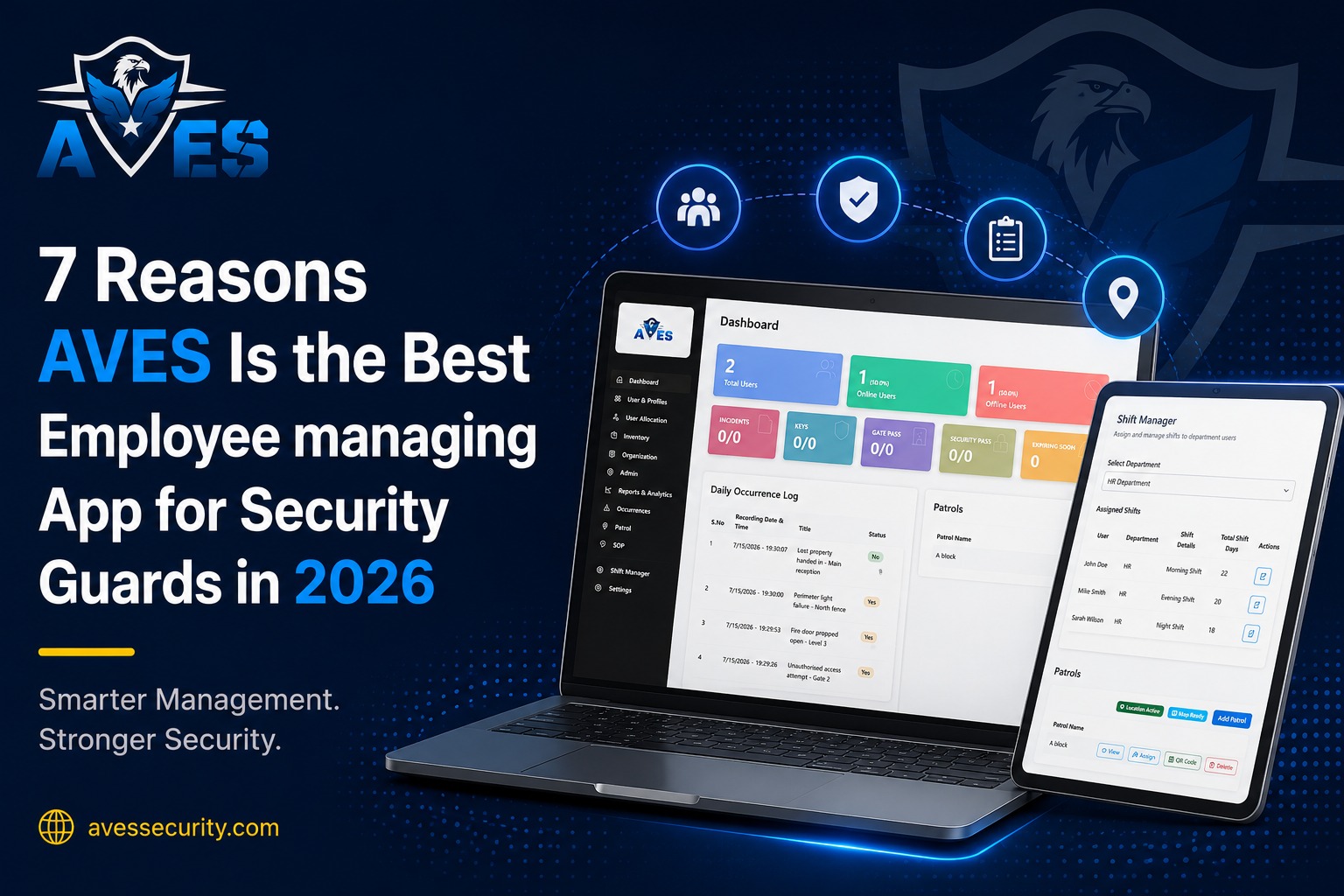
    An employee-managing app for Security Guards is no longer a nice-to-have for modern security companies. At 11 PM, a client calls asking whether a guard completed checkpoint 4. The guard says yes, but without verified patrol data, you’re left relying on trust instead of proof. That’s exactly the problem AVES is designed to solve.

    If that sounds familiar, you’re not alone and honestly most tracking apps won’t fix it either. They’re built for delivery drivers and warehouse clock-ins, not for guards who need patrol proof and access logs a client can actually push back on.

    AVES was built around that specific problem. Here’s why it works.

    An employee-managing app for Security Guards helps security companies replace manual tracking with real-time visibility, verified patrols, and digital reporting.

    An Employee Managing App for Security Guards helps security companies monitor patrols, manage attendance, track incidents, and improve communication across multiple client locations. Instead of relying on paper records, supervisors gain real-time visibility into guard activities and can respond quickly to operational issues.

    1. Employee managing App for Security Guards: GPS That Actually Proves the Round Happened

    A dot moving on a map doesn’t tell you much. Was the checkpoint scanned? Or did he sit in the break room for twenty minutes and walk back?

    AVES ties GPS to checkpoint scanning, so every round leaves a timestamped record. Skip a checkpoint and it flags right away instead of surfacing during a client’s audit three weeks later.

    Nobody thanks you for a clean shift. They remember the one night it wasn’t and “he was probably there” doesn’t hold up when someone’s asking questions.

    An employee-managing app for Security Guards should do more than record attendance. It should create a searchable record of every visitor, entry and approval.

    This is why an employee-managing app for Security Guards becomes essential as security companies expand across multiple client sites.

    2. Incidents get logged on the spot

    Paper notes. A text message an hour later. By the time it reaches a supervisor, half the details are gone and the photos don’t exist.

    Guards file straight from the scene in AVES, photos and video included and the supervisor gets pinged instantly. Not the next morning over coffee.

    An Employee managing an app for Security Guards ensures every incident is documented with accurate timestamps, photos, and location details for future reference.

    3. Access control that’s a real log, not a clipboard

    Plenty of companies say “access control” and mean a sign-in sheet taped to the front desk. AVES does visitor registration, gate passes, approvals, all searchable.

    Client asks who was on site last Tuesday at 3pm? You answer in ten seconds. Insurance adjusters ask this exact question after almost every incident, by the way.

    A reliable Employee Managing App for Security Guards also improves visitor management by maintaining accurate digital records of every entry and exit. This helps security companies provide clients with transparent reports while reducing manual paperwork and administrative errors.

    4. Shift changes stop living in WhatsApp

    Someone needs a day off. Someone wants to swap. Someone’s texting you at 6am about a shift starting in an hour.

    None of it gets tracked when it happens over chat. AVES puts all of it, leave, swaps, schedule changes, in one place. Fine at 10 guards. A genuine mess at 40 across five sites.

    5. One app instead of five logins

    Most security companies don’t set out to run five separate apps. It just happens. One for GPS, one for incidents, one for access, one for scheduling, one for reports.

    AVES puts it all in one place. Less exciting to talk about than GPS tracking, but it’s usually the reason people actually stick with a platform long term.

    Using an employee management app for Security Guards reduces the need for multiple software platforms, improving efficiency and operational control.

    Investing in an Employee Managing App for Security Guards allows supervisors to manage guards, schedules, patrols, and reports from a single platform. This centralised approach saves time and improves overall operational efficiency.

    6. Reports that hold up if someone actually asks

    Everything in AVES gets timestamped automatically. So when an audit or a legal question comes up, there’s a real trail instead of trying to remember what happened last quarter.

    Companies on government contracts or insurance-heavy work tend to care about this one more than any other feature, for obvious reasons.

    7. Doesn’t fall apart once you grow

    Works great for five guards on one site, then breaks completely once you’re managing multiple sites and supervisors. That’s the usual story with basic tracking apps.

    AVES gives you one dashboard across sites, so nobody’s logging into six systems to check six locations. And switching platforms later isn’t just a hassle, it risks a gap in your records at the worst possible time.

    Choosing the right Employee managing App for Security Guards helps eliminate manual tracking, improve accountability and simplify operations across every location.

    Why security companies are switching to this kind of app

    Add a second client site and the old way of doing things starts cracking. Add a third and it’s basically gone. Phone calls, paper logbooks, someone’s memory of what happened Tuesday, none of it holds up once you’re not physically at every site yourself.

    That’s really why firms move to an employee managing app for security guards. Not because paper is old-fashioned, but because a supervisor can’t be everywhere and a dashboard can.

    With patrols, incident reports and checkpoint scans in one place, a supervisor checks a screen instead of calling five sites to ask if everything’s fine. Smart Track GPS is what actually backs this up, since it confirms a patrol happened where and when it was supposed to, not just that a phone was somewhere nearby.

    Swap the paper visitor register for real access control and you get an actual record instead of a guess about who came through the gate. Add a request management system for leave and shift swaps and a good chunk of the admin work that eats a supervisor’s afternoon just disappears.

    None of it’s flashy. It’s mostly just fewer places for things to fall through the cracks.

    How to choose the right employee managing app for security guards

    Not every tracking app on the market was built for security work. Most were designed for delivery drivers or field sales reps and it shows the moment you actually need to verify a patrol or document an incident properly.

    A few things worth checking before you commit to anything.

    Patrol verification matters most. Look for Smart Track GPS paired with digital checkpoint scanning and real-time incident reporting. Without these, you’re basically back to trusting a guard’s word that a round got done.

    Access control is the next one people skip and regret later. You want the best access control software handling visitor registration, gate passes and entry approvals in one system, not a paper register nobody can search when a client or auditor actually asks a question.

    Then there’s the admin side. A proper request management system for leave, shift swaps and scheduling changes means supervisors aren’t buried in texts and phone calls trying to keep staffing straight.

    And last, think ahead. A platform that works fine for one site can fall apart the moment you add a second or third. The right employee managing app for security guards should hold up whether you’re running one location or twenty, with reporting and documentation that don’t need to be rebuilt every time you grow.

    When evaluating an Employee Managing App for Security Guards, choose software that offers GPS patrol verification, incident reporting, shift scheduling, visitor management, and detailed analytics. These features help security companies maintain accountability while improving client satisfaction.

    A few honest limitations

    AVES needs a connection for full functionality. It handles some offline work, syncing once you’re back online, but constant dead zones will slow real-time reporting down.

    Guards used to paper logs usually need a week or two before checkpoint scans feel automatic. That’s normal.

    And no platform replaces an actual supervisor looking at the data and doing something with it.

    Along with using an Employee managing App for Security Guards, security companies should follow industry best practices published by ASIS International and workplace safety guidance from OSHA to strengthen security operations and compliance.

    Modern security companies increasingly rely on an Employee Managing App for Security Guards to simplify workforce management and ensure every patrol, incident, and visitor record is accurately documented. The right platform supports both small teams and large multi-site operations.

    Worth trying before you decide

    If you’re small, start with patrol tracking and incident reporting. Add access control and multi-site tools once you actually need them.

    If you’re already stretched across sites and tired of guessing, that’s the exact problem AVES was built for.

    If you’re looking for an Employee managing App for Security Guards, AVES combines GPS patrol tracking, incident reporting, access control and workforce management in one platform.

    Want to see it on your own sites? Book a free demo.

    AVES is an Employee managing App for Security Guards designed to help security companies improve accountability, streamline operations, and deliver better service to clients.

    Choosing the right Employee Managing App for Security Guards is an investment in better security operations. With AVES, companies can improve accountability, reduce manual work, enhance client trust, and manage every aspect of guard operations through one intelligent platform.

    FAQs

    Is AVES only for large security companies or can small teams use it too?

    Small teams use it too. A lot of companies start with just patrol tracking and incident reporting for five or ten guards, then add access control and scheduling once they actually need it. You don’t have to turn on every feature on day one.

    How is this different from a basic GPS tracking app?

    A basic app just shows where a phone is. That’s it. AVES ties GPS to checkpoint scans, so you know a patrol actually happened at a specific spot, not just that someone’s phone was somewhere nearby. That difference matters a lot when a client starts asking questions.

    What happens if a guard’s phone loses signal on site?

    AVES handles basic offline work and syncs everything once the connection comes back. If a site has constant dead zones though, expect some lag in real-time reporting until it reconnects. Worth checking your site’s coverage before you roll it out.

    How long does it take guards to actually get used to it?

    Usually a week or two, especially for guards coming from paper logs. It’s not complicated, but any change in daily routine takes a bit of adjusting. Nothing unusual there.

    Can clients or auditors get access to the records if they ask?

    Yes. Everything gets timestamped automatically, so pulling up who was on site, when a checkpoint was scanned or what happened during an incident takes minutes instead of digging through old logbooks or texts.

    Does it replace the need for a supervisor?

    No and it’s not meant to. AVES gives supervisors the data to work with faster. Someone still has to look at the reports and act on what they show.

    We’re already running separate apps for GPS, incidents and scheduling. Is switching worth the hassle?

    Depends on how many sites you’re managing. At one or two sites, separate apps are annoying but manageable. Once you’re running multiple sites with different supervisors, having everything in one dashboard usually saves more time than the switch costs.

    How do we get started?

    Most companies book a free demo first, see how it works on their actual sites with their actual guards, then decide. No need to commit to anything before that.


    Why should security companies invest in an Employee Managing App for Security Guards?

    An Employee Managing App for Security Guards improves patrol verification, attendance tracking, incident reporting, visitor management, and workforce scheduling. It helps security companies reduce paperwork, improve accountability, and deliver faster, more transparent reporting to clients.

  • security Guard Management Software: 5 Powerful Reasons to Replace Manual Processes

    security Guard Management Software: 5 Powerful Reasons to Replace Manual Processes

    Security Guard Management Software is helping security companies replace manual processes with real-time tracking, automated attendance, digital incident reporting and instant client updates. If you’re still relying on paper logs, WhatsApp messages and manual check-ins, it’s time to modernise your operations.

    Phone rings at 11 PM… A client wants to know if the guard actually showed up at Site 4 tonight. Truth is, you don’t know…

    That’s not a guard problem. It’s an information problem and it’s the exact gap Security Guard Management Software exists to close.

    Security Guard Management Software gives security companies real-time visibility into guard activities, attendance and incident reporting.

    Most guards actually do the job fine. The breakdown is usually that nobody above them can see what’s happening until it’s already over. Patrol logs get written up from memory. Incident reports land the next morning. Attendance gets “confirmed” over a phone call, which doesn’t really confirm anything.

    Owners often try to patch this by adding more people, more check-in calls, a stricter policy that quietly dies by week two. It rarely works, because you’re piling manual steps on a system already buckling under manual steps. The ones who actually break the cycle stop adding people and just make the information visible on its own.

    Security Guard Management Software is transforming how security companies manage guard operations, patrols, attendance, incident reporting and client reporting through real-time visibility and automation.

    Guard Management Software is transforming how security companies manage guards, patrols and client reporting.

    1. Security Guard Management Software Builds Client Trust

    Clients today don’t just want a body at the gate, they want proof things got done. Can’t pull up a timestamped patrol record in under a minute? That plants doubt, even on a night your team did everything right.

    When you can pull that record up the second someone asks, the doubt doesn’t even get a chance to start.

    2. You’re Losing Hours You Won’t Get Back

    Every time a supervisor burns 40 minutes reconciling paper logs or chasing down confirmation calls, that’s 40 minutes not spent running the business.

    Automatic attendance, patrol and incident records take that admin work off the plate. Supervisors end up managing security again rather than paperwork. This is why many companies invest in Security Guard Management Software to automate daily operations.

    3. You’re Losing Contracts You Didn’t Even Know Were on the Line

    More commercial clients now want compliance reports and audit trails before they’ll renew. Competitor hands theirs over in five minutes, you need two days to pull yours together, guess who looks more put-together. Doesn’t matter if your guards are just as good or better.

    Companies that can produce a clean report on the spot tend to hold onto contracts longer, mostly because they look ready the moment it counts.

    Security Guard Management Software helps generate audit-ready reports in minutes instead of hours.

    4. There’s More Legal Risk Here Than You’d Think

    If something happens and there’s no real record from the moment it went down, you’re stuck relying on someone’s memory written up hours later. Rough spot to defend if anyone ever questions it.

    A timestamped digital record gives you something solid to point to instead. Changes the whole conversation if it ever comes to that.

    Security Guard Management Software creates secure digital records that improve compliance and reduce legal risks.

    5. The Bar Has Moved and Clients Know It

    The industry’s been pushing toward documented, auditable processes for years now. Clients shopping around for vendors have picked up on it too, even if they don’t ask for it in those exact words.

    Many organizations also follow security management best practices published by ASIS International.

    How Security Guard Management Software Changes Daily Operations

    Not going to pretend this fixes bad hiring or a supervisor who checks out mentally, because it doesn’t. What it fixes is visibility. And fixing visibility ends up solving a lot of stuff downstream almost by accident.

    Guard scans a checkpoint on their phone, it hits your dashboard right then. Something happens on site, the report with photos comes through while it’s still happening, not after the shift wraps. Attendance stops being “I think he’s there” and turns into an actual confirmed check-in tied to location. Reports that used to eat an afternoon are basically already built by the time you need them.

    Security Guard Management Software saves supervisors valuable time by automating reporting.

    None of it requires your guards to suddenly become tech people either. Most pick up scanning a checkpoint or filing a quick report in about the time it takes to show them once.

    What Nobody Really Tells You Upfront

    Switching off manual processes isn’t instant. Not pretending otherwise.

    Expect a week or two of people getting used to it. A few of your longer-tenured guards might grumble at first, that’s just normal and it usually fades once they realize it’s actually less work, not more, since they’re not writing the same thing down twice.

    You’ll also need decent signal at your sites. A good system rides out short offline patches and syncs back up once you’re connected again, but it’s not built for spots with zero connectivity long term.

    And no platform fixes a bad hire or a supervisor who isn’t actually supervising. What it does is let a decent team be managed properly instead of managed by guesswork. Anyone tells you switching systems is friction-free overnight, I’d take that with a grain of salt.

    What to Look for in Security Guard Management Software

    Real time incident reporting with photo or video, not just a text box someone fills in later. Checkpoint scanning that creates an actual timestamped record instead of a box anyone could tick from memory. One dashboard for every site, not five different logins. Reports you can pull in minutes when a client or auditor asks. A mobile app simple enough that you’re not running a training session just to get guards using it.

    If a platform can’t walk you through all five of those clearly, it’s probably not there yet.

    Why Choose AVES Security Guard Management Software

    This is basically the whole point of AVES Security Guard Management Software…, moving security teams off manual processes and into real time visibility across every site.

    AVES Security Guard Management Software moves security teams off manual processes… and provides real-time visibility across every site.

    Patrol tracking and checkpoint scanning give you actual proof instead of a guess. Incident reports come through the moment something happens, photo and video included. Geo-based attendance confirms guards are physically where they’re supposed to be, not just where they said they were. One dashboard, every site. Audit-ready reports in minutes, not the night before a meeting.

    None of it replaces your team. It just gives you the visibility to actually trust what they’re doing and hands you your evenings back instead of spending them on the phone.

    One Honest Question to Ask Yourself

    If a client called right now wanting proof of what happened at every site last night, could you show them in under five minutes?

    If not, that’s worth fixing and it’s a smaller fix than most owners expect.

    Investing in Guard Management Software helps improve accountability, efficiency and client confidence.

    AVES offers a free trial and a personal demo, so you can see how it’d actually work for your operation before committing to anything.

    FAQs

    1. What is Security Guard Management Software?

    A platform that handles guard scheduling, attendance, patrols and incident reports in one place. No more paper logs or end-of-day catch-up calls.

    2. How does it improve daily operations?

    Attendance logs itself, patrols get verified in real time and reports are built automatically. Supervisors spend less time chasing information and more time managing sites.

    3. Does it help retain clients?

    Yes. Clients want proof, not promises. Instant access to patrol and incident records builds trust fast.

    4. Is it worth it for small companies?

    Definitely. Whether you run 8 guards or 300, the software scales with you. No extra staff needed.

    5. What features matter most?

    GPS check-ins, checkpoint scanning, photo/video incident reports, automated client reports, a clear supervisor dashboard and offline support for weak-signal sites.

    6. How long does the switch take?

    Just a few days. It’s simpler than paper, so guards adapt fast.

    7. Do guards need tech skills?

    No. Checking in, scanning checkpoints and filing reports takes minutes to learn.

    8. Why ditch manual processes?

    Because they fail silently. Missed patrols, late reports, gaps you only discover when a client asks. Software closes that gap and makes you look sharper.

  • Visitor Management System: Replacing the Paper Visitor Book

    Visitor Management System: Replacing the Paper Visitor Book

    A visitor management system is software that digitally registers, verifies and badges every visitor entering a site, notifies the person they are visiting, and keeps a searchable, timestamped record of who was on the premises and when. It replaces the paper visitor book at reception.

    Most buildings still greet visitors the same way they did in 1995: a paper book at reception, a scrawled name, an illegible signature, and a time nobody checks. It feels harmless — until someone asks who was in the building during a fire drill, or a contractor walks out with equipment and there is no record he was ever there.

    A visitor management system replaces that book with a digital check-in, a gate pass, and a searchable record of every person who came through your gate.

    What Is a Visitor Management System?

    It is software that registers visitors on arrival, verifies who they are, notifies the person they came to see, issues a pass, and logs the moment they leave. Every entry is timestamped and stored, so at any point you can answer a simple question with certainty: who is on site right now?

    You will also see it called visitor management software, a gate pass system, or a visitor entry system. Same idea, different label.

    What Is Actually Wrong With the Paper Visitor Book

    The register at the gate is one of the weakest links in most security setups:

    • Anyone can write any name. Nothing is verified.
    • Handwriting is often unreadable a week later.
    • Visitors sign in and never sign out, so your count is always wrong.
    • The previous visitor’s details sit in plain view of the next one — a privacy problem.
    • Finding one visit from three months ago means flipping through pages by hand.
    • If the building has to be evacuated, nobody actually knows who is inside.

    That last one is the one that keeps facility managers awake.

    How a Visitor Management System Works

    In practice the flow is short enough that it does not slow the gate down:

    • Pre-registration — the host invites the visitor in advance, so they are expected.
    • Check-in — details and ID are captured digitally at the gate, with a photo where required.
    • Host notification — the person being visited is alerted automatically. No hunting for extensions.
    • Gate pass issued — a printed or digital pass, valid for that visit only.
    • Check-out — the visit is closed properly, so the on-site count stays accurate.
    • Audit trail — the whole visit is stored and searchable.

    Gate Passes, Contractors and Deliveries

    Visitors are the easy part. The harder traffic is contractors, delivery drivers and vehicles moving material in and out — which is exactly where a proper gate pass system earns its keep.

    A digital gate pass ties a person or a vehicle to an approval, a time window and a reason for being there. If something leaves the site, there is a record of who authorised it. That single change removes most of the ambiguity that makes material losses so hard to investigate.

    Who Approves a Pass, and How That Should Be Routed

    Registering a visitor is the easy half. Deciding whether they should be let in is the control, and on paper it is usually the slowest part of the day: a supervisor has to physically sign the pass, so the gate waits for whoever happens to be available.

    Routing fixes that. A request goes to the named approver for that pass type, they approve or reject it from wherever they are, and the decision is stamped with their name and the time. The point is not speed for its own sake. It is that “approved by management” is not an audit trail, and a pass approved by whoever was standing nearby is not a control.

    Revocation: The Contractor Who Still Has Access

    This is the failure a paper register cannot see at all. A contractor finishes a six-week job. The contract ends. Nobody revokes the pass, because nothing in the process asks anyone to, and the pass keeps working for as long as the guard on the gate recognises the face.

    A digital pass carries an expiry and can be withdrawn centrally the moment the reason for it ends. The test to apply to any system is simple: ask it to show every pass currently valid, and every pass revoked in the last month with the reason. If that takes more than a few seconds, revocation is not really being managed.

    Overstays, and Why Nobody Notices Them

    A visitor pass issued for a two-hour meeting is frequently still open at the end of the day. Not because anyone did anything wrong, but because a paper book has no idea what time it is. Nothing turns a page and flags that a pass has run past its window.

    Overstay flagging is the smallest feature on this page and one of the most useful, for the same reason overdue returnable passes matter on the material side: it converts a question nobody remembers to ask into a standing list somebody owns. Ageing beats a yes or no here too. A pass forty minutes past its window is a courtesy call. One that is six hours past it is a different conversation.

    What to Look For in Visitor Management Software

    Most tools demo well. These are the things that decide whether it survives a busy Monday morning:

    • Speed at the gate. If check-in takes more than a few seconds, a queue forms and guards go back to the book.
    • Works offline. Gates lose connectivity. The system should not.
    • Multi-site visibility. One dashboard across every location, not one login per gate.
    • Accurate on-site count. Live, and reliable enough to use in an evacuation.
    • Searchable history. Any visit, any date, in seconds.
    • Sensible data handling. Visitor details are personal data. Treat them that way.

    Who Needs One

    Anywhere people who do not work there come and go, across every industry:

    • Residential communities and gated societies
    • Corporate offices
    • Manufacturing plants and industrial parks
    • Warehouses and logistics yards
    • Hospitals
    • Schools and universities
    • Hotels

    The Compliance Angle Nobody Thinks About Until an Audit

    Ask a security manager to produce every visit by a named contractor over the last six months. With a paper register that is a week of work and a guess. With a digital record it is a filter and an export.

    The same record answers the emergency question too. When the alarm goes, a live list of everyone on site is not a nice-to-have.

    Where AVES Fits

    AVES Security Management System includes visitor management and gate pass records as part of one platform — alongside patrols, incidents, checklists and shifts. Visitor logs are not a separate tool bolted onto the side; they sit in the same system your guards already use.

    If you want the wider picture, our guide to the AVES Security Guard Management System covers how the modules fit together, and our piece on the guard tour system explains how patrols are verified.

    Frequently Asked Questions

    What is a visitor management system?

    Software that digitally registers, verifies, badges and tracks every visitor entering a site, and keeps a searchable record of each visit.

    Is a visitor management system the same as a gate pass system?

    Largely, yes. “Gate pass system” usually emphasises the pass issued to a visitor, contractor or vehicle, but both describe controlling and recording entry to a site.

    How do you stop a former contractor still having a valid pass?

    Give every pass an expiry when it is issued, and revoke centrally when the reason for access ends. The check worth running on any system is whether it can list every currently valid pass, and everything revoked in the last month, in seconds.

    What happens when a visitor overstays their pass?

    A paper book will not notice. A digital pass has a time window, so an overstay surfaces on a live list rather than depending on a guard remembering. Treat it as an ageing list rather than a yes or no, because forty minutes and six hours call for different responses.

    Does it work without internet at the gate?

    A well-built system keeps working offline and syncs once the connection returns. Gates are exactly where connectivity tends to be worst.

    Can it tell me who is on site right now?

    Yes — provided check-out is enforced. That live count is one of the main reasons to move off paper.