Author: Kaviarasan

  • From Chaos to Proof: Building an Investigation Timeline Investigators Can Trust

    From Chaos to Proof: Building an Investigation Timeline Investigators Can Trust

    Here’s what nobody tells you when an investigation stalls out: the proof usually existed somewhere. It just never made it into anything an investigator could actually use.

    An investigation opens. Someone needs the photos, the video, the timeline, proof that a patrol actually happened before the incident occurred. What you actually have is a phone gallery, a paper log at another site and a shift note somebody half-remembers writing.

    By the time you piece it together, the deadline’s closer and confidence has dropped through the floor. Sound familiar? It should. This happens constantly and it’s rarely because guards are careless.

    Why investigation management turns into chaos so fast

    Nobody sets out to lose evidence. It happens through a hundred small habits that each made sense at the time. A guard snaps a photo on his own phone because that’s what’s in his pocket. Another writes an incident note on paper that never gets transcribed. A third site keeps its own log because that’s just how it’s always been done there.

    None of that is malicious. Stack it up across a few sites and a few shifts, though and building a clean investigation becomes nearly impossible.

    Here’s what that mess looks like once you actually go digging: incident photos and video scattered across whoever’s personal device was closest. No proof a patrol was actually completed before or during the incident, just someone’s word for it. Paper logs that get lost, water-damaged or never make it back to the office. Separate sites keeping separate records with zero shared visibility between them. Reports reaching investigators hours or days later, by which point memory has already started to fade.

    Any one of these can weaken a case on its own. Most investigation management setups have three or four running simultaneously and don’t realise it until an investigation actually opens and someone goes looking.

    What this actually costs you

    A missing incident photo or a patrol nobody can verify isn’t just annoying. It’s a lost insurance claim. A failed audit. A liability case that could’ve closed clean if the documentation had existed properly in the first place.

    Property managers and legal teams burn hours, sometimes days, trying to reconstruct what happened during an incident that should’ve taken ten minutes to document correctly the first time around.

    Investigators feel this from a different angle. A report without solid evidence and a verified patrol history stops being a resolution and becomes a liability sitting on someone’s desk instead.

    The cost nobody puts a number on is trust. The first time a client, an insurer or an internal audit starts wondering whether an investigation actually holds up, every report after that gets picked apart. Even the good ones.

    The real reason investigation management keeps breaking down

    Most articles on this topic miss the actual root cause.

    Investigations don’t fail because guards are careless. They fail because nobody has one system connecting patrols, incidents and reporting into a single continuous, provable timeline.

    Think of it like a relay race where nobody agreed on where the baton changes hands. A guard owns the walkthrough. A supervisor owns the shift report. An investigator owns the request when it eventually shows up. Nobody owns the full chain running from the moment something happens to the moment it needs to be proven in front of someone who’s skeptical by default.

    That gap is exactly where photos disappear, checkpoints go unverified and reports arrive too late to actually matter.

    Fixing this isn’t about handing out new cameras. This is the after-the-fact reconstruction problem; for logging routine events as they happen, see occurrence reporting software. It’s about closing that ownership gap with a system built to manage the investigation from the first checkpoint scan to the final report.

    Step 1: Get every patrol and incident into one investigation-ready system

    AVES starts by pulling every checkpoint scan, patrol record and incident report, whether it’s one site or fifty, into a single cloud-based dashboard.

    Fragmentation is where most investigation chaos starts. One site logs everything on paper. Another uses a spreadsheet nobody else can access. Nobody can see across both, let alone build an actual investigation out of either one.

    Centralizing through AVES gets you one dashboard to monitor patrol activity and incidents across every site. Checkpoint scanning produces a timestamped record confirming a round was actually walked, not just claimed — the mechanics are covered in the guard tour system guide. Officers submit incident reports in real time straight from the AVES mobile app, using the field set covered in our security incident report format guide. Photos and video attach directly to the report itself as evidence, no more digging through someone’s camera roll three weeks later.

    That alone kills the biggest reason an investigator can’t get a straight answer about what happened and when. Nobody’s guessing which guard or which site holds the answer anymore. It’s already sitting in one place, ready to feed straight into an investigation.

    Step 2: Build a timeline investigators can actually trust

    Most manual security operations skip this step completely and it’s usually the one that matters most once an investigation actually opens.

    A patrol nobody can verify and an incident report nobody can date are both easy targets and both weaken an investigation before it even gets moving.

    AVES builds accountability into investigation record itself instead of treating it like paperwork tacked on afterward. Every action gets timestamped and digitally recorded the instant it happens. Supervisors get notified immediately when an incident comes in, not at the end of a shift when it’s already old news. Checkpoint verification ties directly to the guard, the time and the location. The whole timeline exists digitally, so it doesn’t depend on someone remembering to write it down later.

    Worth saying plainly: no system replaces good field discipline entirely. What this does is make the correct habit the easy one, so the timeline holds up even when the shift itself was chaotic.

    Step 3: Make investigation retrieval faster than the deadline

    The last piece solves the problem everyone feels but almost nobody names directly. Even a strong timeline is useless if it takes forever to find and hand over once an investigation is underway.

    Audits, claims and investigations don’t wait around while someone manually digs through weeks of paper logs.

    AVES generates audit-ready PDF reports, so historical records pull up fast during an investigation instead of turning into a multi-day scramble. Records are searchable by date, site, guard and incident type. Reports export instantly in formats ready for investigators, clients or auditors. Multi-site retrieval doesn’t require logging into five separate systems. Dashboards and performance analytics cover guard activity, incidents and compliance in one view.

    When retrieval stops eating your time, your team spends that time actually supporting the investigation instead of hunting for proof the work got done.

    What changes once your investigation management follows these three steps

    People assume the payoff is speed. Speed’s real, but it’s not the biggest shift.

    The biggest shift is confidence.

    Once patrols, incidents and reports live in one verified system with a clean timestamped timeline and fast retrieval, your team stops second-guessing whether the investigation will actually hold up. That confidence changes how supervisors manage shifts, how legal teams respond to claims and how quickly an investigation moves from open question to closed resolution.

    You stop reacting to documentation gaps and start treating your investigation record as an actual strength.

    Investigation mistakes to avoid even after you fix this

    Don’t assume centralizing everything means guards stop needing training. The app makes reporting easy, sure, but staff still need to understand what and how to document for an investigation to actually hold up later.

    Don’t treat timestamped records as automatic proof of quality. A checkpoint scan confirms someone showed up. It doesn’t confirm they did a thorough job. Supervisors still need to review patrol quality on top of the record itself.

    Don’t wait for a real investigation to test your retrieval speed. Pull a sample report before you actually need one for a claim or audit.

    None of these are big changes. They’re the difference between a system that looks good on paper and one that actually holds up under real investigative pressure.

    Where this leaves your investigation management

    Investigation chaos rarely comes down to bad cameras or careless guards. It comes from fragmented logs, patrols nobody can verify and reporting that was never built with real deadlines in mind.

    AVES fixes that by centralising every patrol and incident, building a verified timestamped timeline automatically and making retrieval fast enough to actually meet the moment when an investigation depends on it.

    If a weak investigation record has ever cost your team time, credibility or an outcome you should’ve controlled outright, this is probably the fix you’ve been missing. Talk to AVES about your current setup and see exactly where your investigation records are exposed and what it looks like once they aren’t.

    Contact Us: avessecurity.com

    Why does incident evidence fall apart in the first place?

    It is almost never one missing document. It is fragmentation. Photos, shift notes and reports end up scattered across personal phones, paper logs and separate site systems with nobody owning the handoff between them. By the time you need everything pulled together, half of it is missing or unverifiable.

    How does AVES actually centralise patrol and incident records?

    AVES pulls every checkpoint scan, patrol record and incident report into a single cloud-based dashboard, regardless of which site or device it came from. Photos and video attach directly to the incident report itself, so nothing lives on a random personal phone waiting to get lost.

    What does “chain of custody” actually mean for investigation and why does it matter so much?

    Chain of custody is the documented proof that a record has not been altered between the moment it was captured and the moment it is submitted as evidence. Without it, a lawyer or auditor can challenge whether the record is legitimate, and that challenge alone can get it set aside regardless of what it shows.

    How fast can we retrieve an incident report once it is in AVES?

    Minutes instead of days. Records are searchable by time, location, site, guard and incident type and exports come out in formats courts, insurers and auditors already accept. No digging through file folders or chasing three sites for the same answer.

    What happens to the paper logs we already have?

    That depends on your setup, but the point of centralising going forward is to stop the bleeding first. Talk to AVES directly about migrating historical records. Every organisation’s starting mess looks a little different.
  • Occurrence Reporting Software: Stop Errors, Build 100% Accountability

    Occurrence Reporting Software: Stop Errors, Build 100% Accountability

    Your paperwork is losing you clients. Not your guards. Not your patrols. Your paperwork.

    Picture this. A client calls asking what happened at their site three weeks ago. You go digging and find a stack of handwritten logbooks, half of them scrawled in handwriting nobody can read anymore. Sound familiar? It should. Almost every security company hits this exact wall before they finally switch to occurrence reporting software. The formal, severity-tiered write-up is a different document — that is covered in our security incident report software guide.

    If you’re reading this, you don’t need someone explaining what occurrence reporting software is. You already know what it does. What you actually want answered is harder than a definition.

    Will this actually fix the problem. Is the switch worth the hassle. Will your guards even bother using it. And will you regret the decision in six months?

    Let’s skip the sales pitch and get into what occurrence reporting software actually needs to do for you.

    Why This Problem Is Bigger Than It Looks

    On paper (pun intended), occurrence recording sounds like a minor operational detail. A guard notices something, jots it down, moves on with the shift.

    In reality, it’s one of the biggest hidden liabilities in the security industry and it is exactly the gap this kind of system was built to close.

    Here’s what most owners don’t figure out until it costs them a contract: clients rarely leave because of one big incident. They leave because they lose confidence in your reporting. Ask a client to imagine calling their bank for a transaction record and getting a shrug instead of an answer. That’s exactly how they feel when they ask you for proof of what happened and get a vague, slow response. They don’t blame the guard on the ground. They blame the system behind him and they start quietly shopping around.

    That shift, from a nice-to-have feature to a retention tool, is why occurrence reporting software has moved up everyone’s priority list.

    What Actually Keeps You Up at Night

    Let’s name the real fear instead of dancing around it.

    You’re not worried about the software itself. You’re worried about three specific outcomes: losing a contract because you couldn’t produce clean records fast enough, facing a liability claim with nothing solid to defend your team or watching your guards ignore a new system because it felt like busywork bolted onto an already full shift.

    All three fears are legitimate. Most systems fail not because the technology is bad, but because nobody built it around what a guard’s actual shift looks like. That distinction matters more than any feature list a vendor hands you.

    What Paper Logs Are Really Costing You

    Paper occurrence books feel free — they are the same artefact as the security guard logbook, with the same weaknesses. They’re not. They just hide the cost somewhere you’re not looking and it’s the exact cost that a digital record eliminates.

    Supervisors burn hours transcribing or hunting through handwriting instead of running the operation. Clients open a photocopied notebook and quietly conclude you’re behind the times, even if your guards are sharp. And in a legal dispute, paper works against you rather than for you, because anyone can alter an entry after the fact and there’s no timestamp proving when it was actually written.

    Then there’s the quiet one nobody talks about: pattern blindness. If the same issue keeps popping up at a site, paper logs almost never reveal it, because nobody has the time to cross-reference months of handwriting against itself.

    None of this shows up as a line item on a budget sheet, which is exactly why so many owners underestimate what the record is worth. That’s exactly why it gets ignored until a client complaint or a lawsuit forces the issue into the open and by then the case has already made itself.

    What Modern Occurrence Recording Actually Changes

    This is where event logging software for security teams earns its keep, though not for the reason most product pages claim.

    Going paperless isn’t the real win. Removing ambiguity is and that is the whole point of doing this properly.

    Think of it the way a bank handles a transaction. Every entry gets locked to a timestamp, a location and a guard identity the second it’s created. Nobody edits it quietly after the fact. Nobody claims it never happened. That one structural change solves most of the fears listed above in one move.

    It Protects Your Guards, Not Just Your Business

    Here’s something most articles skip completely.

    Digital occurrence records don’t just protect the company. They protect the individual guard standing at the gate. If a dispute comes up about whether a checkpoint got covered or an event got reported, the guard has proof he did his job right. That kills the blame game and builds actual trust between the team and management, instead of the usual “he said, she said” that follows an incident.

    Guards who know the record backs them up tend to take reporting more seriously. Not less. This is the part vendors rarely put on the front page, but it is often the reason these systems get adopted so fast once guards actually try it.

    How Occurrence Recording Turns Small Notes Into Real Data

    One occurrence entry, by itself, doesn’t tell you much. A pattern of them tells you everything.

    With searchable occurrence book software, you filter by site, guard, date range or occurrence type in seconds. Patterns that used to hide inside a notebook suddenly stand out. A flickering light reported three times in two weeks isn’t a coincidence, it’s a maintenance issue waiting to become a liability claim. Paper buries that signal. A searchable record surfaces it before it becomes expensive.

    It Connects the Full Picture

    Occurrences rarely happen in isolation. They tie back to a patrol route, a key checkout, an incident nearby — which is why the guard tour system record and the occurrence log need to sit in the same place.

    A solid security event recording system links all of that together instead of stacking it into separate silos that never talk to each other. That connection is often the difference between handing a client a vague explanation and handing them a documented, defensible story of exactly what happened. A good system is built around that connection, not around a single form.

    The Mistake Most Companies Make During Rollout

    Here’s the part nobody tells you upfront: the software is rarely why a rollout fails. The rollout process is.

    Companies buy a platform, hand it to guards with zero context, then act surprised when entries come in inconsistent or missing altogether. What actually works is treating the first two weeks as a habit-building phase, not a software launch.

    Show guards exactly how logging an occurrence protects them personally. Keep entry time under 30 seconds for common event types. Have supervisors review entries daily for those first two weeks, not monthly. And recognise consistent logging the same way you’d recognise solid patrol coverage.

    Skip this and even the best platform underperforms. Respect it and adoption becomes automatic within a month.

    What to Look For Before You Buy

    Not every platform solves the same problems, so check for these specifically before signing anything.

    Offline capability matters more than most buyers realise. Plenty of sites have poor connectivity and if the app can’t log entries offline and sync later, you lose data exactly when you need it most. Entry speed matters too. If logging an occurrence takes longer than writing it on paper, guards will quietly stop bothering. Photo attachments carry more weight than a paragraph of text ever will. A picture of a broken lock or a suspicious vehicle says more in one frame than three sentences.

    You also want tight integration with patrol and incident modules, so occurrence data connects to the rest of your security guard management software instead of living in its own bubble. And you want client-facing reports that take seconds to generate, because that’s often what actually wins a contract renewal.

    If a vendor can’t give you a straight answer on these five things when you ask about their platform, take that as your signal.

    What Success Actually Looks Like

    Six months in, here’s the realistic outcome, not the hype.

    Supervisors stop hunting for information and start actually managing operations. Clients get clean, professional reports without asking twice. Guards stop treating documentation like an afterthought because the process finally respects their time. And when a dispute or claim shows up, you’re not scrambling. You already have the proof sitting there, generated automatically by the system running quietly in the background.

    That’s what accountability looks like in practice, not as a buzzword on a sales page, but as a habit built into every shift once it becomes part of the routine.

    Your Next Step

    You don’t need to overhaul the whole operation overnight.

    Start by mapping how occurrences currently get logged and lost at one site. Just one. That single audit usually shows you exactly how much time and risk your current process is quietly costing you and exactly what switching would save.

    Once that number is sitting in front of you, switching stops feeling like a leap of faith. It starts feeling like the obvious next move.

    And that’s the point where most operators end up saying the same thing about the switch: “I wish I’d done this sooner.”

    Contact Us: avessecurity.com

    Linked In ID: https://www.linkedin.com/company/aves-security-management-system/posts/?feedView=all

    Instagram: https://www.instagram.com/avessecurity/

    FREQUENTLY ASKED QUESTION (FAQ)

    What is occurrence reporting software?

    It is a system that security guards use to log events, incidents and observations during their shift. They do not have to write these things in a paper logbook. Every time a guard makes an entry the system automatically adds a timestamp, a location and the guards identity. This way it is clear when something happened and who reported it.

    How is this different from an incident report system?

    Incident reports usually cover things like theft, injury and break-ins. Occurrence reporting covers everything like a light that is not working a door that is not closed or a car that is not supposed to be in the parking lot. These small things can help show a pattern before it becomes a problem.

    Will my security guards actually use this system. Will they go back to using paper

    It depends on how we introduce the system to them. If it is easy to use and only takes a second to log an entry and if their supervisors check the entries every day for the first two weeks then the guards will likely keep using it. If we just give it to them without explaining it they will probably go back to using paper.

    Can our clients see the reports directly?

    Most systems allow us to generate an easy-to-read report for our clients in just a few seconds. We can filter the report by location, date or type of occurrence. This is often the reason why companies switch to this type of system. Giving a client a photocopy of a note is not as professional as giving them a neat and organised report.

  • Guard Duty Verification: Patrol, Pocket Book and Occurrence Records

    Guard Duty Verification: Patrol, Pocket Book and Occurrence Records

    The Problem

    Ask ten site managers to define security guard duties and you’ll get ten overlapping but slightly different answers. Patrol the perimeter. Log activity. Report anything unusual. Respond to incidents. Every one of these falls under the same umbrella. For what those duties actually are by site type, see security guard duties and responsibilities; this piece is about proving they happened.

    Here’s the part most people miss. The duties themselves are not the hard part. Proving they happened is.

    A guard who walked the full route, checked every gate and noted a broken light on the way has done real work. But if none of it got written down, that work is invisible from the client’s side, indistinguishable from work skipped entirely. That gap between “the work happened” and “the work is provable” is where most client disputes, missed maintenance and liability exposure come from.

    This is the exact problem worth solving before it costs you a contract.

    Why It Matters

    Security contracts are won and renewed on evidence, not effort. A guard company that can hand a client a timestamped account of exactly which duties were carried out, where and when has a fundamentally different conversation than one that says “trust us, they were there.”

    This changes how you should evaluate any security guard management system in this space.

    Contract defensibility. A verified record answers “what happened at 2 a.m.” in seconds. A paper trail answers in days, if at all.

    Guard accountability. Digitising the record reveals the difference between a thorough guard and one cutting corners, data invisible in a handwritten log.

    Liability protection. A documented occurrence report or Pocket Book entry is often the only thing standing between a security company and a disputed claim.

    None of this is about catching guards doing something wrong. It’s about giving everyone, guards included, a record that protects them when a shift gets questioned later.

    Step-by-Step: How Core Duties Get Verified in AVES

    You don’t have to take this on faith. Here is exactly how duty verification works across a shift.

    Duty verification inside AVES runs through patrol verification, a random selfie check, the Pocket Book, daily occurrence reporting and a live supervisor dashboard. Together, these cover a full shift’s worth of evidence.

    Step 1

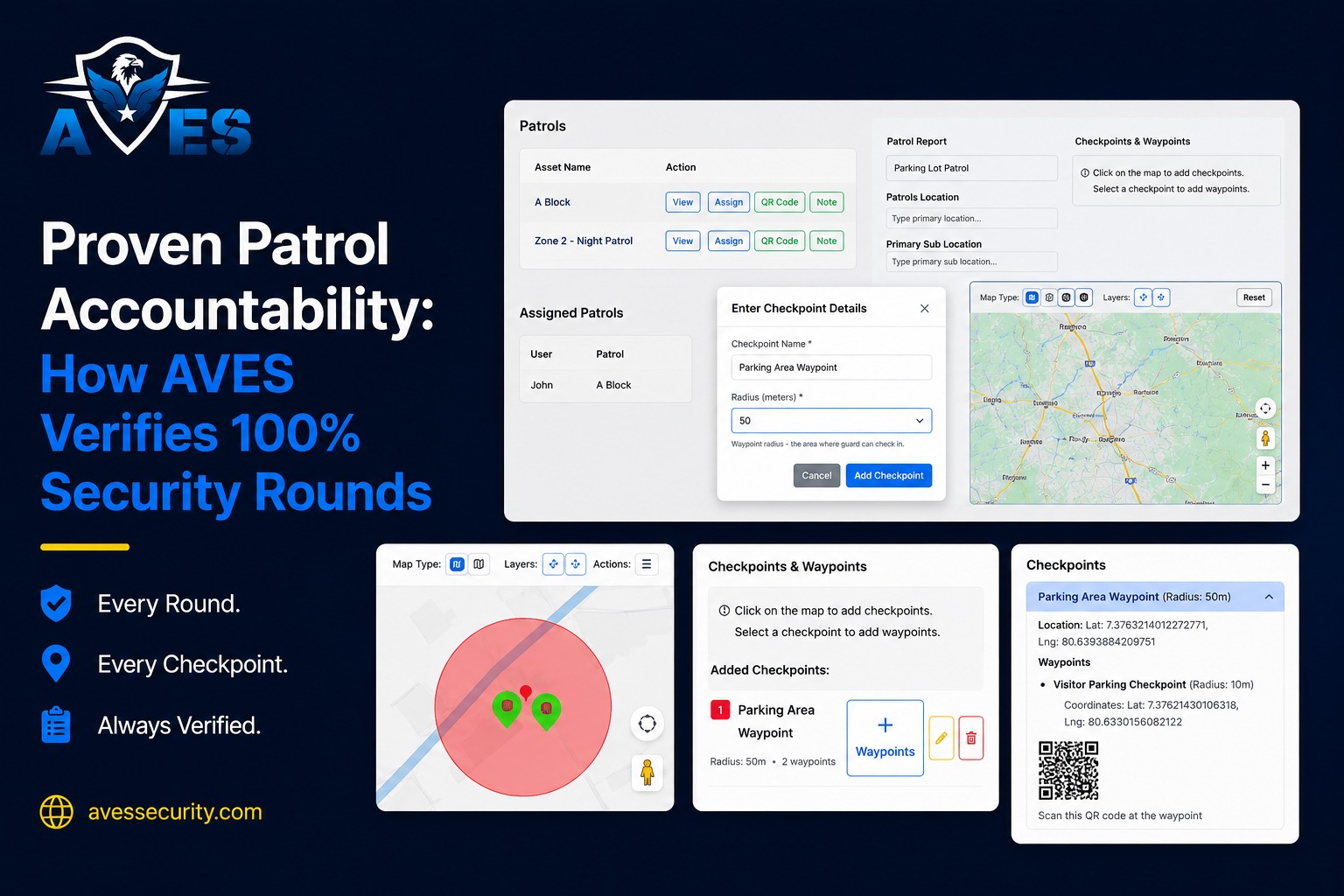
    Patrol verification proves the route was walked and that the guard was actually there. The guard scans a waypoint’s QR code in the app. Before the scan counts, AVES checks the phone’s GPS against that waypoint’s stored coordinates and its configured radius, 50 meters by default. A scan from outside that radius gets rejected with the actual distance shown, for example “You are 180m away. Must be within 50m,” and duplicate scans of the same waypoint are rejected too.

    Every attempt, successful or not, gets written to a scan log with GPS and timestamp. A completed patrol isn’t a claim. It’s a GPS-validated, time-stamped record of the round, failed attempts included.

    Step 2

    Random selfie checks confirm it’s the assigned guard, not just the assigned phone. Waypoints can be flagged to always require a selfie and AVES also triggers one at random so the guard can’t predict which checkpoint will ask. That verifies the person on shift, not just a device in someone’s pocket.

    Step 3

    The Pocket Book, AVES’s electronic guard logbook, replaces the paper notebook. Instead of a pocketbook that lives in a drawer, guards log activity in the app as a free-text message with a date and time. Each entry also records who submitted it and when it was submitted, separately from the date and time the guard assigns to the event itself, so a note written at the end of shift about something that happened at 2:15 a.m. shows both timestamps clearly.

    The message field is deliberately open, with no categories or tags. Forcing routine shift notes into dropdowns is how you end up with a logbook where every entry just says “general.”

    Step 4

    Daily occurrence reporting captures the structured account. An occurrence record carries the recording date and time, the time the event actually occurred, location, who reported it, nature of incident, a description, action taken, whether follow-up is required and a supervisor name plus supervisor remark. This is the formal write-up, the document you hand to a client or pull up six months later with a supervisor’s sign-off already attached.

    Occurrences are filterable by date range, location, nature and reporting user and they roll into the Daily Occurrence report for export.

    Step 5

    Supervisors see patrol status without asking anyone. The admin dashboard breaks patrols into Pending, In Progress and Completed, alongside open incidents and charts daily incident and patrol counts across the last seven days. An “action required” count combines open incidents with pending and in-progress patrols in a single number.

    It updates live. Each waypoint scan pushes to the dashboard with a current completed-of-total count and the final scan pushes a completion event with total distance covered. Supervisors watch the shift happen in real time instead of reading about them afterward.

    Settings Explained

    Here’s what each setting controls and the real gap it exists to close.

    Patrol route setup. Admins build patrol templates as checkpoints and each checkpoint contains waypoints. Every waypoint carries its own coordinates, a GPS radius, a QR code and an optional “always require selfie” flag. Templates are then assigned to guards.

    Waypoint radius. This is the scan tolerance per waypoint, 50 meters by default. Tighten it for indoor checkpoints where GPS is naturally less precise and loosen it for large outdoor sites or unreliable-signal areas. Too tight and it rejects scans from guards genuinely standing at the checkpoint.

    Selfie-required waypoints. Flag the high-sensitivity checkpoints where you always want photo verification. Random selfie prompts still run regardless of this setting, so this only adds guaranteed checks on top of the random ones.

    Occurrence filters and export. Occurrences filter by date range, location, nature of incident and reporting user and export through the Daily Occurrence report. Nature of incident is free text, not a fixed category list, so agree on site wording up front. “Unusual activity” and “suspicious activity” won’t group together in a filter if half your guards type one and half type the other.

    Module permissions. Pocket Book, patrol and occurrence access are controlled per role.

    Best Practices and Benchmarks

    Set your own patrol completion baseline from your first month, then hold to it, using AVES’s Completed, Pending and In Progress counts plus the 7-day trend rather than an industry figure that may not fit your sites. If completion drops below your baseline, check route length against the shift window first. An incomplete patrol is usually a route that can’t be walked in the time available, not a guard cutting corners.

    Review rejected scans, not just completed patrols. The scan log records out-of-radius attempts with the measured distance. A waypoint that generates the same 60-meter rejection night after night usually has bad stored coordinates or a radius set too tight and the fix is a config change, not a conversation with the guard.

    Agree on occurrence wording per site. Because nature of incident is free text, a short, shared vocabulary posted where guards can see it is what makes the filter actually useful later. Without it, the field is searchable in theory and useless in practice.

    Let the Pocket Book stay unstructured, but escalate what shouldn’t be there. Routine notes belong in free text, but a recurring or worsening observation, like a repeated “flickering light” note, should graduate to a full occurrence report with action taken and a supervisor remark. Getting that escalation path right is what separates basic guard management software from a system built around how shifts actually run on site.

    Common Mistakes

    These look harmless at setup and turn into real problems a few months in.

    Treating the Pocket Book as a diary nobody reads. Digitizing a paper habit without anyone actually reviewing entries just moves the same problem online.

    Reusing one waypoint radius across every site. A radius set for a small indoor office and reused on a sprawling outdoor yard rejects scans from guards standing exactly where they should be, which trains everyone to distrust the system.

    Leaving occurrence wording inconsistent across guards. Free text is flexible by design, but with no shared vocabulary, filtering reports later becomes guesswork instead of a real search.

    Not connecting patrol, Pocket Book and occurrence data for supervisors. Reviewing these as three separate reports instead of one shift view makes it easy to miss the full picture of a guard shift.

    FAQ

    Do guards need three separate apps for patrol, the Pocket Book and occurrence recording?

    No. All of these live in the same AVES field app, accessible from the shift home screen, so the record never gets split across disconnected tools.

    Can Pocket Book entries be edited after submission?

    Original entries stay locked once submitted, which preserves an accurate audit trail for supervisors and clients. Guards can add follow-up notes rather than editing the original.

    What happens if a guard is somewhere without signal?

    Core field actions, including patrol scans, Pocket Book entries and occurrence notes, save locally and sync automatically once the device reconnects. AVES’s offline support covers these core actions, not the full platform.

    How is an occurrence different from an incident?

    An occurrence is the structured write-up, with nature of incident, description, action taken and supervisor remark. It sits above a quick Pocket Book note and can escalate into a full incident report when severity calls for it.

    Do all security guard services need this level of documentation?

    Any security guard services under a client contract benefit, but sites with strict compliance needs, like hospitals or industrial facilities, see the biggest drop in disputes once shifts are logged this way.

    Related Features

    These modules don’t work in isolation. Here’s where to look next.

    The Next Step

    You’ve now seen exactly how AVES turns a guard shift into a record that actually holds up when someone asks a question about it, using patrol verification, a random selfie check, the Pocket Book and daily occurrence reporting inside one security guard management system instead of scattered tools.

    Want to see patrol, Pocket Book and occurrence tracking working together on a real shift? Book a live walkthrough of AVES

    CONTACT US

    Website : https://avessecurity.com

    Linkedin: https://www.linkedin.com/company/aves-security-management-system/

    Instagram: https://www.instagram.com/avessecurity/

  • Proven Patrol Accountability: How AVES Verifies 100% Security Rounds

    Proven Patrol Accountability: How AVES Verifies 100% Security Rounds

    Most patrol reports are fiction. Not lies, exactly — more like educated guesses with a timestamp stapled on. A paper checklist can get filled out from the break room just as easily as from the actual checkpoint and a guard’s word at 3am is only as reliable as whatever they remember by the time someone asks.

    You hired guards to walk the property every hour. You paid for it. You trusted the reports.

    Then something happened during the one patrol that never actually took place. A door left unlocked. A fire exit blocked. A break-in that lasted just long enough because nobody was checking that corner of the lot that night.

    If you run security operations, you know this fear. It’s not the loud, dramatic kind. It’s the quiet one that shows up around midnight: did that patrol actually happen, or did someone just say it did?

    You’re not being paranoid. You’re being realistic. Let’s talk about why this keeps happening and what actually fixes it.

    Why One Missed Patrol Can Cost Millions

    A skipped round almost never feels like a big deal in the moment. A guard’s tired. The shift is short-staffed. A checkpoint gets skipped because “nothing ever happens over there.”

    Then one day something does happen over there.

    Insurance claims tied to security negligence regularly climb into six and seven figures once you add legal fees, settlements, reputational damage. A warehouse fire spreads because a patrol missed a smoldering electrical panel. A parking structure assault happens during the exact forty minutes a guard decided to skip.

    Notice the pattern. Nobody planned for the failure. It happened because a paper log or a verbal “all clear” said everything was fine when it wasn’t.

    This is why companies start hunting for security guard management software in the first place. Not because they’re chasing new tech for the sake of it — because they got burned once, or they’re terrified of getting burned and they never want to explain a preventable loss to a client or a board again.

    The Trust Gap Nobody Talks About

    Most security companies don’t actually have a guard problem. They have a visibility problem.

    You can’t manage what you can’t verify. For decades, patrol verification meant a paper checklist that could be filled out anywhere, or a guard’s word, taken on faith. Neither one holds up when a client calls after an incident and asks you to prove what happened.

    It’s a bit like a fitness tracker that only works if you trust the person wearing it to be honest about their steps. A guard log is the same idea. If it can be filled in after the fact, or from somewhere other than the actual checkpoint, it’s not really a record. It’s a guess wearing a uniform.

    A real guard management platform earns its keep here — not by replacing your guards, but by giving you undeniable proof of where they were during every patrol when and what they checked.

    If your current system can’t answer those three questions in seconds, you already know the gap exists. You’ve probably felt it during a tense phone call with a client, trying to piece together what actually happened three nights ago while they wait on the line.

    What Buyers Get Wrong When Evaluating Options

    Most first-time buyers make the same mistake. They shop for features instead of patrol proof.

    They compare dashboards, mobile apps, price sheets. Then they sign with a system that looks great in a demo but has no real way to stop a guard from faking a patrol scan.

    A few traps show up again and again.

    Assuming GPS alone is enough

    GPS tells you a phone was near a location. It doesn’t confirm anyone actually touched or scanned a patrol checkpoint — a phone sitting in a truck cupholder can “prove” a location without a guard ever stepping outside.

    Ignoring offline scenarios

    Basements, parking structures, rural site signal drops constantly in these places. If the system can’t log a patrol scan offline and sync it later, you end up with gaps exactly where incidents are most likely.

    Skipping the audit trail question

    Ask any vendor point blank: can a guard or a manager edit a completed patrol round after the fact? If yes, what you’re buying isn’t verification. It’s just a nicer-looking paper log.

    Underestimating implementation time

    Some platforms take weeks of retraining before anyone trusts them. Others get a guard fully operational within a single shift.

    Buyers who dodge these traps end up with something that actually protects them. Buyers who don’t end up back where they started, just paying more for it.

    How AVES Verifies 100% Rounds

    AVES was built around one uncomfortable idea: if a patrol round can’t be proven, it didn’t happen. Not in any way that protects you legally or operationally, anyway.

    Here’s what that looks like day to day.

    Guards physically tap or scan a checkpoint using NFC or QR codes during every patrol there’s no way to log one from across the lot or from the break room, unlike a paper sheet or a lazy GPS ping.

    Supervisors watch patrol routes happen in real time instead of reading about them hours later in a summary report. If a guard falls behind or skips a section, the system flags it right away, not after something’s already gone wrong.

    The design is offline-first, so scans still get recorded in low-signal areas and sync automatically once connectivity comes back. No blind spots, even in basements or remote lots where cell service just disappears.

    Timestamps are tamper-proof. Once a patrol round is logged, nobody quietly edits it later. The record you hand a client or an insurance adjuster is the same record created in the moment the patrol actually happened.

    And when a patrol checkpoint gets missed, alerts go out within minutes not buried at the end of a weekly review nobody reads closely.

    That’s what a modern guard management platform should actually deliver. Not a scheduling calendar wearing a security label, but a real, defensible chain of proof for every round, every shift, every site.

    What This Actually Costs You (And What It Saves)

    Being honest here matters more than being persuasive.

    A serious guard management solution isn’t free and it shouldn’t be. You’re paying for infrastructure, checkpoint hardware, training, ongoing support. Expect a monthly per-guard or per-site cost — not a one-time fee you pay and forget about.

    Now weigh that against the real number. One lawsuit tied to a missed round can wipe out years of software savings in a single settlement. Losing a client contract because you couldn’t produce proof of coverage costs more than any subscription ever will.

    The math almost always favors the platform once you stop treating it as an expense and start treating it as insurance you can actually control.

    Making the Decision With Confidence

    You don’t need to overhaul the whole operation overnight. Most companies start with their highest-risk sites — the ones where an incident would hurt most — then expand once the team gets comfortable with the new routine.

    What you need is a system that turns “we think the round happened” into “here’s the timestamped proof it happened.”

    That’s really the whole difference between managing security and actually verifying it.

    If you’ve been quietly dreading the day a client asks you to prove a patrol took place, that dread is exactly why you should make this change now, before an incident forces the decision for you.

    AVES exists for that moment. Not to sell you software — to give you the patrol proof you already wish you had.

    Contact Us: www.avessecurity.com

    https://www.asisonline.org

    What is a guard patrol verification system?

    A guard patrol verification system is a way to make sure security patrols actually happened. Guards use their devices to scan things at checkpoints so we know they were really there. This creates a record that says when and where they were and supervisors can check it away.

    How does AVES make sure every patrol round is done?

    AVES needs guards to scan things at every checkpoint. When they do it makes a record with the time and place so supervisors can see what is going on. This helps us know that patrols are really happening.

    What is the difference between using GPS and scanning checkpoints?

    GPS just shows where a device is. It does not mean the guard really checked the place. Scanning a checkpoint means the guard had to go so we know they really did their job.

    Is AVES good for security teams with many sites?

    Yes. AVES can handle sites and many guards. Supervisors can use one place to monitor everything and get reports no matter how sites they have.

    Why should security companies use patrol verification software, like AVES?

    Using patrol verification software like AVES helps security companies do their job better. It makes sure guards are doing their patrols and it helps prevent things from happening. It also makes it easier to show that we are doing our job, which helps us keep our clients happy and safe.

  • Security Guard Mobile App: Take Control of Security Operations

    Security Guard Mobile App: Take Control of Security Operations

    A security guard mobile app lets officers log patrols, incidents, checklists and visitors from a phone while they are on the floor, and gives supervisors a live view of every site without phoning around.

    The AVES Security Guard Management App is a powerful security workforce management solution designed to simplify guard scheduling, attendance tracking, patrol monitoring and incident reporting. In 2026, businesses adopting AVES to improve efficiency and strengthen security operations.

    You know the drill. Every security operator hits this wall the moment they stop being a five-person crew and start being a fifty-person company. The systems that held together at small scale just weren’t built to hold anything at real scale, which is usually when people start actually searching for a security guard management system

    A guard skips a shift and nobody notices until the client calls. Reports are scattered across notebooks, WhatsApp chats and outdated Excel sheets. This makes it difficult to track attendance, patrols and incidents accurately.

    Where the old way actually breaks

    Paper and spreadsheets work fine right up until they don’t and the failure points are always the same ones.

    A guard calls in sick, the roster doesn’t get updated in time and a site sits empty for hours. This is where decent security scheduling software earns its keep, catching the gap before a client does. Reports show up late and by the time they land on your desk, the details are fuzzy and any photo evidence is gone, which is the whole argument for incident reporting software that captures things on the spot. Clients ask for proof that patrols happened and all you’ve got is your word, no dashboard, no data.

    What AVES Security actually changes

    Think of AVES Security management as pulling five separate tools into one pocket-sized platform. It’s essentially a AVES security guard management mobile app built around daily use, not quarterly reporting. Scheduling, patrol tracking, incident reporting and compliance all live in one place instead of scattered across apps nobody checks consistently, the whole point of proper security workforce management.

    Shifts get assigned and confirmed digitally, so double-bookings and no-shows stop being a mystery. Real-time patrol tracking means supervisors see guard locations and checkpoint scans as they happen, not reconstructed the next morning from memory. This is digital patrol management doing its actual job. Guards log incidents the second something happens, photos and timestamps attached automatically. Checklists get time-stamped for security compliance software purposes, which matters more than people expect the first time an insurer comes asking. A proper visitor management system replaces the sign-in sheet nobody ever reopens. And panic mode for lone workers is built specifically for lone worker safety, shrinking the gap between something going wrong and help showing up.

    Digital logbooks are the quiet win here too. A security logbook software setup turns “let me dig through last month’s binder” into a ten-second search. That’s what paperless security operations actually looks like day to day, not a slogan, just less time wasted. So, AVES security guard management is much smarter.

    Why Businesses Choose AVES Security Guard Management
    helps organizations streamline security operations with a single mobile platform. Security agencies, corporate offices, residential communities, hospitals, schools, warehouses and industrial facilities can manage guards more efficiently. The software improves communication, increases accountability, reduces paperwork, and ensures every patrol, attendance record and incident report is stored securely. With real-time monitoring and automated reporting, businesses can improve productivity, maintain compliance and deliver better security services.

    What to actually ask before signing

    Pricing scales with headcount, so get a quote tied to your actual team size. Ask how offline logging works if your sites have shaky connectivity. Budget real weeks for the habit to stick. don’t buy the full feature suite if half of it doesn’t apply to your operation yet.

    Contact Us: www.avessecurity.com

    https://www.securityindustry.org/

    How long does it take to set up AVES?

    Attendance and patrol tracking, the core stuff, is usually running within a few days. Rolling out every feature across a full team takes longer, and how much longer depends on how big that team is.

    What happens if a guard misses a checkpoint?

    It triggers a real-time alert. Managers find out the moment it happens, not hours later when they’re reviewing logs and wondering why there’s a gap.

    Is incident reporting difficult to use?

    No. A guard can log an incident with photos and a timestamp straight from their phone, right where it happened. No forms to fill out back at the office.

    Is AVES built specifically for security operations?

    Yes. It’s not a generic workforce tool stretched to fit security work. It’s built around patrols, checkpoints and incident response from the ground up. Think of the difference between a Swiss Army knife and a chef’s knife. Both cut, but only one was designed for the job you’re actually doing.

    Does AVES work without internet access?

    Many core functions can log activity offline and sync once connectivity returns, though this depends on your specific setup.