
You put real effort into your security post orders. You covered the doors, the contacts, the access rules.
Then something goes wrong at 2am and the guard on duty had no idea what to do.
If that sounds familiar, you are not doing anything wrong as a manager. You are running into a problem almost every security company hits. The document exists. It just isn’t working.
This guide walks through why that happens, what a security post order actually needs to contain and how to fix the gap between “we have post orders” and “guards actually follow them.” No fluff, no generic templates copied from a dozen other sites. Just what actually works on real posts.
What a Security Post Order Actually Is
A security post order is not a job description. It is not a duty roster either.
It is the site-specific instructions for one physical post, at one site, written for the guard standing there right now. Some companies call these security guard post orders instead, but the idea is the same.
A duty roster tells someone when to show up. A general “security guard duties” page tells them what the role covers everywhere. A security post order tells them what to do at this exact gate, this exact lobby, this exact loading dock.
That distinction matters more than it sounds like it should. A guard who only knows the generic version of the job fills in every site-specific gap on their own. That is exactly where liability shows up, where clients get frustrated and where incidents happen that could have been avoided with one clear sentence written down in advance.
Why Most Post Orders Fail Once They’re Written
Here is the part most guides skip. Writing the security post order is the easy part. Keeping it useful is where almost every site falls apart.
They go stale fast. A security post order gets written once at site handover. Six months later the client changed the after-hours contact, a door schedule shifted and nobody updated the document. The guard is now working from instructions that describe a site that no longer exists.
They try to cover everything. A fifteen-page post order feels thorough on paper. In practice, nobody reads fifteen pages in the middle of a shift. Length feels like diligence. It actually kills usability.
Nobody owns the update. Ask most operations managers who is responsible for keeping security post orders current and you will get a pause before an answer. Without a named owner, updates happen never.
There’s no proof anyone read it. A binder in a guard shack does not confirm the current guard has actually seen the current version. That gap is where most “the guard didn’t know” incidents actually start.
None of this means security post orders are the wrong tool. It means most companies are running a good idea badly.
The Real Cost of Getting This Wrong
This is the part that’s easy to underestimate until it costs you a client.
An outdated post order does not just create confusion. It creates security liability. If a guard follows instructions that no longer match the site and something goes wrong, the paper trail shows your company gave them wrong information. This is also where guard accountability breaks down, because a guard can’t be held to instructions that were never accurate in the first place.
Turnover makes this worse. New guards rotate through posts constantly in this industry. Every rotation is a moment where an unclear or outdated security post order turns into a real mistake, not a hypothetical one.
And clients notice. A client who catches a guard not knowing basic site procedure starts wondering what else your company is getting wrong. That is how contracts get lost, not through one dramatic failure but through a slow loss of confidence.
The Five Things Every Post Order Needs
Strip away the extras and a security post order that actually works comes down to five parts.
Post boundaries. What area this post covers and exactly where responsibility hands off to the next post. No gray zones.
Standing instructions. The default state of the post. Which doors lock on schedule, what routine checks happen without being told.
Access rules. Who walks through without escort, who signs in, who gets turned away. Spelled out by role, not left to judgment in the moment.
Emergency contacts. Real names and real numbers for this site. Not a head office line that rings through to voicemail at 3am.
Exceptions and escalation. What falls outside normal instructions and exactly who to call when something doesn’t match what’s written.
If a security post order covers those five things clearly, it works. If it tries to cover every hypothetical situation on top of that, it stops getting read.
How to Write Post Orders Guards Will Actually Follow
Start from real incidents, not imagined ones. The best security post orders come from actual questions guards have asked at that post, not a template built from a desk somewhere else.
One instruction, one sentence. If an instruction needs a paragraph to explain, it belongs in training material, not the post order itself.
Name a person, not a department. “Contact facilities” solves nothing at 2am. A name and a direct number gets a problem handled instead of routed into a voicemail loop.
Update the moment something changes. Do not wait for an annual review. The day a client changes a rule is the day the security post order should change too.
Confirm the guard actually read it. This is the step almost everyone skips. A printed page on a wall does not prove anything. Some form of sign-off, even a simple log, closes that gap.
Paper vs Digital: An Honest Look
You might be wondering if this even needs software, or if a well-organized shared folder solves the problem.
Here’s the honest answer. A shared folder fixes the “which version is current” problem. It does not fix the “did the guard actually read it” problem on its own.
That second gap is where most companies get burned and it’s worth being upfront about the limitation. No system, digital or paper, replaces a supervisor who actually walks the post and checks. Software reduces the risk. It does not eliminate the need for management attention.
What digital tools genuinely solve well is version control and searchability. One current file per post, tagged by department, findable by name instead of buried in a binder nobody has opened since onboarding.
That’s the gap most guard instructions software claims to close and most of it doesn’t.
Where AVES Fits Into This
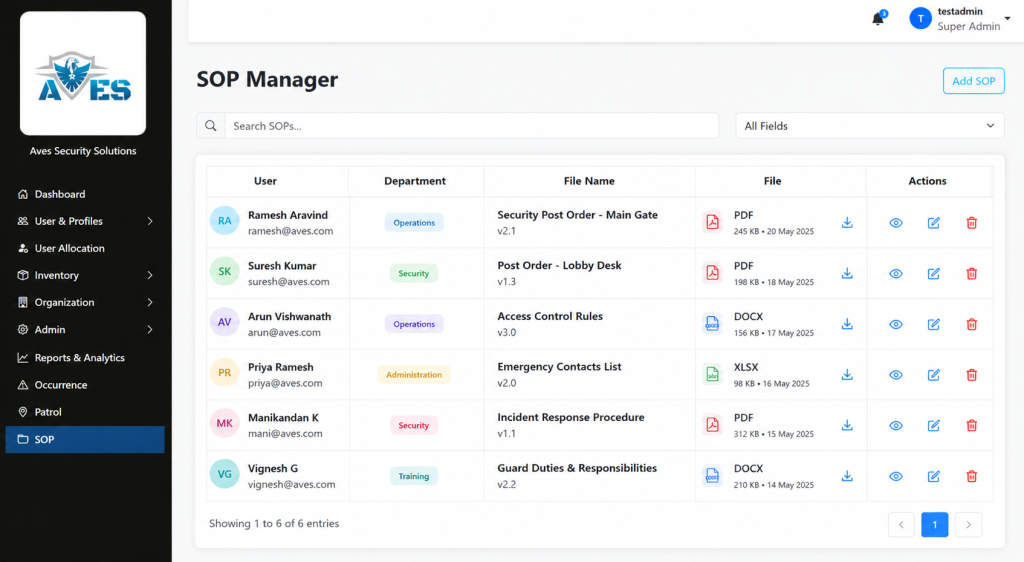
AVES has a real, confirmed feature for exactly the version control problem above. It’s called SOP Management and it works as a document repository built for this kind of site procedure. Think of it less as guard instructions software with built-in workflows and more as the single source of truth those instructions need to live in.
You upload a file, tag it to a user and a department and give it a clear file name. It shows up in a searchable list where anyone can find it by department, username, or file name. Deleting an outdated version takes two confirmation steps, not one accidental click, so an old copy doesn’t disappear by mistake while the current one is still needed.
To be fully transparent, SOP Management is a document upload and search tool. It is not an interactive checklist builder where guards check off individual steps inside the app. If that’s what you’re picturing, it’s worth knowing that upfront rather than finding out later.
AVES also has a confirmed Shift Briefing capability, built around guards acknowledging instructions before going on duty, which is the natural next step after centralizing security post orders. The detailed screen-by-screen workflow for that feature isn’t something we can walk you through yet and we’d rather tell you that plainly than describe steps that don’t exist.
Where to Go From Here
If your current security post orders are living in a binder or scattered across old email attachments, the fix isn’t complicated. It’s organizational first and tools second.
Start by naming one owner per site. Then get every current post order into one searchable place instead of several. That single change solves most of the version confusion described above.
If you want to see how AVES’s SOP Management handles that part, a short walkthrough will show you exactly what it does and, just as importantly, what it doesn’t do yet, so you can decide if it fits how your team actually works.
A binder guards stop reading is not backup protection. It is a liability sitting quietly on a shelf, waiting for the one shift where it mattered and nobody opened it.
See how AVES keeps every post order current. Book a quick walkthrough.
CONTACT US
Website : https://www.avessecurity.com
Linkedin: https://www.linkedin.com/company/aves-security-management-system/
Instagram: https://www.instagram.com/avessecurity/
What are security post orders, exactly?
Think of security post orders as the cheat sheet for one specific post, not the whole job. They spell out what a guard does at that particular gate or lobby, down to which doors get checked and who to call if something’s off. A generic job description won’t tell you any of that. Post orders will, or at least they should.
Aren’t security post orders basically the same as SOPs?
Not quite. Standard operating procedures cover the big stuff that applies everywhere, like what to do if someone collapses on site. Security post orders are narrower and messier in a good way. They’re written for one post, one set of doors, one set of quirks that only that location has. You need both. One without the other leaves a gap.
Do I really need to go digital, or can paper work fine?
Paper can work. It’s just harder to keep straight once you’ve got three shifts and a stack of photocopies floating around. The real problem isn’t paper versus digital. It’s that nobody can tell which copy is the right one. Fix that part and the format matters a lot less.
Can I just use a post order template for every site?
A template’s fine for the skeleton, five sections, same structure every time. But the actual content has to be specific to that post. Copy-paste a template with the site name swapped and you’ve basically written nothing useful. Guards can tell the difference immediately.
Is there software that actually helps manage this across sites?
Some. though I wouldn’t call it guard instructions software exactly. AVES has an SOP Management feature that at least solves the “which file is current” mess, one document per post, searchable by department or file name instead of buried in someone’s inbox. It won’t replace a supervisor actually walking the post and checking. Nothing does that. But it kills the version-control headache that causes most of these problems in the first place.