Author: Kaviarasan

  • Stop Missing Parcels: Parcel Tracking Software For Security

    Stop Missing Parcels: Parcel Tracking Software For Security

    Something happened last week and you still do not have a straight answer.

    A parcel came in. A guard signed for it. Now the vendor says it was never delivered. Nobody can prove otherwise.

    If that sounds familiar, you already understand why parcel tracking software for security exists. It is why so many sites are finally moving away from the clipboard. You are not looking for a nice-to-have feature. You are looking for proof, because proof is what stops a dispute from becoming your problem.

    Why This Keeps Happening

    Most sites still handle deliveries the same way they did fifteen years ago. A clipboard by the front desk. A signature that nobody can read. A note scribbled in a margin.

    That system worked when nobody questioned it. It stops working the moment a client, a vendor, or a resident asks where their package went and expects a real answer.

    This is exactly the gap that parcel tracking software for security was built to close. Not to replace your guards, but to give them a system that remembers what a busy shift cannot.

    Without parcel tracking software for security, every delivery dispute becomes a memory contest instead of a records check. Memory rarely holds up well under pressure.

    What You Are Actually Trying to Solve

    You are not trying to buy software for the sake of having software. You are trying to solve a specific fear.

    The fear that one day a client will ask “what happened to this delivery” and your only answer will be a shrug.

    Delivery logging software for security exists to remove that fear. It turns a guard’s memory into a timestamped record that holds up when someone pushes back.

    Here is what most teams do not realize until it is too late. The problem is rarely the missing package itself. The problem is not having any way to prove what happened to it. A five dollar item and a five thousand dollar item cause the exact same headache if there is no record either way, which is exactly why parcel tracking software for security treats every package the same, no matter how small.

    The Honest Trade-Off Nobody Talks About

    Adding any new system means asking your guards to do one more thing during a shift that is already full. That is a real cost. Pretending otherwise would not be honest.

    But compare that cost to the alternative. Right now, every dispute your team faces gets resolved by whoever argues more convincingly, not by what actually happened. Courier tracking for site security exists specifically to take that guesswork out of the equation.

    The teams who get the most value from parcel tracking software for security are not the ones with the fanciest setup. They are the ones who commit to logging every parcel, not just the ones that look important.

    Skipping small items feels harmless in the moment. It is exactly how the gap that parcel tracking software for security is meant to close quietly reopens.

    Three Moments Every Parcel Passes Through

    Whatever system you choose, three moments matter more than anything else.

    Receipt:

    The exact moment a package arrives and a guard accepts it on the site’s behalf.

    Storage:

    Where that package sits and who is responsible for it while it waits for pickup.

    Handover:

    Proof of exactly who received it and when.

    Miss any one of these three moments and you are back to relying on memory. Cover all three and you have parcel receipt and handover records that settle a dispute in minutes instead of days.

    This is the core promise behind parcel tracking software for security. It is not about adding paperwork. It is about making sure receipt, storage and handover are never left to a single person’s recollection.

    What Beginners Get Wrong

    The most common mistake is treating this as an all-or-nothing decision. Teams assume they need parcel tracking software for security to run perfectly from day one or the whole thing is pointless.

    That is not true. It is not how good security operations actually work. Start by logging the deliveries you are already worried about, then expand from there once your guards are comfortable with the habit.

    The second mistake is assuming a verbal handoff is good enough for small items. It is not. The value of chain of custody security guard software comes from consistency, not from judgment calls about what counts as important enough to log.

    A third mistake, often overlooked, is choosing a general delivery app instead of parcel tracking software for security built specifically around how a guard’s shift actually works. General tools are not designed around handover confirmation or site-level custody. That gap shows up exactly when you need it least.

    Why This Protects You, Not Just the Client

    It is easy to think of parcel logging as something you do for the client’s peace of mind. That is only half the picture.

    This is the part of parcel tracking software for security that clients rarely think about. A documented handover also protects your own team. If a package genuinely was handed off correctly, a clean record proves it. Without one, your guards are defending themselves with nothing but their word against a client’s frustration.

    This is the quiet reason experienced security operators take delivery logging software for security seriously long before a client ever demands it. It protects the company as much as it protects the customer.

    Think about the last time a dispute dragged on for days because nobody could point to a record. Parcel tracking software for security exists to make that specific scenario disappear.

    What Good Actually Looks Like

    You do not need a complicated rollout of parcel tracking software for security to get this right. You need consistency.

    Every parcel gets logged the same way, every time, regardless of size or apparent importance. Every handover gets confirmed, not assumed. Every record stays searchable, so a question from three weeks ago can be answered in under a minute instead of an afternoon of guessing.

    That is what parcel tracking software for security is actually supposed to deliver. Not complexity. Clarity, at the exact moment someone asks a hard question.

    Good parcel tracking software for security should feel invisible on a normal day and indispensable on the one day something goes wrong. If it only helps during a crisis, it was not built for daily use. Your guards will quietly stop using it.

    How This Fits Into the Bigger Picture

    Parcel tracking software for security rarely does its job in isolation. It sits alongside gate movement, supplier deliveries and visitor access, all of which touch the same basic question. Who came in, what did they bring and what happened to it.

    If your site already tracks vehicle and material movement at the gate, adding parcel receipt and handover records is a natural next step, not a separate project. The two work together to close the same liability gap from different angles.

    Parcel tracking software for security is strongest when it connects to the rest of your site’s records rather than sitting off on its own as a disconnected log nobody remembers to check.

    Making the Decision Without the Guesswork

    You do not need to overhaul your entire operation this week to benefit from parcel tracking software for security. You need one honest look at your current process and one honest question.

    If a client asked you right now where a specific delivery from two weeks ago ended up, could you answer in five minutes?

    If the answer is no, that is not a failure. It is simply the gap that courier tracking for site security is designed to close. It is a gap every growing security team eventually has to deal with.

    Ask the same question a different way. If a dispute landed on your desk tomorrow, would parcel tracking software for security already have the answer waiting, or would you be starting from zero?

    The Next Step

    You already know the cost of getting this wrong. A disputed delivery, an unhappy client and a guard left defending a decision they cannot fully explain.

    Closing that gap does not require a complicated system. It requires parcel tracking software for security built specifically for how security teams actually operate, not a generic delivery app repurposed for the job.

    If that sounds like the missing piece in your current setup, it is worth seeing how parcel tracking software for security works before your next disputed delivery forces the question.

    A missing parcel is a five-minute problem only if you logged it. Without proof, it’s a week of finger-pointing nobody wins.

    See how parcel tracking software for security closes the gap – before your next disputed delivery does it for you. Book a walkthrough

    CONTACT US

    Website : https://www.avessecurity.com

    Linkedin: https://www.linkedin.com/company/aves-security-management-system/

    Instagram: https://www.instagram.com/avessecurity/

    What is parcel tracking software for security, really?

    It’s basically a way to stop relying on memory. Someone signs for a package, someone puts it somewhere, someone hands it off eventually and this just writes all of that down as it happens instead of hoping everyone remembers later.

    Isn’t a sign-in sheet basically the same thing?

    Not really, no. A sheet tells you a box showed up. It doesn’t tell you where it went after that or who actually handed it over. That gap is where most disputes live.

    Does this replace the paper log completely, or run alongside it?

    Replace it. There’s no reason to keep two systems going. The paper one just ends up in a drawer nobody checks anyway.

    Who’s this really protecting, us or the client?

    Both, honestly. The client gets peace of mind that their delivery was handled right. Your team gets something to point to when someone comes in hot with a complaint that isn’t actually your fault.

  • Unplanned Events, Real Risk: Event Security Coordination

    Unplanned Events, Real Risk: Event Security Coordination

    You get the call on a Tuesday. A VIP is coming next week. Or someone books a private function for Saturday night, out of nowhere. Or a client tacks a gathering onto the calendar nobody planned for.

    There’s a specific stomach drop that comes with that call. Your regular schedule wasn’t built for this. You know it immediately.

    If you’ve felt that particular mix of pressure and “wait, how do we actually handle this,” you already get why event security coordination matters more than most people admit, at least until something goes wrong once.

    The Fear Nobody Says Out Loud

    Here’s the part nobody puts in the client proposal. It’s not really the event you’re afraid of. It’s what happens if you get it wrong while a client is watching closely.

    A scuffle at the door. A VIP standing around with no clear escort because nobody claimed that job. A parking mess that turns the entrance into chaos before the event starts.

    None of that is really about the event itself. It’s about you and your company. That’s the actual weight event security coordination carries, even though on paper it sounds like nothing more than a scheduling task.

    Why Your Normal Setup Falls Apart Here

    Day to day, your operation runs on routine. Fixed patrols. Predictable shifts. Guards who know the site so well they don’t think about it anymore.

    An event blows all of that up. More people you don’t recognize. A schedule that looks nothing like a normal Tuesday. A client whose reputation is tangled up with yours for a few hours whether either of you likes it or not.

    Without event security coordination, teams end up improvising on the fly. Someone scrambles for extra guards at the last minute. Nobody’s totally sure who’s actually responsible for the VIP’s arrival. The parking plan, if you can call it that, lives buried in a group text somewhere.

    What You’re Probably Wondering, If This Is New To You

    If you’ve never had to coordinate security for an event before, here’s the honest question underneath everything else. Can you pull this off without something slipping through?

    Fair question. Most teams learn event security coordination the hard way, usually after one event where a detail nobody thought to plan for showed up unannounced.

    The good news is the details that matter aren’t some mystery. They show up the same way basically every time. Once you know what they are, this stops feeling like guesswork.

    Not Every Event Needs the Same Level of Fuss

    Something most guides skip. Treating a private birthday party the same as a VIP visit wastes effort exactly where you can’t afford to waste it.

    Event security coordination works better when events get sorted by risk first. A VIP event usually needs its own dedicated incharge and tighter coordination, which is really what VIP event security planning comes down to at its core. A private function might just need standard coverage and a confirmed headcount. Private function security planning rarely needs to go further than that. A regular event sits somewhere between the two.

    Sorting things this way is really the whole trick behind good event security coordination. You spend your best planning energy on what actually needs it, instead of applying the same heavy process to every booking.

    The Four Things That Actually Matter

    You don’t need a complicated system for this. You need four things nailed down for every event security coordination effort, no exceptions.

    Who’s in charge. A named security incharge. One person, accountable start to finish. Not a rotating cast of guards with no clear owner. Getting the security incharge assignment right saves you from a dozen small confusions later.

    Roughly how many people. Even a rough headcount changes staffing, parking allocation and entry point coverage.

    Where the cars go. Event parking isn’t the same as daily traffic. Sort it out ahead of time or deal with chaos at the gate.

    What guards need to know first. A briefing built for this specific event, not a generic one, so your team understands what’s different before it starts. Solid event safety briefing management separates a guard who’s ready from one who’s just showing up.

    Skip more than one of these and event security coordination quietly falls apart right when it matters most.

    What Beginners Get Wrong (And Honestly, It’s Not Their Fault)

    The most common mistake is treating event planning like an extension of the regular schedule instead of its own thing. A guard pulled off routine patrol and dropped into an unfamiliar VIP event with no real briefing is set up to miss things.

    That’s not a skill problem. It’s a planning gap. Event security coordination fails quietly when it gets bolted onto the existing roster as an afterthought instead of getting treated like its own step.

    Mistake two, sneaky one this, is letting event details scatter across messages, emails and random phone calls. By the time the event starts, nobody has the full picture.

    There’s a third one that trips up even experienced teams. Short notice events get treated as lower stakes because there’s less time to plan. Backwards, actually. Short notice makes event security coordination more important, not less.

    The Trade-Off Nobody Loves Talking About

    Planning ahead costs time your team doesn’t always have, especially when notice is short. That’s a real cost.

    But weigh it against the alternative. A poorly coordinated event creates problems that take way longer to clean up afterward, both logistically and with the client relationship itself. Event security coordination that happens even a day in advance beats zero planning every single time.

    The teams that get the most out of this aren’t running some elaborate process. They’re the ones who consistently nail the basics, incharge, headcount, parking, briefing, every time, no matter how small the event looks.

    Why This Protects the Relationship, Not Just the Event

    Clients remember how an event felt, not just whether nothing blew up. That distinction matters more than most security teams give it credit for.

    A team with a parking plan ready, briefed staff who know their role and one clear person running the show looks like a company that’s got this handled. A team scrambling through logistics on the day looks like the opposite, even when nothing goes wrong.

    Event security coordination is what turns “we handled it” into “they really had it handled.” Clients notice that difference even when they can’t quite explain why.

    How This Connects To Everything Else You’re Already Doing

    Events don’t happen in a vacuum away from the rest of your security operation. They tie into shift scheduling, patrol coverage and guest access all at once.

    Event security coordination works best as something your team checks alongside the regular schedule, not as a separate silo where an event can quietly overlap with duties nobody remembered to reroute. Keeping it connected is what actually makes event security coordination reliable week over week.

    Making The Call Without Guessing

    You don’t need to overhaul anything this week to get this right. Just one habit. Capture the basics for every event before it starts instead of piecing them together once guests are already walking through the door.

    Ask yourself something simple about your next booked event. If someone asked right now who’s responsible, roughly how many guests to expect and whether guards have actually been briefed, could you answer without hesitating?

    If the honest answer is no, that’s the exact gap event security coordination is meant to close. It’s a small habit, but it pays for itself the first time a client asks a hard question mid-event.

    The Next Step

    You already know what’s riding on this. A client’s trust. A guard’s ability to do their job well. Your company’s reputation next time someone books an event.

    Closing that gap doesn’t mean reinventing how you run your operation. It means building event security coordination around how events actually unfold, not stretching a generic scheduling tool to cover a job it was never built for. That’s all good event security coordination has ever needed to be.

    If your current process still runs on memory and last-minute texts, event security coordination is worth fixing before the next VIP visit forces the question for you.

    No coordination, no proof it was ever handled well.See how event security coordination keeps every detail covered. Book a walkthrough

    CONTACT US

    Website : https://www.avessecurity.com

    Linkedin: https://www.linkedin.com/company/aves-security-management-system/

    Instagram: https://www.instagram.com/avessecurity/

    What’s event security coordination even mean in plain terms?

    Someone owns the event. That’s it, really. Not five people half-responsible. One person, plus the basics sorted before anyone walks in.

    We just throw more guards at events. Isn’t that enough?

    Nope and I get why people think that. More bodies doesn’t help if nobody’s actually running point. I’ve seen four guards standing around an entrance with zero coordination between them.

    Do we really need this? We maybe do two events a year.

    Kind of the opposite logic applies here honestly. Rare events are the ones that catch people off guard, precisely because nobody’s done it enough times to have a rhythm.

    Do VIP events need more attention than a regular one?

    Definitely. VIP stuff usually needs its own dedicated incharge and tighter coordination. A smaller private function can often get by with standard coverage and a decent headcount.

    How does planning ahead actually help the client relationship?

    Clients remember how the event felt more than whether something technically went wrong. A team that clearly has it together, parking sorted, staff briefed, one person running things, just reads as more trustworthy.

  • Visitor Pass Tracking: Closing the Loop on Unreturned Badges

    Visitor Pass Tracking: Closing the Loop on Unreturned Badges

    You’ve probably had this moment. A visitor badge from three weeks ago turns up in someone’s car, still active, still able to open a door it shouldn’t. Nobody remembers issuing it, nobody remembers taking it back.

    That’s not a rare glitch. It’s what happens when temporary access lives on a sign-in sheet instead of a system built to close the loop. If a pass can be issued but never formally returned, it isn’t access control. It’s a gap with a clipboard attached to it.

    This guide walks through what actually breaks down with informal visitor tracking, what real visitor and security pass management should look like instead and how to evaluate a tool without paying for features you’ll never use.

    Why Most Sites Lose Track of Temporary Access

    Most security teams don’t get burned by a bad actor walking in the front door. They get burned by a legitimate pass that was never properly closed out.

    A sign-in book, a spreadsheet, or a stack of laminated badges works fine on a quiet day. It falls apart the moment two supervisors issue passes on the same shift without checking each other’s records. That’s exactly the coordination problem security and visitor pass management is built to solve.

    Real security and visitor pass management isn’t about greeting people at the door. It’s about the full lifecycle of a credential: who issued it, how long it’s valid and confirmation that it came back. Buyers who go shopping for a broad visitor-experience platform with kiosks and host notifications often overpay for features that have nothing to do with the actual liability risk, which is an unreturned credential still sitting active somewhere.

    The Real Risk Isn’t the Visitor, It’s the Unreturned Pass

    Here’s the part most guides skip. The dangerous moment isn’t when a visitor walks in. It’s the moment their access should have expired and didn’t.

    Common failure points we see on sites without structured security and visitor pass management:

    • Passes issued verbally with no record of the validity window
    • No single log showing which credentials are still active right now
    • A returned badge that never gets marked as returned in any system
    • Different supervisors issuing access with no shared visibility

    None of these are visitor problems. They’re record-keeping problems. A tool built for temporary access card management closes this gap by tying every credential to a start time, an end time and a confirmed return, so nothing stays active by accident.

    If you’re worried tightening this process will slow down legitimate visitors or contractors, it usually does the opposite. A guard who can issue and log a pass in under a minute moves faster than one flipping through a paper binder looking for the last entry.

    What Good Visitor and Security Pass Management Actually Covers

    Strip away the sales language and real visitor and security pass management does three things well.

    Any platform claiming to handle visitor and security pass management should be judged against these three steps, not against how polished its sign-in screen looks.

    First, it issues a credential with a defined validity period. Not an open-ended badge that works forever until someone remembers to deactivate it, but a pass scoped to exactly how long that person needs to be on site.

    Second, it tracks the credential while it’s active. A supervisor should be able to see, at a glance, every temporary pass currently valid on the property, not reconstruct that list from memory when a client asks. This is where guest pass tracking software earns its place over a paper log.

    Third, it confirms the return. The credential isn’t closed out because a shift ended. It’s closed out because someone recorded that the badge came back. That confirmation step is what separates visitor and security pass management from a sign-in sheet with extra steps.

    Systems built around unauthorized access prevention software principles treat that third step as non-negotiable, because an unreturned credential is functionally the same risk as a stolen key.

    Hidden Considerations Buyers Discover Too Late

    A few things people usually find out after they’ve already committed to a tool.

    Validity windows matter more than the badge itself. A pass without a hard expiry is a liability that renews itself every day nobody notices it. Ask any vendor directly how visitor pass validity tracking actually works, not just whether the feature exists on a slide.

    Integration with your gate and occurrence records matters. If visitor and security pass management lives in a separate system from your gate logs and occurrence reports, you end up piecing together three records instead of reading one clear picture during a client review.

    Not every “visitor management” tool is scoped the way you need. A lot of platforms in this space are built for corporate lobbies and photo capture, not for a security operation that needs credential issuance, validity and return tracked as one connected record. Ask to see the actual pass lifecycle on a live demo before assuming it fits.

    How to Evaluate a security and visitor Pass Management Tool

    You don’t need the flashiest kiosk on the market. You need a system that closes the loop every single time, which is the actual promise of visitor and security pass management, not just a nicer badge printer.

    A few practical filters worth running any visitor and security pass management platform through:

    • Does every pass get a defined validity window at the moment it’s issued?
    • Can a supervisor see all currently active passes in one place, in real time?
    • Is there a confirmed return step, not just an assumed one?
    • Does it connect to your existing gate and occurrence records, or sit alone?
    • Can the vendor show the actual issuance and return screens live, not in a slide deck?

    If a vendor answers all five clearly, you’re looking at real visitor and security pass management, not a repackaged lobby app wearing a security label.

    Quick Answers Before You Decide

    Do I need visitor and security pass management if my site rarely has visitors? Probably not on day one. But the moment more than one supervisor issues access, informal tracking becomes the risk, not the visitors themselves.

    Is visitor and security pass management the same as a general visitor management system? Not quite. A general visitor management system is often built around lobby check-in and host notifications. Visitor and security pass management is scoped to the credential itself: issuance, validity and confirmed return.

    What’s the single biggest risk this replaces? An active pass nobody remembers issuing. That’s the exact gap unauthorized access prevention software and structured visitor pass validity tracking are designed to close.

    Who Actually Needs This and When

    Not every property needs a full visitor and security pass management platform on day one and that’s worth saying plainly instead of pushing every site toward the same solution. A single-site operation with low visitor traffic can sometimes get by longer on manual tracking than a multi-tenant building or a construction site with rotating contractors.

    The trigger point is usually simple. The moment more than one supervisor can issue a pass, or more than one shift overlaps with active visitors, informal tracking stops working. That’s exactly when visitor and security pass management earns its cost, because the risk isn’t the volume of visitors, it’s the number of people who could issue access without checking a shared record first.

    Sites that delay this decision usually don’t regret the switch. They regret how long they waited, usually after a client audit or an incident forces the question. Building visitor and security pass management into your process before that happens is cheaper than explaining an unreturned credential afterward.

    Where This Leaves You

    None of this requires a complicated rollout. It requires treating every temporary credential as a record with a start, a defined window and a confirmed end, instead of trusting memory to close the loop.

    You already suspect the sign-in sheet isn’t enough. The real question is whether your next system for visitor and security pass management actually tracks the full lifecycle of a pass, or just makes issuing one look more official.

    If you want to see how real visitor and security pass management works end to end, live, on an actual device, that’s a fifteen-minute conversation, not a sales pitch.

    A badge that looks official isn’t the same as access that’s actually controlled.

    See how a real pass gets tracked from issue to return, live. Book a walkthrough.

    CONTACT US

    Website : https://www.avessecurity.com

    Linkedin: https://www.linkedin.com/company/aves-security-management-system/

    Instagram: https://www.instagram.com/avessecurity/

    What is visitor and security pass management?

    It’s the process of issuing, tracking and closing out temporary access credentials for visitors, contractors, or short-term staff. It covers three things: who got access, how long it was valid for and whether the credential was confirmed returned.

    Isn’t this the same thing as a visitor management system?

    Not really, no. Most visitor management systems are built around the check-in moment, taking a photo, printing a badge, pinging the host that someone’s arrived. Pass management cares less about the arrival and more about what happens after, whether that badge ever comes back.

    How does the validity window actually work in practice?

    Every pass gets a start point and an end point when it’s created. Once that window closes, it’s expired, full stop, regardless of whether the physical badge made its way back to a drawer yet.

    How’s this different from a Gate Pass?

    Gate Pass is about vehicles and materials crossing in and out. This is about people. They sound similar, they even sit near each other in the product, but they’re solving two different problems and one doesn’t cover the other automatically.

    What’s the mistake companies make most with this?

    Thinking a good-looking badge means access is under control. A laminated pass with no expiry and no return check is really just a nicer paper sign-in sheet, it just feels more official.

  • Pocket Book: From Forgotten Notes to Permanent Proof

    Pocket Book: From Forgotten Notes to Permanent Proof

    A guard notices something worth remembering. A gate that sticks. A visitor who seemed off. A reminder for whoever takes over the post next.

    Where does that note actually go? Half the time, nowhere useful. A scrap of paper on a desk, a text to a supervisor that gets buried, a mental note that’s gone by the next shift.

    This is the small, unglamorous problem Pocket Book is built to solve. Not incidents, not formal reports. Just the ordinary notes that keep a site running smoothly when they’re written down and quietly cause confusion when they’re not.

    What Pocket Book Actually Is

    Pocket Book lives inside AVES under Logs & Reference, right next to SOP. Where SOP holds your uploaded documents and procedures. The tool holds the shorter, dated notes guards and managers log day to day.

    It’s not an incident report. It’s not an occurrence log. Think of Pocket Book as a proper electronic guard logbook, the digital version of the notebook a guard used to carry, minus the part where that notebook gets lost, left in a shack, or scribbled in handwriting nobody can read a month later.

    Some companies still call this kind of tool an e-pocketbook for guards, which is a fitting description. It’s personal, it’s quick to use and it’s meant to be checked constantly, not opened once a week.

    How Creating an Entry Actually Works

    Here’s exactly what the Pocket Book create flow looks like, based on the real screens, not a guess.

    From the Home dashboard, scroll to the Logs & Reference section and tap Pocket Books. From there, tap Create.

    The form asks for three things. A Date, picked from a calendar. A Time, picked from a clock selector. And a Message field, where the actual note goes.

    Fill those in and tap Submit. That’s the entire entry process. No categories to choose, no severity level, no extra fields to slow a guard down mid-shift.

    That simplicity is worth noting on purpose. A digital guard logbook that takes thirty seconds to fill out gets used. One that takes five minutes gets skipped, especially at 3am on a slow night when logging a small observation doesn’t feel urgent enough to justify the effort.

    How Reviewing Past Entries Actually Works

    Tap Records from that screen and you land on a screen titled Details of Pocket Book. It opens to a full month calendar, with today’s date already selected by default.

    Two things stand out here. First, the calendar lets you move month to month using the arrows on either side of the month name, so pulling up an entry from six weeks ago is a couple of taps, not a search through a notebook.

    Second, there’s a toggle above the results labeled My Books and Staff Books. My Books shows entries the current user logged. Staff Books shows entries logged by staff. Switching between them is one tap.

    If there’s nothing logged for the date you’ve selected, the screen tells you so, though it’s worth knowing the exact wording differs slightly depending on which toggle you’re on. My Books shows “No Data Available.” Staff Books shows “No Data available for the Selected Date.” Small inconsistency, but worth knowing so you’re not confused wondering if it means something different.

    Why the “My Books vs Staff Books” Split Matters More Than It Looks

    It’s easy to check one Pocket Book toggle, see nothing logged and assume there’s nothing to see. That’s the most common way this feature gets misread.

    My Books and Staff Books are genuinely separate views. A supervisor checking only My Books on a given date could easily miss entries their team logged under Staff Books for that same day. If you’re reviewing a date for any real reason, check both toggles, not just one.

    What’s Confirmed and What Isn’t Yet

    Being straightforward here matters more than sounding polished. The Pocket Book create and records flows above are confirmed directly from real screens. That part isn’t a guess.

    What isn’t shown anywhere in the current screens: whether a Pocket Book entry can be edited or deleted after it’s submitted, what exactly determines whose entries show up under Staff Books and whether the Message field has any length limit.

    If those details matter for how your team plans to use it, the honest answer is to ask for a live walkthrough of those specific flows before assuming how they work.

    Why This Beats a Handwritten Logbook

    If your team is still using paper, the case for Pocket Book as a way to replace handwritten security logbook habits comes down to four things paper can’t do well. A digital record can’t be torn out. It can’t go missing with the notebook. It timestamps automatically instead of relying on a guard’s memory of when something happened. And it’s searchable by date instead of flipped through page by page.

    None of that requires guards to change what they actually write. It changes what happens to the note after it’s written, which is usually where paper systems fail first.

    Getting the Most Out of Pocket Book

    Keep each entry to one note. A message field that turns into a running list of five unrelated observations is harder to scan later than five separate entries would be.

    Log things close to when they happen, not at the end of a shift from memory. The Date and Time fields exist for a reason.

    Check both toggles when reviewing a date for anything that actually matters. It takes one extra tap and avoids the most common way Pocket Book gets misread.

    What This Actually Looks Like Across a Real Shift

    A day shift guard notices the loading dock gate isn’t latching. Not incident-worthy, but worth the next shift knowing. They open Pocket Book, tap Create and log it in under a minute.

    That entry exists whether or not the guard mentions it verbally at handover. The night guard can check Records, filter to today’s date and see it under My Books if they logged it, or Staff Books if a supervisor is reviewing the whole team’s notes.

    This is where the two toggles in Pocket Book earn their place. A guard cares about their own notes. A supervisor cares about the wider picture. Same tool, two different views.

    Picture a slower shift too, nothing worth a formal report. On paper, that shift often produces nothing written down, since nothing felt urgent enough to bother. With Pocket Book, the bar is lower. A visitor who lingered too long. A flickering light. None of it’s an incident, but all of it becomes searchable history instead of a memory that fades.

    That’s really the point. One entry rarely matters. A pattern across two weeks, the same gate mentioned three times, is what a supervisor only catches if the notes exist somewhere searchable. Scattered notebooks can’t show that. A calendar can.

    Guards who know their Pocket Book notes get reviewed tend to write better ones. No complicated rollout needed, just the habit and a supervisor who actually checks.

    Where to Go From Here

    If your team is still relying on scrap paper or memory for the small stuff, that’s exactly the gap Pocket Book is built to close. Simple entry, simple review, one place instead of scattered notes nobody can find later.

    If you want to see the edit, delete and permission details that aren’t shown in these screens yet, ask for a walkthrough of those specific flows before rolling Pocket Book out to your team.

    A logbook nobody can search isn’t a record. It’s just paper that happens to be digital, waiting for the one day someone actually needs it and finds nothing there

    See how Pocket Book actually works. Book a quick walkthrough

    CONTACT US

    Website : https://www.avessecurity.com

    Linkedin: https://www.linkedin.com/company/aves-security-management-system/

    Instagram: https://www.instagram.com/avessecurity/

    What is Pocket Book in AVES?

    Pocket Book is a feature under Logs & Reference where guards and managers log short, dated notes. It functions as an electronic guard logbook, not an incident report or occurrence log, for the everyday observations that don’t need formal escalation.

    How do you create a Pocket Book entry?

    From the Home dashboard, go to Logs & Reference, tap Pocket Books, then Create. Fill in a Date, a Time and a Message, then tap Submit.

    What’s the difference between My Books and Staff Books in Pocket Book?

    My Books shows entries the current user logged. Staff Books shows entries logged by staff. They’re separate views, so checking only one can mean missing entries logged under the other.

    Can a Pocket Book entry be edited after it’s submitted?

    That isn’t confirmed in the current screens. Ask for a live demo of that specific flow before assuming how it works.

    Is Pocket Book meant to replace a handwritten security logbook entirely?

    That’s the intent. A digital guard logbook removes the risks paper carries, lost pages, illegible handwriting, no backup, while asking guards to log roughly the same information they already would on paper.

    What happens if you select a date with no entries?

    The screen tells you plainly rather than leaving it blank. Under My Books it shows “No Data Available.” Under Staff Books it shows a slightly longer message, “No Data available for the Selected Date.” Both mean the same thing, no entries exist for that day, but the wording isn’t identical between the two views, so don’t read it as a different kind of result.

  • Security Post Orders: Fixing the Gap Guards Fall Through

    Security Post Orders: Fixing the Gap Guards Fall Through

    You put real effort into your security post orders. You covered the doors, the contacts, the access rules.

    Then something goes wrong at 2am and the guard on duty had no idea what to do.

    If that sounds familiar, you are not doing anything wrong as a manager. You are running into a problem almost every security company hits. The document exists. It just isn’t working.

    This guide walks through why that happens, what a security post order actually needs to contain and how to fix the gap between “we have post orders” and “guards actually follow them.” No fluff, no generic templates copied from a dozen other sites. Just what actually works on real posts.

    What a Security Post Order Actually Is

    A security post order is not a job description. It is not a duty roster either.

    It is the site-specific instructions for one physical post, at one site, written for the guard standing there right now. Some companies call these security guard post orders instead, but the idea is the same.

    A duty roster tells someone when to show up. A general “security guard duties” page tells them what the role covers everywhere. A security post order tells them what to do at this exact gate, this exact lobby, this exact loading dock.

    That distinction matters more than it sounds like it should. A guard who only knows the generic version of the job fills in every site-specific gap on their own. That is exactly where liability shows up, where clients get frustrated and where incidents happen that could have been avoided with one clear sentence written down in advance.

    Why Most Post Orders Fail Once They’re Written

    Here is the part most guides skip. Writing the security post order is the easy part. Keeping it useful is where almost every site falls apart.

    They go stale fast. A security post order gets written once at site handover. Six months later the client changed the after-hours contact, a door schedule shifted and nobody updated the document. The guard is now working from instructions that describe a site that no longer exists.

    They try to cover everything. A fifteen-page post order feels thorough on paper. In practice, nobody reads fifteen pages in the middle of a shift. Length feels like diligence. It actually kills usability.

    Nobody owns the update. Ask most operations managers who is responsible for keeping security post orders current and you will get a pause before an answer. Without a named owner, updates happen never.

    There’s no proof anyone read it. A binder in a guard shack does not confirm the current guard has actually seen the current version. That gap is where most “the guard didn’t know” incidents actually start.

    None of this means security post orders are the wrong tool. It means most companies are running a good idea badly.

    The Real Cost of Getting This Wrong

    This is the part that’s easy to underestimate until it costs you a client.

    An outdated post order does not just create confusion. It creates security liability. If a guard follows instructions that no longer match the site and something goes wrong, the paper trail shows your company gave them wrong information. This is also where guard accountability breaks down, because a guard can’t be held to instructions that were never accurate in the first place.

    Turnover makes this worse. New guards rotate through posts constantly in this industry. Every rotation is a moment where an unclear or outdated security post order turns into a real mistake, not a hypothetical one.

    And clients notice. A client who catches a guard not knowing basic site procedure starts wondering what else your company is getting wrong. That is how contracts get lost, not through one dramatic failure but through a slow loss of confidence.

    The Five Things Every Post Order Needs

    Strip away the extras and a security post order that actually works comes down to five parts.

    Post boundaries. What area this post covers and exactly where responsibility hands off to the next post. No gray zones.

    Standing instructions. The default state of the post. Which doors lock on schedule, what routine checks happen without being told.

    Access rules. Who walks through without escort, who signs in, who gets turned away. Spelled out by role, not left to judgment in the moment.

    Emergency contacts. Real names and real numbers for this site. Not a head office line that rings through to voicemail at 3am.

    Exceptions and escalation. What falls outside normal instructions and exactly who to call when something doesn’t match what’s written.

    If a security post order covers those five things clearly, it works. If it tries to cover every hypothetical situation on top of that, it stops getting read.

    How to Write Post Orders Guards Will Actually Follow

    Start from real incidents, not imagined ones. The best security post orders come from actual questions guards have asked at that post, not a template built from a desk somewhere else.

    One instruction, one sentence. If an instruction needs a paragraph to explain, it belongs in training material, not the post order itself.

    Name a person, not a department. “Contact facilities” solves nothing at 2am. A name and a direct number gets a problem handled instead of routed into a voicemail loop.

    Update the moment something changes. Do not wait for an annual review. The day a client changes a rule is the day the security post order should change too.

    Confirm the guard actually read it. This is the step almost everyone skips. A printed page on a wall does not prove anything. Some form of sign-off, even a simple log, closes that gap.

    Paper vs Digital: An Honest Look

    You might be wondering if this even needs software, or if a well-organized shared folder solves the problem.

    Here’s the honest answer. A shared folder fixes the “which version is current” problem. It does not fix the “did the guard actually read it” problem on its own.

    That second gap is where most companies get burned and it’s worth being upfront about the limitation. No system, digital or paper, replaces a supervisor who actually walks the post and checks. Software reduces the risk. It does not eliminate the need for management attention.

    What digital tools genuinely solve well is version control and searchability. One current file per post, tagged by department, findable by name instead of buried in a binder nobody has opened since onboarding.

    That’s the gap most guard instructions software claims to close and most of it doesn’t.

    Where AVES Fits Into This

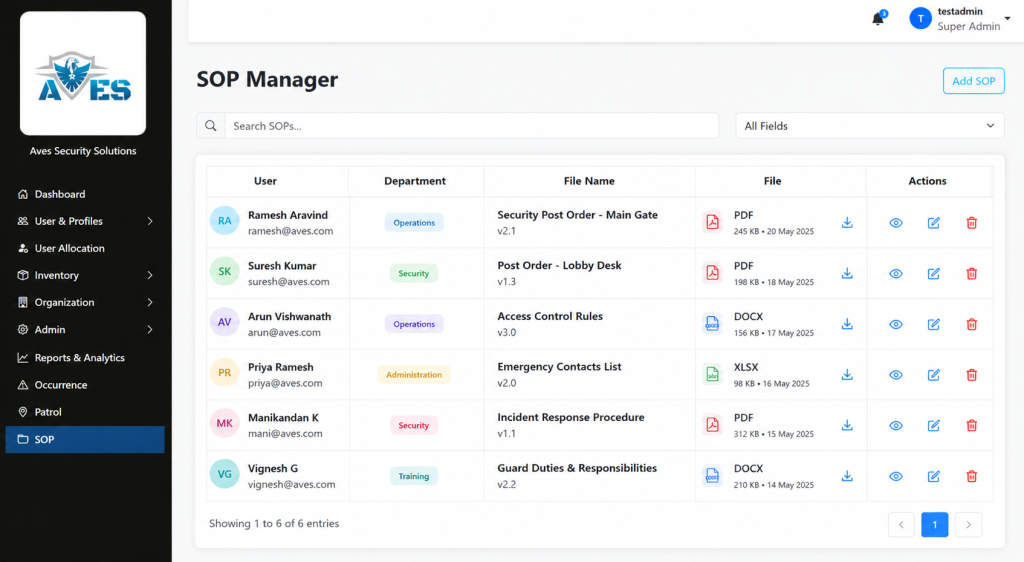
    AVES has a real, confirmed feature for exactly the version control problem above. It’s called SOP Management and it works as a document repository built for this kind of site procedure. Think of it less as guard instructions software with built-in workflows and more as the single source of truth those instructions need to live in.

    You upload a file, tag it to a user and a department and give it a clear file name. It shows up in a searchable list where anyone can find it by department, username, or file name. Deleting an outdated version takes two confirmation steps, not one accidental click, so an old copy doesn’t disappear by mistake while the current one is still needed.

    To be fully transparent, SOP Management is a document upload and search tool. It is not an interactive checklist builder where guards check off individual steps inside the app. If that’s what you’re picturing, it’s worth knowing that upfront rather than finding out later.

    AVES also has a confirmed Shift Briefing capability, built around guards acknowledging instructions before going on duty, which is the natural next step after centralizing security post orders. The detailed screen-by-screen workflow for that feature isn’t something we can walk you through yet and we’d rather tell you that plainly than describe steps that don’t exist.

    Where to Go From Here

    If your current security post orders are living in a binder or scattered across old email attachments, the fix isn’t complicated. It’s organizational first and tools second.

    Start by naming one owner per site. Then get every current post order into one searchable place instead of several. That single change solves most of the version confusion described above.

    If you want to see how AVES’s SOP Management handles that part, a short walkthrough will show you exactly what it does and, just as importantly, what it doesn’t do yet, so you can decide if it fits how your team actually works.

    A binder guards stop reading is not backup protection. It is a liability sitting quietly on a shelf, waiting for the one shift where it mattered and nobody opened it.

    See how AVES keeps every post order current. Book a quick walkthrough.

    CONTACT US

    Website : https://www.avessecurity.com

    Linkedin: https://www.linkedin.com/company/aves-security-management-system/

    Instagram: https://www.instagram.com/avessecurity/

    What are security post orders, exactly?

    Think of security post orders as the cheat sheet for one specific post, not the whole job. They spell out what a guard does at that particular gate or lobby, down to which doors get checked and who to call if something’s off. A generic job description won’t tell you any of that. Post orders will, or at least they should.

    Aren’t security post orders basically the same as SOPs?

    Not quite. Standard operating procedures cover the big stuff that applies everywhere, like what to do if someone collapses on site. Security post orders are narrower and messier in a good way. They’re written for one post, one set of doors, one set of quirks that only that location has. You need both. One without the other leaves a gap.

    Do I really need to go digital, or can paper work fine?

    Paper can work. It’s just harder to keep straight once you’ve got three shifts and a stack of photocopies floating around. The real problem isn’t paper versus digital. It’s that nobody can tell which copy is the right one. Fix that part and the format matters a lot less.

    Can I just use a post order template for every site?

    A template’s fine for the skeleton, five sections, same structure every time. But the actual content has to be specific to that post. Copy-paste a template with the site name swapped and you’ve basically written nothing useful. Guards can tell the difference immediately.

    Is there software that actually helps manage this across sites?

    Some. though I wouldn’t call it guard instructions software exactly. AVES has an SOP Management feature that at least solves the “which file is current” mess, one document per post, searchable by department or file name instead of buried in someone’s inbox. It won’t replace a supervisor actually walking the post and checking. Nothing does that. But it kills the version-control headache that causes most of these problems in the first place.

  • Deadly Gaps, Proven Fix: Digital Inspection Checklist

    Deadly Gaps, Proven Fix: Digital Inspection Checklist

    You already know the feeling. It’s 6 AM, the shift just changed and somewhere in the back of your mind is a question you don’t want to ask out loud: was the panic button actually tested last night, or did someone just sign the sheet?

    That doubt is exactly why a digital inspection checklist exists and if you’re reading this, you’ve probably already lived through the moment where a paper checklist let you down.

    Maybe it wasn’t a disaster. Maybe it was just a client walkthrough where the emergency phone didn’t ring and the log said it was “checked” three hours earlier. Either way, you felt it. That small, sinking realization that your paperwork and your reality had quietly stopped matching.

    That’s the exact question a digital inspection checklist exists to answer, before a client or an insurer ever has to ask it.

    The Fear Nobody Says Out Loud

    Security operators don’t lie awake worrying about the equipment itself. They lie awake worrying about the gap between what the paperwork says and what actually happened on site.

    A paper form can be filled out from memory at the end of a shift. It can be backdated. It can say “all clear” on a piece of equipment nobody actually walked over to touch. That’s not a guard problem. That’s a systems problem and it’s exactly the gap a digital inspection checklist is built to close.

    If you’ve ever had to explain to a client why a piece of safety equipment failed during the one moment it mattered, you already understand why this matters more than almost anything else on a guard’s shift list.

    What a Digital Inspection Checklist Actually Solves

    Here’s the part most people get wrong when they first look into this. They think a digital inspection checklist is just a fancier form. It isn’t.

    The real value of a digital inspection checklist is the timestamp. A record that gets created the moment a guard is standing in front of a panic button, testing it, not the moment they get back to the desk and remember to write it down.

    That single shift, from memory-based logging to real-time logging, is what makes a digital inspection checklist worth adopting in the first place. It’s not about looking more modern. It’s about closing the exact gap that keeps security managers up at night.

    Six Things That Actually Need Checking, Every Single Shift

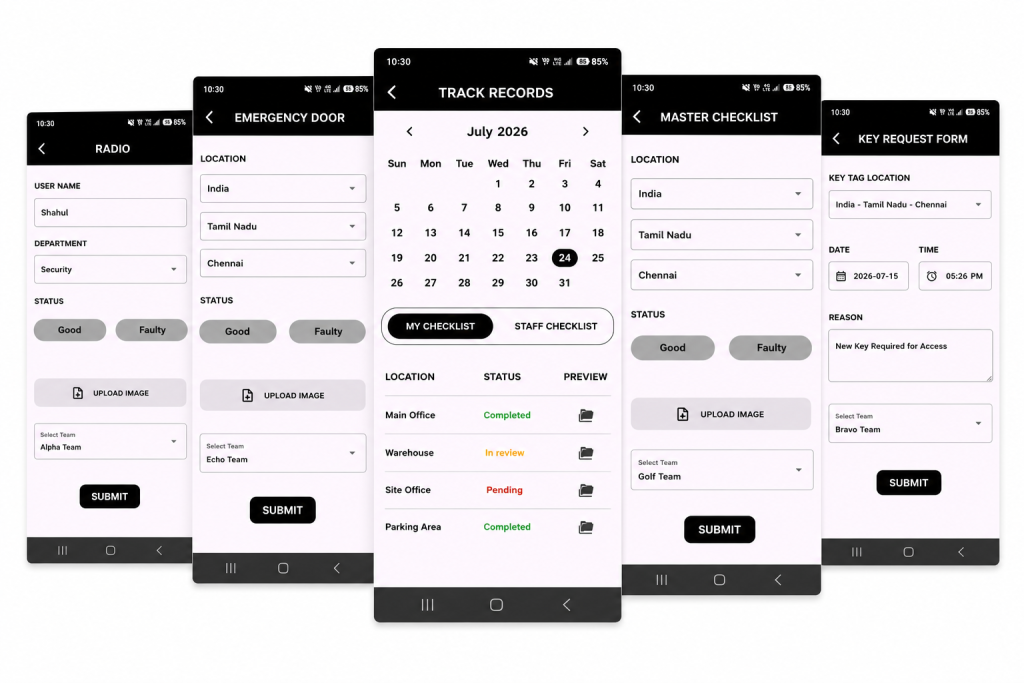
    A good digital inspection checklist doesn’t try to cover everything under the sun. It focuses on the equipment that matters most in an actual emergency:

    • Emergency telephones, confirmed operational and connected
    • Emergency doors, checked for unobstructed operation
    • Panic buttons, tested and confirmed active
    • Intercom doors, verified and logged
    • Electromagnetic doors, verified and logged
    • Radios, verified and logged

    Notice what’s on that list. None of it is decorative. Every item is something that, if it fails silently, turns a manageable situation into a genuinely dangerous one.

    This is the part that separates a serious digital inspection checklist from a generic to-do app repackaged for security teams. It isn’t trying to track everything. It’s trying to make absolutely sure the handful of things that matter most never get skipped.

    The Doubt You’re Probably Carrying Right Now

    If you’re evaluating whether to move to a digital inspection checklist, you’re probably carrying a few quiet doubts. Let’s name them honestly instead of pretending they don’t exist.

    “What if my guards just fake the digital version too?”

    Fair concern. The difference is that a digital inspection checklist creates a record that can’t be backdated or edited after the fact the way a paper form can. A guard can still choose not to test a panic button, but they can’t quietly write “9 PM” on a form at 11:45 PM and make it look accurate. The system captures when the entry was actually made.

    “Is this going to be complicated to roll out?”

    This is where a lot of people overthink it. A digital inspection checklist doesn’t require retraining your entire operation. Guards are already doing the physical check. The tool just changes what happens after they touch the equipment, not the check itself.

    “What if the software becomes another thing I have to babysit?”

    This is the most reasonable fear on the list about any digital inspection checklist and it deserves an honest answer, not a sales pitch. Any digital inspection checklist is only as good as whether your team actually opens it every shift. The ones worth choosing are the ones simple enough that a tired guard at 3 AM can use it without friction. That’s the real test, not the feature list.

    What Good Actually Looks Like

    Picture the version of your operation where this works the way it’s supposed to.

    A guard starts their shift. They walk the fixed equipment list, physically testing each item. Each check gets logged the moment it happens, not reconstructed later from memory. By the time your morning report lands, you already know whether every panic button, door and radio on site was actually verified, not just claimed to be verified.

    That’s the entire promise of a digital inspection checklist. Not more paperwork. Less uncertainty.

    When a client asks you to prove equipment was checked before an incident, you’re not scrambling through a filing cabinet. You’re pulling up a timestamped record that speaks for itself.

    Why This Matters More Than It Looks Like It Does

    Most security operators don’t think about equipment checks as a competitive advantage. They think of them as a chore, something guards grumble through because someone above them said it’s required.

    That mindset is exactly what a digital inspection checklist is designed to change. Every completed, timestamped check is proof of due diligence. It’s the difference between a security company that can defend its record in a liability conversation and one that’s hoping nobody ever asks hard questions.

    If you’ve ever felt that quiet unease about whether your equipment checks would actually hold up under scrutiny, that feeling is worth listening to. It’s usually a sign the process, not the guards, needs fixing.

    The Honest Trade-Offs

    No tool solves everything and it would be dishonest to pretend a digital inspection checklist is a silver bullet.

    It doesn’t replace the physical act of checking equipment. A guard still has to walk over and test the panic button. What it changes is whether that action leaves behind proof and whether that proof can be trusted months later when it actually matters.

    It also won’t fix a culture problem on its own. If a team doesn’t take the underlying duty seriously, no piece of software forces genuine diligence. What a digital inspection checklist does is make it much harder to fake diligence that isn’t there, which tends to change behavior on its own over time.

    Where This Leaves You

    If you’ve made it this far, you already know the real question isn’t whether equipment checks matter. You know they do. The real question is whether you can currently prove they’re happening the way your paperwork says they are.

    That’s the exact gap a digital inspection checklist is built to close. Not a bigger to-do list. A record you can actually stand behind.

    You don’t need to overhaul your entire operation to adopt a digital inspection checklist. You need a system that captures the moment a check actually happens, instead of the moment someone remembers to write it down.

    That’s the whole shift. And once you see it working on your own site, it’s hard to imagine going back to a clipboard.

    See how a digital inspection checklist works on a real site → Book a free walkthrough

    CONTACT US

    Website : https://www.avessecurity.com

    Linkedin: https://www.linkedin.com/company/aves-security-management-system/

    Instagram: https://www.instagram.com/avessecurity/

    What equipment actually needs checking every shift?

    That six things and they’re not random.That’s the list. Not because other equipment doesn’t matter, but because these six are the ones you reach for when something’s already going wrong. If they don’t work in that moment, nothing else about your setup matters much.

    Can someone go back and edit an entry after it’s submitted?

    That’s the whole reason to move off paper in the first place.
    A form filled out from memory can say whatever the person writing it wants it to say. A record created the second someone actually tests the panic button can’t be rewritten later to look tidier than reality. That gap between “what happened” and “what got written down” is exactly what this kind of system is built to close.

    How disruptive is it to actually switch over?

    Less than people expect, usually.
    The underlying job doesn’t move an inch. Guards are already walking the site and testing equipment. All that’s really shifting is how that gets recorded. Most teams find their footing within a shift or two, not weeks.

    What if my guards just fake the digital version too?

    Fair concern. The difference is that a digital inspection checklist creates a record that can’t be backdated or edited after the fact the way a paper form can. A guard can still choose not to test a panic button, but they can’t quietly write “9 PM” on a form at 11:45 PM and make it look accurate. The system captures when the entry was actually made.

  • Chaos to Clarity: The Security Reporting Software Advantage

    Chaos to Clarity: The Security Reporting Software Advantage

    You are asked for a monthly report and your stomach tightens a little. You know the numbers exist somewhere. You just do not know how long it will take to pull them together into something you can actually hand a client.

    That scramble is the exact problem the right security reporting software is supposed to remove. If you have ever built a report by copying numbers into a spreadsheet at eleven at night, this article is for you.

    Why This Feels Harder Than It Should

    Most security companies do not lose client trust because guards fail to show up. They lose it because nobody can produce a clean, professional record fast enough when a client asks for one.

    You already sense this, which is why you are reading about security reporting software instead of just accepting the status quo. You want something that produces a document you can hand over without apologizing for how it looks.

    The quiet fear underneath this search is simple. What if the tool looks fine in a demo, then falls apart the first time you actually need a real report under a real deadline? That fear deserves a straight answer, not a sales pitch.

    What Good Security Reporting Software Actually Does

    Strip away the marketing language and real security reporting software comes down to one core job. It needs to turn your operation’s activity into a branded, filterable document you can export and hand off, without you rebuilding it by hand every time.

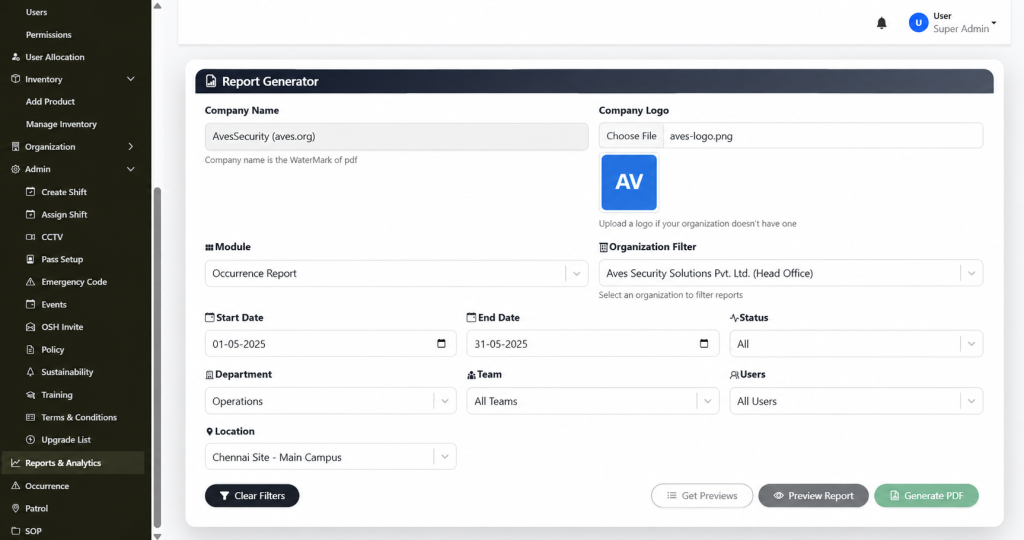
    A dedicated report generator is where this either works or falls apart. A real one lets you set your Company Name, which gets used as the watermark on the exported PDF. It lets you upload a Company Logo and falls back to a clean initials placeholder if you have not uploaded one yet. You pick a Module to define what the report covers. You apply an Organization Filter to scope it. You set a Start Date and End Date. You can narrow further by Status, Department, Team, Users and Location. Then you preview it and generate a branded PDF.

    That is what functioning security reporting looks like when it is built around real filters instead of a vague “export” button that dumps raw data with no formatting.

    The Mistake Most Buyers Make

    Here is something most comparison articles will not tell you. A lot of vendors advertise security reporting software as a headline feature, then the actual export screen turns out to be a single button with no filters, no branding and no date range control.

    The fix is to ask a blunt question before you commit to anything. Can I filter by module, department, team and date range and will the output actually carry my company name and logo? If the honest answer is no, that is not real security reporting software. That is a raw data dump with a nicer name attached.

    Another mistake worth naming. Buyers often assume that once a Generate PDF button exists, the tool is done being evaluated. It is not. You still need to know what that PDF actually looks like once it lands in your hands, because a cluttered, unbranded export creates almost as much extra work as building the report yourself.

    Being Honest About What Is Still Unproven

    Trust gets built through honesty, not perfect promises, so here is the part worth saying plainly. A filter-rich report generator is a strong sign of serious security reporting software, but a few things still need to be confirmed before anyone should treat this as a finished picture.

    It is not yet clear whether the Organization Filter supports comparing multiple organizations side by side in one report, or whether it is scoped to one organization at a time. It is not yet confirmed whether reports can be scheduled to run automatically, or whether every export has to be triggered manually. And the exact layout of the finished PDF, once generated, has not been reviewed yet.

    None of that changes the core value of what is confirmed. It just means anyone evaluating security reporting should ask these specific questions directly, rather than assuming the answer based on what a filter panel implies.

    What It Feels Like Once It Actually Works

    Picture the next time a client asks for a report. Instead of opening a spreadsheet, you open Reports & Analytics. You pick the module, set your date range, apply the department and location filters you already know matter and click Preview Report. Your company name is already watermarked in. Your logo is already sitting in the corner. You click Generate PDF and you are done.

    That is the practical payoff of choosing a tool built with real filtering and branding in mind, instead of treating export as an afterthought. The report stops being a task you dread and becomes something you produce in minutes.

    Over time this compounds. Clients start associating your reports with a professional, consistent look. New admins on your team can generate the same report without you walking them through it. Compliance requests stop turning into fire drills.

    Deciding If This Is Right For You

    You do not need to take a vendor’s word for how well their security reporting software actually performs here. Ask for a live demo where they generate a real PDF in front of you, with a real module, a real date range and their own branding applied. Watch whether the filters actually narrow the data or just sit there decoratively.

    If what comes out the other end is a clean, watermarked, properly filtered document, you are looking at security reporting software built around how reports actually get used, not just how they get advertised.

    You already know your operation needs faster, cleaner reporting than a spreadsheet built at the last minute. The question now is simply finding a version of security reporting software honest enough to show you exactly what the export looks like before you commit to it.

    Quick Answers Before You Move Forward

    Is security reporting software the same as a full analytics suite? No and it is worth being clear about that difference. A login dashboard style of security reporting software gives you a real-time summary. A full analytics suite adds scheduled exports and cross-site comparisons on top of that. Many teams only need the first one to start.

    How long does it take to see value from security reporting software? If the dashboard pulls from real activity already happening in your other modules, value shows up on day one. You are not waiting weeks for data to accumulate before the numbers mean anything.

    What should disqualify a vendor during a demo? If their version of security reporting cannot show you a live login with real counts and instead relies on screenshots or a promise that “it will look like this,” treat that as a warning sign rather than a minor gap.

    Ready to see it yourself? Book a live walkthrough and watch a branded report get generated in real time, filters and all.

    CONTACT US

    Website : https://www.avessecurity.com

    Linkedin: https://www.linkedin.com/company/aves-security-management-system/

    Instagram: https://www.instagram.com/avessecurity/

    What is security reporting?

    Security reporting software is a digital solution that helps security companies create, manage and export professional reports for incidents, patrols, attendance, audits and daily operations from a centralized platform.

    Do I need to upload a company logo to generate a report?

    No. The Company Logo field is optional reports still generate with the watermark from your Company Name even without a logo.

    Can I filter a report by department or team specifically?

    Yes. Department, Team and Users are all separate, optional filters, so you can narrow a report down to a specific group rather than pulling everything.

    How does security reporting software improve reporting efficiency?

    Security reporting software eliminates manual paperwork by allowing users to filter data, generate branded PDF reports and access records instantly, reducing reporting time from hours to minutes.

    Who can benefit from security reporting software?

    Security agencies, facility management companies, corporate security teams, hospitals, educational institutions, residential communities, manufacturing plants and commercial campuses can all benefit from security reporting software.

    How secure is the data stored in security reporting software?

    Reliable security reporting software protects data through user authentication, role-based permissions, encrypted storage and detailed activity logs to ensure only authorized users can access sensitive information.

    Why should I replace spreadsheets with security reporting software?

    Unlike spreadsheets, security reporting software automatically organizes data, reduces human errors, generates professional reports instantly and provides searchable digital records that improve productivity and client confidence.

    Can reports be filtered before exporting?

    Yes. Most advanced security reporting software lets users filter reports by module, date range, location, department, team, user, or report status before generating the final PDF.

    Is security reporting software suitable for multi-site security operations?

    Yes. Good security reporting software enables organizations to filter reports by location, department, team, or site, making it easier to manage multiple security operations from one platform.

    Is security reporting software the same as a full analytics suite?

    No and it is worth being clear about that difference. A login dashboard style of security reporting software gives you a real-time summary. A full analytics suite adds scheduled exports and cross-site comparisons on top of that. Many teams only need the first one to start.

  • AVES Occurrence Log Walkthrough: How Daily Occurrence Reporting Works

    AVES Occurrence Log Walkthrough: How Daily Occurrence Reporting Works

    Every security site racks up dozens of small, easy to forget moments in a single week. A jammed door. A strange vehicle circling the lot twice. A guest who wandered somewhere they shouldn’t have.

    None of it is a full blown incident on its own. But it all matters. Without occurrence reporting software, these details end up living in a supervisor’s memory, a scribbled note, or nowhere at all. Ask what happened last Tuesday night three weeks later and good luck getting a straight answer.

    That’s the real cost of paper based occurrence tracking. It’s not one dramatic failure. It’s a slow leak of institutional memory, one shift at a time. Occurrence reporting software exists to plug that leak. A security occurrence logging system that actually sits inside a guard’s daily dashboard, rather than a side notebook nobody can find, turns “I think someone mentioned that” into something you can actually pull up and read.

    What Occurrence Reporting Software Actually Replaces

    Before any of this existed, most sites ran on an occurrence book. A physical logbook handed from shift to shift. It worked, more or less, right up until the book went missing, a page tore out, or the night guard’s handwriting turned out to be unreadable by morning.

    Occurrence book software solves the exact problem the paper version was built for, minus the physical object that gets lost, spilled on, or left in the wrong guard shack.

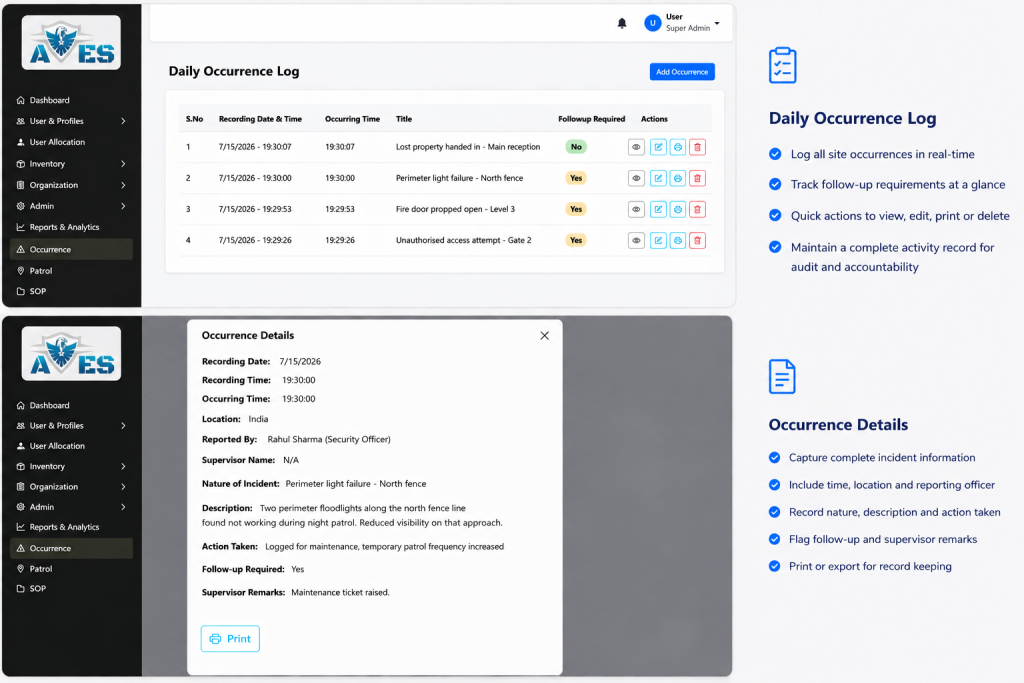
    In AVES, all of this lives under one module, simply called Occurrence, reached from the sidebar via Occurrence → Daily Occurrence Log. Worth saying plainly, this is occurrence reporting software in its most stripped down form. It’s not trying to be an escalation engine or some severity scoring dashboard. It’s a structured place to log what happened, who logged it and whether it needs a second look.

    How the Occurrence Log Actually Works

    Here’s security occurrence logging in practice, the actual steps, as they run inside the AVES dashboard.

    Go to Occurrence → Daily Occurrence Log. Click Add Occurrence, top right. Fill in the form: Occurring Time, Location (pulled from a dropdown of existing locations, not free text), Reported By, Nature of Incident, Description, Action Taken, Follow-up Required (a Yes/No dropdown) and Supervisor Name Remark. Click Submit.

    The entry lands in the Daily Occurrence Log table with a Serial Number, Recording Date & Time, Occurring Time, Title, Follow-up Required status and an Actions column.

    From there, Actions gives a supervisor three moves. View Details on the full record. Edit any field. Or Delete the entry outright. A confirmation prompt fires first, so nothing vanishes by accident. That’s the whole lifecycle of one entry in this occurrence reporting software. Log it, review it, act on it if it needs acting on.

    Two Fields That Do Different Jobs

    Here’s a small detail in this event logging software for security teams that trips people up. Nature of Incident and Description look similar, but they’re not meant to duplicate each other.

    Nature of Incident is the short label, a quick tag for what kind of thing happened. Description is the fuller account, in the reporting guard’s own words.

    Treat them as interchangeable and you’ll under-use the whole feature. Fill in both properly and the log turns into something a supervisor can actually scan a week later without opening every single record one by one.

    Why a Security Event Recording System Beats a Notebook

    The case for a real security event recording system over a paper occurrence book was never about looking modern. It’s about what happens when something goes sideways three weeks later and someone asks, “didn’t we have trouble at that gate before?”

    A notebook only answers that if someone remembers which page to flip to. A structured log answers it in seconds. Every entry carries the same fields, in the same order, searchable by date, location, or supervisor name.

    That consistency is really the whole point. Occurrence reporting software doesn’t make guards write more. If anything, a dropdown driven form is usually faster than freehand notes. What it does is make what they write usable later.

    Built this way, a security event recording system turns a shift’s worth of scattered observations into one clean, chronological table any admin can pull up from the dashboard. No filing cabinet required.

    What This Occurrence Reporting Software Doesn’t Claim to Do

    Honesty matters more than a padded feature list here. This occurrence book software isn’t an escalation platform. There’s no severity scale attached to an occurrence, just the Follow-up Required Yes/No flag. Marking it Yes doesn’t automatically ping a supervisor.

    It’s a manual review signal, not an automated routing trigger. Any site rolling this out should train guards and supervisors around that fact. Follow-up Required is the only signal in the record that something needs a second look, so defaulting it to No without genuinely reviewing each entry kind of defeats the point of having the flag.

    Getting the Most Out of Security Occurrence Logging

    A few habits make this style of security occurrence logging actually worth the effort.

    Use the Location dropdown on purpose. Since it pulls from pre-set locations rather than free text, consistent location data is what makes searching the log later actually useful.

    Don’t skip Action Taken. It’s easy to log what happened and forget what the guard actually did about it, but that’s often the one detail a client or supervisor cares about most.

    Review Follow-up Required entries on a set schedule, not just whenever someone happens to open the log. There’s no automated escalation here, so the flag only earns its keep if someone’s actually checking it.

    Choosing Occurrence Reporting Software for Your Site

    If you’re sizing up occurrence reporting software for the first time, don’t judge it by how many extra features get bundled in.

    The real test is simpler than that. Does it capture Occurring Time, Location, Reported By, Nature of Incident, Description, Action Taken and Follow-up Required without friction and can you actually find that record again later?

    A security event recording system that nails those basics will beat a bloated one that half does everything, every time. Same goes for occurrence book software sold with dashboards and analytics it can’t really back up. Ask to see the actual entry form before you sign anything.

    The Bottom Line

    Security teams don’t need more paperwork. What they need is occurrence reporting software that turns five minutes of typing into a record that’s still worth something six months from now.

    Call it occurrence book software, call it a security event recording system, or just call it event logging software for security operations. The job underneath is the same. Capture what happened, in a consistent shape, before it disappears into someone’s memory.

    Get that right and “no more lost records” stops being a slogan and starts being how the site actually runs.

    Every site already has these small moments happening every shift. The only question is whether they disappear into someone’s memory or end up somewhere you can actually pull up six months from now.

    Want to see the Daily Occurrence Log in action, the actual form, the actual dashboard in AVES? Book a walkthrough of AVES and watch it happen on a real screen →

    CONTACT US

    Website : https://www.avessecurity.com

    Linkedin: https://www.linkedin.com/company/aves-security-management-system/

    Instagram: https://www.instagram.com/avessecurity/

    What exactly is occurrence reporting software?

    Basically a digital stand-in for the old paper occurrence book. Instead of a guard scrawling something in a notebook that might get lost or torn, they fill in a form, time, location, who reported it, that kind of thing and it just sits there in a searchable table instead of a drawer somewhere.

    Isn’t this basically the same as an incident report?

    Not quite. This is for the smaller stuff. A jammed door, a car circling the lot twice, someone wandering somewhere they shouldn’t. No severity rating or anything like that, just a Follow-up Required flag if something’s worth a second look.

    Can you fix or delete an entry after it’s already submitted?

    Yeah. There’s a View Details option, an Edit option and a Delete option, though deleting asks you to confirm first so you don’t lose something by accident.

    Is “occurrence book software” a different thing from this, or basically the same?

    Same thing, different name. Occurrence reporting software, occurrence book software, event logging software for security, people just call it different things depending on who’s selling it. The job underneath doesn’t change.

    Does this mean guards don’t need to write much anymore?

    Not exactly, it just gives their notes somewhere useful to go. People skip the Action Taken field a lot, honestly and that’s usually the one thing a client actually wants to know.

    Why does Location use a dropdown instead of just letting guards type it in?

    Because if ten different guards type “front gate” ten different ways, good luck filtering by location six months from now. The dropdown keeps things consistent enough to actually search later.

    Nature of Incident vs Description, what’s actually different there?

    People mix these up constantly. Nature of Incident is more of a quick label, like a category. Description is the real story in the guard’s own words. You need both filled in properly or the log ends up half useful.

  • Defect and Damage Reporting: Stop False Claims, Win Trust

    Defect and Damage Reporting: Stop False Claims, Win Trust

    A guard walks past a cracked window on Tuesday. Nobody writes it down. Three weeks later, a tenant claims the crack happened during a break-in that never occurred and there is no record proving otherwise.

    This is the scenario that keeps security company owners up at night. Not the incident itself, but the complete absence of proof on the days before it.

    If you are researching a defect and damage reporting tool right now, you already know this fear. You are not looking for a generic maintenance app. You are looking for a way to protect your company the next time someone tries to blame your guards for damage that was already there.

    This guide is written for exactly that. No fluff, no recycled definitions. Just what a defect and damage reporting tool actually solves, what it costs to skip and how to choose a defect and damage reporting tool that holds up when a client or a lawyer starts asking questions.

    What a Defect and Damage Reporting Tool Actually Means

    A defect and damage reporting tool is how a security team documents the physical condition of a site, cracked glass, broken locks, damaged fencing, faulty equipment, before, during and after a shift. It exists to answer one question clearly: was this already broken, or did it happen on our watch?

    Done on paper, this looks like a maintenance note scribbled at the end of a shift, if it gets written at all. Done properly through a defect and damage reporting tool, it becomes a timestamped, photo-backed record that either clears your guards or flags a real issue immediately.

    The gap between those two versions is exactly where false damage claims against security companies come from.

    Why Skipping This Quietly Costs You Later

    Most security companies don’t decide to skip damage documentation. They simply never build a habit around it, so it only happens when someone remembers.

    Here’s what nobody tells you until a claim lands on your desk.

    No baseline means no defense. If nobody documented the site’s condition at shift start, you have no way to prove damage existed before your guard ever arrived.

    Verbal reports disappear. A guard mentioning something to a supervisor in passing is not a record. By the time a claim surfaces weeks later, that conversation is gone.

    Maintenance issues get discovered too late. A faulty gate or broken camera that never gets logged stays broken until it causes a bigger problem, often right when you need it working most.

    Clients lose confidence fast. A client who receives a vague “we’ll look into it” instead of a documented defect and damage reporting tool response starts wondering what else isn’t being tracked.

    The Real Cost of Getting This Wrong

    Let’s talk about what this actually costs, not just the theory.

    A single disputed damage claim without documentation can cost thousands in a settlement your company didn’t actually cause. A pattern of undocumented site conditions can cost you the entire contract when a client decides they can’t trust your reporting.

    A defect and damage reporting tool is not a nice-to-have add-on. It is the record that stands between your company and a claim you cannot disprove. Treat a defect and damage reporting tool as optional paperwork and you are gambling with money you will eventually lose.

    What Buyers Get Wrong When Choosing a Solution

    If you are comparing options, here is where most first-time buyers get stuck.

    Mistake one: assuming photos alone are enough. A photo without a timestamp, a location and a guard’s name attached is easy to dispute in a real conversation about liability. A proper defect and damage reporting tool captures all of it automatically, which is the whole point of using a defect and damage reporting tool instead of a plain camera roll.

    Mistake two: treating this as a one-time inspection instead of an ongoing habit. Documenting site condition once at contract start is not the same as capturing it every shift. Damage happens over time and your records need to as well.

    Mistake three: choosing damage claim reporting software with no searchable history. If you can’t pull up every defect logged at a site over the last six months in seconds, the tool isn’t actually protecting you when a dispute happens.

    Mistake four: not connecting this to your broader operation. A standalone damage log that lives outside your guard’s daily workflow gets used inconsistently, which defeats the entire purpose.

    Knowing these traps in advance puts you ahead of most buyers who learn them the hard way.

    What a Properly Built System Looks Like

    A modern defect and damage reporting tool, tied to a real security operation, handles the full picture in one place. The best defect and damage reporting tool makes logging a broken lock or a cracked window faster than ignoring it.

    • Capture defects with photo evidence so every issue is documented with visual proof from the field.
    • Record complete incident details including defect title, description and reporting officer in one place
    • Monitor repair progress with status updates from reported to completed, ensuring nothing is overlooked.
    • Maintain an audit trail that helps resolve disputes and proves when issues were reported and closed.

    This is not about turning your guards into inspectors. It’s about making sure the condition of a site is never a matter of memory or opinion.

    Why This Fits Inside a Bigger Security Guard Management System

    A defect and damage reporting tool rarely works well as an isolated app. It needs to sit inside a complete security guard management system, alongside patrol verification, occurrence recording and incident reporting.

    Here’s why that matters. A disputed damage claim is rarely answered by one piece of evidence alone. A logged defect, a patrol record showing who was on site and a timestamp from the same shift together tell a story that a single photo cannot.

    When damage claim reporting software lives inside the same security guard management system as patrol tracking and occurrence logs, pulling together a full defense against a false claim takes minutes instead of a frantic search across disconnected tools.

    This is the same reason established guard management software providers, from GuardsPro to Novagems to SGMS, build this kind of documentation directly into their core platform rather than leaving it as a separate purchase. Preventing fraudulent damage claims isn’t a side feature. For a lot of security companies, it’s the single most financially important thing the software does all year.

    Honest Limitations to Expect

    No system is magic and you deserve a straight answer here.

    A defect and damage reporting tool still depends on guards actually taking the time to log what they see. It won’t catch damage nobody happened to notice and no defect and damage reporting tool replaces a genuine walk-through at shift start.

    Offline coverage typically covers core actions, with photos and notes syncing once the device reconnects. Plan for a short delay in low-signal areas rather than assuming instant upload every time.

    And building the habit takes a few weeks. Guards used to only reporting the big, obvious problems will need practice logging the smaller stuff before it becomes second nature.

    Making the Decision With Confidence

    If you’ve read this far, you already understand more about choosing a defect and damage reporting tool than most people evaluating a defect and damage reporting tool for the first time.

    You know what it actually covers, why undocumented site conditions quietly become expensive claims, what mistakes to avoid and what a properly built system should include.

    The next step is simple. Ask your current process one direct question. If a client disputed damage at one of your sites today, could you produce a timestamped record proving the condition beforehand? If the honest answer is no, that’s exactly where a real defect and damage reporting tool, connected to your broader security guard management system, earns its place. That single gap is what a defect and damage reporting tool exists to close.

    Want to see how a defect gets logged, tracked and cleared in AVES? Book a live walkthrough →

    CONTACT US

    Website : https://www.avessecurity.com

    Linkedin: https://www.linkedin.com/company/aves-security-management-system/

    Instagram: https://www.instagram.com/avessecurity/

    What exactly is defect and damage reporting?

    It’s your guards keeping track of what a site actually looks like. Cracked glass, a busted lock, torn-up fencing, that kind of thing. Photo, timestamp, whoever’s name is on the shift. So nobody’s arguing later about when it happened.

    Isn’t that basically incident reporting?

    Different animal. Incident reports cover things that happen, a break-in, someone getting hurt. This is about the property itself, its condition. A cracked window might get its own quick entry, or it might show up as a line inside a bigger incident report if things escalate.

    Can a photo by itself settle a dispute?

    Not on its own, no. A photo with a timestamp and location stapled to it and a name attached, that’s what actually means something when a client pushes back or a lawyer gets involved.

    Once it’s fixed, does the record just vanish?

    No. You close it out, add a line about what got done and it stays in the history. First flagged, what happened, when it closed. All in one thread instead of getting wiped.

  • security pass Management System: Stop Risk, Build Control

    security pass Management System: Stop Risk, Build Control

    Every security manager remembers the moment it went wrong. A visitor walked out with a laptop that was never logged in. A contractor overstayed a pass by six hours and nobody noticed. A client asked for last month’s entry records and the answer was a shrug.

    If you are researching a security pass management system right now, you already know this feeling. You are not looking for theory. You are looking for a way to stop the next incident before it happens.

    This guide is written for exactly that. No fluff, no recycled definitions. Just what a security pass management system actually solves in 2026, what it costs to get wrong and how to choose one that works in the real world for a security team, not a corporate front desk.

    What a Security Pass Management System Actually Means

    A security pass management system is the process and the software behind creating, approving, tracking and revoking recurring, standing access for anyone who is not a permanent employee but who is on site repeatedly over days or weeks: long-term contractors, vendors on a service contract, agency staff and rotating temp workers. That is a different problem from a one-off visitor arriving for an afternoon, which our visitor management system guide covers, or a single load of material crossing the gate, which our gate pass management guide covers.

    Worth being precise about this, because the three overlap in casual conversation. A visitor pass is issued once and expires the same day. A gate pass moves an asset or vehicle across the boundary. A standing security pass persists across many visits until someone actively revokes it, which is exactly why it is the one paper systems lose track of first.

    Done on paper, it looks like a logbook at the gate. Done properly through a security pass management system, it is a live, searchable record of who entered, who approved them, how long they stayed and what they were allowed to access.

    The gap between those two versions is where most security failures happen and clients in 2026 are asking about that gap more often than ever.

    Why Paper-Based Pass Systems Quietly Fail

    Most companies do not choose to fail here. They just never upgrade to a proper security pass management system after the business grows past what a logbook can handle.

    Here is what nobody tells you until it is too late.

    Handwriting is not evidence. When a client or auditor asks for proof of who was on site during a specific incident, an illegible paper trail is not proof. It is a liability.

    Manual approvals create bottlenecks. Without a security pass management system, a supervisor has to physically sign off every pass and the front gate becomes the slowest part of your operation during peak hours.

    Nobody tracks overstays. A pass meant to expire in two hours often sits open for the entire day because there is no automatic flag when time runs out.

    Multi-site visibility does not exist. If you run more than one site, paper logs mean your head office has zero real-time view of who is where.

    These are not edge cases. They are the default outcome of running visitor and contractor traffic without a security pass management system behind it.

    The Real Cost of Getting This Wrong

    Let’s talk numbers instead of fear.

    A missed pass revocation can mean a former contractor still has building access weeks after their contract ended. A lost paper log can mean your team spends two full days manually reconstructing entry history for an insurance claim.

    A client audit that fails because your gate pass management system cannot produce a clean report can cost you the entire contract, not just one site.

    A security pass management system is not an administrative nice-to-have. It is risk management with a paper trail that either protects you or exposes you. Treat a weak security pass management system as a cost center and it will eventually prove you right.

    What Buyers Get Wrong When Choosing a Solution in 2026

    If you are comparing options, here is where most first-time buyers get stuck.

    Mistake one: choosing based on price alone. The cheapest security pass management system often lacks approval workflows, audit trails, or mobile access, which means your team ends up doing manual work anyway.

    Mistake two: assuming every security pass management system is built the same way. A generic front-desk visitor tool stops at check-in. A security-grade security pass management system covers visitors, contractors, employees and materials, with approval and revocation built in.

    Mistake three: not checking multi-site support. If you manage several locations, a single-site tool will force you back into spreadsheets within six months.

    Mistake four: ignoring offline reliability. Gates do not stop working when the internet drops. Your security pass management system should not either, even if only for core actions until the connection returns.

    Knowing these four traps in advance puts you ahead of most buyers who learn them the hard way.

    What a Properly Built System Looks Like

    A modern security pass management system, like the pass and permit workflow built into AVES, handles the full lifecycle in one place.

    • Create and issue passes for visitors, employees and workers from a single dashboard
    • Route approval or rejection to the right supervisor automatically
    • Timestamp every entry and exit for an audit-ready record
    • Flag overstays before they become a liability
    • Give head office real-time visibility across every site

    This is not about replacing your guards. It is about giving them a tool that catches what a rushed handwritten log cannot.

    Combine that with a connected gate pass management system for vehicles and materials and you close the two biggest gaps most sites carry today: who came in and what left with them.

    Why This Fits Inside a Bigger Security Guard Management System

    Passes rarely work well as an isolated tool. They need to sit inside a complete security guard management system, alongside patrol verification, incident reporting and shift scheduling.

    Here is why that matters. A pass-related incident is rarely just a check-in problem. It usually involves a patrol log, an incident report and a shift record all at once. If those pieces live in separate tools, reconstructing the full picture after something goes wrong takes hours.

    When your security pass management system, patrol tracking and incident reporting sit inside the same security guard management system, that reconstruction takes minutes and every record lines up automatically.

    This is the same reason established guard management software providers, from GuardsPro to Novagems to SGMS, all build pass and permit handling directly into their core platform instead of selling a standalone front-desk tool. It is also why security guard services that take liability seriously ask about this feature before signing a contract, not after.

    Honest Limitations to Expect

    No system is magic and you deserve a straight answer here.

    A digital system still needs a device at the gate and a guard trained to use it. It will not fix a team that refuses to follow process. It reduces friction and risk, but it does not remove the need for good supervision.

    Offline coverage is usually limited to core actions, with full sync happening once connectivity returns. If your site has zero connectivity for extended periods, plan around that reality instead of assuming full offline functionality.

    And migration takes a short adjustment period. Guards who have logged passes on paper for years will need a week or two to build the new habit. That is normal, not a sign your security pass management system rollout is wrong for you.

    Making the Decision With Confidence in 2026

    If you have read this far, you already understand more about choosing a security pass management system than most people evaluating one for the first time.

    You know what it actually covers, where paper systems break down, what mistakes to avoid and what a properly built platform should include. You also know the honest limitations, which means nothing here will surprise you later.

    The next step is simple. Look at how your current process handles a visitor or contractor pass from creation to expiry. If there is a gap anywhere in that chain, that is exactly where a real security pass management system, connected to your broader security guard management system, earns its place going into 2026.

    You are not starting from zero. You are finally choosing the platform that matches the operation you are already running.

    CONTACT US

    Website : https://avessecurity.com

    Linkedin: https://www.linkedin.com/company/aves-security-management-system/

    Instagram: https://www.instagram.com/avessecurity/

    What is a security pass management system, exactly?

    Strip away the sales language and it’s the process and software behind creating, approving, tracking and revoking access for anyone who isn’t a permanent employee. Visitors, contractors, vendors, delivery staff, temporary workers. All of them fall under this umbrella.

    How is security pass management different from a paper logbook?

    A logbook is a static record chained to a desk at the gate. Security pass management is live and searchable. It shows who entered, who approved them, how long they stayed and what they were allowed to touch. That gap is where most security failures live.

    What does it actually cost a company to skip security pass management?

    A missed pass revocation means a former contractor still badges in weeks after his contract ended. A lost paper log means two full days rebuilding entry history by hand for an insurance claim. A failed client audit, because your gate pass management system can’t produce a clean report, can cost you the entire contract, not just one site.

    What should a properly built security pass management system include?

    It should let you create and issue passes from a single dashboard, route approvals automatically to the right supervisor, timestamp every entry and exit for an audit-ready record, flag overstays before they become a liability and give head office real-time visibility across every site.

    Does security pass management work as a standalone tool?

    Rarely and it shouldn’t have to. It works best sitting inside a full security guard management system, alongside patrol verification, incident reporting and shift scheduling. A visitor incident usually touches all three at once and keeping them separate turns reconstruction into hours of work instead of minutes.