
Your 2-shift system is breaking. You know it. Your team knows it. The only question is when you’re going to actually do something about it.
One of your officers is permanently wrecked from pulling nights. Handovers are a mess. And you’ve got this nagging feeling that someone’s going to miss something important because they’re too tired to think straight.
Here’s the thing: that feeling’s justified. But you’re not stuck with it. A 3 shift duty roster handles this exact problem. Once you walk through how it actually works in your system, it stops looking complicated.
Why a 2-Shift Roster Eventually Breaks (and Why a 3 Shift Duty Roster Fixes It)
Two 12-hour shifts look perfect when you’re building them. The numbers work. You save money. Two handovers a day instead of three.
Then your people start falling apart.
Twelve hours is too long. Add a graveyard shift and it gets worse. Your officers can’t stay sharp that long no matter how hard they try. This isn’t laziness or a character problem. It’s just how human bodies work. You can’t willpower your way out of it.
A 3 shift duty roster cuts each shift to 8 hours. Your officers stay alert. They make better decisions. The cost is more staff and three handovers instead of two. Both are doable once you know what to expect.
How a 3 Shift Duty Roster Actually Gets Built in AVES
Two screens run this. Both are under Admin. Create Shift builds your three shift templates. Assign Shift puts your people into those shifts.
Step 1: Define three separate shift templates.
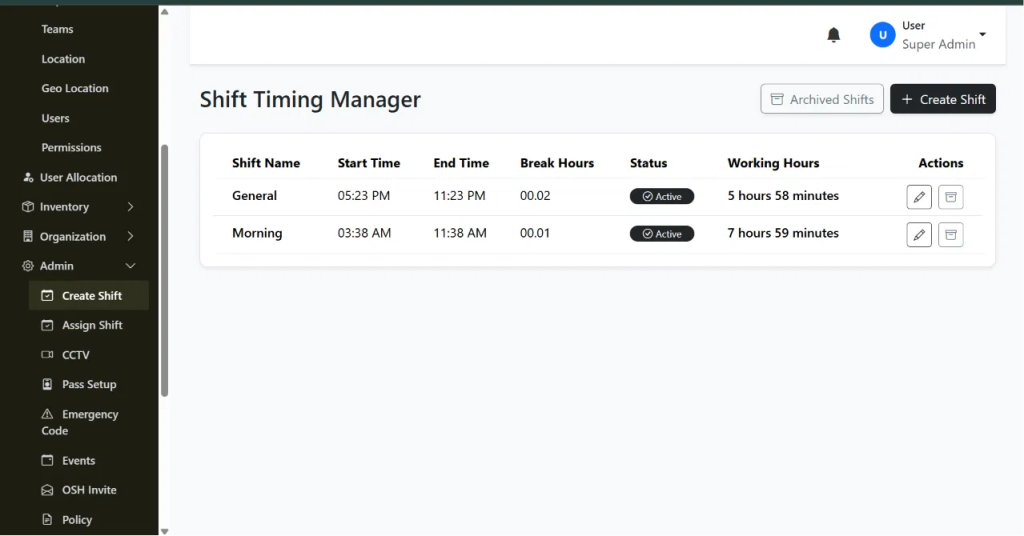
Go to Create Shift and make three rows. Morning, Afternoon, Night. Each gets a Shift Name, Start Time, End Time, Break Hours. Working Hours fills in automatically.
So you’re making three entries instead of one or two. Flip each to Active when you’re done.
Step 2: Confirm timing doesn’t overlap or leave gaps.
Check that Morning ends when Afternoon starts. Check that Afternoon ends when Night starts. A 30-minute gap looks harmless until a client asks who was covering at 2:15 PM and nobody was there.
Step 3: Assign officers to shift templates in Assign Shift.
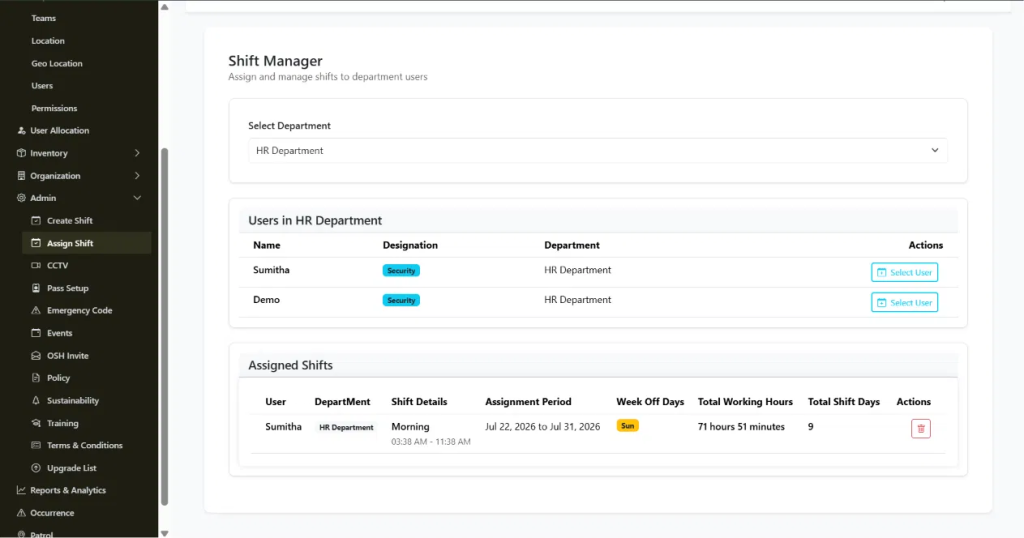
Pick the department. Pick the shift. Assign it to the officer for your chosen period. Set Week Off Days here too.
Step 4: Rotate officers on your cadence.
Rotation doesn’t happen on its own. You go back to Assign Shift, delete the old assignment, create a new one for a different shift template. Weekly? Two weeks? That’s your call. Just stick to it.
Step 5: Check the Dashboard before shifts start.
The Dashboard shows how many people you’ve got total, who’s online, who’s offline. It’s a quick way to verify the rotation actually updated before anyone shows up for work.
What Each Setting Actually Controls
Create Shift handles Shift Name, Start Time, End Time, Break Hours, Status and the automatic Working Hours calculation. Three rows for three shifts.
Assign Shift handles department, shift template, Assignment Period, Week Off Days, Total Working Hours, Total Shift Days.
Know what these do. That’s the difference between a rotation that works and one you rebuild in three months.
Best Practices for Running a 3 Shift Duty Roster That Actually Prevent Problems
Build all three templates first. Set up Morning and Night, then add Afternoon later and you’ll create gaps nobody sees coming.
Check timing every time you change something. Takes 30 seconds. Prevents client complaints.
Don’t put officers on night shifts for more than three or four in a row. This is policy, not a system setting. Officers who get predictable breaks from nights make fewer mistakes and don’t quit.
Update assignments a day or two before they start. Gives you time to catch mistakes before the shift begins.
3 Shift Duty Roster Mistakes Worth Avoiding From the Start
Timing gaps between shifts. Leaving an old assignment active when you rotate someone, which creates duplicate records. Moving someone from Night straight into Morning without a break. Talking about a rotation plan in a meeting and then not actually entering it into Assign Shift.
These aren’t subtle. You just need to watch for them.
Frequently Asked Questions
What is a 3 shift duty roster?
It’s three 8-hour shifts instead of two 12-hour ones. Morning, Afternoon, Night. Keeps people awake. Costs more, requires more handovers.
How do you build a duty roster for 3 shift coverage in AVES?
Make three shift templates in Create Shift. Assign officers to them in Assign Shift. Rotate them on whatever schedule you pick.
Does AVES automatically rotate officers through a night duty roster?
Nope. You do it manually in Assign Shift each time you change the rotation.
How do you avoid gaps in a shift wise duty roster?
Check that each shift ends exactly when the next one starts. Do this every time you make changes.
How often should officers rotate through night shifts?
Three or four nights in a row max. Then rotate them out. Keep it predictable.
Can I see who is currently assigned to which shift at a glance? The Assign Shift screen shows it by department. The Dashboard shows online and offline counts.
Where a 3 Shift Duty Roster Leaves You
A 3 shift duty roster solves the problem that made you look for help. It’s straightforward once you know which two screens to use. The common mistakes are all preventable.
AVES keeps everything in one place instead of scattered across spreadsheets. Update a rotation and it’s live everywhere immediately.
Want to see how AVES actually does this? Check out avessecurity.com.