Category: Uncategorized

  • First Aid Checklists: From Fatal Gaps to Guard-Ready Kits

    First Aid Checklists: From Fatal Gaps to Guard-Ready Kits

    You already suspect the first aid kit at your site isn’t what it should be.

    Maybe nobody’s checked it in months. Maybe the last audit flagged something and it never got fixed. Or maybe you inherited this whole process from someone else and honestly don’t know what “good” is supposed to look like here.

    Listen to that feeling. A first aid checklist can look handled for a long time right up until the moment it isn’t. When that moment arrives, the cost isn’t a fine or a bad review. It’s someone standing over an empty shelf while an actual emergency is happening.

    So here’s what this guide covers: what a working first aid checklist actually needs, where sites quietly get it wrong without noticing and how to build a process you can trust that doesn’t turn into one more compliance chore nobody owns.

    Why This Feels Harder Than It Should

    If you run a security team, a facility, or several sites, you already know the theory here. Keep the kit stocked. Check it on a schedule. Log what’s missing.

    None of that theory is the actual problem, though. The real issue is that a first aid checklist sits near the bottom of a long list of things marked urgent. Urgent almost never includes a kit that hasn’t failed anyone yet.

    So it gets checked once, filed away and quietly drifts out of date. Nobody decides to let that happen on purpose. It just happens, the same way a duty roster stops matching who’s actually on shift, or a key register stops matching who actually has the keys in hand.

    You’re not here for a lecture about why safety matters. You already know that part. What you want is a process that survives you being busy.

    What a First Aid Checklist Is Actually For

    Strip it down and a first aid checklist exists to answer exactly one question with certainty: if someone reaches for this kit right now, is what they need actually sitting inside it?

    Sounds obvious enough. In practice, though, most checklists end up answering a different question entirely. They confirm a checklist exists somewhere. They don’t confirm the kit still matches it.

    That gap matters more than it looks. “First aid supplies present” tells you nothing useful when you’re staring at an empty box. A line that names bandages, antiseptic, gauze and gloves tells you exactly what belongs there. Just as importantly, it tells you exactly what’s gone missing.

    If your current checklist reads like a formality rather than a real check, that’s your first sign it needs rebuilding, not just re-laminating.

    The Doubts You’re Probably Carrying

    Before you spend time fixing any of this, you’re probably running through a few honest questions in your head. Worth addressing them directly rather than dancing around them.

    Is this actually worth the effort, or am I overreacting to one bad audit?

    If a kit has ever come up short exactly when someone needed it, even once, the effort’s already justified. A five-minute weekly check costs almost nothing next to what the alternative costs.

    What if I build a new process and nobody follows it either?

    Fair worry and a real one. A checklist without an owner tends to fail quietly. Give one specific person one specific kit on a schedule they actually keep though and it tends to survive.

    Isn’t there a simpler way to do this without buying software I don’t need?

    Paper works fine as long as ownership and schedule are both solid. Software mostly helps with visibility once you’re managing more than one department or site. Don’t buy a tool to solve what’s really a discipline problem.

    What if my site’s too small for this to matter?

    Site size changes the scale of the problem, not whether it exists. A two-person front desk needs the same certainty about its kit as a fifty-guard facility does. The checklist just ends up shorter.

    What Belongs in a Real First Aid Checklist

    Strip away the generic templates floating around online and a first aid checklist people actually trust tends to come down to a handful of specific choices.

    Name the exact items, not a category. “Bandages, antiseptic, gauze, gloves, burn cream” beats a vague line like “first aid supplies” every single time. Specific items get checked one by one. Vague categories get assumed and skipped.

    Scope it to the department or post, not the whole site at once. A loading dock and a reception desk don’t need matching kits. One site-wide checklist tends to hide the exact gaps that matter most in whichever area actually needs a different kit.

    Give it somewhere to record what’s missing, not only what’s present. A checklist that only ever tracks success can’t point anyone toward the gap. The missing-item column is the part that actually earns its keep.

    Assign it to one named person, not a team. A checklist that belongs to “the team” ends up belonging to no one. One that belongs to a specific shift supervisor gets checked.

    Where Sites Get This Wrong Without Realizing It

    Here’s the pattern that shows up most often. It rarely comes from carelessness.

    A first aid checklist gets built for compliance purposes. An auditor asks for one, or a client requires it, so someone writes it up and files it away. Nobody ever pairs it with an actual physical count of what’s sitting in the kit.

    From that point forward, the checklist and the kit quietly drift apart. The checklist keeps saying the kit’s fine, because that’s what it said last time around. Meanwhile the kit itself hasn’t been opened in weeks.

    This isn’t really a training problem. It’s a design problem. The checklist got built to satisfy a requirement rather than to reflect reality. Those turn out to be two very different documents that happen to look identical on paper.

    Fixing it doesn’t mean writing a stricter checklist. It means tying the checklist to an actual, scheduled, physical check, with one person’s name attached to that check.

    From Paper to a Digital First Aid Report

    Once ownership and specificity are locked in, the next honest question is whether paper itself is what’s holding things back.

    Paper works just fine for a single site with a simple kit. It starts to strain once you’re managing several departments, several locations, or a team where supervisors rotate often enough that “who actually checked this” gets fuzzy fast.

    A digital first aid report solves a narrow problem and solves it well. It keeps a running record of what each department’s kit is supposed to hold. It also lets a supervisor open, edit or update that record the second something changes rather than hunting down a physical sheet to cross an item out.

    Worth being direct about what this does and doesn’t do right now. A digital first aid report inside AVES lets you build a department-level list of items and review or edit it whenever needed. It doesn’t currently track expiry dates or exact quantities on hand. If your site genuinely needs that level of detail, you’ll still be checking those specifics by hand for the time being. That’s worth knowing up front rather than discovering it later.

    That kind of honesty matters more than padding out a feature list. A tool that does a few things reliably beats one that promises everything and quietly delivers half of it.

    What Success Actually Looks Like

    Six months out, a working first aid checklist process looks almost unremarkable. That’s actually the point of it.

    Each department carries its own list, naming specific items rather than vague ones. One named person reviews it on a fixed schedule. Whenever something goes missing, it gets logged and replaced instead of just noticed and quietly forgotten.

    Nobody’s scrambling before an audit, because there’s nothing left to scramble for. The record already matches the kit, since checking it was never treated as optional in the first place. It’s the same discipline that keeps a site’s shift logbook trustworthy instead of decorative.

    That’s a lower bar than it sounds like and it’s completely achievable without any major overhaul. All it takes is a specific list, a specific owner and a specific schedule. Everything past that is just detail.

    Getting Started This Week

    You don’t need to fix every site at once. Pick one department, ideally the one you trust least right now. Work through three things.

    Write out exactly what the kit should hold, item by item. Assign one person to check it against the real kit this week. Set a repeat reminder for the next check before you consider this one closed.

    If that single department stays accurate for a month, roll the same process out to the next one. That’s how a reliable first aid checklist actually gets built over time, one department at a time, rather than through a single sweeping policy nobody bothers reading twice.

    If you’re juggling this across multiple departments or sites and paper’s starting to slip, AVES’s Admin First Aid module gives each department its own reviewable report instead of a scattered pile of clipboards. It won’t track expiry or quantity for you yet, but it will tell you, honestly, which departments have an up-to-date list and which ones don’t.

    Want to see what a documented first aid checklist actually looks like in practice? Book a walkthrough and we’ll show you.

    CONTACT US

    Website : https://www.avessecurity.com

    Linkedin: https://www.linkedin.com/company/aves-security-management-system/

    Instagram: https://www.instagram.com/avessecurity/

    How often should a first aid kit actually be checked?

    Weekly works for most sites. High-traffic areas or departments with frequent incidents may need a faster cycle. What matters more than the exact interval is that the same person checks it on the same schedule every time, rather than “whenever someone remembers.”

    Who should be responsible for checking the kit, a team or one person?

    One named person, always. A checklist assigned to “the team” or “whoever’s on shift” tends to fail quietly, because everyone assumes someone else already did it. A specific name attached to a specific kit is what actually gets checked.

    Does every department need its own separate first aid checklist?

    Yes, if departments genuinely differ in risk or layout. A loading dock and a front desk don’t need identical kits and a single site-wide checklist tends to hide exactly the gaps that matter most in whichever area needs something different.

    How do we roll this out without overhauling every site at once?

    Start with one department, ideally the one you trust least right now. List exactly what the kit should hold, assign one person to check it against the real kit this week and set a repeat reminder for the next check. Once that department stays accurate for a month, move to the next one.
  • Security Daily Activity Report Template: A Copy-Ready Format With a Worked Example

    Security Daily Activity Report Template: A Copy-Ready Format With a Worked Example

    By Nithish, AVES Security

    If you already know what a daily activity report is and why the format matters, this is the next step: a copy-ready template you can hand a guard tonight, plus a filled-in example so nobody has to guess what “good” looks like.

    The template below is deliberately short. A one-page report that gets filled in the same way every shift beats a three-page one that gets rushed in the last ten minutes. Copy it, adapt the labels to your site, and keep the section order the same across every guard so a month of reports reads as one comparable record instead of five different styles.

    The copy-ready security daily activity report template

    Use these six sections, in this order. Each line is a field the guard fills in as the shift happens, not a paragraph written from memory at the end.

    • 1. Shift and site details – guard name, site/post, date, shift start and end time.
    • 2. Equipment and access checks – radio, keys and access cards issued and returned; doors, gates and cameras checked at start and end.
    • 3. Patrol log – each patrol with its time and route; note any checkpoint missed and why.
    • 4. Visitor and vehicle activity – who arrived and left, when, and purpose; deliveries received.
    • 5. Flagged items and incidents – anything unusual with a timestamp; reference the occurrence log or incident report entry rather than repeating it.
    • 6. Handover notes – site status at end of shift and anything the next guard needs, kept separate from the pre-shift briefing.

    A worked example: one filled-in shift

    Here is the same template completed for a quiet night shift, so the level of detail is clear. A quiet shift still needs a full report – it is the proof that nothing went wrong, which is exactly what a client wants confirmed.

    • Shift and site – J. Okafor, North Gate post, 18:00 – 06:00.
    • Equipment – Radio #4 and 2 keys issued at 18:00, returned 06:00. Gate camera, both doors and barrier checked, all working.
    • Patrols – 19:15 full perimeter, complete. 22:40 full perimeter, complete. 02:10 perimeter, west gate checkpoint skipped (contractor van parked across it), logged and rerun at 02:35.
    • Visitors and vehicles – 20:05 delivery van, dock 2, signed out 20:20. 23:50 client staff badge #112 in, out 00:30.
    • Flagged items – 02:10 west gate access blocked by parked van; see occurrence log entry 0210. No incidents otherwise.
    • Handover – Site secure at 06:00. Flag to day shift: contractor parking near west gate is recurring, worth a note to the client.

    Notice what the example does that memory cannot: every entry carries a time, the one skipped checkpoint is logged rather than hidden, and the flagged item points to a separate record instead of retelling it. That is the difference between a template that documents and one that just fills space.

    Paper works until someone needs to search it

    A handwritten log is fine right up until you need to answer a specific question has this gate had trouble before, has this visitor come by more than once. Flipping through three weeks of notebooks to find that isn’t really realistic. A well-kept security daily activity report is realistic when the report is timestamped and searchable by default, because the format’s built into the system rather than left up to whoever’s on shift that night. Guidance from the National Association of Security Companies makes a similar point: consistent, retrievable documentation is what separates a defensible security program from a paper trail nobody can actually use.

    That consistency is also what makes it possible to hand a report to a client without cleaning it up first. If the format doesn’t change, they don’t need a translation this week’s report reads the same as last month’s.

    It ties everything else together

    A security daily activity report doesn’t replace the rest of your shift paperwork it’s the thing that connects it. It picks up where the briefing left off, feeds into the handover checklist at the end of the night and gives auditors the same kind of clean, comparable record the shift template is meant to produce day to day. Get the format settled once and every shift after it gets a little easier to write and a lot easier to trust.

    Frequently Asked Questions

    What is the difference between a blank template and a filled-in one?
    The blank template sets the fields and their order; the filled-in example shows the level of detail each field needs. Give guards both – the blank to fill in, the example as the standard to match.

    Should the template be the same for every site?
    Keep the six sections and their order fixed so reports stay comparable across sites; only adapt the labels inside a section (post names, which gates, which equipment) to each site.

    Do we still need this template if we log digitally?
    Yes – the template is the structure, whether on paper or in an app. A digital system just enforces it automatically, timestamping each field so a completed round and a skipped one no longer look the same. See how the daily activity report format holds up either way.

    If you want to see this template assembled automatically from patrols, visitor logs and incidents as the shift happens – instead of typed up afterward – you can request a demo at avessecurity.com and walk through it with your own sites in mind.

  • How to Set Up a 3 Shift Duty Roster in AVES (Step-by-Step)

    How to Set Up a 3 Shift Duty Roster in AVES (Step-by-Step)

    Your 2-shift system is breaking. You know it. Your team knows it. The only question is when you’re going to actually do something about it.

    One of your officers is permanently wrecked from pulling nights. Handovers are a mess. And you’ve got this nagging feeling that someone’s going to miss something important because they’re too tired to think straight.

    Here’s the thing: that feeling’s justified. But you’re not stuck with it. A 3 shift duty roster handles this exact problem. Once you walk through how it actually works in your system, it stops looking complicated.

    Why a 2-Shift Roster Eventually Breaks (and Why a 3 Shift Duty Roster Fixes It)

    Two 12-hour shifts look perfect when you’re building them. The numbers work. You save money. Two handovers a day instead of three.

    Then your people start falling apart.

    Twelve hours is too long. Add a graveyard shift and it gets worse. Your officers can’t stay sharp that long no matter how hard they try. This isn’t laziness or a character problem. It’s just how human bodies work. You can’t willpower your way out of it.

    A 3 shift duty roster cuts each shift to 8 hours. Your officers stay alert. They make better decisions. The cost is more staff and three handovers instead of two. Both are doable once you know what to expect.

    How a 3 Shift Duty Roster Actually Gets Built in AVES

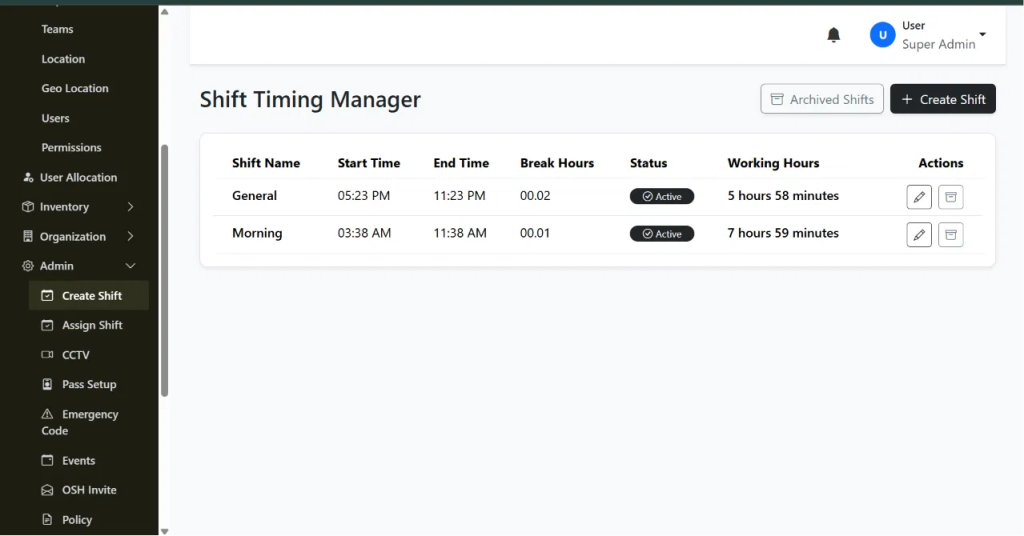
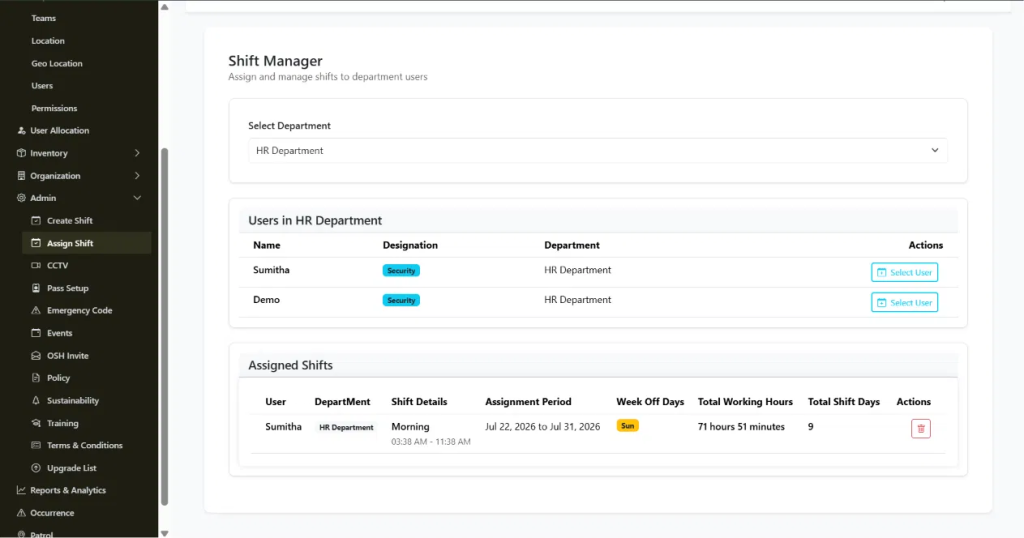
    Two screens run this. Both are under Admin. Create Shift builds your three shift templates. Assign Shift puts your people into those shifts.

    Step 1: Define three separate shift templates.

    Go to Create Shift and make three rows. Morning, Afternoon, Night. Each gets a Shift Name, Start Time, End Time, Break Hours. Working Hours fills in automatically.

    So you’re making three entries instead of one or two. Flip each to Active when you’re done.

    Step 2: Confirm timing doesn’t overlap or leave gaps.

    Check that Morning ends when Afternoon starts. Check that Afternoon ends when Night starts. A 30-minute gap looks harmless until a client asks who was covering at 2:15 PM and nobody was there.

    Step 3: Assign officers to shift templates in Assign Shift.

    Pick the department. Pick the shift. Assign it to the officer for your chosen period. Set Week Off Days here too.

    Step 4: Rotate officers on your cadence.

    Rotation doesn’t happen on its own. You go back to Assign Shift, delete the old assignment, create a new one for a different shift template. Weekly? Two weeks? That’s your call. Just stick to it.

    Step 5: Check the Dashboard before shifts start.

    The Dashboard shows how many people you’ve got total, who’s online, who’s offline. It’s a quick way to verify the rotation actually updated before anyone shows up for work.

    What Each Setting Actually Controls

    Create Shift handles Shift Name, Start Time, End Time, Break Hours, Status and the automatic Working Hours calculation. Three rows for three shifts.

    Assign Shift handles department, shift template, Assignment Period, Week Off Days, Total Working Hours, Total Shift Days.

    Know what these do. That’s the difference between a rotation that works and one you rebuild in three months.

    Best Practices for Running a 3 Shift Duty Roster That Actually Prevent Problems

    Build all three templates first. Set up Morning and Night, then add Afternoon later and you’ll create gaps nobody sees coming.

    Check timing every time you change something. Takes 30 seconds. Prevents client complaints.

    Don’t put officers on night shifts for more than three or four in a row. This is policy, not a system setting. Officers who get predictable breaks from nights make fewer mistakes and don’t quit.

    Update assignments a day or two before they start. Gives you time to catch mistakes before the shift begins.

    3 Shift Duty Roster Mistakes Worth Avoiding From the Start

    Timing gaps between shifts. Leaving an old assignment active when you rotate someone, which creates duplicate records. Moving someone from Night straight into Morning without a break. Talking about a rotation plan in a meeting and then not actually entering it into Assign Shift.

    These aren’t subtle. You just need to watch for them.

    Frequently Asked Questions

    What is a 3 shift duty roster?

    It’s three 8-hour shifts instead of two 12-hour ones. Morning, Afternoon, Night. Keeps people awake. Costs more, requires more handovers.

    How do you build a duty roster for 3 shift coverage in AVES?

    Make three shift templates in Create Shift. Assign officers to them in Assign Shift. Rotate them on whatever schedule you pick.

    Does AVES automatically rotate officers through a night duty roster?

    Nope. You do it manually in Assign Shift each time you change the rotation.

    How do you avoid gaps in a shift wise duty roster?

    Check that each shift ends exactly when the next one starts. Do this every time you make changes.

    How often should officers rotate through night shifts?

    Three or four nights in a row max. Then rotate them out. Keep it predictable.

    Can I see who is currently assigned to which shift at a glance? The Assign Shift screen shows it by department. The Dashboard shows online and offline counts.

    Where a 3 Shift Duty Roster Leaves You

    A 3 shift duty roster solves the problem that made you look for help. It’s straightforward once you know which two screens to use. The common mistakes are all preventable.

    AVES keeps everything in one place instead of scattered across spreadsheets. Update a rotation and it’s live everywhere immediately.

    Want to see how AVES actually does this? Check out avessecurity.com.

    CONTACT US

    Website : https://www.avessecurity.com

    Linkedin: https://www.linkedin.com/company/aves-security-management-system/

    Instagram: https://www.instagram.com/avessecurity/

  • Fire Drill and Safety Drill Management: Scheduling, Records and Compliance Proof

    Fire Drill and Safety Drill Management: Scheduling, Records and Compliance Proof

    Every site runs fire drills. Almost none of them can prove who attended.

    That gap doesn’t show up on a normal day. It shows up the moment an auditor, an insurer or an incident investigator asks a simple question: who was present at the last fire drill and at what time did they arrive? If the honest answer involves a clipboard, a pen and someone’s best guess, you don’t have a compliance record you have a claim.

    AVES Security was built to close that gap. Here’s how fire drill and safety drill management actually works when it’s treated as a tracked event instead of a paperwork exercise.

    The Problem With a Sign-In Sheet at a Fire Drill

    Picture the usual fire drill routine. It happens on the 14th. Someone scribbles a topic on a form. A clipboard makes its way around the assembly point.

    It comes back with twenty-two signatures and no way to tell which ones the named person actually wrote. A few colleagues signed for each other because they were “just outside.” One signature is illegible. Nobody logged arrival times, so there’s no way to say whether the evacuation took four minutes or fourteen.

    None of that is malicious. It’s just what happens when attendance depends on a pen and goodwill instead of a system. And it’s exactly the weak point that surfaces during an audit, a claims review or a post-incident inquiry the moment your fire drill records matter most.

    Two Ideas AVES Keeps Separate

    Before getting into the workflow, it helps to understand a distinction AVES makes from day one: Drill Codes versus Drills.

    Drill Codes are your reusable emergency code catalogue things like “CODE RED fire” or “CODE BLUE medical emergency.” Each code carries standard summary lines describing what it means and what people should do. You configure these once and they stay as reference data.

    Drills are the actual scheduled events. A drill pulls a code from that catalogue and attaches the specifics topic, venue, shift, date and time. The drill is what gets a report number, a QR code and a live attendance roster.

    The payoff is consistency. Whichever supervisor schedules a CODE RED drill, the response instructions come from the shared catalogue, not from whatever they happened to type that morning. Every site, every quarter, same instructions.

    How a Drill Gets Verified, Start to Finish

    1. The groundwork is already there before your first fire drill. If you’re running shifts, Security Passes and staff rosters in AVES, you’re set. Drills reuse your existing shift assignments instead of asking you to build a separate participant list for every single exercise. A Security Pass matters here too it’s what gets scanned for supervisor-led roll call.

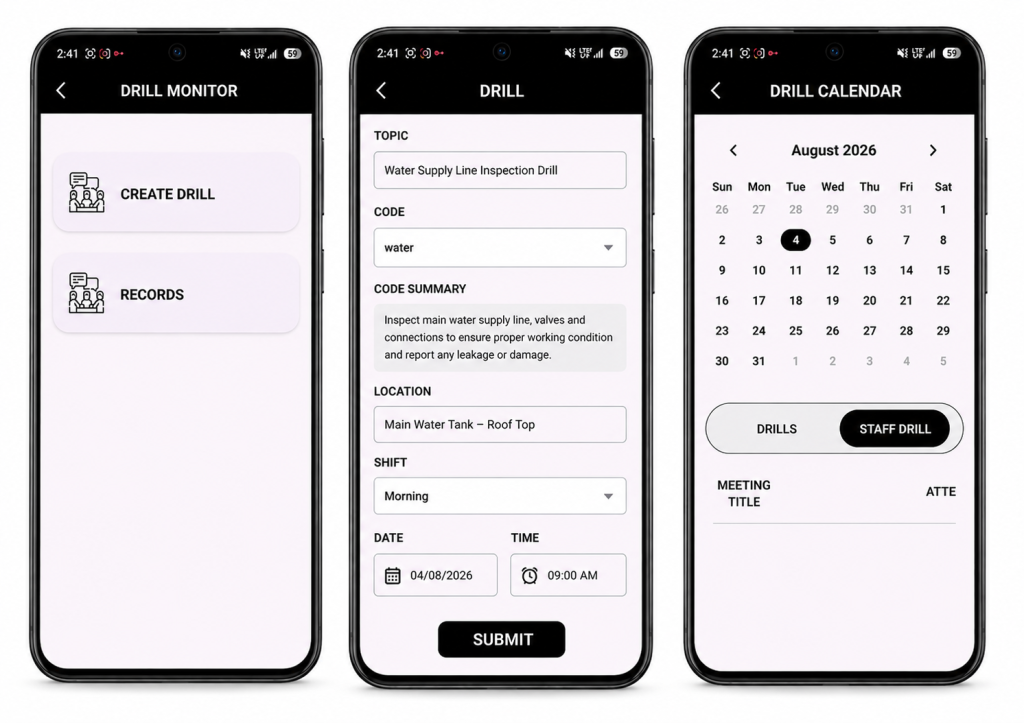
    2. Scheduling a fire drill takes under a minute. From the Drill Monitor, a supervisor fills in the topic, picks a code from the dropdown the official summary auto-fills and locks, so nobody can edit the response instructions on the fly then sets the location, shift and time.

    On save, AVES automatically:

    • Assigns a sequential report number (DRILL-001, DRILL-002 and so on), so a gap in the sequence is immediately visible
    • Generates a unique QR code for that drill
    • Notifies every staff member on the selected shift
    • Locks the record’s core fields so nothing can be quietly rewritten later

    3. The fire drill reaches exactly the right people. This is where AVES departs from a generic calendar invite: the shift is the audience. You don’t hand-build a list you pick a shift and everyone rostered to it sees the drill and gets notified. Nobody else does. Your night team stops getting pinged about day-shift exercises, which is the fastest route to notification fatigue and ignored alerts. The trade-off is worth knowing: a staff member with no shift assignment won’t see anything. If someone says a drill never reached them, check their roster first that’s the answer nearly every time.

    4. Staff confirm availability and can change their mind. Each person responds Yes, No or Maybe and can update that answer right up until the drill, whether that’s a shift swap, a late callout or a change of plans. AVES keeps them in exactly one group at a time, so the headcount supervisors see is always current. Supervisors get a grouped view names, departments, designations showing expected turnout before the drill even starts.

    5. Attendance at every fire drill is verified by QR scan, not by pen. This is the step that actually converts a fire drill claim into evidence. AVES supports two check-in modes, and most sites run both together:

    • Self check-in staff scan the drill’s QR code at the assembly point. AVES identifies them from their own authenticated session, not from anything they typed and timestamps the arrival automatically.
    • Supervisor roll call a supervisor scans each person’s Security Pass. Every scan marks that specific person and a supervisor can never accidentally mark themselves while scanning someone else.

    Three rules hold on every single scan:

    • You can’t check in someone who isn’t registered on that drill
    • You can’t scan the same person twice
    • The arrival time is written by the server the moment of the scan never typed in afterward

    And if someone answered “No” but shows up anyway (which happens far more often than you’d expect), the scan moves them straight into the attended group. The record reflects what actually happened on the ground, not what people predicted three days earlier.

    6. Close it out and export a real record. Once the drill wraps, a supervisor sets its status Complete, Cancel or Postpone and adds remarks on what went well and what needs work before the next one. AVES logs who closed it and when.

    Then it exports as a first-class report: PDF or Excel, filterable by date range, status, department, location, team or individual. What comes out isn’t a photo of a clipboard it’s a numbered record with a topic, code, venue, shift, scheduled time, full response roster, timestamped attendance and outcome notes. That’s the document you actually hand to an auditor.

    Sign-In Sheet vs. AVES, Side by Side

    CategorySignature SheetAVES
    Who gets notifiedWhoever saw the noticeboardEvery rostered shift member, automatically
    Expected turnoutUnknown until the dayKnown in advance via Yes/No/Maybe
    Proof of presenceA signature, signable by anyoneQR scan tied to an authenticated identity
    Arrival timeRarely capturedTimestamped server-side, per person
    Duplicate entriesCommonAutomatically rejected
    Record integrityEditable with a penReport number and identity fields locked by the system
    RetrievalA folder, eventuallyFiltered PDF or Excel in seconds

    Control Over Who Can Do What

    Drill management sits under a dedicated Drilling & Safety permission, split into three levels View, Create and Update so an entire shift can respond and check in without ever being able to schedule a drill, while supervisors get Update access for roll call. The emergency code catalogue is governed separately, so managing codes is its own grant, not bundled in with running drills. And every organisation’s drill data lives in its own isolated database one tenant never sees another’s records.

    A Drill Is Only as Good as the Evidence It Leaves Behind

    Fire and safety drills are one of the few compliance activities where proving the activity happened is harder than running it in the first place. AVES closes that gap end to end: schedule to a shift, notify the right people automatically, verify every arrival by scan and export a record that actually holds up.

    Ready to see it in action? Book a demo of AVES Security Management today.

    What is a mock fire drill?

    A mock fire drill is a simulated emergency exercise that tests how staff respond and evacuate without an actual fire. It checks response time, headcount accuracy and whether people know the evacuation route the same purpose as any safety mock drill, run under controlled conditions.

    How often should a fire drill be conducted?

    Most compliance frameworks require a fire drill at regular intervals commonly quarterly or twice a year, depending on the site and local regulation. AVES lets you schedule each fire drill to a specific shift so the frequency stays consistent across every team, not just the ones that happen to be on-site that day.

    What’s the difference between a fire drill and an evacuation drill?

    In practice, the terms are often used interchangeably. A fire drill is technically a fire-specific safety drill, while an evacuation drill can cover any emergency that requires clearing a building — fire, gas leak, bomb threat and so on. AVES handles both the same way: schedule against an emergency code, notify the right shift and verify attendance by QR scan.

    How do you track attendance at a fire drill?

    The reliable way is a scan, not a signature. AVES verifies fire drill safety compliance by having staff scan the drill’s QR code themselves or having a supervisor scan each person’s Security Pass during roll call. Every scan is timestamped server-side, so there’s no way to sign in for someone else or backdate an arrival time.

    Why is fire drill safety documentation important for audits?

    Auditors and insurers don’t just want to know a fire drill happened they want proof of who attended, when they arrived and what was covered. A signature sheet can’t verify any of that. AVES exports each fire drill as a numbered, timestamped record with a full attendance roster, so the documentation holds up under review.

    Can a safety mock drill be scheduled for a specific team only?

    Yes. Every fire drill in AVES targets a shift, not the whole organisation, so only the staff rostered to that shift get notified and can respond. This keeps the safety mock drill relevant to the people actually meant to take part, without spamming teams who aren’t on that shift.


    CONTACT US

    Website : https://www.avessecurity.com

    Linkedin: https://www.linkedin.com/company/aves-security-management-system/

    Instagram: https://www.instagram.com/avessecurity/

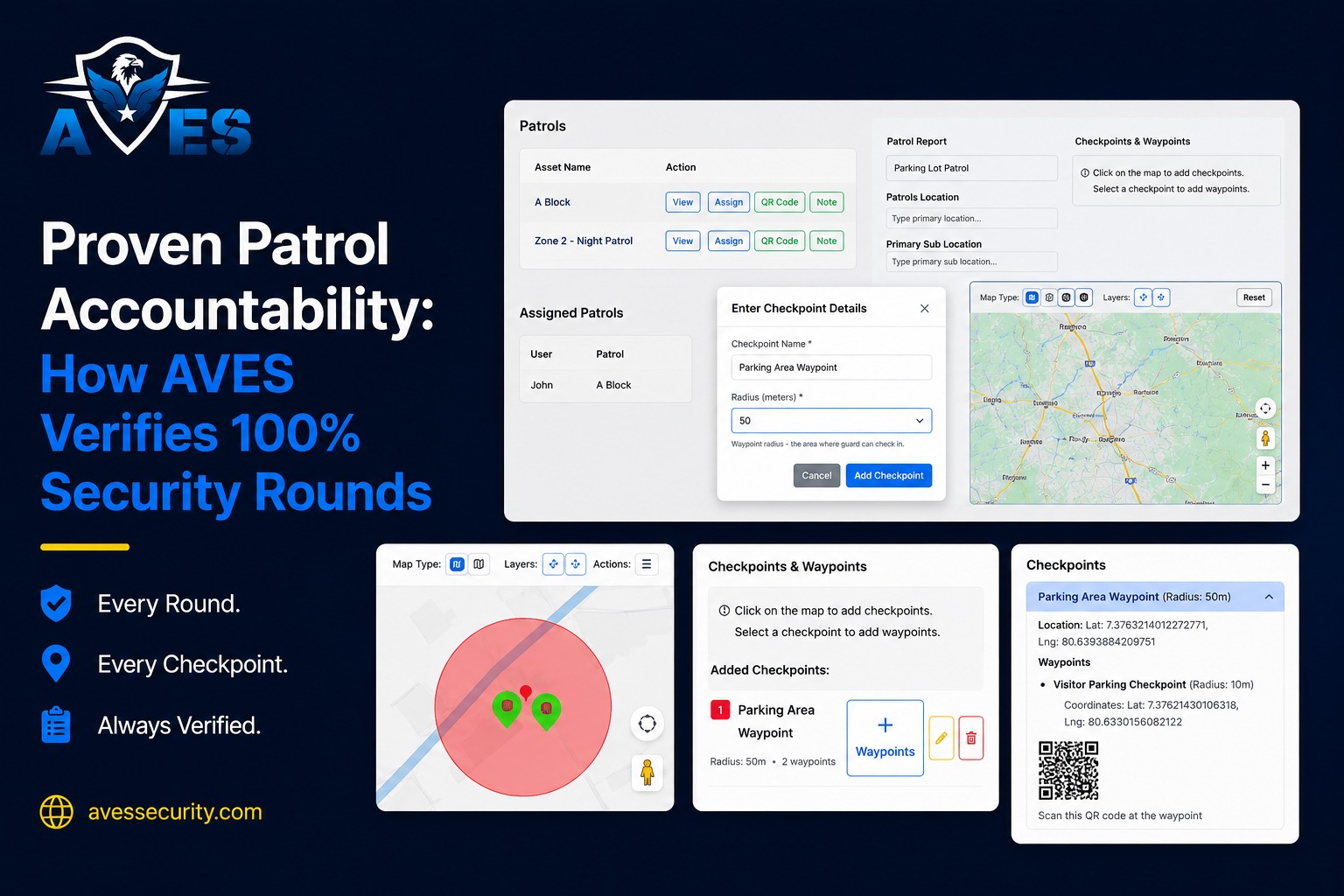
  • Proven Patrol Accountability: How AVES Verifies 100% Security Rounds

    Proven Patrol Accountability: How AVES Verifies 100% Security Rounds

    Most patrol reports are fiction. Not lies, exactly — more like educated guesses with a timestamp stapled on. A paper checklist can get filled out from the break room just as easily as from the actual checkpoint and a guard’s word at 3am is only as reliable as whatever they remember by the time someone asks.

    You hired guards to walk the property every hour. You paid for it. You trusted the reports.

    Then something happened during the one patrol that never actually took place. A door left unlocked. A fire exit blocked. A break-in that lasted just long enough because nobody was checking that corner of the lot that night.

    If you run security operations, you know this fear. It’s not the loud, dramatic kind. It’s the quiet one that shows up around midnight: did that patrol actually happen, or did someone just say it did?

    You’re not being paranoid. You’re being realistic. Let’s talk about why this keeps happening and what actually fixes it.

    Why One Missed Patrol Can Cost Millions

    A skipped round almost never feels like a big deal in the moment. A guard’s tired. The shift is short-staffed. A checkpoint gets skipped because “nothing ever happens over there.”

    Then one day something does happen over there.

    Insurance claims tied to security negligence regularly climb into six and seven figures once you add legal fees, settlements, reputational damage. A warehouse fire spreads because a patrol missed a smoldering electrical panel. A parking structure assault happens during the exact forty minutes a guard decided to skip.

    Notice the pattern. Nobody planned for the failure. It happened because a paper log or a verbal “all clear” said everything was fine when it wasn’t.

    This is why companies start hunting for security guard management software in the first place. Not because they’re chasing new tech for the sake of it — because they got burned once, or they’re terrified of getting burned and they never want to explain a preventable loss to a client or a board again.

    The Trust Gap Nobody Talks About

    Most security companies don’t actually have a guard problem. They have a visibility problem.

    You can’t manage what you can’t verify. For decades, patrol verification meant a paper checklist that could be filled out anywhere, or a guard’s word, taken on faith. Neither one holds up when a client calls after an incident and asks you to prove what happened.

    It’s a bit like a fitness tracker that only works if you trust the person wearing it to be honest about their steps. A guard log is the same idea. If it can be filled in after the fact, or from somewhere other than the actual checkpoint, it’s not really a record. It’s a guess wearing a uniform.

    A real guard management platform earns its keep here — not by replacing your guards, but by giving you undeniable proof of where they were during every patrol when and what they checked.

    If your current system can’t answer those three questions in seconds, you already know the gap exists. You’ve probably felt it during a tense phone call with a client, trying to piece together what actually happened three nights ago while they wait on the line.

    What Buyers Get Wrong When Evaluating Options

    Most first-time buyers make the same mistake. They shop for features instead of patrol proof.

    They compare dashboards, mobile apps, price sheets. Then they sign with a system that looks great in a demo but has no real way to stop a guard from faking a patrol scan.

    A few traps show up again and again.

    Assuming GPS alone is enough

    GPS tells you a phone was near a location. It doesn’t confirm anyone actually touched or scanned a patrol checkpoint — a phone sitting in a truck cupholder can “prove” a location without a guard ever stepping outside.

    Ignoring offline scenarios

    Basements, parking structures, rural site signal drops constantly in these places. If the system can’t log a patrol scan offline and sync it later, you end up with gaps exactly where incidents are most likely.

    Skipping the audit trail question

    Ask any vendor point blank: can a guard or a manager edit a completed patrol round after the fact? If yes, what you’re buying isn’t verification. It’s just a nicer-looking paper log.

    Underestimating implementation time

    Some platforms take weeks of retraining before anyone trusts them. Others get a guard fully operational within a single shift.

    Buyers who dodge these traps end up with something that actually protects them. Buyers who don’t end up back where they started, just paying more for it.

    How AVES Verifies 100% Rounds

    AVES was built around one uncomfortable idea: if a patrol round can’t be proven, it didn’t happen. Not in any way that protects you legally or operationally, anyway.

    Here’s what that looks like day to day.

    Guards physically tap or scan a checkpoint using NFC or QR codes during every patrol there’s no way to log one from across the lot or from the break room, unlike a paper sheet or a lazy GPS ping.

    Supervisors watch patrol routes happen in real time instead of reading about them hours later in a summary report. If a guard falls behind or skips a section, the system flags it right away, not after something’s already gone wrong.

    The design is offline-first, so scans still get recorded in low-signal areas and sync automatically once connectivity comes back. No blind spots, even in basements or remote lots where cell service just disappears.

    Timestamps are tamper-proof. Once a patrol round is logged, nobody quietly edits it later. The record you hand a client or an insurance adjuster is the same record created in the moment the patrol actually happened.

    And when a patrol checkpoint gets missed, alerts go out within minutes not buried at the end of a weekly review nobody reads closely.

    That’s what a modern guard management platform should actually deliver. Not a scheduling calendar wearing a security label, but a real, defensible chain of proof for every round, every shift, every site.

    What This Actually Costs You (And What It Saves)

    Being honest here matters more than being persuasive.

    A serious guard management solution isn’t free and it shouldn’t be. You’re paying for infrastructure, checkpoint hardware, training, ongoing support. Expect a monthly per-guard or per-site cost — not a one-time fee you pay and forget about.

    Now weigh that against the real number. One lawsuit tied to a missed round can wipe out years of software savings in a single settlement. Losing a client contract because you couldn’t produce proof of coverage costs more than any subscription ever will.

    The math almost always favors the platform once you stop treating it as an expense and start treating it as insurance you can actually control.

    Making the Decision With Confidence

    You don’t need to overhaul the whole operation overnight. Most companies start with their highest-risk sites — the ones where an incident would hurt most — then expand once the team gets comfortable with the new routine.

    What you need is a system that turns “we think the round happened” into “here’s the timestamped proof it happened.”

    That’s really the whole difference between managing security and actually verifying it.

    If you’ve been quietly dreading the day a client asks you to prove a patrol took place, that dread is exactly why you should make this change now, before an incident forces the decision for you.

    AVES exists for that moment. Not to sell you software — to give you the patrol proof you already wish you had.

    Contact Us: www.avessecurity.com

    https://www.asisonline.org

    What is a guard patrol verification system?

    A guard patrol verification system is a way to make sure security patrols actually happened. Guards use their devices to scan things at checkpoints so we know they were really there. This creates a record that says when and where they were and supervisors can check it away.

    How does AVES make sure every patrol round is done?

    AVES needs guards to scan things at every checkpoint. When they do it makes a record with the time and place so supervisors can see what is going on. This helps us know that patrols are really happening.

    What is the difference between using GPS and scanning checkpoints?

    GPS just shows where a device is. It does not mean the guard really checked the place. Scanning a checkpoint means the guard had to go so we know they really did their job.

    Is AVES good for security teams with many sites?

    Yes. AVES can handle sites and many guards. Supervisors can use one place to monitor everything and get reports no matter how sites they have.

    Why should security companies use patrol verification software, like AVES?

    Using patrol verification software like AVES helps security companies do their job better. It makes sure guards are doing their patrols and it helps prevent things from happening. It also makes it easier to show that we are doing our job, which helps us keep our clients happy and safe.

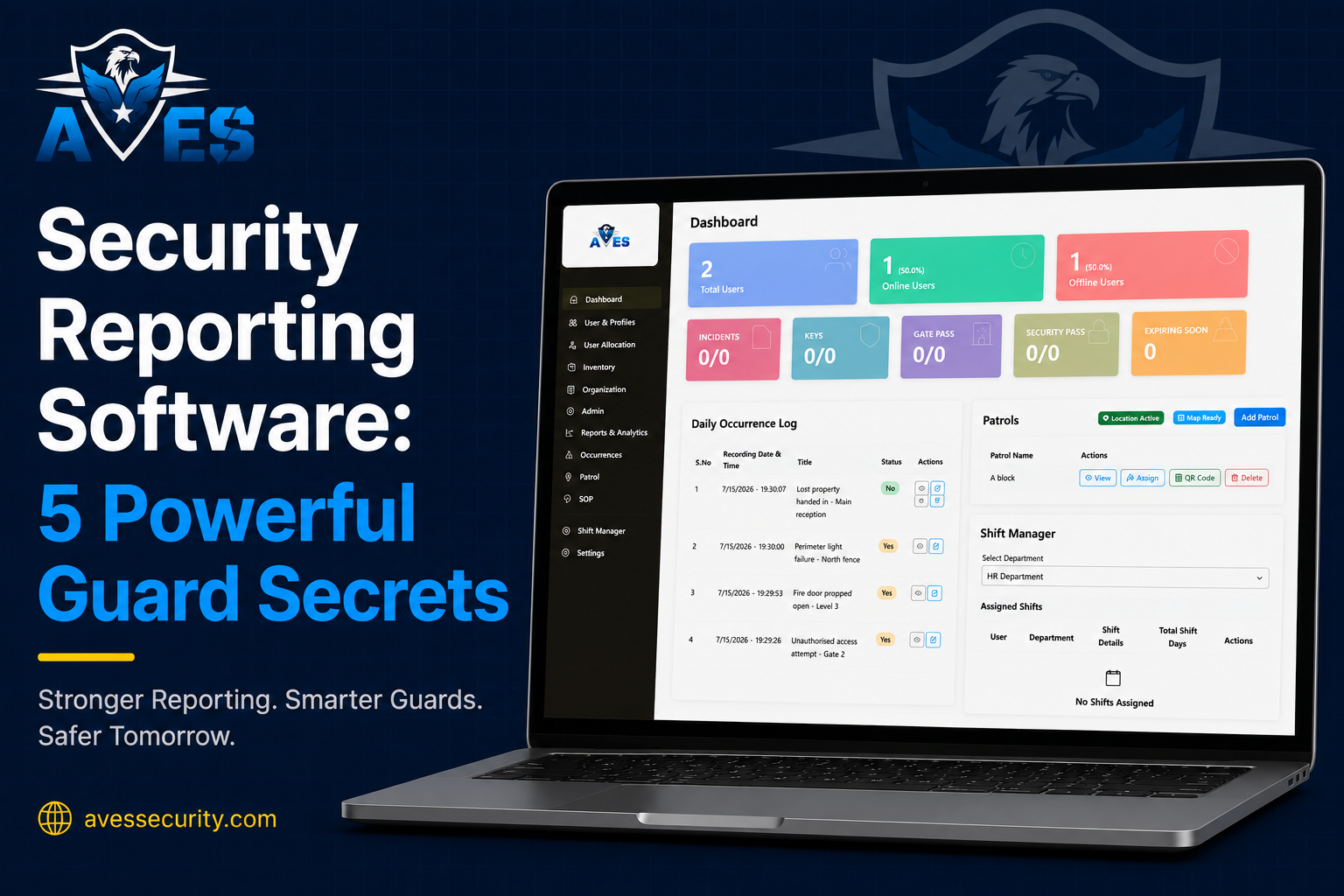
  • Security Reporting Software: 5 Powerful Guard Secrets

    Security Reporting Software: 5 Powerful Guard Secrets

    A client calls asking for proof a patrol actually happened last night and you dig through paper logs, texted photos, half filled checklists, hoping something turns up. You find something eventually. But that ten minute scramble tells you something you’d rather not admit: your business needs security reporting software not the patchwork system you’re currently running on.

    That’s the real reason so many security companies go looking for security reporting software. Not because it sounds impressive on a sales page. The old way of proving work happened is quietly costing them contracts trust and sleep. and most owners only notice once it’s already cost them something.

    You’re probably not hunting for another app to learn. You want to stop feeling like your business runs on hope and paperwork and honestly that’s a fair thing to want. The right security reporting software fixes exactly that.

    Five things below. Most guard companies only figure them out after years of trial error and lost clients.

    Secret 1: Your Biggest Risk Isn’t a Missed Patrol. It’s Missing Proof.

    Most owners assume the danger is a guard skipping rounds. It isn’t not really — and that’s the first thing good security reporting software teaches you.

    Even when the patrol happens exactly the way it’s supposed to if there’s no timestamped location verified record of it you can’t prove anything. To a client sitting across the table from you unproven work looks identical to no work.

    Security reporting software doesn’t just track guards. It builds a paper trail that actually holds up when someone pushes back on it protecting your business on the bad nights not just the easy ones.

    Think about the last time a client questioned an incident. What did you have to show them really? A text message? Your own memory? A signature on a clipboard that could belong to anyone who happened to be standing there?

    Digital patrol verification changes that conversation. You stop explaining what probably happened and start showing what did happen down to the minute and the GPS coordinate.

    Secret 2: Paper Logs Cost More Than They Look Like They Cost

    A paper logbook looks free on the surface right up until you compare it to what security reporting software actually saves you. No subscription no setup no training.

    It isn’t free. It costs you constantly just never in a way that shows up on an invoice. Lost pages. Handwriting nobody can read three weeks later. Guards backdating entries after the shift already ended. Supervisors burning hours every week doing nothing but organizing paperwork.

    Add it up sometime. The hours your office staff spends chasing logs usually land at several unpaid hours a week per site — and once you multiply that across ten or twenty sites the real cost stops being invisible.

    A digital electronic guard logbook the kind built into most security reporting software kills that hidden tax. Entries timestamp themselves. Nothing gets backdated nothing disappears into a glovebox. Your team gets that time back for actual security work not paperwork archaeology.

    Secret 3: Clients Don’t Renew Contracts Because of Guards. They Renew Because of Reports.

    This one catches a lot of owners off guard.

    Your guards can do great work every single night. Doesn’t matter not if the client never actually sees clear proof of it happening. What they don’t feel they eventually stop paying for.

    Clients renew when they can open a report and instantly understand what happened when it happened and that nothing got missed. Not a guard problem. A reporting problem and the right security reporting software solves it before the client ever has to ask.

    Picture a mechanic who does flawless work on your car but hands you nothing no invoice no breakdown nothing to look at afterward. Would you book with them again without asking a few questions first? Probably not even though the work itself was fine.

    Same logic here. Security reporting software has quietly turned into a competitive advantage rather than a nice extra because the companies using it aren’t just doing the work they’re proving it. That’s what makes renewal an easy decision instead of a negotiation.

    Secret 4: The Software You Choose Should Fit Your Operation Not the Other Way Around

    Almost every first time buyer makes the same mistake shopping for security reporting software. They pick software off the longest feature list then spend months forcing their team to bend around a tool that was never built for security work to begin with.

    Before you commit to anything run it through a few honest questions:

    • Does it work offline in basements and parking structures with no signal?
    • Can guards actually use it in under two minutes no training manual required?
    • Does it handle patrol verification incident reporting and shift logs in one place or are you stitching together three separate apps?
    • Can a supervisor put together a client ready report without formatting it by hand afterward?

    Answer no to any of those and that tool is going to slow your team down not speed them up. A good platform disappears into the background of your operation. It shouldn’t be one more thing your guards have to wrestle with at two in the morning.

    Secret 5: The Companies Winning New Contracts Aren’t the Cheapest. They’re the Most Provable.

    Nobody tells you this part directly so here it is.

    Clients comparing security providers rarely stop at hourly rates. They’re weighing confidence. A company that can pull up a live dashboard show instant incident alerts and hand over clean digital reports just looks more professional and that happens before a single guard even shows up on site.

    That perception isn’t fluff. It comes straight out of having real systems behind you and more often than not it’s the thing that decides between two similarly priced bids.

    Switching to a proper security reporting software system was never about chasing technology for its own sake. It’s about walking into a client meeting and saying with zero hesitation “here’s exactly what we did and here’s the proof” — instead of digging through a folder first.

    What This Actually Looks Like Day to Day

    None of this means overhauling your entire business overnight with new security reporting software.

    Most guard companies start small with security reporting software: digital patrol verification or incident reporting or just an electronic logbook. They see the time saved they watch how clients react and the rest of the platform gets adopted on its own without much of a push.

    The goal was never to add complexity. It’s to remove the guesswork that’s been quietly draining hours credibility and contracts out of your business for longer than you’d like to admit.

    Where to Go From Here

    If you’ve made it this far you already know your current system isn’t built for where you’re trying to take this business. That’s not a knock on you. Most security companies outgrow their original process long before they realize they need proper security reporting software.

    AVES Security was built specifically for this problem: digital patrol verification, incident reporting, electronic logbooks, shift management and more all in one platform shaped around how security teams actually work in the field.

    Visit www.avessecurity.com and see what it would actually look like inside your own operation.

    You don’t need to overhaul everything this week. Just stop relying on proof that vanishes the moment someone asks for it.

    AVES Security was built specifically for this problem: digital patrol verification, incident reporting, electronic logbooks, shift management and more all in one platform shaped around how security professionals actually work in the field.

    What is security reporting software?

    It’s the digital replacement for your paper logbook. Guard companies use it to log patrols, record incidents and pull together reports that actually hold up. Every entry gets a timestamp and GPS location automatically, so nobody’s taking your word for it after the fact.

    How is security reporting software different from a paper logbook?

    Paper feels free, but it isn’t. Lost pages, bad handwriting, guards backdating entries after the shift’s over. Security reporting software kills all that. Entries stamp themselves, nothing gets backdated and supervisors get their hours back instead of losing them to paperwork.

    Can security reporting software handle incident reporting and shift logs or just patrols?

    The good ones don’t make you choose. Patrol verification, incident reporting, shift logs, all in one place, not three apps your team has to juggle mid-shift. Stitching tools together to cover one night is a sign the software wasn’t built for how security teams actually work.

    Why do clients care about security reporting software instead of just trusting the guards?

    Because trust only goes so far. Clients renew based on what they can see not what they’re told. Hand them a clean report showing exactly what happened and when and renewal stops being a conversation.

    What makes AVES Security different from other security reporting software?

    AVES Security was built around how guard teams actually work in the field not the other way around. Digital patrol verification, incident reporting, electronic logbooks and shift management all live in one platform so you’re not gluing together separate tools just to cover a single shift.

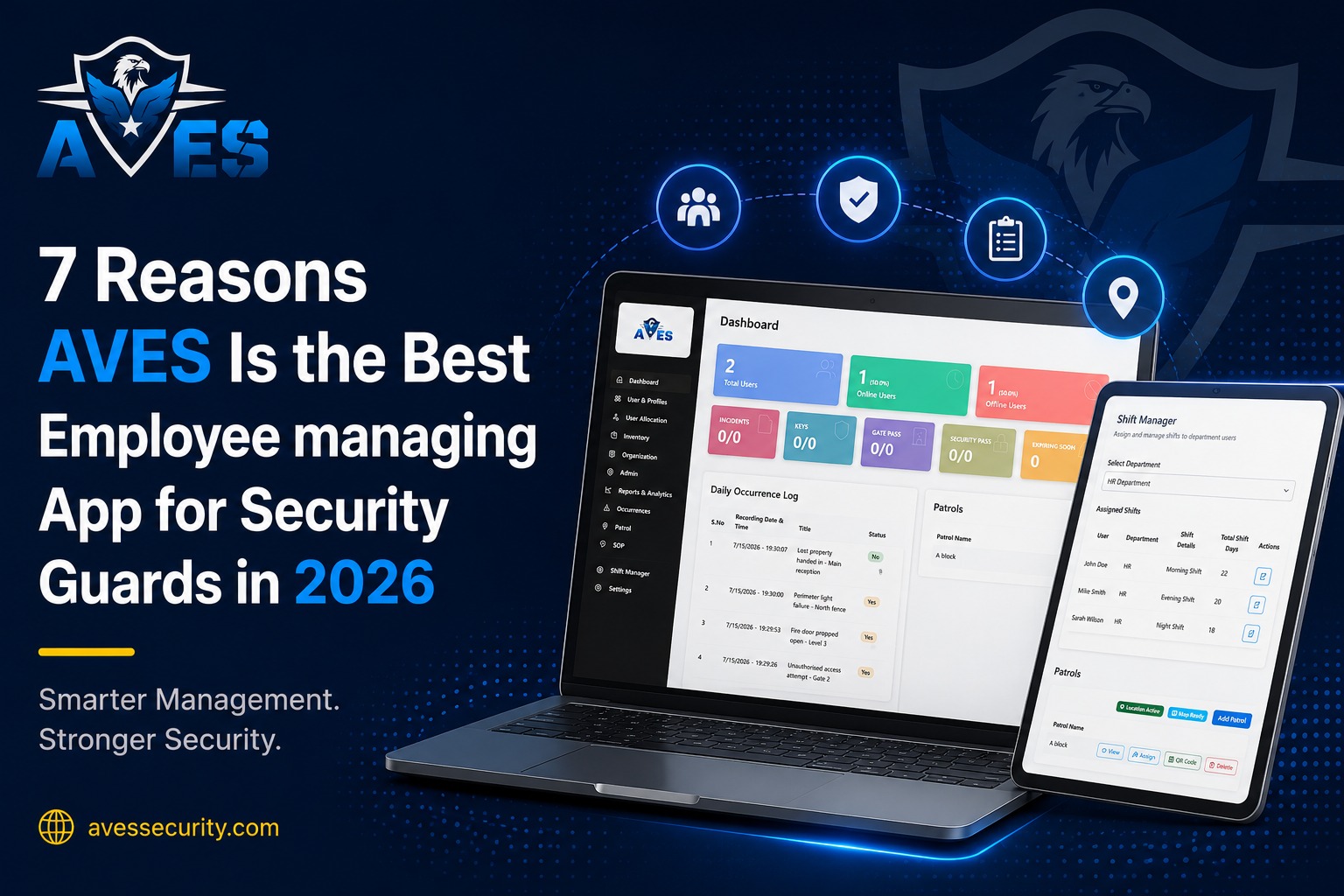
  • “7 Reasons AVES Is the Best Employee managing App for Security Guards in 2026”

    “7 Reasons AVES Is the Best Employee managing App for Security Guards in 2026”

    An employee-managing app for Security Guards is no longer a nice-to-have for modern security companies. At 11 PM, a client calls asking whether a guard completed checkpoint 4. The guard says yes, but without verified patrol data, you’re left relying on trust instead of proof. That’s exactly the problem AVES is designed to solve.

    If that sounds familiar, you’re not alone and honestly most tracking apps won’t fix it either. They’re built for delivery drivers and warehouse clock-ins, not for guards who need patrol proof and access logs a client can actually push back on.

    AVES was built around that specific problem. Here’s why it works.

    An employee-managing app for Security Guards helps security companies replace manual tracking with real-time visibility, verified patrols, and digital reporting.

    An Employee Managing App for Security Guards helps security companies monitor patrols, manage attendance, track incidents, and improve communication across multiple client locations. Instead of relying on paper records, supervisors gain real-time visibility into guard activities and can respond quickly to operational issues.

    1. Employee managing App for Security Guards: GPS That Actually Proves the Round Happened

    A dot moving on a map doesn’t tell you much. Was the checkpoint scanned? Or did he sit in the break room for twenty minutes and walk back?

    AVES ties GPS to checkpoint scanning, so every round leaves a timestamped record. Skip a checkpoint and it flags right away instead of surfacing during a client’s audit three weeks later.

    Nobody thanks you for a clean shift. They remember the one night it wasn’t and “he was probably there” doesn’t hold up when someone’s asking questions.

    An employee-managing app for Security Guards should do more than record attendance. It should create a searchable record of every visitor, entry and approval.

    This is why an employee-managing app for Security Guards becomes essential as security companies expand across multiple client sites.

    2. Incidents get logged on the spot

    Paper notes. A text message an hour later. By the time it reaches a supervisor, half the details are gone and the photos don’t exist.

    Guards file straight from the scene in AVES, photos and video included and the supervisor gets pinged instantly. Not the next morning over coffee.

    An Employee managing an app for Security Guards ensures every incident is documented with accurate timestamps, photos, and location details for future reference.

    3. Access control that’s a real log, not a clipboard

    Plenty of companies say “access control” and mean a sign-in sheet taped to the front desk. AVES does visitor registration, gate passes, approvals, all searchable.

    Client asks who was on site last Tuesday at 3pm? You answer in ten seconds. Insurance adjusters ask this exact question after almost every incident, by the way.

    A reliable Employee Managing App for Security Guards also improves visitor management by maintaining accurate digital records of every entry and exit. This helps security companies provide clients with transparent reports while reducing manual paperwork and administrative errors.

    4. Shift changes stop living in WhatsApp

    Someone needs a day off. Someone wants to swap. Someone’s texting you at 6am about a shift starting in an hour.

    None of it gets tracked when it happens over chat. AVES puts all of it, leave, swaps, schedule changes, in one place. Fine at 10 guards. A genuine mess at 40 across five sites.

    5. One app instead of five logins

    Most security companies don’t set out to run five separate apps. It just happens. One for GPS, one for incidents, one for access, one for scheduling, one for reports.

    AVES puts it all in one place. Less exciting to talk about than GPS tracking, but it’s usually the reason people actually stick with a platform long term.

    Using an employee management app for Security Guards reduces the need for multiple software platforms, improving efficiency and operational control.

    Investing in an Employee Managing App for Security Guards allows supervisors to manage guards, schedules, patrols, and reports from a single platform. This centralised approach saves time and improves overall operational efficiency.

    6. Reports that hold up if someone actually asks

    Everything in AVES gets timestamped automatically. So when an audit or a legal question comes up, there’s a real trail instead of trying to remember what happened last quarter.

    Companies on government contracts or insurance-heavy work tend to care about this one more than any other feature, for obvious reasons.

    7. Doesn’t fall apart once you grow

    Works great for five guards on one site, then breaks completely once you’re managing multiple sites and supervisors. That’s the usual story with basic tracking apps.

    AVES gives you one dashboard across sites, so nobody’s logging into six systems to check six locations. And switching platforms later isn’t just a hassle, it risks a gap in your records at the worst possible time.

    Choosing the right Employee managing App for Security Guards helps eliminate manual tracking, improve accountability and simplify operations across every location.

    Why security companies are switching to this kind of app

    Add a second client site and the old way of doing things starts cracking. Add a third and it’s basically gone. Phone calls, paper logbooks, someone’s memory of what happened Tuesday, none of it holds up once you’re not physically at every site yourself.

    That’s really why firms move to an employee managing app for security guards. Not because paper is old-fashioned, but because a supervisor can’t be everywhere and a dashboard can.

    With patrols, incident reports and checkpoint scans in one place, a supervisor checks a screen instead of calling five sites to ask if everything’s fine. Smart Track GPS is what actually backs this up, since it confirms a patrol happened where and when it was supposed to, not just that a phone was somewhere nearby.

    Swap the paper visitor register for real access control and you get an actual record instead of a guess about who came through the gate. Add a request management system for leave and shift swaps and a good chunk of the admin work that eats a supervisor’s afternoon just disappears.

    None of it’s flashy. It’s mostly just fewer places for things to fall through the cracks.

    How to choose the right employee managing app for security guards

    Not every tracking app on the market was built for security work. Most were designed for delivery drivers or field sales reps and it shows the moment you actually need to verify a patrol or document an incident properly.

    A few things worth checking before you commit to anything.

    Patrol verification matters most. Look for Smart Track GPS paired with digital checkpoint scanning and real-time incident reporting. Without these, you’re basically back to trusting a guard’s word that a round got done.

    Access control is the next one people skip and regret later. You want the best access control software handling visitor registration, gate passes and entry approvals in one system, not a paper register nobody can search when a client or auditor actually asks a question.

    Then there’s the admin side. A proper request management system for leave, shift swaps and scheduling changes means supervisors aren’t buried in texts and phone calls trying to keep staffing straight.

    And last, think ahead. A platform that works fine for one site can fall apart the moment you add a second or third. The right employee managing app for security guards should hold up whether you’re running one location or twenty, with reporting and documentation that don’t need to be rebuilt every time you grow.

    When evaluating an Employee Managing App for Security Guards, choose software that offers GPS patrol verification, incident reporting, shift scheduling, visitor management, and detailed analytics. These features help security companies maintain accountability while improving client satisfaction.

    A few honest limitations

    AVES needs a connection for full functionality. It handles some offline work, syncing once you’re back online, but constant dead zones will slow real-time reporting down.

    Guards used to paper logs usually need a week or two before checkpoint scans feel automatic. That’s normal.

    And no platform replaces an actual supervisor looking at the data and doing something with it.

    Along with using an Employee managing App for Security Guards, security companies should follow industry best practices published by ASIS International and workplace safety guidance from OSHA to strengthen security operations and compliance.

    Modern security companies increasingly rely on an Employee Managing App for Security Guards to simplify workforce management and ensure every patrol, incident, and visitor record is accurately documented. The right platform supports both small teams and large multi-site operations.

    Worth trying before you decide

    If you’re small, start with patrol tracking and incident reporting. Add access control and multi-site tools once you actually need them.

    If you’re already stretched across sites and tired of guessing, that’s the exact problem AVES was built for.

    If you’re looking for an Employee managing App for Security Guards, AVES combines GPS patrol tracking, incident reporting, access control and workforce management in one platform.

    Want to see it on your own sites? Book a free demo.

    AVES is an Employee managing App for Security Guards designed to help security companies improve accountability, streamline operations, and deliver better service to clients.

    Choosing the right Employee Managing App for Security Guards is an investment in better security operations. With AVES, companies can improve accountability, reduce manual work, enhance client trust, and manage every aspect of guard operations through one intelligent platform.

    FAQs

    Is AVES only for large security companies or can small teams use it too?

    Small teams use it too. A lot of companies start with just patrol tracking and incident reporting for five or ten guards, then add access control and scheduling once they actually need it. You don’t have to turn on every feature on day one.

    How is this different from a basic GPS tracking app?

    A basic app just shows where a phone is. That’s it. AVES ties GPS to checkpoint scans, so you know a patrol actually happened at a specific spot, not just that someone’s phone was somewhere nearby. That difference matters a lot when a client starts asking questions.

    What happens if a guard’s phone loses signal on site?

    AVES handles basic offline work and syncs everything once the connection comes back. If a site has constant dead zones though, expect some lag in real-time reporting until it reconnects. Worth checking your site’s coverage before you roll it out.

    How long does it take guards to actually get used to it?

    Usually a week or two, especially for guards coming from paper logs. It’s not complicated, but any change in daily routine takes a bit of adjusting. Nothing unusual there.

    Can clients or auditors get access to the records if they ask?

    Yes. Everything gets timestamped automatically, so pulling up who was on site, when a checkpoint was scanned or what happened during an incident takes minutes instead of digging through old logbooks or texts.

    Does it replace the need for a supervisor?

    No and it’s not meant to. AVES gives supervisors the data to work with faster. Someone still has to look at the reports and act on what they show.

    We’re already running separate apps for GPS, incidents and scheduling. Is switching worth the hassle?

    Depends on how many sites you’re managing. At one or two sites, separate apps are annoying but manageable. Once you’re running multiple sites with different supervisors, having everything in one dashboard usually saves more time than the switch costs.

    How do we get started?

    Most companies book a free demo first, see how it works on their actual sites with their actual guards, then decide. No need to commit to anything before that.


    Why should security companies invest in an Employee Managing App for Security Guards?

    An Employee Managing App for Security Guards improves patrol verification, attendance tracking, incident reporting, visitor management, and workforce scheduling. It helps security companies reduce paperwork, improve accountability, and deliver faster, more transparent reporting to clients.

  • security Guard Management Software: 5 Powerful Reasons to Replace Manual Processes

    security Guard Management Software: 5 Powerful Reasons to Replace Manual Processes

    Security Guard Management Software is helping security companies replace manual processes with real-time tracking, automated attendance, digital incident reporting and instant client updates. If you’re still relying on paper logs, WhatsApp messages and manual check-ins, it’s time to modernise your operations.

    Phone rings at 11 PM… A client wants to know if the guard actually showed up at Site 4 tonight. Truth is, you don’t know…

    That’s not a guard problem. It’s an information problem and it’s the exact gap Security Guard Management Software exists to close.

    Security Guard Management Software gives security companies real-time visibility into guard activities, attendance and incident reporting.

    Most guards actually do the job fine. The breakdown is usually that nobody above them can see what’s happening until it’s already over. Patrol logs get written up from memory. Incident reports land the next morning. Attendance gets “confirmed” over a phone call, which doesn’t really confirm anything.

    Owners often try to patch this by adding more people, more check-in calls, a stricter policy that quietly dies by week two. It rarely works, because you’re piling manual steps on a system already buckling under manual steps. The ones who actually break the cycle stop adding people and just make the information visible on its own.

    Security Guard Management Software is transforming how security companies manage guard operations, patrols, attendance, incident reporting and client reporting through real-time visibility and automation.

    Guard Management Software is transforming how security companies manage guards, patrols and client reporting.

    1. Security Guard Management Software Builds Client Trust

    Clients today don’t just want a body at the gate, they want proof things got done. Can’t pull up a timestamped patrol record in under a minute? That plants doubt, even on a night your team did everything right.

    When you can pull that record up the second someone asks, the doubt doesn’t even get a chance to start.

    2. You’re Losing Hours You Won’t Get Back

    Every time a supervisor burns 40 minutes reconciling paper logs or chasing down confirmation calls, that’s 40 minutes not spent running the business.

    Automatic attendance, patrol and incident records take that admin work off the plate. Supervisors end up managing security again rather than paperwork. This is why many companies invest in Security Guard Management Software to automate daily operations.

    3. You’re Losing Contracts You Didn’t Even Know Were on the Line

    More commercial clients now want compliance reports and audit trails before they’ll renew. Competitor hands theirs over in five minutes, you need two days to pull yours together, guess who looks more put-together. Doesn’t matter if your guards are just as good or better.

    Companies that can produce a clean report on the spot tend to hold onto contracts longer, mostly because they look ready the moment it counts.

    Security Guard Management Software helps generate audit-ready reports in minutes instead of hours.

    4. There’s More Legal Risk Here Than You’d Think

    If something happens and there’s no real record from the moment it went down, you’re stuck relying on someone’s memory written up hours later. Rough spot to defend if anyone ever questions it.

    A timestamped digital record gives you something solid to point to instead. Changes the whole conversation if it ever comes to that.

    Security Guard Management Software creates secure digital records that improve compliance and reduce legal risks.

    5. The Bar Has Moved and Clients Know It

    The industry’s been pushing toward documented, auditable processes for years now. Clients shopping around for vendors have picked up on it too, even if they don’t ask for it in those exact words.

    Many organizations also follow security management best practices published by ASIS International.

    How Security Guard Management Software Changes Daily Operations

    Not going to pretend this fixes bad hiring or a supervisor who checks out mentally, because it doesn’t. What it fixes is visibility. And fixing visibility ends up solving a lot of stuff downstream almost by accident.

    Guard scans a checkpoint on their phone, it hits your dashboard right then. Something happens on site, the report with photos comes through while it’s still happening, not after the shift wraps. Attendance stops being “I think he’s there” and turns into an actual confirmed check-in tied to location. Reports that used to eat an afternoon are basically already built by the time you need them.

    Security Guard Management Software saves supervisors valuable time by automating reporting.

    None of it requires your guards to suddenly become tech people either. Most pick up scanning a checkpoint or filing a quick report in about the time it takes to show them once.

    What Nobody Really Tells You Upfront

    Switching off manual processes isn’t instant. Not pretending otherwise.

    Expect a week or two of people getting used to it. A few of your longer-tenured guards might grumble at first, that’s just normal and it usually fades once they realize it’s actually less work, not more, since they’re not writing the same thing down twice.

    You’ll also need decent signal at your sites. A good system rides out short offline patches and syncs back up once you’re connected again, but it’s not built for spots with zero connectivity long term.

    And no platform fixes a bad hire or a supervisor who isn’t actually supervising. What it does is let a decent team be managed properly instead of managed by guesswork. Anyone tells you switching systems is friction-free overnight, I’d take that with a grain of salt.

    What to Look for in Security Guard Management Software

    Real time incident reporting with photo or video, not just a text box someone fills in later. Checkpoint scanning that creates an actual timestamped record instead of a box anyone could tick from memory. One dashboard for every site, not five different logins. Reports you can pull in minutes when a client or auditor asks. A mobile app simple enough that you’re not running a training session just to get guards using it.

    If a platform can’t walk you through all five of those clearly, it’s probably not there yet.

    Why Choose AVES Security Guard Management Software

    This is basically the whole point of AVES Security Guard Management Software…, moving security teams off manual processes and into real time visibility across every site.

    AVES Security Guard Management Software moves security teams off manual processes… and provides real-time visibility across every site.

    Patrol tracking and checkpoint scanning give you actual proof instead of a guess. Incident reports come through the moment something happens, photo and video included. Geo-based attendance confirms guards are physically where they’re supposed to be, not just where they said they were. One dashboard, every site. Audit-ready reports in minutes, not the night before a meeting.

    None of it replaces your team. It just gives you the visibility to actually trust what they’re doing and hands you your evenings back instead of spending them on the phone.

    One Honest Question to Ask Yourself

    If a client called right now wanting proof of what happened at every site last night, could you show them in under five minutes?

    If not, that’s worth fixing and it’s a smaller fix than most owners expect.

    Investing in Guard Management Software helps improve accountability, efficiency and client confidence.

    AVES offers a free trial and a personal demo, so you can see how it’d actually work for your operation before committing to anything.

    FAQs

    1. What is Security Guard Management Software?

    A platform that handles guard scheduling, attendance, patrols and incident reports in one place. No more paper logs or end-of-day catch-up calls.

    2. How does it improve daily operations?

    Attendance logs itself, patrols get verified in real time and reports are built automatically. Supervisors spend less time chasing information and more time managing sites.

    3. Does it help retain clients?

    Yes. Clients want proof, not promises. Instant access to patrol and incident records builds trust fast.

    4. Is it worth it for small companies?

    Definitely. Whether you run 8 guards or 300, the software scales with you. No extra staff needed.

    5. What features matter most?

    GPS check-ins, checkpoint scanning, photo/video incident reports, automated client reports, a clear supervisor dashboard and offline support for weak-signal sites.

    6. How long does the switch take?

    Just a few days. It’s simpler than paper, so guards adapt fast.

    7. Do guards need tech skills?

    No. Checking in, scanning checkpoints and filing reports takes minutes to learn.

    8. Why ditch manual processes?

    Because they fail silently. Missed patrols, late reports, gaps you only discover when a client asks. Software closes that gap and makes you look sharper.

  • Security Guard Mobile App: Take Control of Security Operations

    Security Guard Mobile App: Take Control of Security Operations

    A security guard mobile app lets officers log patrols, incidents, checklists and visitors from a phone while they are on the floor, and gives supervisors a live view of every site without phoning around.

    The AVES Security Guard Management App is a powerful security workforce management solution designed to simplify guard scheduling, attendance tracking, patrol monitoring and incident reporting. In 2026, businesses adopting AVES to improve efficiency and strengthen security operations.

    You know the drill. Every security operator hits this wall the moment they stop being a five-person crew and start being a fifty-person company. The systems that held together at small scale just weren’t built to hold anything at real scale, which is usually when people start actually searching for a security guard management system

    A guard skips a shift and nobody notices until the client calls. Reports are scattered across notebooks, WhatsApp chats and outdated Excel sheets. This makes it difficult to track attendance, patrols and incidents accurately.

    Where the old way actually breaks

    Paper and spreadsheets work fine right up until they don’t and the failure points are always the same ones.

    A guard calls in sick, the roster doesn’t get updated in time and a site sits empty for hours. This is where decent security scheduling software earns its keep, catching the gap before a client does. Reports show up late and by the time they land on your desk, the details are fuzzy and any photo evidence is gone, which is the whole argument for incident reporting software that captures things on the spot. Clients ask for proof that patrols happened and all you’ve got is your word, no dashboard, no data.

    What AVES Security actually changes

    Think of AVES Security management as pulling five separate tools into one pocket-sized platform. It’s essentially a AVES security guard management mobile app built around daily use, not quarterly reporting. Scheduling, patrol tracking, incident reporting and compliance all live in one place instead of scattered across apps nobody checks consistently, the whole point of proper security workforce management.

    Shifts get assigned and confirmed digitally, so double-bookings and no-shows stop being a mystery. Real-time patrol tracking means supervisors see guard locations and checkpoint scans as they happen, not reconstructed the next morning from memory. This is digital patrol management doing its actual job. Guards log incidents the second something happens, photos and timestamps attached automatically. Checklists get time-stamped for security compliance software purposes, which matters more than people expect the first time an insurer comes asking. A proper visitor management system replaces the sign-in sheet nobody ever reopens. And panic mode for lone workers is built specifically for lone worker safety, shrinking the gap between something going wrong and help showing up.

    Digital logbooks are the quiet win here too. A security logbook software setup turns “let me dig through last month’s binder” into a ten-second search. That’s what paperless security operations actually looks like day to day, not a slogan, just less time wasted. So, AVES security guard management is much smarter.

    Why Businesses Choose AVES Security Guard Management
    helps organizations streamline security operations with a single mobile platform. Security agencies, corporate offices, residential communities, hospitals, schools, warehouses and industrial facilities can manage guards more efficiently. The software improves communication, increases accountability, reduces paperwork, and ensures every patrol, attendance record and incident report is stored securely. With real-time monitoring and automated reporting, businesses can improve productivity, maintain compliance and deliver better security services.

    What to actually ask before signing

    Pricing scales with headcount, so get a quote tied to your actual team size. Ask how offline logging works if your sites have shaky connectivity. Budget real weeks for the habit to stick. don’t buy the full feature suite if half of it doesn’t apply to your operation yet.

    Contact Us: www.avessecurity.com

    https://www.securityindustry.org/

    How long does it take to set up AVES?

    Attendance and patrol tracking, the core stuff, is usually running within a few days. Rolling out every feature across a full team takes longer, and how much longer depends on how big that team is.

    What happens if a guard misses a checkpoint?

    It triggers a real-time alert. Managers find out the moment it happens, not hours later when they’re reviewing logs and wondering why there’s a gap.

    Is incident reporting difficult to use?

    No. A guard can log an incident with photos and a timestamp straight from their phone, right where it happened. No forms to fill out back at the office.

    Is AVES built specifically for security operations?

    Yes. It’s not a generic workforce tool stretched to fit security work. It’s built around patrols, checkpoints and incident response from the ground up. Think of the difference between a Swiss Army knife and a chef’s knife. Both cut, but only one was designed for the job you’re actually doing.

    Does AVES work without internet access?

    Many core functions can log activity offline and sync once connectivity returns, though this depends on your specific setup.