
Every site runs fire drills. Almost none of them can prove who attended.
That gap doesn’t show up on a normal day. It shows up the moment an auditor, an insurer or an incident investigator asks a simple question: who was present at the last fire drill and at what time did they arrive? If the honest answer involves a clipboard, a pen and someone’s best guess, you don’t have a compliance record you have a claim.
AVES Security was built to close that gap. Here’s how fire drill and safety drill management actually works when it’s treated as a tracked event instead of a paperwork exercise.
The Problem With a Sign-In Sheet at a Fire Drill
Picture the usual fire drill routine. It happens on the 14th. Someone scribbles a topic on a form. A clipboard makes its way around the assembly point.
It comes back with twenty-two signatures and no way to tell which ones the named person actually wrote. A few colleagues signed for each other because they were “just outside.” One signature is illegible. Nobody logged arrival times, so there’s no way to say whether the evacuation took four minutes or fourteen.
None of that is malicious. It’s just what happens when attendance depends on a pen and goodwill instead of a system. And it’s exactly the weak point that surfaces during an audit, a claims review or a post-incident inquiry the moment your fire drill records matter most.
Two Ideas AVES Keeps Separate
Before getting into the workflow, it helps to understand a distinction AVES makes from day one: Drill Codes versus Drills.
Drill Codes are your reusable emergency code catalogue things like “CODE RED fire” or “CODE BLUE medical emergency.” Each code carries standard summary lines describing what it means and what people should do. You configure these once and they stay as reference data.
Drills are the actual scheduled events. A drill pulls a code from that catalogue and attaches the specifics topic, venue, shift, date and time. The drill is what gets a report number, a QR code and a live attendance roster.
The payoff is consistency. Whichever supervisor schedules a CODE RED drill, the response instructions come from the shared catalogue, not from whatever they happened to type that morning. Every site, every quarter, same instructions.
How a Drill Gets Verified, Start to Finish
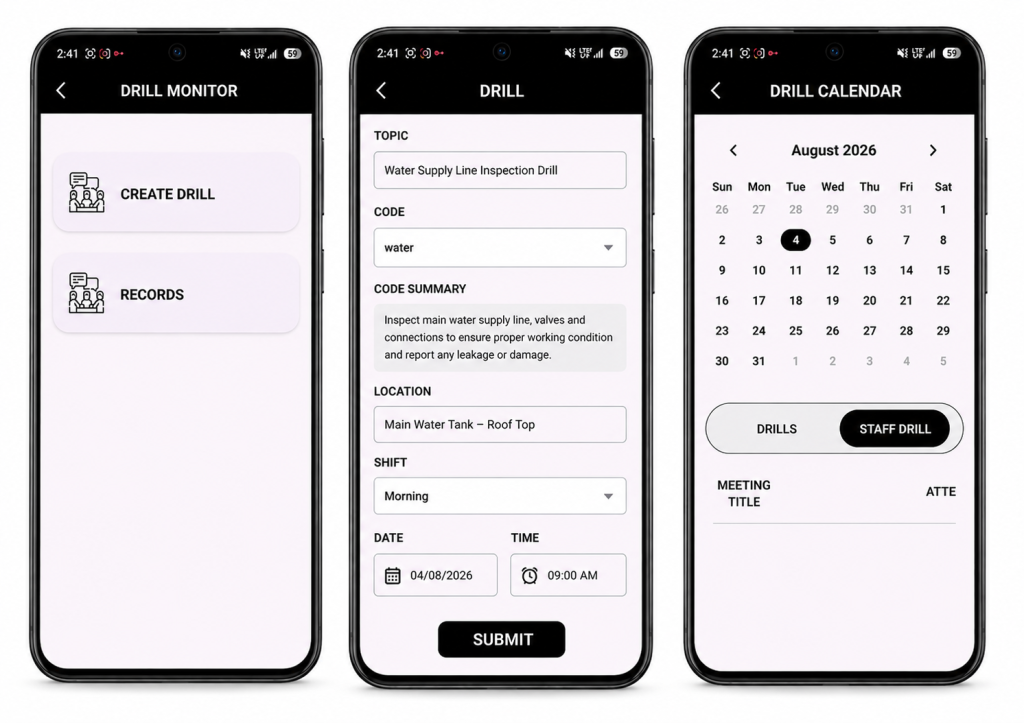
1. The groundwork is already there before your first fire drill. If you’re running shifts, Security Passes and staff rosters in AVES, you’re set. Drills reuse your existing shift assignments instead of asking you to build a separate participant list for every single exercise. A Security Pass matters here too it’s what gets scanned for supervisor-led roll call.
2. Scheduling a fire drill takes under a minute. From the Drill Monitor, a supervisor fills in the topic, picks a code from the dropdown the official summary auto-fills and locks, so nobody can edit the response instructions on the fly then sets the location, shift and time.
On save, AVES automatically:
- Assigns a sequential report number (DRILL-001, DRILL-002 and so on), so a gap in the sequence is immediately visible
- Generates a unique QR code for that drill
- Notifies every staff member on the selected shift
- Locks the record’s core fields so nothing can be quietly rewritten later
3. The fire drill reaches exactly the right people. This is where AVES departs from a generic calendar invite: the shift is the audience. You don’t hand-build a list you pick a shift and everyone rostered to it sees the drill and gets notified. Nobody else does. Your night team stops getting pinged about day-shift exercises, which is the fastest route to notification fatigue and ignored alerts. The trade-off is worth knowing: a staff member with no shift assignment won’t see anything. If someone says a drill never reached them, check their roster first that’s the answer nearly every time.
4. Staff confirm availability and can change their mind. Each person responds Yes, No or Maybe and can update that answer right up until the drill, whether that’s a shift swap, a late callout or a change of plans. AVES keeps them in exactly one group at a time, so the headcount supervisors see is always current. Supervisors get a grouped view names, departments, designations showing expected turnout before the drill even starts.
5. Attendance at every fire drill is verified by QR scan, not by pen. This is the step that actually converts a fire drill claim into evidence. AVES supports two check-in modes, and most sites run both together:
- Self check-in staff scan the drill’s QR code at the assembly point. AVES identifies them from their own authenticated session, not from anything they typed and timestamps the arrival automatically.
- Supervisor roll call a supervisor scans each person’s Security Pass. Every scan marks that specific person and a supervisor can never accidentally mark themselves while scanning someone else.
Three rules hold on every single scan:
- You can’t check in someone who isn’t registered on that drill
- You can’t scan the same person twice
- The arrival time is written by the server the moment of the scan never typed in afterward
And if someone answered “No” but shows up anyway (which happens far more often than you’d expect), the scan moves them straight into the attended group. The record reflects what actually happened on the ground, not what people predicted three days earlier.
6. Close it out and export a real record. Once the drill wraps, a supervisor sets its status Complete, Cancel or Postpone and adds remarks on what went well and what needs work before the next one. AVES logs who closed it and when.
Then it exports as a first-class report: PDF or Excel, filterable by date range, status, department, location, team or individual. What comes out isn’t a photo of a clipboard it’s a numbered record with a topic, code, venue, shift, scheduled time, full response roster, timestamped attendance and outcome notes. That’s the document you actually hand to an auditor.
Sign-In Sheet vs. AVES, Side by Side
| Category | Signature Sheet | AVES |
|---|---|---|
| Who gets notified | Whoever saw the noticeboard | Every rostered shift member, automatically |
| Expected turnout | Unknown until the day | Known in advance via Yes/No/Maybe |
| Proof of presence | A signature, signable by anyone | QR scan tied to an authenticated identity |
| Arrival time | Rarely captured | Timestamped server-side, per person |
| Duplicate entries | Common | Automatically rejected |
| Record integrity | Editable with a pen | Report number and identity fields locked by the system |
| Retrieval | A folder, eventually | Filtered PDF or Excel in seconds |
Control Over Who Can Do What
Drill management sits under a dedicated Drilling & Safety permission, split into three levels View, Create and Update so an entire shift can respond and check in without ever being able to schedule a drill, while supervisors get Update access for roll call. The emergency code catalogue is governed separately, so managing codes is its own grant, not bundled in with running drills. And every organisation’s drill data lives in its own isolated database one tenant never sees another’s records.
A Drill Is Only as Good as the Evidence It Leaves Behind
Fire and safety drills are one of the few compliance activities where proving the activity happened is harder than running it in the first place. AVES closes that gap end to end: schedule to a shift, notify the right people automatically, verify every arrival by scan and export a record that actually holds up.
Ready to see it in action? Book a demo of AVES Security Management today.
What is a mock fire drill?
A mock fire drill is a simulated emergency exercise that tests how staff respond and evacuate without an actual fire. It checks response time, headcount accuracy and whether people know the evacuation route the same purpose as any safety mock drill, run under controlled conditions.
How often should a fire drill be conducted?
Most compliance frameworks require a fire drill at regular intervals commonly quarterly or twice a year, depending on the site and local regulation. AVES lets you schedule each fire drill to a specific shift so the frequency stays consistent across every team, not just the ones that happen to be on-site that day.
What’s the difference between a fire drill and an evacuation drill?
In practice, the terms are often used interchangeably. A fire drill is technically a fire-specific safety drill, while an evacuation drill can cover any emergency that requires clearing a building — fire, gas leak, bomb threat and so on. AVES handles both the same way: schedule against an emergency code, notify the right shift and verify attendance by QR scan.
How do you track attendance at a fire drill?
The reliable way is a scan, not a signature. AVES verifies fire drill safety compliance by having staff scan the drill’s QR code themselves or having a supervisor scan each person’s Security Pass during roll call. Every scan is timestamped server-side, so there’s no way to sign in for someone else or backdate an arrival time.
Why is fire drill safety documentation important for audits?
Auditors and insurers don’t just want to know a fire drill happened they want proof of who attended, when they arrived and what was covered. A signature sheet can’t verify any of that. AVES exports each fire drill as a numbered, timestamped record with a full attendance roster, so the documentation holds up under review.
Can a safety mock drill be scheduled for a specific team only?
Yes. Every fire drill in AVES targets a shift, not the whole organisation, so only the staff rostered to that shift get notified and can respond. This keeps the safety mock drill relevant to the people actually meant to take part, without spamming teams who aren’t on that shift.