Author: Subash

  • Daily Briefing: The Missing Piece Every Security Team Overlooks (2026)

    Daily Briefing: The Missing Piece Every Security Team Overlooks (2026)

    You know the feeling already. A guard walks onto post and within the first hour something goes wrong. Something a two-minute conversation could’ve prevented.

    Maybe a contractor was on site and nobody said a word. Maybe an incident from yesterday was still open and nobody followed up on it. Not bad luck. A missing daily briefing, plain and simple.

    If you manage a security team, you’re probably reading this because something already slipped through the cracks. Fair enough. You want to know how a daily briefing should actually work, what it prevents and how to stop losing information between shifts without dumping more paperwork on your guards.

    What a Daily Briefing Actually Is

    A daily briefing is the structured update a supervisor gives guards before their shift starts. Site conditions. Open follow ups. Anything that changed since the last shift.

    Don’t mix it up with a shift handover. A handover happens between two guards, right at the moment one leaves and the other arrives. A briefing comes earlier, usually run by a supervisor and it covers the bigger picture across the whole site, not just one handoff between two people.

    Think of it like a flight crew briefing before takeoff. The plane flew fine yesterday. Doesn’t mean today looks the same. Weather shifts. Traffic shifts. Crews change. Pilots brief before every single flight because assuming yesterday still applies is exactly how mistakes happen.

    Security sites work no differently. Guards need today’s actual picture when they start, not yesterday’s leftover assumptions carried forward out of habit.

    Why Most Sites Get This Wrong

    Here’s the part nobody says out loud. Most sites don’t skip briefing on purpose. They just never build it into an actual process.

    It turns into a quick chat in the parking lot. Someone mentions the important stuff or thinks they do and everyone heads to post. Nothing written down anywhere.

    Works fine, until it doesn’t. The day a client asks what got communicated last Tuesday or a follow up item quietly vanishes for three weeks, that’s when you realize the verbal version was never a real system to begin with.

    The fix isn’t more meetings. It’s turning the briefing into something you can actually go back and check.

    What Should Be Inside Every Daily Briefing

    A daily briefing that actually holds up covers five specific things. Skip even one and you’ve left a gap waiting to open up.

    Date and shift. Every briefing needs a specific date and a specific shift attached, morning, evening or night. Skip this and you can’t search back later to confirm what got covered on any given day.

    Who was actually present. Every guard in the briefing should be logged by name, role and department, with confirmation they showed up. A briefing nobody can confirm happened isn’t much different from one that never happened.

    Current site conditions. The property specific update. What changed since yesterday. What needs attention today that didn’t before.

    The actual topic covered. What got communicated. Sounds obvious, sure, but this is exactly the part most verbal briefings lose within a day, because it only ever existed as spoken words in the air.

    Open follow up items. Anything raised in a previous briefing that’s still unresolved carries forward with a clear status attached. Not just a passing mention that fades out by the next shift.

    Miss any one of these and the briefing turns into a formality. Not a working system.

    The Fear Behind This and Why It Is Reasonable

    Worried that fixing this means piling on more admin work? That fear makes sense. Nobody wants another form standing between guards and the job they’re actually there to do.

    Here’s the honest tradeoff. A logged daily briefing takes a little longer than a hallway conversation. Two extra minutes, maybe.

    What you get back is proof. A searchable record instead of a guess about what got said three weeks ago. For most supervisors, two minutes a day beats standing in front of a client with nothing to show.

    Common Mistakes That Quietly Undermine a Daily Briefing

    A handful of habits show up again and again on sites where briefing exists on paper but doesn’t really function.

    The briefing happens while guards are already walking to post, so half of it gets lost because nobody’s fully listening.

    Follow up items get mentioned once and never checked again. Weeks go by and nobody notices, because there was never a status attached forcing someone to close it out.

    Site conditions get skipped because “nothing changed.” Which is exactly the assumption that causes problems the one day something actually did.

    Briefings never get tied to specific dates, so when someone asks what got communicated on a particular day, there’s nothing to pull up. Just a memory of what probably happened.

    None of this is complicated to fix. It just needs treating as a logged step, not a habit you hope holds up on its own.

    How AVES Turns Daily Briefing Into a Real Record
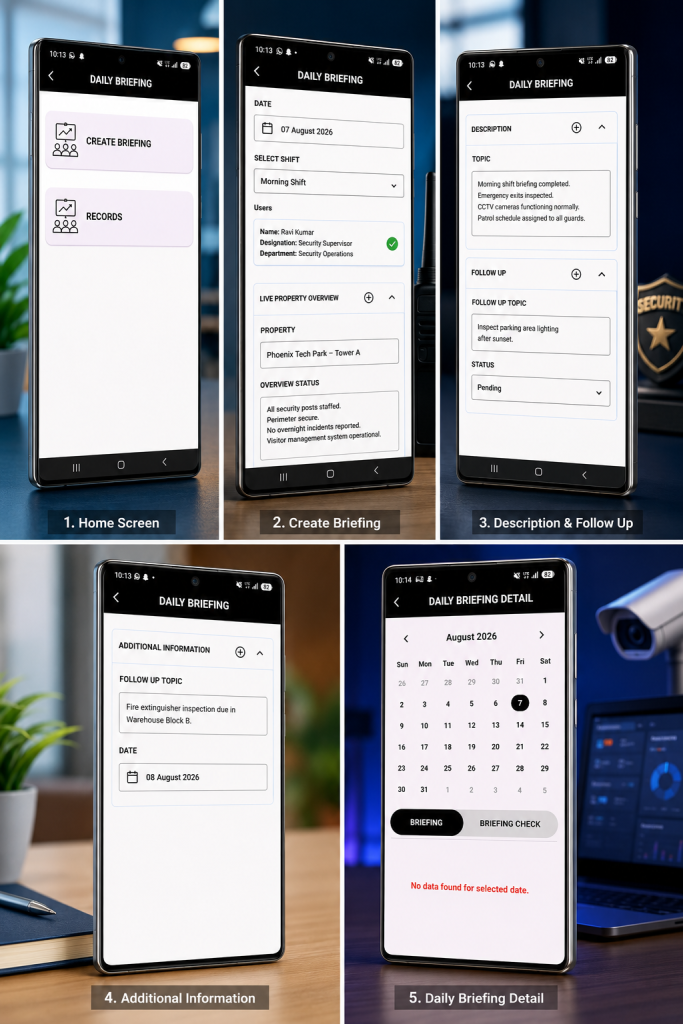
    Here’s where most manual systems fall apart. A notebook or a group chat message disappears into the noise within days. Nobody can search it. Nobody can prove it happened.

    AVES handles this through its Daily Briefing module. A supervisor creates a briefing, picks the date and shift and pulls in the guards being briefed, role and department shown clearly right there.

    The Live Property Overview section captures site conditions at the exact moment of briefing. The Topic and Description fields capture exactly what got communicated, not a rough memory of it weeks later.

    Follow Up items carry their own status field, so something raised Monday can’t quietly disappear by Friday without anyone catching it. Every briefing logs against a calendar too, so a supervisor can pull up any date and see exactly what got covered,or spot right away when a briefing got missed.

    That last part matters more than people expect. A missed daily briefing is often the first sign of a bigger accountability gap on a site. Catching it early costs a lot less than finding out after something’s already gone wrong.

    What This Looks Like in Practice

    Walk through an actual briefing and the process becomes obvious fast.

    A supervisor opens the Daily Briefing screen and taps Create Briefing. They select today’s date and pick the shift, morning, evening, or night. The relevant guards get pulled in, each one shown with their name, designation, and department, so there is no confusion about who is actually being briefed.

    Next comes the Live Property Overview. The supervisor types in the property, then logs the overview status in plain language, security posts staffed, perimeter secure, nothing unusual overnight. This is the part that replaces a rushed verbal summary with something searchable.

    The Description and Topic fields capture exactly what was communicated that day. If anything needs following up, it goes into Follow Up with its own status, pending, in progress, or resolved, so it does not disappear the moment the shift starts.

    Every entry lands on a calendar. A supervisor can jump back to any date and see exactly what was briefed, or immediately notice a date with no entry at all.

    What Good Actually Looks Like

    A site running a proper daily briefing doesn’t feel more complicated. Honestly, it feels calmer.

    Supervisors stop repeating themselves because everything’s logged and searchable. Guards stop starting shifts blind because today’s conditions are already documented before they even arrive.

    Clients stop asking questions you can’t answer, because you can pull up exactly what got briefed on any given day. That confidence is the real payoff here. Not the process for its own sake.

    Frequently Asked Questions

    What is a daily briefing in security operations?


    A daily briefing is a structured update given to guards before a shift starts, covering site conditions, communication topics and any unresolved follow up items from previous shifts.

    How is a daily briefing different from a shift handover?


    A handover happens between two guards at the point one shift ends and another begins. A briefing happens earlier, usually led by a supervisor and covers the wider site picture rather than a single handoff.

    Why does a daily briefing need to be logged instead of spoken?


    Because a spoken briefing leaves nothing behind. If a follow up item gets missed or a client asks what got communicated on a specific date, there’s nothing to check against without a logged entry.

    What happens to follow up items raised in a daily briefing?


    They carry a status forward until resolved. Not just get mentioned once and forgotten. This is usually where verbal briefings fail the hardest.

    Who is responsible for running the daily briefing?


    Typically a supervisor or shift lead, though the real responsibility is confirming every guard present actually got briefed, not just assuming attendance because they were on site.

    Where This Leaves You

    A daily briefing isn’t another form standing between your guards and their job. It’s the reason guards start each shift knowing today’s actual conditions, instead of carrying yesterday’s assumptions forward out of habit.

    Get it logged properly, tied to date, shift and follow up status and it stops being a hallway conversation nobody can verify. It becomes a record you can actually stand behind when it matters most.

    If you want to see how AVES handles daily briefing, follow up tracking and shift records in one dashboard, visit avessecurity.com and request a demo.

    CONTACT US

    Website : https://www.avessecurity.com

    Linkedin: https://www.linkedin.com/company/aves-security-management-system/

    Instagram: https://www.instagram.com/avessecurity/
  • Shift Handover Checklist: What Every Outgoing Guard Must Log

    Shift Handover Checklist: What Every Outgoing Guard Must Log

    Most accountability failures on a security site don’t happen during a shift. They happen in the ninety seconds between shifts.

    Staff a sharp guard on days, an equally sharp one on nights you can still end up with a gap nobody can explain. A missing key. A pending incident nobody flagged to the next person. A visitor who signed in and nobody remembers signing out. Neither guard was careless here. That’s exactly the gap a shift handover checklist is built to close. The handover itself just has no structure, so whatever gets said in that ninety-second exchange is whatever the outgoing guard happens to remember right then.

    A shift handover checklist fixes exactly this. Not the shift. The changeover.

    Why the Handover Moment Is the Real Risk Point

    Think of a relay race. Two fast runners can still lose if the baton drops during the exchange, doesn’t matter how clean each leg was run individually. Races get won or lost in the handoff, every single time.

    Guard duty’s no different. Morning shift runs clean, night shift runs clean and the site still ends up exposed because the exchange between them was verbal, rushed or just skipped when the incoming guard rolled in two minutes late.

    A shift handover checklist that isn’t written down isn’t really a handover. It’s a conversation one person may or may not remember correctly six hours later, when a client wants to know exactly what happened.

    What Actually Belongs on a Shift Handover Checklist

    A good handover checklist isn’t long, it’s specific. Four things need to move from outgoing guard to incoming guard, every single time and none of them should ride on memory. Skip any one of these on your shift handover checklist and you’ve built a hole straight into it.

    Keys and access items. Every key, fob or access card checked out at shift start gets checked back in or physically handed over, with both people confirming the count matches. Sounds obvious, until you’ve chased a missing master key three weeks later and nobody can say which shift lost it. Some teams run this as its own key control checklist inside the larger handover works fine, as long as it still gets logged and timestamped. This is item one on every shift handover checklist, for good reason.

    Pending incidents. Something happened during the shift and it hasn’t been closed out, resolved or escalated? It doesn’t just vanish when the shift ends. Write it down. Hand it over as an open item, with enough detail that the next guard actually knows what to watch for. No shift handover checklist is complete without this logged.

    Visitor logs. Anyone who entered during the shift and hasn’t formally exited needs flagging. Matters even more at sites running contractors or maintenance crews outside normal visitor hours they’re the ones who slip through a verbal handover every time.

    Equipment condition. Radios, torches, patrol devices, whatever hardware the post depends on. Something’s low on battery, damaged or missing? The incoming guard needs to know before the round starts, not halfway through when the radio dies on them mid-patrol. Equipment checks close out the shift handover checklist and it’s usually the first thing forgotten.

    Those four form the core of any real security handover register. Weather notes, general site observations that’s optional context. These four aren’t.

    How AVES Turns This Into a Register, Not a Guessing Game

    Here’s what most people get wrong: writing your shift handover checklist on a paper register doesn’t solve the problem, it just delays it. Pages go missing. Logs get lost. And there’s no way to prove after the fact that a handover even happened, let alone what got said during it.

    AVES is built to make your shift handover checklist enforceable, not just documented. That happens through its digital Books and Checklist modules. Officers log handover entries right through the app and every entry gets timestamped automatically the second it’s created. That timestamp is what actually makes the register useful during an audit or a client dispute nobody’s relying on anyone’s word for when something got logged.

    The Reports module ties in for pending incidents specifically. An incident that hasn’t closed out by end of shift stays visible in the system instead of living only in someone’s memory and it can carry photo or video evidence attached from when it was first logged. The Pass & Permit module handles visitor tracking the same way a searchable record of who entered and whether they’ve formally exited, instead of a paper sign-in sheet that only tells you half the story.

    None of this is about extra paperwork. It’s about making the handover something you can actually check, not something you just have to trust blindly.

    Mistakes That Quietly Break a Handover

    A few habits quietly break even a well-designed shift handover checklist.

    The handover happens verbally, nothing written down anywhere, so the only record of what was said is whatever both guards happen to remember. That record disappears the second either one forgets.

    The incoming guard skips physically verifying keys and equipment, just takes the outgoing guard’s word for it. This right here is how a missing item goes unnoticed for days.

    Pending incidents get mentioned in passing instead of logged as open items, so they fall straight off the radar the moment the outgoing guard walks out the door.

    And the classic one: the handover gets rushed because the incoming guard is running late, so both of them cut corners on the exact checklist built to stop corners from being cut.

    None of this is complicated to fix. It just means treating the handover as its own step, with its own checklist, not an afterthought wedged between two shifts.

    Frequently Asked Questions

    What is a shift handover checklist?
    A shift handover checklist is a fixed set of items an outgoing guard confirms and logs before leaving post keys, pending incidents, visitor status, equipment condition so the incoming guard starts with the full picture instead of a verbal summary.

    Why does the handover matter more than the shift itself?
    Because it’s the one point where information can actually get lost and once it’s lost, the incoming guard has no idea what they’re missing. A clean shift followed by a sloppy handover still leaves the site exposed.

    What’s the difference between a handover checklist and a handover register?
    The checklist is what gets confirmed at handover. The register is the ongoing record of every handover that’s happened timestamped, searchable, the thing that actually gets pulled up during an audit.

    Can a handover checklist be done on paper?
    Sure, but paper registers get lost easily and can’t be timestamped reliably. A digital log through something like AVES gives you the same checklist backed by a record you can actually verify later.

    Who is responsible for confirming the handover happened correctly?
    Both guards. Outgoing guard logs everything accurately. Incoming guard verifies it physically instead of just nodding along to a verbal summary.

    Where This Leaves You

    A shift handover checklist isn’t about piling on process for its own sake. It’s about closing the one gap in your operation that has nothing to do with how good your guards are individually and everything to do with what happens in the handoff between them.

    Get that ninety-second exchange right, backed by a real security handover register and most of the accountability gaps plaguing 24/7 sites just stop happening on their own. This connects directly to how your rotation gets structured in the first place and it runs alongside live key control at the post too worth looking at both together rather than separately. Build your shift handover checklist once, enforce it every shift and the gaps stop showing up.

    Want to see how AVES handles handover logging, incident tracking and visitor management in one dashboard? Visit AVES Security Guard Management and request a demo.

    CONTACT US

    Website : https://www.avessecurity.com

    Linkedin: https://www.linkedin.com/company/aves-security-management-system/

    Instagram: https://www.instagram.com/avessecurity/
  • Training Management System for Security Guards: The Essential Guide to Tracking Training and Records

    Training Management System for Security Guards: The Essential Guide to Tracking Training and Records

    A training management system is supposed to fix one simple problem: training that nobody wrote down might as well not have happened. Ask most security companies how they track guard training, though, and you’ll hear the same answer nine times out of ten. A folder somewhere. A supervisor’s memory. Maybe a spreadsheet nobody’s touched since spring.

    A guard sits through a class. Nobody logs it anywhere searchable. Fast forward three months, a client wants proof that every officer on their site completed fire safety training, and now you’re digging through old attendance sheets and screenshots from a group chat, trying to reconstruct something a proper training management system would’ve handed you in thirty seconds.

    Here’s what most companies don’t want to face: training nobody wrote down doesn’t count, not to a client, an auditor, or an insurance adjuster. That’s the exact gap a training management system exists to close, and before you convince yourself your current setup is “fine,” it’s worth understanding what a good one actually looks like.

    Why a Training Management System Matters More Than Most Companies Realize

    Two reasons this matters, and most companies only ever think about one of them.

    First, client trust. When a client asks whether your guards are trained for their site, handing them dates and records from a real system builds a lot more confidence than “yeah, we handle that.” Contracts these days increasingly expect proof upfront, not a vague promise that training happens somewhere in the background.

    Second, and this is the one that really catches people off guard: liability. If something goes wrong on a shift and training becomes a question, a training management system that shows exactly what an officer completed and when is the difference between a defensible position and pure guesswork. Lawyers and insurers don’t ask fuzzy questions. “We train our guards” won’t cut it. A dated record will.

    Without one behind you, both of those things ride entirely on someone’s memory holding up months, maybe years, after the fact. That’s a bad place to be standing when it counts.

    How a Training Management System Works in AVES

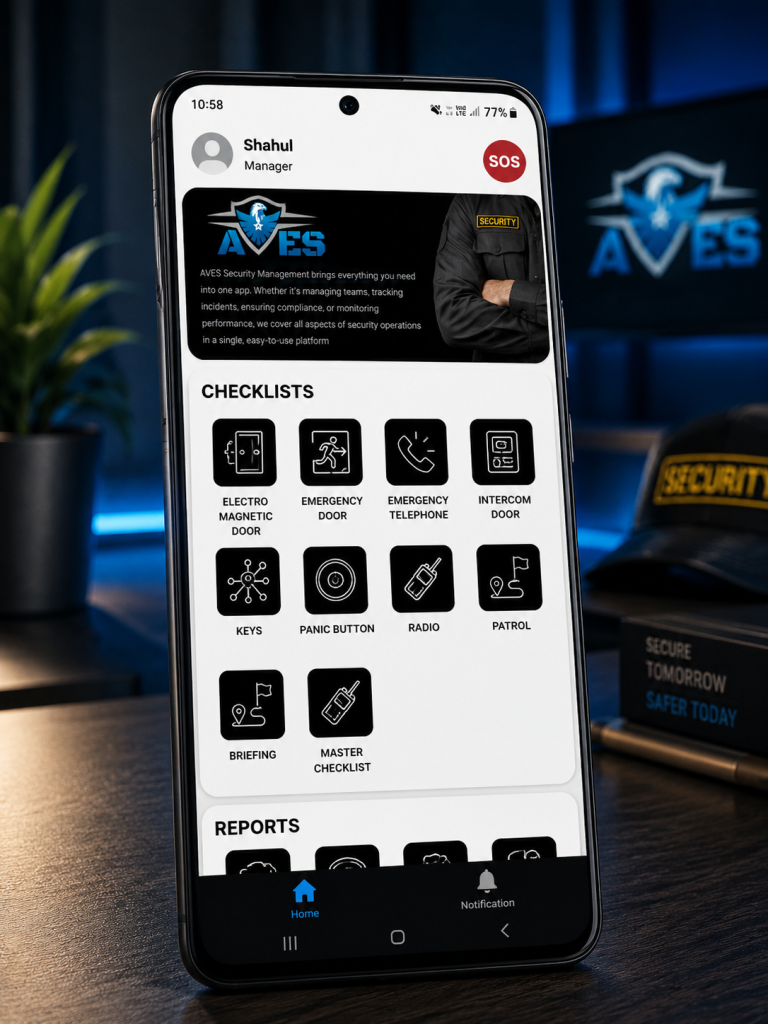
    AVES builds its training management system into the Staff Development section of the mobile app, right next to Performance Development Plan. Open Training and two paths show up: All Trainings and Records. They do very different jobs, so it helps to know which one you’re actually in.

    All Trainings is where sessions get built and managed. You can add or update training programs here, and, this part matters, assign them to specific users or departments instead of blasting them out to the whole team. Not every guard needs every training. Fire marshal certification might apply to one shift only. A first-aid refresher might just be for one department. Being able to target instead of broadcast keeps the list something people actually pay attention to, instead of noise they scroll past.

    Records, labeled Security Trainings, is the other half, and it works nothing like the first. Picture a calendar. You flip through months, land on a day, and see whatever got logged for that date. Nothing there? It just says so: no data available for that date. That’s the piece that turns a one-off event into something you can actually revisit later. Instead of asking a supervisor “hey, when was that class again,” you click the date and there’s your answer.

    One thing you won’t find here: a certification-expiry tracker, or anything resembling a compliance-scoring dashboard. If tracking exact expiry dates and renewal reminders matters to your business, that detail lives inside the individual training entry itself. The list and calendar views don’t surface it automatically.

    Getting Real Value Out of Your Training Management System

    A training management system is only as good as the habits around it. A few habits separate a training record that’s actually useful from one that just looks fine sitting there.

    Name your sessions like they mean something. “class1” tells you nothing six months later, not even to the person who typed it in. “Fire Safety Refresher, Site 4, Q3” tells a whole story the moment someone opens it.

    Only assign by department when the entire department genuinely needs it. It’s tempting to go broad “just in case,” but that buries the training under noise for everyone who didn’t need it, and makes it harder to spot who actually still has to complete it.

    Log it the day it happens. Records sorts by date, so a session entered three days late lands under the wrong day. It chips away at accuracy quietly, until you notice it during an audit and it’s too late to fix.

    Check Records regularly. Not just when a client comes asking. A monthly look catches gaps while you can still do something about them.

    The Mistakes That Undo a Training Management System

    Same handful of mistakes, over and over, even at companies with a solid system already sitting in their pocket.

    Vague naming tops the list. A training log full of “class1,” “class2” technically counts as a record. It just fails the actual point, which is answering a real question later, quickly and without guesswork.

    Over-assigning is next. Push a single-department training out company-wide and you bury the people who actually need to act on it under a pile of people who don’t.

    Then there’s confusing scheduled with logged, a subtler trap. A session sitting in someone’s calendar or a group chat thread isn’t proof of anything. Only an entry under Records, for that date, counts.

    And the big one: waiting for a client to ask before you check your own records. By then you’re not reviewing, you’re scrambling. Scrambling almost never produces a clean answer.

    Where a Training Management System Fits Into the Bigger Picture

    It doesn’t live on its own island. It ties directly into your duty roster and shift assignments, because whether a guard was actually qualified for a given post on a given shift depends partly on their training record. It sits right beside Performance Development Plan too, both feeding into a documented picture of how ready your team really is, not just how ready you assume they are.

    A training session nobody logged is a session you can’t prove happened. In this line of work, what you can prove tends to matter more than what you simply know to be true. AVES keeps checklists and dated training records in one training management system your guards already use for shifts and attendance, with the option to assign precisely instead of blasting everything to everyone by default.

    If you want to see how AVES handles this as a training management system in practice, you can explore the platform and request a demo at avessecurity.com.

    Frequently Asked Questions

    What is a training management system for security guards?

    A training management system for security guards is a software that helps you keep track of the training that security guards have completed. It is a place where you can log, assign and track the training of security guards, which’s better than using paper sign-in sheets or trying to remember who did what. This system gives you a record of who completed what training and when which’s very useful.

    Why do security companies need a training management system for security guards?

    Security companies need a training management system for security guards because clients and insurers often ask for proof of training. A training management system for security guards gives you the proof you need so you can give them an answer instead of just guessing.

    How is training assigned in a training management system like AVES?

    In a system like AVES training can be assigned to security guards or to entire departments. This means that each security guard only sees the training that’s relevant to them instead of seeing a long list of training that does not apply to their job or the site they work at.

    Does a training management system track certification expiry dates?

    Not all training management systems track certification expiry dates automatically. For example in AVES you have to look at the training entry to see the expiry and renewal details. So if you need to keep track of these dates for compliance you should check them directly.

    How often should I check my training management systems records?

    You should check your training management systems records at once a month. If you do this you can catch any gaps in the training schedule. Fix them before it is too late. This is better than finding out about the gaps during an audit when it is already too late to do anything about them.

    Can a training management system prevent liability issues?

    A training management system for security guards cannot prevent incidents from happening. It can help protect you after an incident occurs. If someone asks about the training that security guards received during an investigation a training management system for security guards gives you a record of the training that you can use to defend yourself. This is much better, than guessing what training was completed.

    CONTACT US

    Website : https://www.avessecurity.com

    Linkedin: https://www.linkedin.com/company/aves-security-management-system/

    Instagram: https://www.instagram.com/avessecurity/
  • How to Set Up a 3 Shift Duty Roster in AVES (Step-by-Step)

    How to Set Up a 3 Shift Duty Roster in AVES (Step-by-Step)

    Your 2-shift system is breaking. You know it. Your team knows it. The only question is when you’re going to actually do something about it.

    One of your officers is permanently wrecked from pulling nights. Handovers are a mess. And you’ve got this nagging feeling that someone’s going to miss something important because they’re too tired to think straight.

    Here’s the thing: that feeling’s justified. But you’re not stuck with it. A 3 shift duty roster handles this exact problem. Once you walk through how it actually works in your system, it stops looking complicated.

    Why a 2-Shift Roster Eventually Breaks (and Why a 3 Shift Duty Roster Fixes It)

    Two 12-hour shifts look perfect when you’re building them. The numbers work. You save money. Two handovers a day instead of three.

    Then your people start falling apart.

    Twelve hours is too long. Add a graveyard shift and it gets worse. Your officers can’t stay sharp that long no matter how hard they try. This isn’t laziness or a character problem. It’s just how human bodies work. You can’t willpower your way out of it.

    A 3 shift duty roster cuts each shift to 8 hours. Your officers stay alert. They make better decisions. The cost is more staff and three handovers instead of two. Both are doable once you know what to expect.

    How a 3 Shift Duty Roster Actually Gets Built in AVES

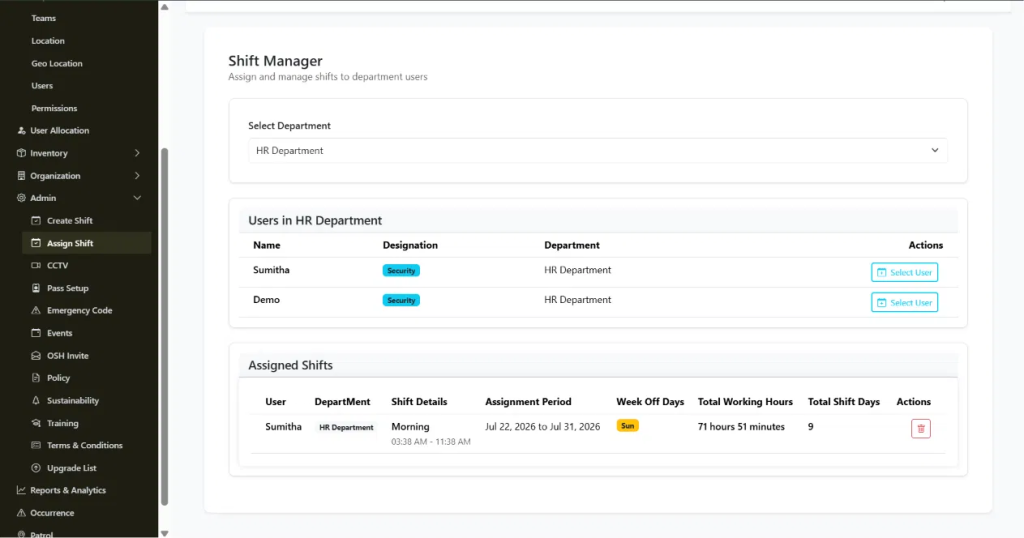
    Two screens run this. Both are under Admin. Create Shift builds your three shift templates. Assign Shift puts your people into those shifts.

    Step 1: Define three separate shift templates.

    Go to Create Shift and make three rows. Morning, Afternoon, Night. Each gets a Shift Name, Start Time, End Time, Break Hours. Working Hours fills in automatically.

    So you’re making three entries instead of one or two. Flip each to Active when you’re done.

    Step 2: Confirm timing doesn’t overlap or leave gaps.

    Check that Morning ends when Afternoon starts. Check that Afternoon ends when Night starts. A 30-minute gap looks harmless until a client asks who was covering at 2:15 PM and nobody was there.

    Step 3: Assign officers to shift templates in Assign Shift.

    Pick the department. Pick the shift. Assign it to the officer for your chosen period. Set Week Off Days here too.

    Step 4: Rotate officers on your cadence.

    Rotation doesn’t happen on its own. You go back to Assign Shift, delete the old assignment, create a new one for a different shift template. Weekly? Two weeks? That’s your call. Just stick to it.

    Step 5: Check the Dashboard before shifts start.

    The Dashboard shows how many people you’ve got total, who’s online, who’s offline. It’s a quick way to verify the rotation actually updated before anyone shows up for work.

    What Each Setting Actually Controls

    Create Shift handles Shift Name, Start Time, End Time, Break Hours, Status and the automatic Working Hours calculation. Three rows for three shifts.

    Assign Shift handles department, shift template, Assignment Period, Week Off Days, Total Working Hours, Total Shift Days.

    Know what these do. That’s the difference between a rotation that works and one you rebuild in three months.

    Best Practices for Running a 3 Shift Duty Roster That Actually Prevent Problems

    Build all three templates first. Set up Morning and Night, then add Afternoon later and you’ll create gaps nobody sees coming.

    Check timing every time you change something. Takes 30 seconds. Prevents client complaints.

    Don’t put officers on night shifts for more than three or four in a row. This is policy, not a system setting. Officers who get predictable breaks from nights make fewer mistakes and don’t quit.

    Update assignments a day or two before they start. Gives you time to catch mistakes before the shift begins.

    3 Shift Duty Roster Mistakes Worth Avoiding From the Start

    Timing gaps between shifts. Leaving an old assignment active when you rotate someone, which creates duplicate records. Moving someone from Night straight into Morning without a break. Talking about a rotation plan in a meeting and then not actually entering it into Assign Shift.

    These aren’t subtle. You just need to watch for them.

    Frequently Asked Questions

    What is a 3 shift duty roster?

    It’s three 8-hour shifts instead of two 12-hour ones. Morning, Afternoon, Night. Keeps people awake. Costs more, requires more handovers.

    How do you build a duty roster for 3 shift coverage in AVES?

    Make three shift templates in Create Shift. Assign officers to them in Assign Shift. Rotate them on whatever schedule you pick.

    Does AVES automatically rotate officers through a night duty roster?

    Nope. You do it manually in Assign Shift each time you change the rotation.

    How do you avoid gaps in a shift wise duty roster?

    Check that each shift ends exactly when the next one starts. Do this every time you make changes.

    How often should officers rotate through night shifts?

    Three or four nights in a row max. Then rotate them out. Keep it predictable.

    Can I see who is currently assigned to which shift at a glance? The Assign Shift screen shows it by department. The Dashboard shows online and offline counts.

    Where a 3 Shift Duty Roster Leaves You

    A 3 shift duty roster solves the problem that made you look for help. It’s straightforward once you know which two screens to use. The common mistakes are all preventable.

    AVES keeps everything in one place instead of scattered across spreadsheets. Update a rotation and it’s live everywhere immediately.

    Want to see how AVES actually does this? Check out avessecurity.com.

    CONTACT US

    Website : https://www.avessecurity.com

    Linkedin: https://www.linkedin.com/company/aves-security-management-system/

    Instagram: https://www.instagram.com/avessecurity/
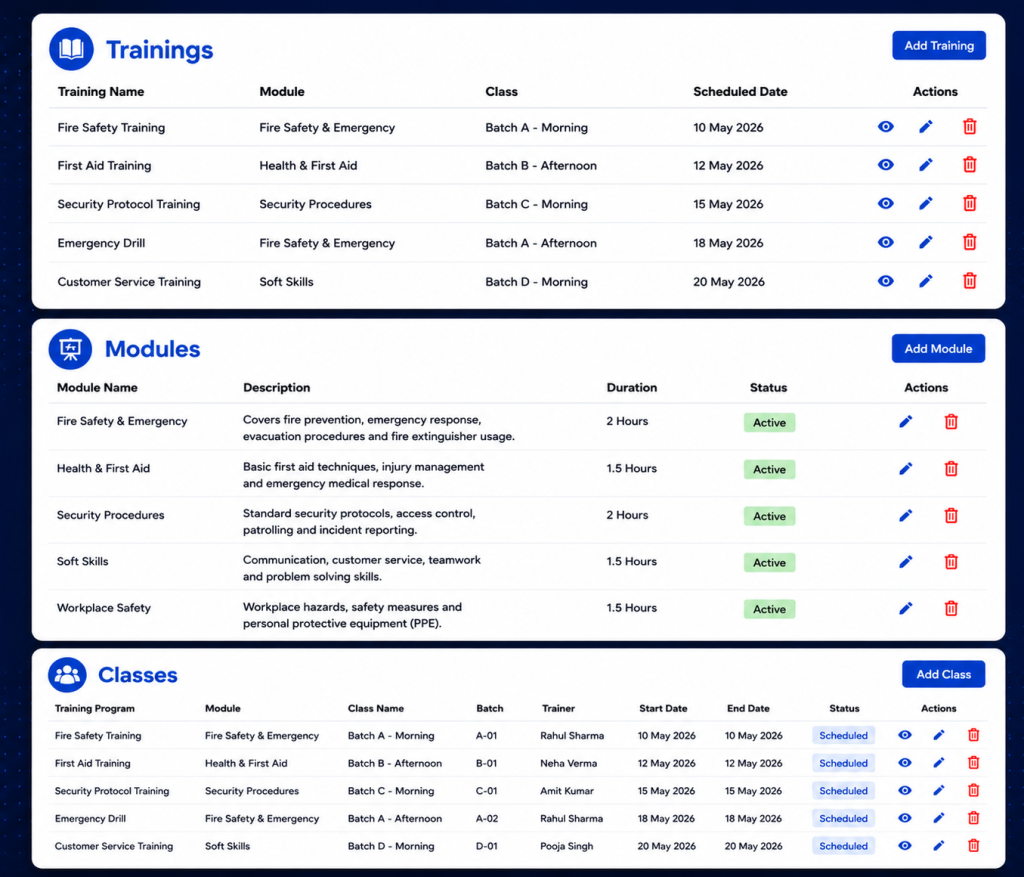
  • Fire Drill and Safety Drill Management: Scheduling, Records and Compliance Proof

    Fire Drill and Safety Drill Management: Scheduling, Records and Compliance Proof

    Every site runs fire drills. Almost none of them can prove who attended.

    That gap doesn’t show up on a normal day. It shows up the moment an auditor, an insurer or an incident investigator asks a simple question: who was present at the last fire drill and at what time did they arrive? If the honest answer involves a clipboard, a pen and someone’s best guess, you don’t have a compliance record you have a claim.

    AVES Security was built to close that gap. Here’s how fire drill and safety drill management actually works when it’s treated as a tracked event instead of a paperwork exercise.

    The Problem With a Sign-In Sheet at a Fire Drill

    Picture the usual fire drill routine. It happens on the 14th. Someone scribbles a topic on a form. A clipboard makes its way around the assembly point.

    It comes back with twenty-two signatures and no way to tell which ones the named person actually wrote. A few colleagues signed for each other because they were “just outside.” One signature is illegible. Nobody logged arrival times, so there’s no way to say whether the evacuation took four minutes or fourteen.

    None of that is malicious. It’s just what happens when attendance depends on a pen and goodwill instead of a system. And it’s exactly the weak point that surfaces during an audit, a claims review or a post-incident inquiry the moment your fire drill records matter most.

    Two Ideas AVES Keeps Separate

    Before getting into the workflow, it helps to understand a distinction AVES makes from day one: Drill Codes versus Drills.

    Drill Codes are your reusable emergency code catalogue things like “CODE RED fire” or “CODE BLUE medical emergency.” Each code carries standard summary lines describing what it means and what people should do. You configure these once and they stay as reference data.

    Drills are the actual scheduled events. A drill pulls a code from that catalogue and attaches the specifics topic, venue, shift, date and time. The drill is what gets a report number, a QR code and a live attendance roster.

    The payoff is consistency. Whichever supervisor schedules a CODE RED drill, the response instructions come from the shared catalogue, not from whatever they happened to type that morning. Every site, every quarter, same instructions.

    How a Drill Gets Verified, Start to Finish

    1. The groundwork is already there before your first fire drill. If you’re running shifts, Security Passes and staff rosters in AVES, you’re set. Drills reuse your existing shift assignments instead of asking you to build a separate participant list for every single exercise. A Security Pass matters here too it’s what gets scanned for supervisor-led roll call.

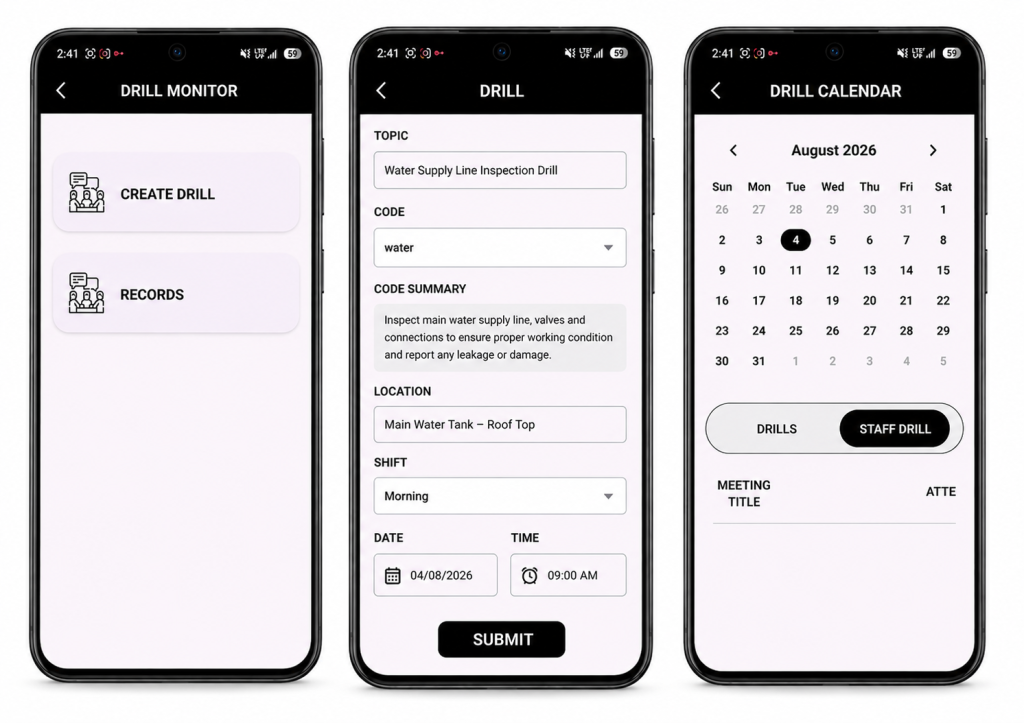
    2. Scheduling a fire drill takes under a minute. From the Drill Monitor, a supervisor fills in the topic, picks a code from the dropdown the official summary auto-fills and locks, so nobody can edit the response instructions on the fly then sets the location, shift and time.

    On save, AVES automatically:

    • Assigns a sequential report number (DRILL-001, DRILL-002 and so on), so a gap in the sequence is immediately visible
    • Generates a unique QR code for that drill
    • Notifies every staff member on the selected shift
    • Locks the record’s core fields so nothing can be quietly rewritten later

    3. The fire drill reaches exactly the right people. This is where AVES departs from a generic calendar invite: the shift is the audience. You don’t hand-build a list you pick a shift and everyone rostered to it sees the drill and gets notified. Nobody else does. Your night team stops getting pinged about day-shift exercises, which is the fastest route to notification fatigue and ignored alerts. The trade-off is worth knowing: a staff member with no shift assignment won’t see anything. If someone says a drill never reached them, check their roster first that’s the answer nearly every time.

    4. Staff confirm availability and can change their mind. Each person responds Yes, No or Maybe and can update that answer right up until the drill, whether that’s a shift swap, a late callout or a change of plans. AVES keeps them in exactly one group at a time, so the headcount supervisors see is always current. Supervisors get a grouped view names, departments, designations showing expected turnout before the drill even starts.

    5. Attendance at every fire drill is verified by QR scan, not by pen. This is the step that actually converts a fire drill claim into evidence. AVES supports two check-in modes, and most sites run both together:

    • Self check-in staff scan the drill’s QR code at the assembly point. AVES identifies them from their own authenticated session, not from anything they typed and timestamps the arrival automatically.
    • Supervisor roll call a supervisor scans each person’s Security Pass. Every scan marks that specific person and a supervisor can never accidentally mark themselves while scanning someone else.

    Three rules hold on every single scan:

    • You can’t check in someone who isn’t registered on that drill
    • You can’t scan the same person twice
    • The arrival time is written by the server the moment of the scan never typed in afterward

    And if someone answered “No” but shows up anyway (which happens far more often than you’d expect), the scan moves them straight into the attended group. The record reflects what actually happened on the ground, not what people predicted three days earlier.

    6. Close it out and export a real record. Once the drill wraps, a supervisor sets its status Complete, Cancel or Postpone and adds remarks on what went well and what needs work before the next one. AVES logs who closed it and when.

    Then it exports as a first-class report: PDF or Excel, filterable by date range, status, department, location, team or individual. What comes out isn’t a photo of a clipboard it’s a numbered record with a topic, code, venue, shift, scheduled time, full response roster, timestamped attendance and outcome notes. That’s the document you actually hand to an auditor.

    Sign-In Sheet vs. AVES, Side by Side

    CategorySignature SheetAVES
    Who gets notifiedWhoever saw the noticeboardEvery rostered shift member, automatically
    Expected turnoutUnknown until the dayKnown in advance via Yes/No/Maybe
    Proof of presenceA signature, signable by anyoneQR scan tied to an authenticated identity
    Arrival timeRarely capturedTimestamped server-side, per person
    Duplicate entriesCommonAutomatically rejected
    Record integrityEditable with a penReport number and identity fields locked by the system
    RetrievalA folder, eventuallyFiltered PDF or Excel in seconds

    Control Over Who Can Do What

    Drill management sits under a dedicated Drilling & Safety permission, split into three levels View, Create and Update so an entire shift can respond and check in without ever being able to schedule a drill, while supervisors get Update access for roll call. The emergency code catalogue is governed separately, so managing codes is its own grant, not bundled in with running drills. And every organisation’s drill data lives in its own isolated database one tenant never sees another’s records.

    A Drill Is Only as Good as the Evidence It Leaves Behind

    Fire and safety drills are one of the few compliance activities where proving the activity happened is harder than running it in the first place. AVES closes that gap end to end: schedule to a shift, notify the right people automatically, verify every arrival by scan and export a record that actually holds up.

    Ready to see it in action? Book a demo of AVES Security Management today.

    What is a mock fire drill?

    A mock fire drill is a simulated emergency exercise that tests how staff respond and evacuate without an actual fire. It checks response time, headcount accuracy and whether people know the evacuation route the same purpose as any safety mock drill, run under controlled conditions.

    How often should a fire drill be conducted?

    Most compliance frameworks require a fire drill at regular intervals commonly quarterly or twice a year, depending on the site and local regulation. AVES lets you schedule each fire drill to a specific shift so the frequency stays consistent across every team, not just the ones that happen to be on-site that day.

    What’s the difference between a fire drill and an evacuation drill?

    In practice, the terms are often used interchangeably. A fire drill is technically a fire-specific safety drill, while an evacuation drill can cover any emergency that requires clearing a building — fire, gas leak, bomb threat and so on. AVES handles both the same way: schedule against an emergency code, notify the right shift and verify attendance by QR scan.

    How do you track attendance at a fire drill?

    The reliable way is a scan, not a signature. AVES verifies fire drill safety compliance by having staff scan the drill’s QR code themselves or having a supervisor scan each person’s Security Pass during roll call. Every scan is timestamped server-side, so there’s no way to sign in for someone else or backdate an arrival time.

    Why is fire drill safety documentation important for audits?

    Auditors and insurers don’t just want to know a fire drill happened they want proof of who attended, when they arrived and what was covered. A signature sheet can’t verify any of that. AVES exports each fire drill as a numbered, timestamped record with a full attendance roster, so the documentation holds up under review.

    Can a safety mock drill be scheduled for a specific team only?

    Yes. Every fire drill in AVES targets a shift, not the whole organisation, so only the staff rostered to that shift get notified and can respond. This keeps the safety mock drill relevant to the people actually meant to take part, without spamming teams who aren’t on that shift.


    CONTACT US

    Website : https://www.avessecurity.com

    Linkedin: https://www.linkedin.com/company/aves-security-management-system/

    Instagram: https://www.instagram.com/avessecurity/
  • Best Access Control Security Software:Gate Pass,Shift Request

    Best Access Control Security Software:Gate Pass,Shift Request

    Here’s the truth. You’re not searching for access control software because you’re curious. You’re searching because something already went wrong.

    A visitor walked in without a pass. A guard couldn’t find a key. A shift request got buried in a chat and nobody covered the gate. Sound familiar? That’s usually how this starts. Not curiosity. A problem that just exposed how much of your operation runs on spreadsheets and good intentions.

    And if you’re hunting for the best access control software for a real security operation, you’ve probably got a few nagging worries too. Will this be too complicated for guards who barely have time to read a manual, let alone a training deck? Will it actually fix gate passes and keys or just add another login nobody bothers opening? Will you spend money on access control software and end up right back here in six months, typing the same search into Google?

    Fair questions. All of them. So let’s answer them properly, using what actually matters when you’re evaluating access control software for a working security team, not some polished demo environment built to impress.

    What Access Control Software Actually Needs to Do

    Most access control software gets marketed around badges and doors. That’s only part of the job. Treat it as the whole job and you’ll find out the hard way that it isn’t.

    For a security company running multiple sites, access control software has to juggle three things at once: who’s allowed where, who requested access and when and who’s holding the physical keys that open everything else. Miss one of those and the other two barely matter. Picture a three-legged stool. Two solid legs and one missing and it still tips over the moment someone leans on it.

    That’s exactly why so many buyers feel burned after picking access control software that looked sharp on a sales call. Badges? Handled. Gate passes, key custody, request approvals? Never really touched.

    Software for Access Control Should Cover the Gate, Not Just the Door

    Here’s something most product pages conveniently leave out. Software for access control that only manages internal doors leaves your biggest exposure point wide open: the gate.

    Think about it. Visitors, delivery drivers, contractors, vendors, they all pass through a gate before they ever reach a door. If your software for access control skips a proper gate pass management system, you’re still tracking that traffic on a clipboard or worse, a WhatsApp message to whichever guard happens to be on duty.

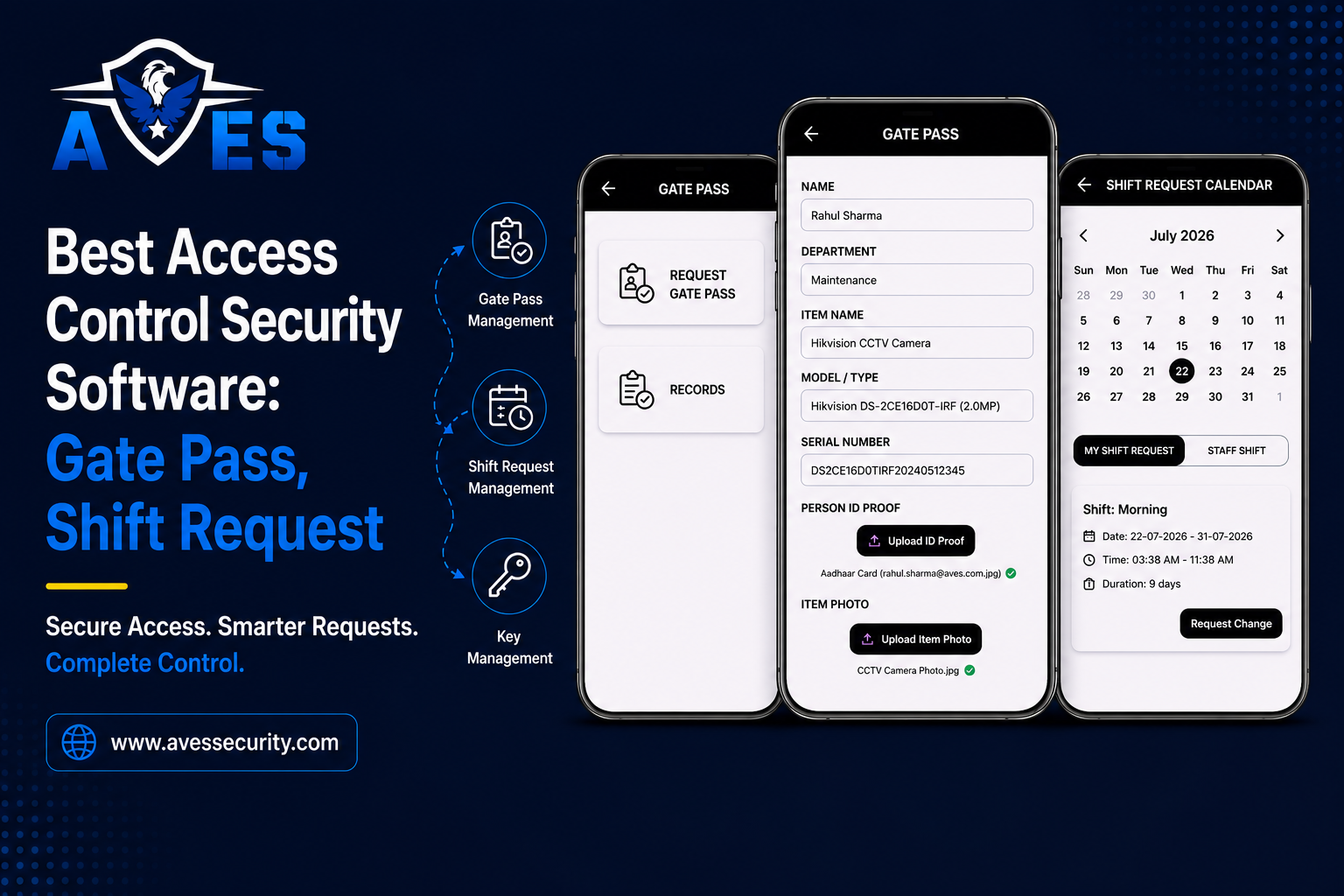
    A real gate pass management system lets a guard issue, verify and log a visitor pass in seconds, straight from a phone, no phone calls, no waiting on approval. That one change kills the single most common complaint clients raise about security vendors: “why did it take fifteen minutes just to let my delivery in?”

    Gate Pass Management System: What Buyers Discover Too Late

    Most people evaluating a gate pass management system assume it’s basically a digital sign-in sheet. It’s not, and assuming otherwise is a mistake you’ll only notice later, during an audit or a furious client call, exactly when you can least afford it. For the full breakdown of pass types, approval chains and audit reporting, see our dedicated gate pass management guide.

    A proper gate pass management system should:

    • Log entry and exit times automatically, not from memory
    • Attach a photo or ID scan to each visitor record
    • Flag expired or unauthorised passes before a guard waves someone through
    • Give supervisors a searchable record across every site, not just one

    Skip this and you’re stuck reconstructing what happened after an incident, instead of pulling up a report that already has the answer sitting there. That gap? That’s exactly where client trust quietly erodes, one delayed answer at a time.

    Request Management System: Why Shift Chaos Usually Starts Here

    A request management system sounds small. Boring, even. Until you’re the one covering a shift nobody assigned you, because a swap request got lost somewhere in a text thread.

    Here’s what beginners tend to miss. Guard shortages rarely happen because there aren’t enough guards. They happen because a request management system or the lack of one, fails to route a simple leave or swap request to the right supervisor in time.

    The best access control software treats requests the same way it treats access itself, as something that needs approval, a timestamp and a record. A working request management system, like the one inside AVES’s scheduling module, lets a guard submit a leave or shift-swap request from their phone and get an answer the same day, with a supervisor approving or rejecting it in one tap.

    Call it a minor convenience if you like. It’s really the difference between a site running short-staffed and a site staying fully covered.

    Key Management Solutions: The Gap Almost Nobody Talks About

    Search for access control software today and most results talk about badges and cameras. Almost nobody talks about the keys.

    That’s a genuine blind spot. Key management solutions matter because physical keys are still how most buildings actually get opened, long after the badge system has already logged someone in and moved on.

    Without proper key management solutions, you’re relying on a logbook or worse, someone’s memory, to know who’s holding a master key overnight. That’s a liability every security company eventually has to explain to a client, usually right after something’s gone missing.

    Good key management solutions track who checked out which key, when it’s due back and fire off an alert the moment it’s overdue. Sounds simple, doesn’t it? But it closes a gap spreadsheets have never actually closed.

    What to Look for Before You Buy Access Control Software

    Skip the vendor with the longest feature list on their homepage. Look past the marketing and focus on whether the platform actually covers the full picture.

    When comparing access control software, check for:

    • A gate pass management system built in, not bolted on as an afterthought
    • A request management system guards can genuinely use from their phone
    • Key management solutions that log custody, not just issue a key once and forget it
    • One dashboard across every site, not five separate logins
    • Reports that are ready for a client or auditor without extra formatting

    Missing more than one of these? You’re not buying access control software. You’re buying a badge reader with a nicer interface, nothing more.

    Why AVES Was Built Around This Exact Gap

    AVES Security Management System came out of watching the same pattern repeat, over and over, across growing security companies. Gate passes handled on paper. Keys tracked in someone’s head. Shift requests lost in a group chat nobody checks after hours.

    AVES brings gate pass management, key management and request management into one platform instead of several disconnected tools. A guard logs a visitor at the gate, checks out a key or submits a shift request, all from the same app and a supervisor sees every bit of it from one dashboard.

    That’s the real difference between access control software that looks complete on a sales page and software that actually holds up on a Tuesday night when three things go wrong at once.

    Making the Decision With Confidence

    You don’t need to overhaul everything overnight. Start by mapping out where your process actually breaks down most, whether that’s the gate, the key cabinet or shift coverage.

    Once you know that, choosing between access control software options gets a lot simpler. You stop comparing feature lists. You start checking whether a platform actually closes the specific gap costing you time and trust right now.

    If gate passes, keys and requests are still the parts of your operation running on paper or good faith, AVES was built to close exactly that gap. You can see how it works on a real site with a short demo, no long-term commitment needed to take a look.

    Frequently Asked Questions (FAQ)

    What makes access control software “the best” instead of just adequate?

    The best option covers gates, keys and requests together, not badges alone. If a platform only handles one of those, it’s a partial fix, not a complete one.

    Is access control software difficult for guards to learn?

    Not if it’s built correctly. A good platform should take a guard less than a day to learn, since most of the work happens through simple taps, not manual data entry.

    Does this kind of platform replace physical security guards?

    No. It supports guards by removing paperwork and guesswork. It doesn’t replace the judgment a trained guard brings to a gate or a checkpoint.

    How is a gate pass management system different from a normal visitor log?

    A gate pass management system automates verification and flags problems in real time. A paper visitor log only records what happened after the fact, with no way to catch an issue before it becomes one.

    CONTACT US

    Website: https://avessecurity.com/

    Linkedin: https://www.linkedin.com/company/aves-security-management-system/posts/?feedView=all

    Instagram: https://www.instagram.com/avessecurity/

  • Security Incident Report Format: The Critical Guide to What Every Report Must Record (2026)

    Security Incident Report Format: The Critical Guide to What Every Report Must Record (2026)

    I’ve sat in rooms where a security incident report format got picked apart by a lawyer, line by line. That’s when you learn how a badly written report stops being paperwork and starts being the thing that sinks your case.

    A security incident report format isn’t something you scribble out at the end of a shift to check a box. It’s the document that decides whether your company looks sharp or careless the moment something goes wrong. A vague security incident report format — missing timestamps, no real sequence of events, no record of who was told — protects nobody. It hands the other side more questions than answers.

    “Suspicious person near loading dock, resolved.” Three weeks later, when a client asks what happened, that tells you nothing. Who was this person? And “resolved” how? Who got called, and when?

    That last question sinks a security incident report format most often. The report says “management informed” — not which manager, at what time, or whether they responded — and the guard who wrote it has since left.

    Why It Matters

    Most guards never think about this until it’s too late: a security incident report format isn’t just internal record-keeping. It’s what your company hands over when a client, an insurer, or a lawyer asks “prove it.” The system side of that is covered in our security incident report software guide; this piece is about the fields themselves.

    a report that cannot answer basic questions doesn’t just look sloppy — it creates legal exposure. If it can’t establish what happened, who was involved, and who was notified, you’re not defending your company in a dispute. You’re handing the other side ammunition.

    The notification chain quietly makes or breaks an otherwise solid report. A detailed timeline means little if “management was informed” replaces a named person and a timestamp. The hardest question — did anyone respond in time — stays unanswered.

    Step-by-Step: Filing a Report the Right Way

    Here’s how this works in AVES, field by field.

    Step 1: File the report from the app, on site

    Case title is the only required field, so a guard can start the record while the incident is live and fill in the rest as facts settle. Date, time, place, description, and location/department are optional at capture.

    Step 2: Record the people involved as structured fields, not prose

    Victim name, age, gender, witness and affiliation, and a casualties flag sit in named fields rather than a paragraph, which is what makes the record searchable later — you can answer “how many incidents involved casualties this quarter” without reading fifty reports.

    Step 3: Fill in the notification chain

    This section earns its place in any incident report: person in charge, whether notified, department head, and duty manager, all by name. “Who was told, and when” is the first thing disputed after a serious incident, and here it’s filled in while it’s happening, not reconstructed weeks later.

    Step 4: Attach evidence to the report itself

    An incident accepts photos from six named angles — front, back, left, right, top, bottom — up to five images each, plus three videos and three audio files, at 50 MB per file. Accepted formats are JPEG, PNG, GIF, MP4, MOV, MP3, WAV, and OGG.

    Six named angles instead of a random photo pile makes two reports of the same incident type comparable months later. Files can be attached during submission or uploaded first and referenced afterward.

    Step 5: Close the loop with findings and recommendations

    Beyond what happened, a complete report carries findings, action taken, recommendation, estimated value, and whether the item was insured — the difference between a log entry and a document you can hand to a client.

    Step 6: Let supervisors see it the moment it’s filed

    New incidents and edits broadcast to the dashboard in real time, carrying case number and status. The dashboard tracks open incidents and folds them into an “action required” count.

    The incident list filters by case title, number, location, date range, and open/closed status, sorted newest-first. Guards also get a dedicated view of reports they filed themselves.

    Step 7: Export as PDF — one case or a filtered batch

    Any incident generates a PDF titled with its case number, carrying the full field set and status. A filtered set — a date range, one location, all open cases — exports as a batch report in a single action. Images embedded in the PDF resolve without the reader needing a login, so a report you send a client shows its photos, not broken image icons.

    Step 8: The record protects itself at the edges

    The report records which user filed it and in what role, automatically. Deletes are soft, so a removed record is flagged rather than destroyed.

    Settings Explained

    Incident permissions, split four ways. View, create, update, and delete are separate, so “can file a report” doesn’t imply “can erase one.”

    “My incidents” scope. Guards see only the reports they filed, useful for completing a write-up across a shift.

    Open/closed status. Status is binary — open or closed — and drives the dashboard’s open count. Formal investigation trails with severity levels belong in a separate module.

    Location and department tagging. Both are free text, with dropdowns generated from values already entered. Agree on site wording up front, since “Loading Bay” and “loading bay 1” won’t group together.

    Upload limits. 50 MB per file, five images per angle, three videos and three audio files per incident. On sites with poor connectivity, brief guards to submit the report first and attach video afterward.

    Best Practices / Benchmarks

    Fill the notification chain every time, even when it feels redundant — the person-in-charge and duty-manager fields are skipped on quiet incidents and needed most on loud ones.

    Set your own time-to-close baseline for closing reports, then hold to it. Open versus closed counts establish what normal looks like across your sites, more useful than an industry figure.

    Review open incidents weekly, not monthly. An incident open for six weeks is rarely still under investigation — it’s usually finished work nobody closed.

    Use the six angles as a checklist for every report. A single wide photo answers one question; six answer the ones you don’t know to ask yet.

    Standardise location wording per site. A short agreed vocabulary, posted where guards can see it, is what makes location filtering useful at quarter-end.

    Common Mistakes That Undermine Otherwise Good Reports

    Writing conclusions instead of observations. “Theft occurred” is a conclusion. “Inventory count showed three units missing from shelf B4 during the 10 PM count” is an observation. A strong report always uses the second.

    Filling reports out from memory. The same failure the security guard logbook has always had. Details slip away faster than expected — which is why case title is the only required field to start the record.

    Leaving the notification chain vague. “Management informed” answers nothing. Name the person in charge, department head, and duty manager, and when each was notified.

    Skipping the photo angles. Patrol evidence has the same problem — see the guard tour system guide. One convenient photo tells you less than you think. Six named angles make a scene comparable months later.

    Letting open incidents sit. An incident with no severity tier can quietly rot if nobody reviews the open list.

    Frequently Asked Questions

    What is a security incident report format? A structured record capturing incident details, the people involved, the notification chain, supporting evidence, and findings and actions taken — built so the event can be reconstructed without relying on memory.

    What should a security incident report format include? Case title and details, structured fields for victim/witness/casualties, a notification chain naming who was told and when, photo/video/audio evidence, and a findings-and-recommendation section that closes the loop.

    Is incident severity classified in this system? No — status is binary. Severity tiers and staged escalation live in a separate module, not a general security incident report format.

    Why does the notification chain matter so much? Because “who was told, and when” is the first thing disputed after a serious incident, and it’s most often reconstructed from memory instead of recorded in the moment.

    What makes a security incident report format legally usable? It sticks to observable facts, records exactly who was notified and when, attaches evidence directly to the case, and can’t be silently altered — deletes are soft, and every field is tied to the user and role that filed it.

    How is a security incident report format different from a general incident report? Both share the same field set here. Formal investigation tracking, with severity levels and staged status, is handled by a separate module.

    Related Features

    Dashboard reporting — real-time counts for every report, filterable by location, date range, and status.

    Batch PDF export — a filtered set of cases exports as a single report.

    Role-based permissions — view, create, update, and delete as independently assignable permissions.

    CTA

    A good format tells your guards what to write down. It doesn’t guarantee that report survives getting questioned later, unless the system behind it records who was notified and protects the record from silent edits.

    If you want to see how AVES turns a report into evidence you can stand behind, explore the platform and request a demo at avessecurity.com.

  • Security Guard Duty Roster: Shift Patterns, Rules and Formats (2026)

    Security Guard Duty Roster: Shift Patterns, Rules and Formats (2026)

    Nobody tells you this part. The spreadsheet was never really the problem with your security guard duty roster. What breaks it is simpler than that nobody touches it once the shift’s already moving.

    Officer calls in sick at 6 AM. Another site’s got a gap on nights out of nowhere. And somewhere in your inbox three versions of the same file all slightly different and honestly? Even you can’t say which one’s current anymore. Everyone running a crew has lived this exact morning.

    Doesn’t mean you’re bad at the job. Means you inherited a mess that most security operations just. never actually fix. It’s common. More common than anyone admits out loud.

    So this guide gets into the real stuff shift patterns that survive contact with reality rest rules that keep you out of legal trouble formats that hold up when a client or inspector wants to see one. Read through and you’ll know what an actual working roster looks like not the textbook version.

    What a Duty Roster Meaning Actually Covers

    Drop the idea that a duty roster is just names sitting next to time slots. It’s a lot heavier than that.

    It’s proof. Who was supposed to be where starting when for how long. Payroll runs off it. So does client billing. Your whole attendance record hangs on this one document being right every time.

    Most people file it under “scheduling admin.” Ask anyone who’s been burned before though they’ll tell you it’s a liability record first scheduling tool second. Both true at once. That’s exactly why a messy schedule costs way more down the line than new managers assume going in. The roster is the document; security guard scheduling software is the system that keeps it honest once shifts start moving.

    Kind of like a flight log if you think about it. Nobody looks twice at it on a quiet day. Then something goes wrong and it’s suddenly the only piece of paper anyone trusts. Same logic applies here someone asks “who was on site at 2 AM last Tuesday” and that document’s the first thing anyone reaches for. Doesn’t match what actually happened? Now you’re dealing with something a lot worse than a scheduling hiccup.

    Common Shift Patterns That Actually Work

    No single pattern’s “correct” for a staff duty roster. Comes down to site risk actual headcount how much fatigue your team can take before things start slipping.

    2-shift system (12-hour shifts)
    Two officers 24 hours split down the middle. Easy enough to manage — until the same person keeps pulling nights and fatigue quietly builds underneath everything.

    3-shift system (8-hour shifts)
    Three shifts shorter each. Officers stay sharper no argument there. But now you’re staffing up more and running handovers three times a day instead of two and every handover’s a chance for something to fall through.

    4-on-4-off
    Shows up a lot on bigger industrial or warehouse jobs. Four days on four off looks generous on paper. Then you check and those four “on” days are 12-hour shifts anyway so run the actual math before you commit.

    Rotating nights
    Rather than parking one guy on permanent nights until he burns out the schedule cycles who takes it. Spreads the wear across the whole team instead of one person quietly reaching their limit.

    Same mistake over and over with first-timers building this duty roster. Pick a pattern because it looks clean on paper skip checking if the headcount actually supports it. Four officers on a 3-shift setup? Works fine. Drop to three on that same pattern and somebody’s losing their rest day. Every time. No exceptions.

    Fatigue and Rest Rules Nobody Warns You About

    Most guides skip straight past this which is a mistake because it’s the part that actually gets companies fined or dragged into court.

    Security sits near the top for fatigue-linked incidents in low-wage work generally and it’s not really a mystery why. Shifts run long rest periods get shaved down quietly whenever there’s a gap to cover fast.

    Worth locking into any duty roster before you finalize it:

    • Minimum rest gap between shifts usually 8 to 11 hours depending where you are. Back-to-back 12-hour shifts with barely a gap break this rule constantly more than most managers realize until someone points it out.
    • Consecutive nights need a cap. Three sometimes four in a row that’s about where alertness starts dropping off measurably.
    • Weekly hour caps exist basically everywhere. Push past them and you need actual paperwork not just someone nodding along and saying sure go ahead.

    None of this reads as exciting fair enough. But that’s precisely why it gets ignored and why most companies only sort out this staff duty roster structure after an audit or incident forces the issue into the open.

    How Coverage Gaps Actually Happen

    Gaps in a duty roster rarely come from bad planning. They come from the plan not keeping up once reality shifted underneath it.

    Guard calls in sick at 6. Supervisor scrambles has someone in by 7 crisis handled right? Except the paper schedule or that spreadsheet sitting unopened somewhere still lists the original guy as on shift. Payroll processes the wrong hours. Client’s report shows a name that was never actually on site that night and now someone’s got questions.

    This right here is the biggest failure point in manual rostering full stop. Not the planning. The tracking of what changed after the plan was already locked in.

    From Roster to Payroll: Where Most Companies Lose Money

    A security duty roster isn’t just paperwork gathering dust. It’s the direct input into payroll and that’s precisely where manual systems bleed money without anyone noticing for months.

    Your schedule says full shift worked. Officer actually left two hours early nobody flagged it. Now either you’re overpaying that guy or your client’s getting billed for hours that never actually happened on site. Neither’s great. Both happen constantly everywhere spreadsheet-based systems are still running things.

    Fix isn’t “tell supervisors to pay more attention” that’s not a real fix that’s a hope. Real fix is closing the distance between what the duty roster says happened and what actually happened on the ground automatically without relying on someone’s memory three weeks later.

    Common Mistakes First-Time Roster Managers Make

    Building it once treating it as finished.
    It’s not finished ever. Should update the moment something changes not get quietly patched up once the pay period wraps.

    Ignoring rest rules until something forces the conversation.
    By the time fatigue causes a missed patrol or an actual injury that violation already happened repeatedly probably for weeks.

    Choosing a format that can’t be audited.
    Client wants three months of history tomorrow can your security duty roster actually produce it clean? Or are you piecing it together from memory and half-updated spreadsheets at midnight hoping nothing’s missing?

    Assuming Excel just scales.
    Fine for six guards one site. Add more locations more supervisors touching the same file and the whole thing starts cracking. Fast.

    What a Trustworthy Roster Format Actually Needs

    A duty roster for security guards built to survive real scrutiny needs at minimum:

    • Officer name and ID
    • Site and post assignment
    • Shift start and end time including approved overtime
    • Actual clock-in and clock-out not the planned times the real ones
    • Sign-off on any swap or last-minute change and who approved it
    • Timestamp trail showing when the duty roster was last touched and by who

    Can’t produce this on demand? That’s not a risk sitting somewhere down the road. That’s a gap you’re carrying right now.

    Where This Usually Breaks Down and What Actually Fixes It

    Most security companies don’t fail their duty roster out of laziness. They fail because they’re using a static document to manage something that’s live and changing constantly hour by hour.

    Spreadsheet-based setups won’t catch a late clock-in. Won’t flag a guard about to blow past a weekly hour cap either. And there’s zero chance it hands you an audit-ready report in thirty seconds when a client calls asking for proof of coverage from last month.

    That gap right there is what AVES Security Management Software exists to close. The roster is the plan; security guard scheduling software is what keeps that plan tied to what actually happened on shift. Shift schedules stay tied directly to real attendance not floating around in some separate file someone remembers to update eventually. Shift swaps get logged with a real approval trail instead of disappearing into a deleted text thread nobody saved. Someone asks for historical duty roster records you pull a timestamped report on the spot instead of reconstructing three files’ worth of memory at midnight.

    Don’t need to rebuild your whole operation for this. Just need the duty roster and what actually happened to finally be the same document.

    Tired of chasing down what really went on during last night’s shift? Worth a look at how AVES handles a security guard duty roster attendance and shift management in the real world request a demo at avessecurity.com.

    Related reading: Security guard scheduling software covers the shift-assignment and ghost-shift side of this, and geofence attendance covers how location-verified check-in produces the actual clock-in data a roster needs.

    Frequently asked questions ( FAQ )

    What is the meaning of a duty roster?


    A duty roster meaning, in security operations, is a formal schedule that records which officer is assigned to which post, for what hours, on any given day. It is not just a plan. Once shifts start, it also becomes the record of who was actually present, which is why it doubles as an attendance and payroll document.

    How is a staff duty roster different from a general work schedule?


    A staff duty roster is built around post coverage, not just individual convenience. Every slot on the roster has to be filled by someone qualified for that post, so gaps cannot be left open the way they might be on a regular office schedule. That is what makes staff duty rosters harder to manage manually once you have more than one site.

    What should a security duty roster include?


    A proper security duty roster needs officer name and ID, site and post assignment, planned shift timing, actual clock-in and clock-out and a record of who approved any last-minute change. Without the actual attendance data, a security duty roster is just a plan on paper, not a real operational record.

    How do you build a duty roster for security guards with multiple sites?


    A duty roster for security guards across multiple sites needs to show post coverage per site, not just names against time slots. Most managers start in a single spreadsheet, but it becomes hard to track once you are juggling several sites and shift patterns at once. Centralizing rosters by site, with attendance tied in, is usually what keeps multi-site coverage from slipping through the cracks.

    Is a duty roster in Excel good enough for a growing security team?


    A duty roster excel template works fine for a single site with a handful of guards. It starts to break down once you add more officers, more shifts or more than one supervisor editing the file, because there is no audit trail and no way to catch a discrepancy between planned and actual attendance in real time.

    What is a 3 shift duty roster and when should you use one?


    A 3 shift duty roster splits 24-hour coverage into three 8-hour blocks instead of two 12-hour ones. It reduces fatigue per officer but needs more staff and tighter shift handover discipline, since shift changes happen three times a day instead of two. It tends to suit sites with higher risk profiles where alertness matters more than staffing cost.

    How does AVES help with duty roster management?


    AVES Security Management Software keeps the duty roster tied to real attendance instead of a separate spreadsheet someone updates later. Shift assignments, clock-in and clock-out times and shift swap approvals all live in one system, so the roster reflects what actually happened on site, not just what was planned. When a client or auditor asks for coverage history, you can pull a timestamped, audit-ready report instead of piecing it together from old files

    CONTACT US

    Website : https://avessecurity.com

    Linkedin: https://www.linkedin.com/company/aves-security-management-system/

    Instagram: https://www.instagram.com/avessecurity/
  • Security Reporting Software: 5 Powerful Guard Secrets

    Security Reporting Software: 5 Powerful Guard Secrets

    A client calls asking for proof a patrol actually happened last night and you dig through paper logs, texted photos, half filled checklists, hoping something turns up. You find something eventually. But that ten minute scramble tells you something you’d rather not admit: your business needs security reporting software not the patchwork system you’re currently running on.

    That’s the real reason so many security companies go looking for security reporting software. Not because it sounds impressive on a sales page. The old way of proving work happened is quietly costing them contracts trust and sleep. and most owners only notice once it’s already cost them something.

    You’re probably not hunting for another app to learn. You want to stop feeling like your business runs on hope and paperwork and honestly that’s a fair thing to want. The right security reporting software fixes exactly that.

    Five things below. Most guard companies only figure them out after years of trial error and lost clients.

    Secret 1: Your Biggest Risk Isn’t a Missed Patrol. It’s Missing Proof.

    Most owners assume the danger is a guard skipping rounds. It isn’t not really — and that’s the first thing good security reporting software teaches you.

    Even when the patrol happens exactly the way it’s supposed to if there’s no timestamped location verified record of it you can’t prove anything. To a client sitting across the table from you unproven work looks identical to no work.

    Security reporting software doesn’t just track guards. It builds a paper trail that actually holds up when someone pushes back on it protecting your business on the bad nights not just the easy ones.

    Think about the last time a client questioned an incident. What did you have to show them really? A text message? Your own memory? A signature on a clipboard that could belong to anyone who happened to be standing there?

    Digital patrol verification changes that conversation. You stop explaining what probably happened and start showing what did happen down to the minute and the GPS coordinate.

    Secret 2: Paper Logs Cost More Than They Look Like They Cost

    A paper logbook looks free on the surface right up until you compare it to what security reporting software actually saves you. No subscription no setup no training.

    It isn’t free. It costs you constantly just never in a way that shows up on an invoice. Lost pages. Handwriting nobody can read three weeks later. Guards backdating entries after the shift already ended. Supervisors burning hours every week doing nothing but organizing paperwork.

    Add it up sometime. The hours your office staff spends chasing logs usually land at several unpaid hours a week per site — and once you multiply that across ten or twenty sites the real cost stops being invisible.

    A digital electronic guard logbook the kind built into most security reporting software kills that hidden tax. Entries timestamp themselves. Nothing gets backdated nothing disappears into a glovebox. Your team gets that time back for actual security work not paperwork archaeology.

    Secret 3: Clients Don’t Renew Contracts Because of Guards. They Renew Because of Reports.

    This one catches a lot of owners off guard.

    Your guards can do great work every single night. Doesn’t matter not if the client never actually sees clear proof of it happening. What they don’t feel they eventually stop paying for.

    Clients renew when they can open a report and instantly understand what happened when it happened and that nothing got missed. Not a guard problem. A reporting problem and the right security reporting software solves it before the client ever has to ask.

    Picture a mechanic who does flawless work on your car but hands you nothing no invoice no breakdown nothing to look at afterward. Would you book with them again without asking a few questions first? Probably not even though the work itself was fine.

    Same logic here. Security reporting software has quietly turned into a competitive advantage rather than a nice extra because the companies using it aren’t just doing the work they’re proving it. That’s what makes renewal an easy decision instead of a negotiation.

    Secret 4: The Software You Choose Should Fit Your Operation Not the Other Way Around

    Almost every first time buyer makes the same mistake shopping for security reporting software. They pick software off the longest feature list then spend months forcing their team to bend around a tool that was never built for security work to begin with.

    Before you commit to anything run it through a few honest questions:

    • Does it work offline in basements and parking structures with no signal?
    • Can guards actually use it in under two minutes no training manual required?
    • Does it handle patrol verification incident reporting and shift logs in one place or are you stitching together three separate apps?
    • Can a supervisor put together a client ready report without formatting it by hand afterward?

    Answer no to any of those and that tool is going to slow your team down not speed them up. A good platform disappears into the background of your operation. It shouldn’t be one more thing your guards have to wrestle with at two in the morning.

    Secret 5: The Companies Winning New Contracts Aren’t the Cheapest. They’re the Most Provable.

    Nobody tells you this part directly so here it is.

    Clients comparing security providers rarely stop at hourly rates. They’re weighing confidence. A company that can pull up a live dashboard show instant incident alerts and hand over clean digital reports just looks more professional and that happens before a single guard even shows up on site.

    That perception isn’t fluff. It comes straight out of having real systems behind you and more often than not it’s the thing that decides between two similarly priced bids.

    Switching to a proper security reporting software system was never about chasing technology for its own sake. It’s about walking into a client meeting and saying with zero hesitation “here’s exactly what we did and here’s the proof” — instead of digging through a folder first.

    What This Actually Looks Like Day to Day

    None of this means overhauling your entire business overnight with new security reporting software.

    Most guard companies start small with security reporting software: digital patrol verification or incident reporting or just an electronic logbook. They see the time saved they watch how clients react and the rest of the platform gets adopted on its own without much of a push.

    The goal was never to add complexity. It’s to remove the guesswork that’s been quietly draining hours credibility and contracts out of your business for longer than you’d like to admit.

    Where to Go From Here

    If you’ve made it this far you already know your current system isn’t built for where you’re trying to take this business. That’s not a knock on you. Most security companies outgrow their original process long before they realize they need proper security reporting software.

    AVES Security was built specifically for this problem: digital patrol verification, incident reporting, electronic logbooks, shift management and more all in one platform shaped around how security teams actually work in the field.

    Visit www.avessecurity.com and see what it would actually look like inside your own operation.

    You don’t need to overhaul everything this week. Just stop relying on proof that vanishes the moment someone asks for it.

    AVES Security was built specifically for this problem: digital patrol verification, incident reporting, electronic logbooks, shift management and more all in one platform shaped around how security professionals actually work in the field.

    What is security reporting software?

    It’s the digital replacement for your paper logbook. Guard companies use it to log patrols, record incidents and pull together reports that actually hold up. Every entry gets a timestamp and GPS location automatically, so nobody’s taking your word for it after the fact.

    How is security reporting software different from a paper logbook?

    Paper feels free, but it isn’t. Lost pages, bad handwriting, guards backdating entries after the shift’s over. Security reporting software kills all that. Entries stamp themselves, nothing gets backdated and supervisors get their hours back instead of losing them to paperwork.

    Can security reporting software handle incident reporting and shift logs or just patrols?

    The good ones don’t make you choose. Patrol verification, incident reporting, shift logs, all in one place, not three apps your team has to juggle mid-shift. Stitching tools together to cover one night is a sign the software wasn’t built for how security teams actually work.

    Why do clients care about security reporting software instead of just trusting the guards?

    Because trust only goes so far. Clients renew based on what they can see not what they’re told. Hand them a clean report showing exactly what happened and when and renewal stops being a conversation.

    What makes AVES Security different from other security reporting software?

    AVES Security was built around how guard teams actually work in the field not the other way around. Digital patrol verification, incident reporting, electronic logbooks and shift management all live in one platform so you’re not gluing together separate tools just to cover a single shift.