Category: Guard Management

  • Pocket Book: From Forgotten Notes to Permanent Proof

    Pocket Book: From Forgotten Notes to Permanent Proof

    A guard notices something worth remembering. A gate that sticks. A visitor who seemed off. A reminder for whoever takes over the post next.

    Where does that note actually go? Half the time, nowhere useful. A scrap of paper on a desk, a text to a supervisor that gets buried, a mental note that’s gone by the next shift.

    This is the small, unglamorous problem Pocket Book is built to solve. Not incidents, not formal reports. Just the ordinary notes that keep a site running smoothly when they’re written down and quietly cause confusion when they’re not.

    What Pocket Book Actually Is

    Pocket Book lives inside AVES under Logs & Reference, right next to SOP. Where SOP holds your uploaded documents and procedures. The tool holds the shorter, dated notes guards and managers log day to day.

    It’s not an incident report. It’s not an occurrence log. Think of Pocket Book as a proper electronic guard logbook, the digital version of the notebook a guard used to carry, minus the part where that notebook gets lost, left in a shack, or scribbled in handwriting nobody can read a month later.

    Some companies still call this kind of tool an e-pocketbook for guards, which is a fitting description. It’s personal, it’s quick to use and it’s meant to be checked constantly, not opened once a week.

    How Creating an Entry Actually Works

    Here’s exactly what the Pocket Book create flow looks like, based on the real screens, not a guess.

    From the Home dashboard, scroll to the Logs & Reference section and tap Pocket Books. From there, tap Create.

    The form asks for three things. A Date, picked from a calendar. A Time, picked from a clock selector. And a Message field, where the actual note goes.

    Fill those in and tap Submit. That’s the entire entry process. No categories to choose, no severity level, no extra fields to slow a guard down mid-shift.

    That simplicity is worth noting on purpose. A digital guard logbook that takes thirty seconds to fill out gets used. One that takes five minutes gets skipped, especially at 3am on a slow night when logging a small observation doesn’t feel urgent enough to justify the effort.

    How Reviewing Past Entries Actually Works

    Tap Records from that screen and you land on a screen titled Details of Pocket Book. It opens to a full month calendar, with today’s date already selected by default.

    Two things stand out here. First, the calendar lets you move month to month using the arrows on either side of the month name, so pulling up an entry from six weeks ago is a couple of taps, not a search through a notebook.

    Second, there’s a toggle above the results labeled My Books and Staff Books. My Books shows entries the current user logged. Staff Books shows entries logged by staff. Switching between them is one tap.

    If there’s nothing logged for the date you’ve selected, the screen tells you so, though it’s worth knowing the exact wording differs slightly depending on which toggle you’re on. My Books shows “No Data Available.” Staff Books shows “No Data available for the Selected Date.” Small inconsistency, but worth knowing so you’re not confused wondering if it means something different.

    Why the “My Books vs Staff Books” Split Matters More Than It Looks

    It’s easy to check one Pocket Book toggle, see nothing logged and assume there’s nothing to see. That’s the most common way this feature gets misread.

    My Books and Staff Books are genuinely separate views. A supervisor checking only My Books on a given date could easily miss entries their team logged under Staff Books for that same day. If you’re reviewing a date for any real reason, check both toggles, not just one.

    What’s Confirmed and What Isn’t Yet

    Being straightforward here matters more than sounding polished. The Pocket Book create and records flows above are confirmed directly from real screens. That part isn’t a guess.

    What isn’t shown anywhere in the current screens: whether a Pocket Book entry can be edited or deleted after it’s submitted, what exactly determines whose entries show up under Staff Books and whether the Message field has any length limit.

    If those details matter for how your team plans to use it, the honest answer is to ask for a live walkthrough of those specific flows before assuming how they work.

    Why This Beats a Handwritten Logbook

    If your team is still using paper, the case for Pocket Book as a way to replace handwritten security logbook habits comes down to four things paper can’t do well. A digital record can’t be torn out. It can’t go missing with the notebook. It timestamps automatically instead of relying on a guard’s memory of when something happened. And it’s searchable by date instead of flipped through page by page.

    None of that requires guards to change what they actually write. It changes what happens to the note after it’s written, which is usually where paper systems fail first.

    Getting the Most Out of Pocket Book

    Keep each entry to one note. A message field that turns into a running list of five unrelated observations is harder to scan later than five separate entries would be.

    Log things close to when they happen, not at the end of a shift from memory. The Date and Time fields exist for a reason.

    Check both toggles when reviewing a date for anything that actually matters. It takes one extra tap and avoids the most common way Pocket Book gets misread.

    What This Actually Looks Like Across a Real Shift

    A day shift guard notices the loading dock gate isn’t latching. Not incident-worthy, but worth the next shift knowing. They open Pocket Book, tap Create and log it in under a minute.

    That entry exists whether or not the guard mentions it verbally at handover. The night guard can check Records, filter to today’s date and see it under My Books if they logged it, or Staff Books if a supervisor is reviewing the whole team’s notes.

    This is where the two toggles in Pocket Book earn their place. A guard cares about their own notes. A supervisor cares about the wider picture. Same tool, two different views.

    Picture a slower shift too, nothing worth a formal report. On paper, that shift often produces nothing written down, since nothing felt urgent enough to bother. With Pocket Book, the bar is lower. A visitor who lingered too long. A flickering light. None of it’s an incident, but all of it becomes searchable history instead of a memory that fades.

    That’s really the point. One entry rarely matters. A pattern across two weeks, the same gate mentioned three times, is what a supervisor only catches if the notes exist somewhere searchable. Scattered notebooks can’t show that. A calendar can.

    Guards who know their Pocket Book notes get reviewed tend to write better ones. No complicated rollout needed, just the habit and a supervisor who actually checks.

    Where to Go From Here

    If your team is still relying on scrap paper or memory for the small stuff, that’s exactly the gap Pocket Book is built to close. Simple entry, simple review, one place instead of scattered notes nobody can find later.

    If you want to see the edit, delete and permission details that aren’t shown in these screens yet, ask for a walkthrough of those specific flows before rolling Pocket Book out to your team.

    A logbook nobody can search isn’t a record. It’s just paper that happens to be digital, waiting for the one day someone actually needs it and finds nothing there

    See how Pocket Book actually works. Book a quick walkthrough

    CONTACT US

    Website : https://www.avessecurity.com

    Linkedin: https://www.linkedin.com/company/aves-security-management-system/

    Instagram: https://www.instagram.com/avessecurity/

    What is Pocket Book in AVES?

    Pocket Book is a feature under Logs & Reference where guards and managers log short, dated notes. It functions as an electronic guard logbook, not an incident report or occurrence log, for the everyday observations that don’t need formal escalation.

    How do you create a Pocket Book entry?

    From the Home dashboard, go to Logs & Reference, tap Pocket Books, then Create. Fill in a Date, a Time and a Message, then tap Submit.

    What’s the difference between My Books and Staff Books in Pocket Book?

    My Books shows entries the current user logged. Staff Books shows entries logged by staff. They’re separate views, so checking only one can mean missing entries logged under the other.

    Can a Pocket Book entry be edited after it’s submitted?

    That isn’t confirmed in the current screens. Ask for a live demo of that specific flow before assuming how it works.

    Is Pocket Book meant to replace a handwritten security logbook entirely?

    That’s the intent. A digital guard logbook removes the risks paper carries, lost pages, illegible handwriting, no backup, while asking guards to log roughly the same information they already would on paper.

    What happens if you select a date with no entries?

    The screen tells you plainly rather than leaving it blank. Under My Books it shows “No Data Available.” Under Staff Books it shows a slightly longer message, “No Data available for the Selected Date.” Both mean the same thing, no entries exist for that day, but the wording isn’t identical between the two views, so don’t read it as a different kind of result.
  • Medical Incident Reporting Software: What Actually Matters

    Medical Incident Reporting Software: What Actually Matters

    You’re probably here because a paper form failed you. A worker got hurt, maybe, and the incident report took three days to land on the right desk. Or a hospitalization case got logged with half the details missing.

    Medical incident reporting software exists to close exactly that gap. But before you spend money on a platform, you need to know what actually separates a real system from a glorified digital form.

    Call it a medical incident report, an injury report, or medical incident reporting software, the underlying problem doesn’t change. That gap has a name. Medical incident reporting software, and most sites still don’t have it. That’s what this guide covers, no sales pitch attached.

    Why Paper Still Fails Even When Everyone Tries Hard

    Nobody sets out to lose an incident report. It happens because paper depends on someone remembering to fill it out completely, then physically carrying it to the right desk.

    A guard writes down that someone got injured. Forgets the injured body part. Forgets whether the person was hospitalized. Three weeks later, someone asks for the medical clearance date, and nobody can find it.

    Not a training problem. A structural one. Paper has no required fields, no timestamps, no way to flag a case as still open. That’s the exact gap medical incident reporting is supposed to close, and it’s the failure point medical incident reporting software was built to eliminate.

    What Real Medical Incident Reporting Software Actually Tracks

    Here’s where most buyers get surprised. Proper incident reporting software doesn’t just capture “what happened.” It captures the entire medical and legal trail around an injury.

    Personal details. Who was involved, their role, their department. Sounds basic. It’s also the first thing that goes missing on a rushed paper form. Healthcare incident reporting software should never let this field go blank.

    Incident details. What happened, when, where. Specific enough that someone reading it six months later understands the full picture without guessing. This is where medical incident reporting software actually earns its keep.

    Observance data. Condition of the scene, whether the person appeared intoxicated, what they were wearing, their movement at the time, any witnesses present. Most software skips this section entirely, and it’s often the first thing lawyers ask about. Most cheap medical incident reporting software skips it too.

    Personal injury classification. A checklist covering exact injury types, bruises and lacerations through concussions and chemical burns, mapped to a front and back body diagram showing exactly where the injury occurred. A body diagram like that is the clearest sign you’re looking at real medical incident reporting software.

    Hospitalization and case tracking. Whether the person was hospitalized, how many medical certificate days got issued, which hospital or clinic treated them, the date they returned to work, the ambulance or transport number used. Non-negotiable, in any serious medical incident reporting software.

    Accountability fields. Who was in charge at the time, whether that person got notified, whether the case is still open, whether a police report was filed. Medical incident reporting software without accountability tracking is only half a system.

    Skip any one of these six and you’re not looking at real healthcare incident reporting software. You’re looking at a form builder wearing a healthcare label.

    The Fear You Are Not Saying Out Loud

    You’re probably worried this is going to be complicated to roll out. Your team already resists paperwork, and you’re picturing another system nobody actually uses.

    That fear is reasonable. Most failed rollouts happen because the tool asks guards or staff to enter data in a format that doesn’t match how the incident actually unfolded in real life.

    The fix isn’t more training. It’s choosing software structured the way an actual incident happens. Scene first. Injury second. Medical outcome third. Not one giant form with fifty fields dumped onto a single screen. Good medical incident reporting software is built to prevent exactly that rollout failure.

    What Beginners Get Wrong When Choosing a Platform

    The most common mistake: picking software based on how clean the incident form looks in a demo, without checking whether it captures hospitalization and return-to-work data at all. Honestly, this is the single biggest mistake buyers make when shopping for medical incident reporting software.

    A close second: assuming any generic incident reporting software will work for medical cases. Generic tools usually skip the personal injury body diagram, the intoxication field, the police report status, because those are healthcare and workplace-safety specific, not general security fields. Generic tools rebranded as medical incident reporting software rarely hold up under real use.

    Third mistake, and a sneaky one: not checking whether photos attach directly to the injury record. If your incident reporting software makes you email photos separately, you’ve already lost your single source of truth. Photo attachment is a baseline requirement in medical incident reporting software, not a bonus feature.

    Fourth mistake, and people usually only discover this one after something’s already gone wrong: not checking whether the software tracks case status over time. An injury doesn’t end the moment the form gets submitted. Someone needs to know if the case is still open, if the person’s returned to work, if a police report is still pending weeks later. A tool that only captures the initial report and nothing after is solving half the problem. Ongoing case tracking is what separates real medical incident reporting software from a one-time form.

    What This Looks Like in AVES

    AVES is a working example of healthcare incident reporting software built around how real incidents actually unfold, through its Medical Report module.

    An officer opens the Medical Report screen and works through five sections in order: Report, Personal Details, Incident Details, Observance, Personal Injury. Each section expands only when needed, so the form never feels overwhelming.

    The Personal Injury section uses a front and back body diagram. Tap the injured area, select the injury type from a checklist covering everything from abrasions to electrocution, add a written reason if needed.

    Hospitalization gets its own dedicated fields. Hospital or clinic name, number of medical certificate days, date of return to work, ambulance or transport number. Nothing buried inside a generic notes field.

    Accountability’s built in too. In-charge name, whether that person got notified, current case status, whether a police report exists, all sitting as clear yes-or-no fields instead of something someone has to remember to mention out loud.

    Photos attach directly through an upload button, so evidence stays tied to the exact case it belongs to instead of floating in a separate folder somewhere.

    What Good Actually Looks Like Once This Is Running

    This is the actual payoff of switching to real medical incident reporting software. A site running it properly doesn’t feel more complicated day to day. It feels calmer, because nobody’s chasing paperwork after the fact.

    Supervisors stop reconstructing incidents from memory weeks later. HR stops asking guards to recall details from a shift that happened a month ago. Legal teams get a clean, timestamped record instead of a stack of inconsistent notes.

    That’s the real return on switching to medical incident reporting software. Not fewer incidents. Zero incidents quietly disappearing from the record because nobody logged them properly the first time.

    Frequently Asked Questions

    What is medical incident reporting software?


    A digital system, sometimes called medical incident reporting software, that captures the full details of a workplace injury or medical incident, personal details, incident details, injury classification, hospitalization status, and accountability information, all in one searchable record.

    How is it different from general incident reporting software?


    General incident reporting software usually covers security events like theft or trespassing. Medical incident reporting software adds medical-specific fields, injured body part diagrams, hospitalization tracking, medical certificate days, police report status.

    What information should a medical incident report always include?


    At minimum, personal details of the injured person, incident details, scene observance, injury classification, hospitalization and treatment information, plus accountability fields like in-charge notification and case status.

    Can photos be attached to a medical incident report?


    Yes. A proper system lets you upload photos directly into the report record, so visual evidence stays attached to the exact case it documents.

    Is this only useful for large organizations?


    No. Even a small team benefits, because the alternative, relying on memory and scattered paper notes, fails regardless of company size the moment a case gets questioned later.

    Where This Leaves You

    You don’t need to overhaul your entire operation to fix this. You need one piece of medical incident reporting software that captures an incident the way it actually happens: scene, injury, treatment, accountability, in that order.

    Get that in place and you stop losing details to memory. You stop scrambling when a case gets questioned months later. And you finally have a record you can actually stand behind. That’s what proper medical incident reporting software gives you. Nothing more, nothing less.

    If you want to see how AVES handles medical incident reporting, injury tracking, and case accountability in one dashboard visit AVES security and request a demo https://master.avessecurity.com/book-demo.

    CONTACT US

    Website : https://www.avessecurity.com

    Linkedin: https://www.linkedin.com/company/aves-security-management-system/

    Instagram: https://www.instagram.com/avessecurity/

  • Daily Briefing: The Missing Piece Every Security Team Overlooks (2026)

    Daily Briefing: The Missing Piece Every Security Team Overlooks (2026)

    You know the feeling already. A guard walks onto post and within the first hour something goes wrong. Something a two-minute conversation could’ve prevented.

    Maybe a contractor was on site and nobody said a word. Maybe an incident from yesterday was still open and nobody followed up on it. Not bad luck. A missing daily briefing, plain and simple.

    If you manage a security team, you’re probably reading this because something already slipped through the cracks. Fair enough. You want to know how a daily briefing should actually work, what it prevents and how to stop losing information between shifts without dumping more paperwork on your guards.

    What a Daily Briefing Actually Is

    A daily briefing is the structured update a supervisor gives guards before their shift starts. Site conditions. Open follow ups. Anything that changed since the last shift.

    Don’t mix it up with a shift handover. A handover happens between two guards, right at the moment one leaves and the other arrives. A briefing comes earlier, usually run by a supervisor and it covers the bigger picture across the whole site, not just one handoff between two people.

    Think of it like a flight crew briefing before takeoff. The plane flew fine yesterday. Doesn’t mean today looks the same. Weather shifts. Traffic shifts. Crews change. Pilots brief before every single flight because assuming yesterday still applies is exactly how mistakes happen.

    Security sites work no differently. Guards need today’s actual picture when they start, not yesterday’s leftover assumptions carried forward out of habit.

    Why Most Sites Get This Wrong

    Here’s the part nobody says out loud. Most sites don’t skip briefing on purpose. They just never build it into an actual process.

    It turns into a quick chat in the parking lot. Someone mentions the important stuff or thinks they do and everyone heads to post. Nothing written down anywhere.

    Works fine, until it doesn’t. The day a client asks what got communicated last Tuesday or a follow up item quietly vanishes for three weeks, that’s when you realize the verbal version was never a real system to begin with.

    The fix isn’t more meetings. It’s turning the briefing into something you can actually go back and check.

    What Should Be Inside Every Daily Briefing

    A daily briefing that actually holds up covers five specific things. Skip even one and you’ve left a gap waiting to open up.

    Date and shift. Every briefing needs a specific date and a specific shift attached, morning, evening or night. Skip this and you can’t search back later to confirm what got covered on any given day.

    Who was actually present. Every guard in the briefing should be logged by name, role and department, with confirmation they showed up. A briefing nobody can confirm happened isn’t much different from one that never happened.

    Current site conditions. The property specific update. What changed since yesterday. What needs attention today that didn’t before.

    The actual topic covered. What got communicated. Sounds obvious, sure, but this is exactly the part most verbal briefings lose within a day, because it only ever existed as spoken words in the air.

    Open follow up items. Anything raised in a previous briefing that’s still unresolved carries forward with a clear status attached. Not just a passing mention that fades out by the next shift.

    Miss any one of these and the briefing turns into a formality. Not a working system.

    The Fear Behind This and Why It Is Reasonable

    Worried that fixing this means piling on more admin work? That fear makes sense. Nobody wants another form standing between guards and the job they’re actually there to do.

    Here’s the honest tradeoff. A logged daily briefing takes a little longer than a hallway conversation. Two extra minutes, maybe.

    What you get back is proof. A searchable record instead of a guess about what got said three weeks ago. For most supervisors, two minutes a day beats standing in front of a client with nothing to show.

    Common Mistakes That Quietly Undermine a Daily Briefing

    A handful of habits show up again and again on sites where briefing exists on paper but doesn’t really function.

    The briefing happens while guards are already walking to post, so half of it gets lost because nobody’s fully listening.

    Follow up items get mentioned once and never checked again. Weeks go by and nobody notices, because there was never a status attached forcing someone to close it out.

    Site conditions get skipped because “nothing changed.” Which is exactly the assumption that causes problems the one day something actually did.

    Briefings never get tied to specific dates, so when someone asks what got communicated on a particular day, there’s nothing to pull up. Just a memory of what probably happened.

    None of this is complicated to fix. It just needs treating as a logged step, not a habit you hope holds up on its own.

    How AVES Turns Daily Briefing Into a Real Record

    Here’s where most manual systems fall apart. A notebook or a group chat message disappears into the noise within days. Nobody can search it. Nobody can prove it happened.

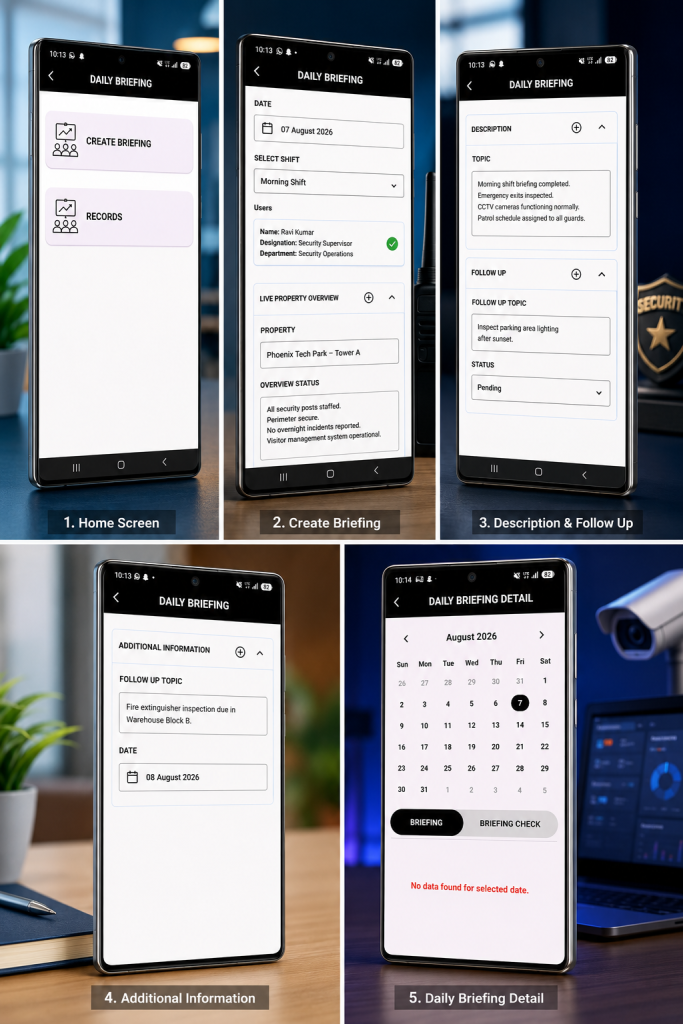
    AVES handles this through its Daily Briefing module. A supervisor creates a briefing, picks the date and shift and pulls in the guards being briefed, role and department shown clearly right there.

    The Live Property Overview section captures site conditions at the exact moment of briefing. The Topic and Description fields capture exactly what got communicated, not a rough memory of it weeks later.

    Follow Up items carry their own status field, so something raised Monday can’t quietly disappear by Friday without anyone catching it. Every briefing logs against a calendar too, so a supervisor can pull up any date and see exactly what got covered,or spot right away when a briefing got missed.

    That last part matters more than people expect. A missed daily briefing is often the first sign of a bigger accountability gap on a site. Catching it early costs a lot less than finding out after something’s already gone wrong.

    What This Looks Like in Practice

    Walk through an actual briefing and the process becomes obvious fast.

    A supervisor opens the Daily Briefing screen and taps Create Briefing. They select today’s date and pick the shift, morning, evening, or night. The relevant guards get pulled in, each one shown with their name, designation, and department, so there is no confusion about who is actually being briefed.

    Next comes the Live Property Overview. The supervisor types in the property, then logs the overview status in plain language, security posts staffed, perimeter secure, nothing unusual overnight. This is the part that replaces a rushed verbal summary with something searchable.

    The Description and Topic fields capture exactly what was communicated that day. If anything needs following up, it goes into Follow Up with its own status, pending, in progress, or resolved, so it does not disappear the moment the shift starts.

    Every entry lands on a calendar. A supervisor can jump back to any date and see exactly what was briefed, or immediately notice a date with no entry at all.

    What Good Actually Looks Like

    A site running a proper daily briefing doesn’t feel more complicated. Honestly, it feels calmer.

    Supervisors stop repeating themselves because everything’s logged and searchable. Guards stop starting shifts blind because today’s conditions are already documented before they even arrive.

    Clients stop asking questions you can’t answer, because you can pull up exactly what got briefed on any given day. That confidence is the real payoff here. Not the process for its own sake.

    Frequently Asked Questions

    What is a daily briefing in security operations?


    A daily briefing is a structured update given to guards before a shift starts, covering site conditions, communication topics and any unresolved follow up items from previous shifts.

    How is a daily briefing different from a shift handover?


    A handover happens between two guards at the point one shift ends and another begins. A briefing happens earlier, usually led by a supervisor and covers the wider site picture rather than a single handoff.

    Why does a daily briefing need to be logged instead of spoken?


    Because a spoken briefing leaves nothing behind. If a follow up item gets missed or a client asks what got communicated on a specific date, there’s nothing to check against without a logged entry.

    What happens to follow up items raised in a daily briefing?


    They carry a status forward until resolved. Not just get mentioned once and forgotten. This is usually where verbal briefings fail the hardest.

    Who is responsible for running the daily briefing?


    Typically a supervisor or shift lead, though the real responsibility is confirming every guard present actually got briefed, not just assuming attendance because they were on site.

    Where This Leaves You

    A daily briefing isn’t another form standing between your guards and their job. It’s the reason guards start each shift knowing today’s actual conditions, instead of carrying yesterday’s assumptions forward out of habit.

    Get it logged properly, tied to date, shift and follow up status and it stops being a hallway conversation nobody can verify. It becomes a record you can actually stand behind when it matters most.

    If you want to see how AVES handles daily briefing, follow up tracking and shift records in one dashboard, visit avessecurity.com and request a demo.

    CONTACT US

    Website : https://www.avessecurity.com

    Linkedin: https://www.linkedin.com/company/aves-security-management-system/

    Instagram: https://www.instagram.com/avessecurity/

  • Security Guard Audit Checklist: What Site Inspectors Actually Check

    Security Guard Audit Checklist: What Site Inspectors Actually Check

    By Nithish, AVES Security

    A security audit checklist is what separates a clean inspection from an awkward one. I’ve sat across the table during audits that went fine and audits that went badly and the difference was almost never the guards. It was the paperwork. An inspector asks for last month’s patrol records and someone digs out a stack of registers a few gaps here, a guessed time there, one page where the ink’s gone faint enough you can’t read it. Nobody’s accusing anyone of skipping rounds. The client just wanted proof and there wasn’t any sitting ready.

    That’s really what a security audit checklist is for. Not “did the guard do the job,” that part’s usually fine, but “can you show someone who wasn’t there that it happened.”

    What is a security audit checklist actually for

    A security audit checklist like this ends up in front of three kinds of people and they’re not all looking for the same thing.

    A client’s compliance officer is checking the contract got delivered right number of patrols, right intervals, incidents logged and closed. A regulator wants to see statutory requirements actually followed, not just claimed on paper. And your own supervisor doing a spot-check is trying to catch a site that’s slipping before the client notices it first.

    Different people, same underlying test though: does this record match something that actually happened and when.

    What a security audit checklist actually covers

    Every site has its own quirks, but pull those aside and most audits client, regulatory, internal, doesn’t matter end up checking the same seven things.

    Attendance and shift coverage. Was someone actually on site every hour they were supposed to be, no unexplained gaps between shifts.

    Patrol completion. Were the rounds walked, in the right order, not just marked done at the end of the night.

    Incident handling. Logged when it happened, escalated if it needed escalating, closed with an actual outcome not left open.

    Key and access control. Who had which key, when they took it, when it came back.

    Visitor and contractor movement. Who came in, when and who approved it?

    Equipment and defect reporting. Faults and damage flagged when they’re found ideally before the client spots them first.

    Training records. Can you actually show who was trained on what and when?

    An inspector isn’t expecting a perfect site. They’re expecting a record for each of those seven, produced without anyone scrambling to reconstruct it from memory the night before.

    Where a security audit checklist usually finds gaps

    It’s rarely the first item that trips a site up. It’s usually somewhere in the middle a patrol that got logged but has no timestamp to prove it was on schedule or a visitor with an entry time and no exit time. Any one of those looks minor on its own. Line up a month of them and that’s the gap between a clean audit and a follow-up visit.

    The worst version of this is when two records that should match don’t. A key register showing a guard holding keys during a shift, the attendance log says they weren’t even on site that’s not a gap, that’s a records problem and it’s a lot harder to explain away than a missing entry.

    How a security audit checklist changes on audit day

    None of this means guards do more work. It means the same seven categories get captured once, when they happen, tied to a timestamp and a name instead of written up later from memory. When a client or regulator wants the last quarter, that’s a filtered report instead of someone flipping through binders looking for the right week.

    It’s the same shift that’s already happened with patrol verification, key custody and occurrence logging on individual sites. A security audit checklist stops being a scramble before an inspection and just becomes a byproduct of the daily paperwork being accurate to begin with.

    Regulatory bodies like ASIS International publish general standards for physical security audits and most client contracts in this space borrow the same core structure coverage, incident handling and access control, at minimum.

    Preparing your security audit checklist before an inspection

    Don’t try to backfill history inspectors can usually tell a record written at the time from one written last week to cover a gap. Better to pull those seven categories from your duty roster and gate pass records for the last thirty days and see where the actual holes are that’s usually where a security audit checklist review starts anyway. Most of the time it’s one or two, not all seven. Fix the process from here, be straight about it if asked and treat the audit as the thing that told you where the weak spot actually was.

    The bottom line on your security audit checklist

    A security audit checklist isn’t a form you fill in before someone visits. It’s a check on whether the records you’re already keeping can stand on their own, without you in the room explaining what really happened. The sites that get through audits without drama aren’t the ones with the thickest file they’re the ones where the paperwork was right the first time it was written.


    Frequently asked questions

    What is a security audit checklist? A security audit checklist is a list of the records and controls an inspector checks to confirm a site’s security operations are actually happening as reported attendance, patrols, incidents, keys, visitor movement, equipment condition and training records.

    Who typically requests a security audit checklist? Three groups usually ask for it: a client’s compliance officer verifying contract terms are met, a regulator or licensing body confirming statutory requirements and a company’s own supervisor running an internal spot-check.

    How often should a security audit checklist be reviewed? Most sites review it monthly at minimum, with a fuller pass before any scheduled client or regulatory audit. Waiting until an audit is announced to check your records usually means finding the gaps too late to fix them.

    What’s the difference between a security audit checklist and a daily guard checklist? A daily guard checklist covers what happens during a single shift gear checks, rounds, handover. A security audit checklist looks backward across a period of time to confirm those daily records are complete, consistent and provable.

    Can a security audit checklist be done digitally instead of on paper? Yes. A digital checklist ties each entry to a timestamp and the person who logged it, which is what most inspectors are actually looking for a record they don’t have to take on trust.

    What happens if gaps show up during a security audit? A gap on its own usually isn’t fatal to an audit. What matters more is whether the company can explain it and show the process has since been fixed, rather than trying to backfill records after the fact.

    For more details visit our website: https://avessecurity.com/

  • Security Post Orders: Fixing the Gap Guards Fall Through

    Security Post Orders: Fixing the Gap Guards Fall Through

    You put real effort into your security post orders. You covered the doors, the contacts, the access rules.

    Then something goes wrong at 2am and the guard on duty had no idea what to do.

    If that sounds familiar, you are not doing anything wrong as a manager. You are running into a problem almost every security company hits. The document exists. It just isn’t working.

    This guide walks through why that happens, what a security post order actually needs to contain and how to fix the gap between “we have post orders” and “guards actually follow them.” No fluff, no generic templates copied from a dozen other sites. Just what actually works on real posts.

    What a Security Post Order Actually Is

    A security post order is not a job description. It is not a duty roster either.

    It is the site-specific instructions for one physical post, at one site, written for the guard standing there right now. Some companies call these security guard post orders instead, but the idea is the same.

    A duty roster tells someone when to show up. A general “security guard duties” page tells them what the role covers everywhere. A security post order tells them what to do at this exact gate, this exact lobby, this exact loading dock.

    That distinction matters more than it sounds like it should. A guard who only knows the generic version of the job fills in every site-specific gap on their own. That is exactly where liability shows up, where clients get frustrated and where incidents happen that could have been avoided with one clear sentence written down in advance.

    Why Most Post Orders Fail Once They’re Written

    Here is the part most guides skip. Writing the security post order is the easy part. Keeping it useful is where almost every site falls apart.

    They go stale fast. A security post order gets written once at site handover. Six months later the client changed the after-hours contact, a door schedule shifted and nobody updated the document. The guard is now working from instructions that describe a site that no longer exists.

    They try to cover everything. A fifteen-page post order feels thorough on paper. In practice, nobody reads fifteen pages in the middle of a shift. Length feels like diligence. It actually kills usability.

    Nobody owns the update. Ask most operations managers who is responsible for keeping security post orders current and you will get a pause before an answer. Without a named owner, updates happen never.

    There’s no proof anyone read it. A binder in a guard shack does not confirm the current guard has actually seen the current version. That gap is where most “the guard didn’t know” incidents actually start.

    None of this means security post orders are the wrong tool. It means most companies are running a good idea badly.

    The Real Cost of Getting This Wrong

    This is the part that’s easy to underestimate until it costs you a client.

    An outdated post order does not just create confusion. It creates security liability. If a guard follows instructions that no longer match the site and something goes wrong, the paper trail shows your company gave them wrong information. This is also where guard accountability breaks down, because a guard can’t be held to instructions that were never accurate in the first place.

    Turnover makes this worse. New guards rotate through posts constantly in this industry. Every rotation is a moment where an unclear or outdated security post order turns into a real mistake, not a hypothetical one.

    And clients notice. A client who catches a guard not knowing basic site procedure starts wondering what else your company is getting wrong. That is how contracts get lost, not through one dramatic failure but through a slow loss of confidence.

    The Five Things Every Post Order Needs

    Strip away the extras and a security post order that actually works comes down to five parts.

    Post boundaries. What area this post covers and exactly where responsibility hands off to the next post. No gray zones.

    Standing instructions. The default state of the post. Which doors lock on schedule, what routine checks happen without being told.

    Access rules. Who walks through without escort, who signs in, who gets turned away. Spelled out by role, not left to judgment in the moment.

    Emergency contacts. Real names and real numbers for this site. Not a head office line that rings through to voicemail at 3am.

    Exceptions and escalation. What falls outside normal instructions and exactly who to call when something doesn’t match what’s written.

    If a security post order covers those five things clearly, it works. If it tries to cover every hypothetical situation on top of that, it stops getting read.

    How to Write Post Orders Guards Will Actually Follow

    Start from real incidents, not imagined ones. The best security post orders come from actual questions guards have asked at that post, not a template built from a desk somewhere else.

    One instruction, one sentence. If an instruction needs a paragraph to explain, it belongs in training material, not the post order itself.

    Name a person, not a department. “Contact facilities” solves nothing at 2am. A name and a direct number gets a problem handled instead of routed into a voicemail loop.

    Update the moment something changes. Do not wait for an annual review. The day a client changes a rule is the day the security post order should change too.

    Confirm the guard actually read it. This is the step almost everyone skips. A printed page on a wall does not prove anything. Some form of sign-off, even a simple log, closes that gap.

    Paper vs Digital: An Honest Look

    You might be wondering if this even needs software, or if a well-organized shared folder solves the problem.

    Here’s the honest answer. A shared folder fixes the “which version is current” problem. It does not fix the “did the guard actually read it” problem on its own.

    That second gap is where most companies get burned and it’s worth being upfront about the limitation. No system, digital or paper, replaces a supervisor who actually walks the post and checks. Software reduces the risk. It does not eliminate the need for management attention.

    What digital tools genuinely solve well is version control and searchability. One current file per post, tagged by department, findable by name instead of buried in a binder nobody has opened since onboarding.

    That’s the gap most guard instructions software claims to close and most of it doesn’t.

    Where AVES Fits Into This

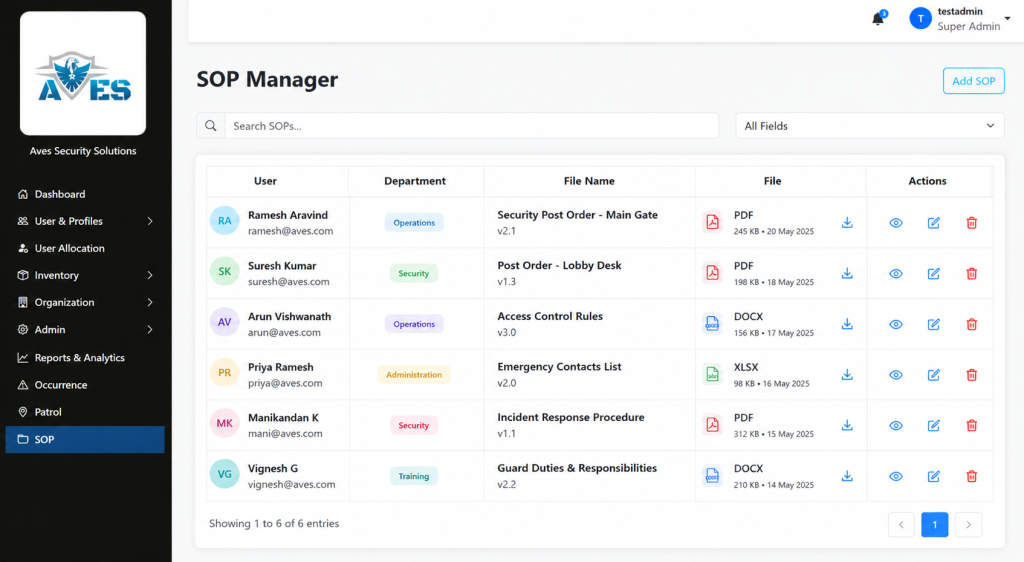
    AVES has a real, confirmed feature for exactly the version control problem above. It’s called SOP Management and it works as a document repository built for this kind of site procedure. Think of it less as guard instructions software with built-in workflows and more as the single source of truth those instructions need to live in.

    You upload a file, tag it to a user and a department and give it a clear file name. It shows up in a searchable list where anyone can find it by department, username, or file name. Deleting an outdated version takes two confirmation steps, not one accidental click, so an old copy doesn’t disappear by mistake while the current one is still needed.

    To be fully transparent, SOP Management is a document upload and search tool. It is not an interactive checklist builder where guards check off individual steps inside the app. If that’s what you’re picturing, it’s worth knowing that upfront rather than finding out later.

    AVES also has a confirmed Shift Briefing capability, built around guards acknowledging instructions before going on duty, which is the natural next step after centralizing security post orders. The detailed screen-by-screen workflow for that feature isn’t something we can walk you through yet and we’d rather tell you that plainly than describe steps that don’t exist.

    Where to Go From Here

    If your current security post orders are living in a binder or scattered across old email attachments, the fix isn’t complicated. It’s organizational first and tools second.

    Start by naming one owner per site. Then get every current post order into one searchable place instead of several. That single change solves most of the version confusion described above.

    If you want to see how AVES’s SOP Management handles that part, a short walkthrough will show you exactly what it does and, just as importantly, what it doesn’t do yet, so you can decide if it fits how your team actually works.

    A binder guards stop reading is not backup protection. It is a liability sitting quietly on a shelf, waiting for the one shift where it mattered and nobody opened it.

    See how AVES keeps every post order current. Book a quick walkthrough.

    CONTACT US

    Website : https://www.avessecurity.com

    Linkedin: https://www.linkedin.com/company/aves-security-management-system/

    Instagram: https://www.instagram.com/avessecurity/

    What are security post orders, exactly?

    Think of security post orders as the cheat sheet for one specific post, not the whole job. They spell out what a guard does at that particular gate or lobby, down to which doors get checked and who to call if something’s off. A generic job description won’t tell you any of that. Post orders will, or at least they should.

    Aren’t security post orders basically the same as SOPs?

    Not quite. Standard operating procedures cover the big stuff that applies everywhere, like what to do if someone collapses on site. Security post orders are narrower and messier in a good way. They’re written for one post, one set of doors, one set of quirks that only that location has. You need both. One without the other leaves a gap.

    Do I really need to go digital, or can paper work fine?

    Paper can work. It’s just harder to keep straight once you’ve got three shifts and a stack of photocopies floating around. The real problem isn’t paper versus digital. It’s that nobody can tell which copy is the right one. Fix that part and the format matters a lot less.

    Can I just use a post order template for every site?

    A template’s fine for the skeleton, five sections, same structure every time. But the actual content has to be specific to that post. Copy-paste a template with the site name swapped and you’ve basically written nothing useful. Guards can tell the difference immediately.

    Is there software that actually helps manage this across sites?

    Some. though I wouldn’t call it guard instructions software exactly. AVES has an SOP Management feature that at least solves the “which file is current” mess, one document per post, searchable by department or file name instead of buried in someone’s inbox. It won’t replace a supervisor actually walking the post and checking. Nothing does that. But it kills the version-control headache that causes most of these problems in the first place.

  • Deadly Gaps, Proven Fix: Digital Inspection Checklist

    Deadly Gaps, Proven Fix: Digital Inspection Checklist

    You already know the feeling. It’s 6 AM, the shift just changed and somewhere in the back of your mind is a question you don’t want to ask out loud: was the panic button actually tested last night, or did someone just sign the sheet?

    That doubt is exactly why a digital inspection checklist exists and if you’re reading this, you’ve probably already lived through the moment where a paper checklist let you down.

    Maybe it wasn’t a disaster. Maybe it was just a client walkthrough where the emergency phone didn’t ring and the log said it was “checked” three hours earlier. Either way, you felt it. That small, sinking realization that your paperwork and your reality had quietly stopped matching.

    That’s the exact question a digital inspection checklist exists to answer, before a client or an insurer ever has to ask it.

    The Fear Nobody Says Out Loud

    Security operators don’t lie awake worrying about the equipment itself. They lie awake worrying about the gap between what the paperwork says and what actually happened on site.

    A paper form can be filled out from memory at the end of a shift. It can be backdated. It can say “all clear” on a piece of equipment nobody actually walked over to touch. That’s not a guard problem. That’s a systems problem and it’s exactly the gap a digital inspection checklist is built to close.

    If you’ve ever had to explain to a client why a piece of safety equipment failed during the one moment it mattered, you already understand why this matters more than almost anything else on a guard’s shift list.

    What a Digital Inspection Checklist Actually Solves

    Here’s the part most people get wrong when they first look into this. They think a digital inspection checklist is just a fancier form. It isn’t.

    The real value of a digital inspection checklist is the timestamp. A record that gets created the moment a guard is standing in front of a panic button, testing it, not the moment they get back to the desk and remember to write it down.

    That single shift, from memory-based logging to real-time logging, is what makes a digital inspection checklist worth adopting in the first place. It’s not about looking more modern. It’s about closing the exact gap that keeps security managers up at night.

    Six Things That Actually Need Checking, Every Single Shift

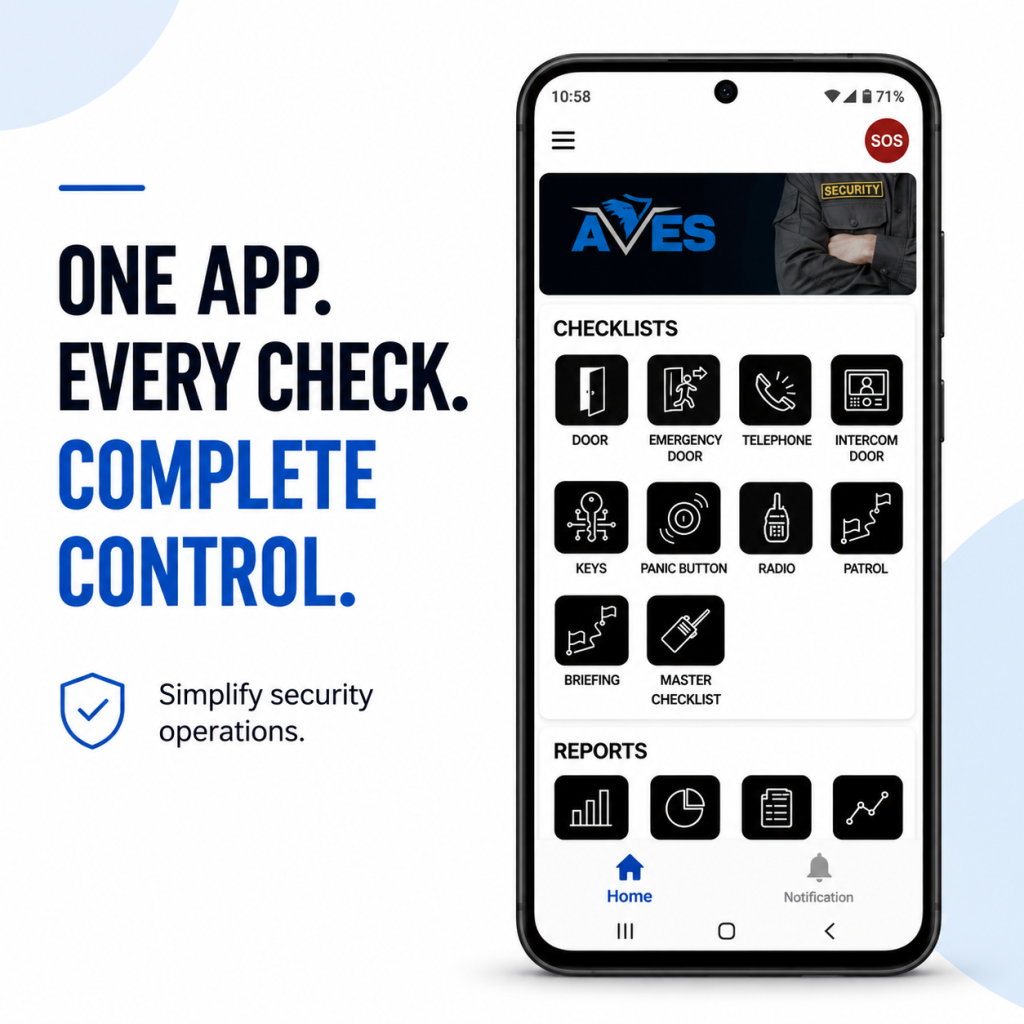
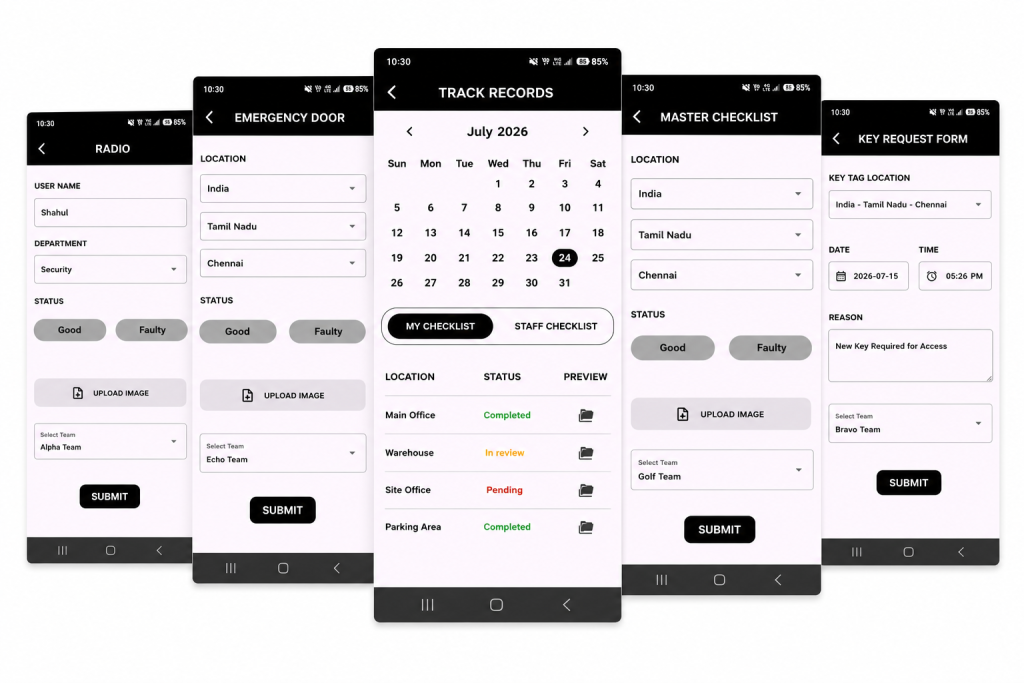
    A good digital inspection checklist doesn’t try to cover everything under the sun. It focuses on the equipment that matters most in an actual emergency:

    • Emergency telephones, confirmed operational and connected
    • Emergency doors, checked for unobstructed operation
    • Panic buttons, tested and confirmed active
    • Intercom doors, verified and logged
    • Electromagnetic doors, verified and logged
    • Radios, verified and logged

    Notice what’s on that list. None of it is decorative. Every item is something that, if it fails silently, turns a manageable situation into a genuinely dangerous one.

    This is the part that separates a serious digital inspection checklist from a generic to-do app repackaged for security teams. It isn’t trying to track everything. It’s trying to make absolutely sure the handful of things that matter most never get skipped.

    The Doubt You’re Probably Carrying Right Now

    If you’re evaluating whether to move to a digital inspection checklist, you’re probably carrying a few quiet doubts. Let’s name them honestly instead of pretending they don’t exist.

    “What if my guards just fake the digital version too?”

    Fair concern. The difference is that a digital inspection checklist creates a record that can’t be backdated or edited after the fact the way a paper form can. A guard can still choose not to test a panic button, but they can’t quietly write “9 PM” on a form at 11:45 PM and make it look accurate. The system captures when the entry was actually made.

    “Is this going to be complicated to roll out?”

    This is where a lot of people overthink it. A digital inspection checklist doesn’t require retraining your entire operation. Guards are already doing the physical check. The tool just changes what happens after they touch the equipment, not the check itself.

    “What if the software becomes another thing I have to babysit?”

    This is the most reasonable fear on the list about any digital inspection checklist and it deserves an honest answer, not a sales pitch. Any digital inspection checklist is only as good as whether your team actually opens it every shift. The ones worth choosing are the ones simple enough that a tired guard at 3 AM can use it without friction. That’s the real test, not the feature list.

    What Good Actually Looks Like

    Picture the version of your operation where this works the way it’s supposed to.

    A guard starts their shift. They walk the fixed equipment list, physically testing each item. Each check gets logged the moment it happens, not reconstructed later from memory. By the time your morning report lands, you already know whether every panic button, door and radio on site was actually verified, not just claimed to be verified.

    That’s the entire promise of a digital inspection checklist. Not more paperwork. Less uncertainty.

    When a client asks you to prove equipment was checked before an incident, you’re not scrambling through a filing cabinet. You’re pulling up a timestamped record that speaks for itself.

    Why This Matters More Than It Looks Like It Does

    Most security operators don’t think about equipment checks as a competitive advantage. They think of them as a chore, something guards grumble through because someone above them said it’s required.

    That mindset is exactly what a digital inspection checklist is designed to change. Every completed, timestamped check is proof of due diligence. It’s the difference between a security company that can defend its record in a liability conversation and one that’s hoping nobody ever asks hard questions.

    If you’ve ever felt that quiet unease about whether your equipment checks would actually hold up under scrutiny, that feeling is worth listening to. It’s usually a sign the process, not the guards, needs fixing.

    The Honest Trade-Offs

    No tool solves everything and it would be dishonest to pretend a digital inspection checklist is a silver bullet.

    It doesn’t replace the physical act of checking equipment. A guard still has to walk over and test the panic button. What it changes is whether that action leaves behind proof and whether that proof can be trusted months later when it actually matters.

    It also won’t fix a culture problem on its own. If a team doesn’t take the underlying duty seriously, no piece of software forces genuine diligence. What a digital inspection checklist does is make it much harder to fake diligence that isn’t there, which tends to change behavior on its own over time.

    Where This Leaves You

    If you’ve made it this far, you already know the real question isn’t whether equipment checks matter. You know they do. The real question is whether you can currently prove they’re happening the way your paperwork says they are.

    That’s the exact gap a digital inspection checklist is built to close. Not a bigger to-do list. A record you can actually stand behind.

    You don’t need to overhaul your entire operation to adopt a digital inspection checklist. You need a system that captures the moment a check actually happens, instead of the moment someone remembers to write it down.

    That’s the whole shift. And once you see it working on your own site, it’s hard to imagine going back to a clipboard.

    See how a digital inspection checklist works on a real site → Book a free walkthrough

    CONTACT US

    Website : https://www.avessecurity.com

    Linkedin: https://www.linkedin.com/company/aves-security-management-system/

    Instagram: https://www.instagram.com/avessecurity/

    What equipment actually needs checking every shift?

    That six things and they’re not random.That’s the list. Not because other equipment doesn’t matter, but because these six are the ones you reach for when something’s already going wrong. If they don’t work in that moment, nothing else about your setup matters much.

    Can someone go back and edit an entry after it’s submitted?

    That’s the whole reason to move off paper in the first place.
    A form filled out from memory can say whatever the person writing it wants it to say. A record created the second someone actually tests the panic button can’t be rewritten later to look tidier than reality. That gap between “what happened” and “what got written down” is exactly what this kind of system is built to close.

    How disruptive is it to actually switch over?

    Less than people expect, usually.
    The underlying job doesn’t move an inch. Guards are already walking the site and testing equipment. All that’s really shifting is how that gets recorded. Most teams find their footing within a shift or two, not weeks.

    What if my guards just fake the digital version too?

    Fair concern. The difference is that a digital inspection checklist creates a record that can’t be backdated or edited after the fact the way a paper form can. A guard can still choose not to test a panic button, but they can’t quietly write “9 PM” on a form at 11:45 PM and make it look accurate. The system captures when the entry was actually made.

  • Shift Handover Checklist: What Every Outgoing Guard Must Log

    Shift Handover Checklist: What Every Outgoing Guard Must Log

    Most accountability failures on a security site don’t happen during a shift. They happen in the ninety seconds between shifts.

    Staff a sharp guard on days, an equally sharp one on nights you can still end up with a gap nobody can explain. A missing key. A pending incident nobody flagged to the next person. A visitor who signed in and nobody remembers signing out. Neither guard was careless here. That’s exactly the gap a shift handover checklist is built to close. The handover itself just has no structure, so whatever gets said in that ninety-second exchange is whatever the outgoing guard happens to remember right then.

    A shift handover checklist fixes exactly this. Not the shift. The changeover.

    Why the Handover Moment Is the Real Risk Point

    Think of a relay race. Two fast runners can still lose if the baton drops during the exchange, doesn’t matter how clean each leg was run individually. Races get won or lost in the handoff, every single time.

    Guard duty’s no different. Morning shift runs clean, night shift runs clean and the site still ends up exposed because the exchange between them was verbal, rushed or just skipped when the incoming guard rolled in two minutes late.

    A shift handover checklist that isn’t written down isn’t really a handover. It’s a conversation one person may or may not remember correctly six hours later, when a client wants to know exactly what happened.

    What Actually Belongs on a Shift Handover Checklist

    A good handover checklist isn’t long, it’s specific. Four things need to move from outgoing guard to incoming guard, every single time and none of them should ride on memory. Skip any one of these on your shift handover checklist and you’ve built a hole straight into it.

    Keys and access items. Every key, fob or access card checked out at shift start gets checked back in or physically handed over, with both people confirming the count matches. Sounds obvious, until you’ve chased a missing master key three weeks later and nobody can say which shift lost it. Some teams run this as its own key control checklist inside the larger handover works fine, as long as it still gets logged and timestamped. This is item one on every shift handover checklist, for good reason.

    Pending incidents. Something happened during the shift and it hasn’t been closed out, resolved or escalated? It doesn’t just vanish when the shift ends. Write it down. Hand it over as an open item, with enough detail that the next guard actually knows what to watch for. No shift handover checklist is complete without this logged.

    Visitor logs. Anyone who entered during the shift and hasn’t formally exited needs flagging. Matters even more at sites running contractors or maintenance crews outside normal visitor hours they’re the ones who slip through a verbal handover every time.

    Equipment condition. Radios, torches, patrol devices, whatever hardware the post depends on. Something’s low on battery, damaged or missing? The incoming guard needs to know before the round starts, not halfway through when the radio dies on them mid-patrol. Equipment checks close out the shift handover checklist and it’s usually the first thing forgotten.

    Those four form the core of any real security handover register. Weather notes, general site observations that’s optional context. These four aren’t.

    How AVES Turns This Into a Register, Not a Guessing Game

    Here’s what most people get wrong: writing your shift handover checklist on a paper register doesn’t solve the problem, it just delays it. Pages go missing. Logs get lost. And there’s no way to prove after the fact that a handover even happened, let alone what got said during it.

    AVES is built to make your shift handover checklist enforceable, not just documented. That happens through its digital Books and Checklist modules. Officers log handover entries right through the app and every entry gets timestamped automatically the second it’s created. That timestamp is what actually makes the register useful during an audit or a client dispute nobody’s relying on anyone’s word for when something got logged.

    The Reports module ties in for pending incidents specifically. An incident that hasn’t closed out by end of shift stays visible in the system instead of living only in someone’s memory and it can carry photo or video evidence attached from when it was first logged. The Pass & Permit module handles visitor tracking the same way a searchable record of who entered and whether they’ve formally exited, instead of a paper sign-in sheet that only tells you half the story.

    None of this is about extra paperwork. It’s about making the handover something you can actually check, not something you just have to trust blindly.

    Mistakes That Quietly Break a Handover

    A few habits quietly break even a well-designed shift handover checklist.

    The handover happens verbally, nothing written down anywhere, so the only record of what was said is whatever both guards happen to remember. That record disappears the second either one forgets.

    The incoming guard skips physically verifying keys and equipment, just takes the outgoing guard’s word for it. This right here is how a missing item goes unnoticed for days.

    Pending incidents get mentioned in passing instead of logged as open items, so they fall straight off the radar the moment the outgoing guard walks out the door.

    And the classic one: the handover gets rushed because the incoming guard is running late, so both of them cut corners on the exact checklist built to stop corners from being cut.

    None of this is complicated to fix. It just means treating the handover as its own step, with its own checklist, not an afterthought wedged between two shifts.

    Frequently Asked Questions

    What is a shift handover checklist?
    A shift handover checklist is a fixed set of items an outgoing guard confirms and logs before leaving post keys, pending incidents, visitor status, equipment condition so the incoming guard starts with the full picture instead of a verbal summary.

    Why does the handover matter more than the shift itself?
    Because it’s the one point where information can actually get lost and once it’s lost, the incoming guard has no idea what they’re missing. A clean shift followed by a sloppy handover still leaves the site exposed.

    What’s the difference between a handover checklist and a handover register?
    The checklist is what gets confirmed at handover. The register is the ongoing record of every handover that’s happened timestamped, searchable, the thing that actually gets pulled up during an audit.

    Can a handover checklist be done on paper?
    Sure, but paper registers get lost easily and can’t be timestamped reliably. A digital log through something like AVES gives you the same checklist backed by a record you can actually verify later.

    Who is responsible for confirming the handover happened correctly?
    Both guards. Outgoing guard logs everything accurately. Incoming guard verifies it physically instead of just nodding along to a verbal summary.

    Where This Leaves You

    A shift handover checklist isn’t about piling on process for its own sake. It’s about closing the one gap in your operation that has nothing to do with how good your guards are individually and everything to do with what happens in the handoff between them.

    Get that ninety-second exchange right, backed by a real security handover register and most of the accountability gaps plaguing 24/7 sites just stop happening on their own. This connects directly to how your rotation gets structured in the first place and it runs alongside live key control at the post too worth looking at both together rather than separately. Build your shift handover checklist once, enforce it every shift and the gaps stop showing up.

    Want to see how AVES handles handover logging, incident tracking and visitor management in one dashboard? Visit AVES Security Guard Management and request a demo.

    CONTACT US

    Website : https://www.avessecurity.com

    Linkedin: https://www.linkedin.com/company/aves-security-management-system/

    Instagram: https://www.instagram.com/avessecurity/

  • “Security Guard Checklist: The Foolproof Shift Template”

    “Security Guard Checklist: The Foolproof Shift Template”

    Ask five site supervisors for their “security guard checklist,” and you’ll get five different PDFs, and none of them will match what actually happens on a shift. Some are a single page with ten boxes on it that could apply to literally any job site. Others run four pages long and read like they were drafted by someone in a compliance office who’s never walked a perimeter at 2 a.m. with a flashlight that’s about to die.

    Neither version gets used properly, and honestly, guards can’t be blamed for that. A checklist has to fit into the time a shift actually gives you. Eleven minutes between rounds isn’t eleven minutes to fill out a form.

    So here’s a security guard checklist built the other way around starting from what a shift actually looks like, hour by hour, and working out what needs to be written down at each stage.

    Why Most Security Guard Checklists Don’t Get Filled In Properly

    Talk to enough guards and supervisors and the same complaints keep coming up.

    Length is the obvious one. Nobody’s filling out fifty line items in the fifteen minutes before a shift starts. What happens instead is that the form gets completed after the fact, from memory, sitting in the guard shack, which more or less defeats the point of having it.

    There’s also the problem of everything being lumped together. Gate checks, radio tests, end-of-shift notes, all sitting in one long undifferentiated list. A guard glancing at that mid-shift can’t quickly tell what’s due right now versus what’s for later.

    Then there’s the stuff a plain checklist just can’t capture. Say a door’s been propped open with a brick and you’ve told the site manager about it. Where does that go on a form made entirely of tick boxes? Usually nowhere. It ends up scrawled in the margin, or in a separate notebook that nobody ever cross-references again.

    And the last one is more of a trust issue. If a checklist doesn’t line up with what a supervisor or a client actually looks at during a review, guards catch on fast, and the whole thing starts feeling like busywork.

    None of that gets solved by tacking on more boxes. It gets solved by matching the security guard checklist to how a shift actually unfolds, and by making sure whatever gets written down has somewhere real to go afterward.

    Security Guard Checklist, Broken Down by Stage of the Shift

    Before You’re Even Posted

    The first five or ten minutes on site, ideally before you relieve whoever’s coming off shift.

    • Uniform and ID badge on and correct for the site
    • Radio switched on, charged, tested on the right channel
    • Flashlight charged and actually working (not “worked yesterday”)
    • Duty phone or panic button charged, if the site issues one
    • Keys, cards, or fobs collected and checked against the key log
    • Previous shift’s incident log or occurrence book read through
    • Any handover notes from the outgoing guard read and understood, not just glanced at
    • Standing orders checked in case anything’s changed since last shift
    • PPE checked, if the site calls for it

    If something’s off here dead radio, keys missing from the log that’s the moment to say something. Not two hours in, once you’ve already started rounds without it. This is the part of the security guard checklist that gets rushed most often, and it’s the cheapest one to get right.

    On Rounds

    This is the part guards carry with them, clipboard in hand or phone in pocket. It has to be quick, or it slows the whole patrol down and people start skipping it.

    At each point on the round:

    • Door or gate is in the state it’s supposed to be in
    • Locks and hinges look fine, nothing pried or forced
    • Lighting’s working in the area
    • Fire exits and extinguishers aren’t blocked
    • Anything unusual a car that shouldn’t be there, someone loitering gets a note
    • Checkpoint scanned or logged, whatever method the site uses
    • Time noted

    At access points specifically:

    • Visitor log current, nobody unregistered wandering around
    • ID actually checked for anyone coming in, not waved through
    • Deliveries logged

    The time matters more than people think. A checkmark tells you the check happened; a timestamp tells you when. That gap is exactly what digital patrol tools are built to close automatically. We go into that in guard duty verification if you want the fuller picture. It’s also a piece of a security guard’s checklist that a paper form struggles to prove after the fact.

    In the Control Room

    For anyone posted there or rotating through:

    • Camera feeds all up and recording
    • No dead cameras that haven’t been flagged
    • Playback tested, works when you need it to
    • Alarm panel showing the correct armed/disarmed status
    • Access control system logging properly
    • Storage isn’t about to run out
    • Any system alerts actually looked at, not dismissed

    Even sites without a real control room usually have someone holding this responsibility. That person should still run through it once at the start of the shift and once more before handing off.

    Logging What Actually Happened

    This is the step that gets skipped most, and it’s usually the one that matters most when something goes wrong later.

    • Every incident logged with a time, a location, and a description that isn’t three words
    • Photos where it’s safe and relevant to take one
    • Anything serious escalated to a supervisor or client contact, not sat on
    • Log reviewed before the shift ends, not left half-finished
    • Lost property logged and put somewhere secure
    • Maintenance stuff: a broken light, a lock that sticks noted separately so facilities actually see it

    An occurrence log is only worth something the day a client rings up asking what happened at 2 a.m. on the 14th and someone can actually answer. It’s arguably the most overlooked line on the whole security guard checklist. We’ve written more about what a decent log should include in the daily occurrence log walkthrough.

    Handing Off

    This is where a good shift either counts for something or doesn’t. A guard can do everything right for eight hours and still leave the next person in the dark if the handover is just a wave and “nothing happened.”

    • Everything above is actually completed, not half-done
    • Keys, radios, equipment physically handed over
    • Anything unresolved flagged clearly, not left for the incoming guard to discover
    • Incident log gone through together, not just left on the desk
    • Any follow-ups noted with where things stand
    • Handover signed or timestamped by the person coming on

    If the site runs a set roster, this is also a decent moment to double-check that the next shift is actually staffed the way it’s meant to be, worth checking against the security guard duty roster. Handover is the last checkpoint on the security guard checklist, and it’s the one that decides whether everything before it actually meant something.

    Paper Security Guard Checklist or an App: Does It Matter?

    Paper’s fine. Guards have been using clipboards for as long as there’s been a job to do, and there’s nothing wrong with printing this list and sticking it in a guard shack.

    Where it falls apart is proof. A ticked box tells you the box got ticked; it doesn’t tell you the guard was actually standing at the checkpoint when they ticked it. On a slow night, it’s not hard to fill in ten boxes at once from memory near the end of a shift. That’s fine right up until a client wants proof of coverage, or an incident needs to be matched against the exact minute a patrol went past a specific door.

    That’s the gap digital tools are built for: a guard scans a checkpoint or logs something in the moment, the time and location attach on their own, and a supervisor can actually see the shift happening rather than reconstructing it off a clipboard the next morning. If attendance by location is also something your team tracks, geofence attendance covers how that fits alongside patrol checks.

    Format matters less than structure, though. A checklist built around how a shift actually runs pre-shift, patrol, control room, incidents, handover gets used whether it’s on paper or on a phone. A forty-item list with no shape to it usually doesn’t, no matter what it’s printed on.

    Adjusting This Security Guard Checklist for Your Own Site

    Treat this as a starting point, not something to follow word for word. A retail site is going to care a lot more about the visitor log than about a fence line. A warehouse is roughly the reverse. The five stages hold up across both; what changes is which specific items sit inside each one.

    One rule holds regardless of how you tweak it: if a check doesn’t have a clear instruction to be written down, it won’t get written down consistently. Build around where the information needs to end up, not just what someone’s supposed to look at.

    Last Word on This

    A security guard checklist earns its place by matching how a shift actually goes, not by looking thorough on paper. Five stages: pre-shift, patrol, control room, incidents, handover cover what needs checking without turning the job into paperwork.

    Print it out and laminate it, or build it into a patrol app. Either way, the point’s the same: every check needs somewhere real to go once it’s done.

    Curious how AVES turns this same checklist into a digital patrol and occurrence log that guards actually use on shift? Book a walkthrough and see it on a real screen →

    CONTACT US

    Website: https://www.avessecurity.com

    LinkedIn: https://www.linkedin.com/company/aves-security-management-system/

    Instagram: https://www.instagram.com/avessecurity/

    FAQ

    Do I need a separate checklist for every site?

    Not a separate one exactly, more of an adjusted one. The five stages carry over no matter the site, since this security guard checklist is meant to be a base, not a rigid form. What changes underneath them is which specific items matter, since a warehouse and a retail store aren’t watching for the same things.

    Paper or phone, which one should guards actually use?

    Both get the job done day to day. Paper’s simple, and guards already know how to use it without training. The catch is what happens afterward: the paper shows the boxes got filled in, not that anyone was actually there when it happened. A phone-based version timestamps and locates the entry without anyone having to think about it.

    What’s the step guards skip the most?

    Getting the handover actually acknowledged by the incoming guard, rather than just talked through on the way out the door. Easy to skip, but it’s usually the one thing that decides whether the next shift can trust what’s on the page.

    Isn’t this the same thing as a duty roster?

    No roster tells you who’s working and when. This is what that person is meant to actually do once they’re on post. They sit next to each other, but one’s about staffing and the other’s about what happens during the shift itself.

    Does filling in a checklist actually prove the rounds happened?

    Not by itself. It shows boxes were ticked, not necessarily when or where. If you need something closer to actual proof, timestamped checkpoint scans tied to a location, that’s what guard duty verification covers.

  • Training Management System for Security Guards: The Essential Guide to Tracking Training and Records

    Training Management System for Security Guards: The Essential Guide to Tracking Training and Records

    A training management system is supposed to fix one simple problem: training that nobody wrote down might as well not have happened. Ask most security companies how they track guard training, though, and you’ll hear the same answer nine times out of ten. A folder somewhere. A supervisor’s memory. Maybe a spreadsheet nobody’s touched since spring.

    A guard sits through a class. Nobody logs it anywhere searchable. Fast forward three months, a client wants proof that every officer on their site completed fire safety training, and now you’re digging through old attendance sheets and screenshots from a group chat, trying to reconstruct something a proper training management system would’ve handed you in thirty seconds.

    Here’s what most companies don’t want to face: training nobody wrote down doesn’t count, not to a client, an auditor, or an insurance adjuster. That’s the exact gap a training management system exists to close, and before you convince yourself your current setup is “fine,” it’s worth understanding what a good one actually looks like.

    Why a Training Management System Matters More Than Most Companies Realize

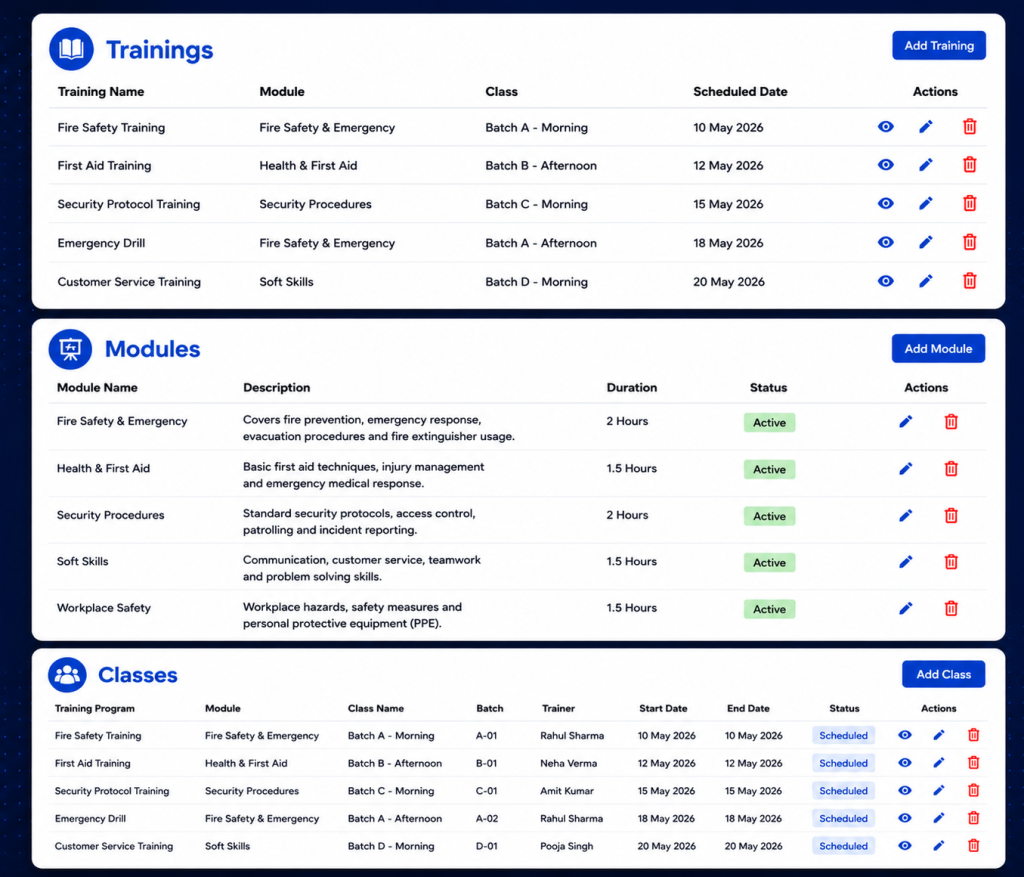
    Two reasons this matters, and most companies only ever think about one of them.

    First, client trust. When a client asks whether your guards are trained for their site, handing them dates and records from a real system builds a lot more confidence than “yeah, we handle that.” Contracts these days increasingly expect proof upfront, not a vague promise that training happens somewhere in the background.

    Second, and this is the one that really catches people off guard: liability. If something goes wrong on a shift and training becomes a question, a training management system that shows exactly what an officer completed and when is the difference between a defensible position and pure guesswork. Lawyers and insurers don’t ask fuzzy questions. “We train our guards” won’t cut it. A dated record will.

    Without one behind you, both of those things ride entirely on someone’s memory holding up months, maybe years, after the fact. That’s a bad place to be standing when it counts.

    How a Training Management System Works in AVES

    AVES builds its training management system into the Staff Development section of the mobile app, right next to Performance Development Plan. Open Training and two paths show up: All Trainings and Records. They do very different jobs, so it helps to know which one you’re actually in.

    All Trainings is where sessions get built and managed. You can add or update training programs here, and, this part matters, assign them to specific users or departments instead of blasting them out to the whole team. Not every guard needs every training. Fire marshal certification might apply to one shift only. A first-aid refresher might just be for one department. Being able to target instead of broadcast keeps the list something people actually pay attention to, instead of noise they scroll past.

    Records, labeled Security Trainings, is the other half, and it works nothing like the first. Picture a calendar. You flip through months, land on a day, and see whatever got logged for that date. Nothing there? It just says so: no data available for that date. That’s the piece that turns a one-off event into something you can actually revisit later. Instead of asking a supervisor “hey, when was that class again,” you click the date and there’s your answer.

    One thing you won’t find here: a certification-expiry tracker, or anything resembling a compliance-scoring dashboard. If tracking exact expiry dates and renewal reminders matters to your business, that detail lives inside the individual training entry itself. The list and calendar views don’t surface it automatically.

    Getting Real Value Out of Your Training Management System

    A training management system is only as good as the habits around it. A few habits separate a training record that’s actually useful from one that just looks fine sitting there.

    Name your sessions like they mean something. “class1” tells you nothing six months later, not even to the person who typed it in. “Fire Safety Refresher, Site 4, Q3” tells a whole story the moment someone opens it.

    Only assign by department when the entire department genuinely needs it. It’s tempting to go broad “just in case,” but that buries the training under noise for everyone who didn’t need it, and makes it harder to spot who actually still has to complete it.

    Log it the day it happens. Records sorts by date, so a session entered three days late lands under the wrong day. It chips away at accuracy quietly, until you notice it during an audit and it’s too late to fix.

    Check Records regularly. Not just when a client comes asking. A monthly look catches gaps while you can still do something about them.

    The Mistakes That Undo a Training Management System

    Same handful of mistakes, over and over, even at companies with a solid system already sitting in their pocket.

    Vague naming tops the list. A training log full of “class1,” “class2” technically counts as a record. It just fails the actual point, which is answering a real question later, quickly and without guesswork.

    Over-assigning is next. Push a single-department training out company-wide and you bury the people who actually need to act on it under a pile of people who don’t.

    Then there’s confusing scheduled with logged, a subtler trap. A session sitting in someone’s calendar or a group chat thread isn’t proof of anything. Only an entry under Records, for that date, counts.

    And the big one: waiting for a client to ask before you check your own records. By then you’re not reviewing, you’re scrambling. Scrambling almost never produces a clean answer.

    Where a Training Management System Fits Into the Bigger Picture

    It doesn’t live on its own island. It ties directly into your duty roster and shift assignments, because whether a guard was actually qualified for a given post on a given shift depends partly on their training record. It sits right beside Performance Development Plan too, both feeding into a documented picture of how ready your team really is, not just how ready you assume they are.

    A training session nobody logged is a session you can’t prove happened. In this line of work, what you can prove tends to matter more than what you simply know to be true. AVES keeps checklists and dated training records in one training management system your guards already use for shifts and attendance, with the option to assign precisely instead of blasting everything to everyone by default.

    If you want to see how AVES handles this as a training management system in practice, you can explore the platform and request a demo at avessecurity.com.

    Frequently Asked Questions

    What is a training management system for security guards?

    A training management system for security guards is a software that helps you keep track of the training that security guards have completed. It is a place where you can log, assign and track the training of security guards, which’s better than using paper sign-in sheets or trying to remember who did what. This system gives you a record of who completed what training and when which’s very useful.

    Why do security companies need a training management system for security guards?

    Security companies need a training management system for security guards because clients and insurers often ask for proof of training. A training management system for security guards gives you the proof you need so you can give them an answer instead of just guessing.

    How is training assigned in a training management system like AVES?

    In a system like AVES training can be assigned to security guards or to entire departments. This means that each security guard only sees the training that’s relevant to them instead of seeing a long list of training that does not apply to their job or the site they work at.

    Does a training management system track certification expiry dates?

    Not all training management systems track certification expiry dates automatically. For example in AVES you have to look at the training entry to see the expiry and renewal details. So if you need to keep track of these dates for compliance you should check them directly.

    How often should I check my training management systems records?

    You should check your training management systems records at once a month. If you do this you can catch any gaps in the training schedule. Fix them before it is too late. This is better than finding out about the gaps during an audit when it is already too late to do anything about them.

    Can a training management system prevent liability issues?

    A training management system for security guards cannot prevent incidents from happening. It can help protect you after an incident occurs. If someone asks about the training that security guards received during an investigation a training management system for security guards gives you a record of the training that you can use to defend yourself. This is much better, than guessing what training was completed.

    CONTACT US

    Website : https://www.avessecurity.com

    Linkedin: https://www.linkedin.com/company/aves-security-management-system/

    Instagram: https://www.instagram.com/avessecurity/

  • Chaos to Clarity: The Security Reporting Software Advantage

    Chaos to Clarity: The Security Reporting Software Advantage

    You are asked for a monthly report and your stomach tightens a little. You know the numbers exist somewhere. You just do not know how long it will take to pull them together into something you can actually hand a client.

    That scramble is the exact problem the right security reporting software is supposed to remove. If you have ever built a report by copying numbers into a spreadsheet at eleven at night, this article is for you.

    Why This Feels Harder Than It Should

    Most security companies do not lose client trust because guards fail to show up. They lose it because nobody can produce a clean, professional record fast enough when a client asks for one.

    You already sense this, which is why you are reading about security reporting software instead of just accepting the status quo. You want something that produces a document you can hand over without apologizing for how it looks.

    The quiet fear underneath this search is simple. What if the tool looks fine in a demo, then falls apart the first time you actually need a real report under a real deadline? That fear deserves a straight answer, not a sales pitch.

    What Good Security Reporting Software Actually Does

    Strip away the marketing language and real security reporting software comes down to one core job. It needs to turn your operation’s activity into a branded, filterable document you can export and hand off, without you rebuilding it by hand every time.

    A dedicated report generator is where this either works or falls apart. A real one lets you set your Company Name, which gets used as the watermark on the exported PDF. It lets you upload a Company Logo and falls back to a clean initials placeholder if you have not uploaded one yet. You pick a Module to define what the report covers. You apply an Organization Filter to scope it. You set a Start Date and End Date. You can narrow further by Status, Department, Team, Users and Location. Then you preview it and generate a branded PDF.

    That is what functioning security reporting looks like when it is built around real filters instead of a vague “export” button that dumps raw data with no formatting.

    The Mistake Most Buyers Make

    Here is something most comparison articles will not tell you. A lot of vendors advertise security reporting software as a headline feature, then the actual export screen turns out to be a single button with no filters, no branding and no date range control.

    The fix is to ask a blunt question before you commit to anything. Can I filter by module, department, team and date range and will the output actually carry my company name and logo? If the honest answer is no, that is not real security reporting software. That is a raw data dump with a nicer name attached.

    Another mistake worth naming. Buyers often assume that once a Generate PDF button exists, the tool is done being evaluated. It is not. You still need to know what that PDF actually looks like once it lands in your hands, because a cluttered, unbranded export creates almost as much extra work as building the report yourself.

    Being Honest About What Is Still Unproven

    Trust gets built through honesty, not perfect promises, so here is the part worth saying plainly. A filter-rich report generator is a strong sign of serious security reporting software, but a few things still need to be confirmed before anyone should treat this as a finished picture.

    It is not yet clear whether the Organization Filter supports comparing multiple organizations side by side in one report, or whether it is scoped to one organization at a time. It is not yet confirmed whether reports can be scheduled to run automatically, or whether every export has to be triggered manually. And the exact layout of the finished PDF, once generated, has not been reviewed yet.

    None of that changes the core value of what is confirmed. It just means anyone evaluating security reporting should ask these specific questions directly, rather than assuming the answer based on what a filter panel implies.

    What It Feels Like Once It Actually Works

    Picture the next time a client asks for a report. Instead of opening a spreadsheet, you open Reports & Analytics. You pick the module, set your date range, apply the department and location filters you already know matter and click Preview Report. Your company name is already watermarked in. Your logo is already sitting in the corner. You click Generate PDF and you are done.

    That is the practical payoff of choosing a tool built with real filtering and branding in mind, instead of treating export as an afterthought. The report stops being a task you dread and becomes something you produce in minutes.

    Over time this compounds. Clients start associating your reports with a professional, consistent look. New admins on your team can generate the same report without you walking them through it. Compliance requests stop turning into fire drills.

    Deciding If This Is Right For You

    You do not need to take a vendor’s word for how well their security reporting software actually performs here. Ask for a live demo where they generate a real PDF in front of you, with a real module, a real date range and their own branding applied. Watch whether the filters actually narrow the data or just sit there decoratively.

    If what comes out the other end is a clean, watermarked, properly filtered document, you are looking at security reporting software built around how reports actually get used, not just how they get advertised.

    You already know your operation needs faster, cleaner reporting than a spreadsheet built at the last minute. The question now is simply finding a version of security reporting software honest enough to show you exactly what the export looks like before you commit to it.

    Quick Answers Before You Move Forward

    Is security reporting software the same as a full analytics suite? No and it is worth being clear about that difference. A login dashboard style of security reporting software gives you a real-time summary. A full analytics suite adds scheduled exports and cross-site comparisons on top of that. Many teams only need the first one to start.

    How long does it take to see value from security reporting software? If the dashboard pulls from real activity already happening in your other modules, value shows up on day one. You are not waiting weeks for data to accumulate before the numbers mean anything.

    What should disqualify a vendor during a demo? If their version of security reporting cannot show you a live login with real counts and instead relies on screenshots or a promise that “it will look like this,” treat that as a warning sign rather than a minor gap.

    Ready to see it yourself? Book a live walkthrough and watch a branded report get generated in real time, filters and all.

    CONTACT US

    Website : https://www.avessecurity.com

    Linkedin: https://www.linkedin.com/company/aves-security-management-system/

    Instagram: https://www.instagram.com/avessecurity/

    What is security reporting?

    Security reporting software is a digital solution that helps security companies create, manage and export professional reports for incidents, patrols, attendance, audits and daily operations from a centralized platform.

    Do I need to upload a company logo to generate a report?

    No. The Company Logo field is optional reports still generate with the watermark from your Company Name even without a logo.

    Can I filter a report by department or team specifically?

    Yes. Department, Team and Users are all separate, optional filters, so you can narrow a report down to a specific group rather than pulling everything.

    How does security reporting software improve reporting efficiency?

    Security reporting software eliminates manual paperwork by allowing users to filter data, generate branded PDF reports and access records instantly, reducing reporting time from hours to minutes.

    Who can benefit from security reporting software?

    Security agencies, facility management companies, corporate security teams, hospitals, educational institutions, residential communities, manufacturing plants and commercial campuses can all benefit from security reporting software.

    How secure is the data stored in security reporting software?

    Reliable security reporting software protects data through user authentication, role-based permissions, encrypted storage and detailed activity logs to ensure only authorized users can access sensitive information.

    Why should I replace spreadsheets with security reporting software?

    Unlike spreadsheets, security reporting software automatically organizes data, reduces human errors, generates professional reports instantly and provides searchable digital records that improve productivity and client confidence.

    Can reports be filtered before exporting?

    Yes. Most advanced security reporting software lets users filter reports by module, date range, location, department, team, user, or report status before generating the final PDF.

    Is security reporting software suitable for multi-site security operations?

    Yes. Good security reporting software enables organizations to filter reports by location, department, team, or site, making it easier to manage multiple security operations from one platform.

    Is security reporting software the same as a full analytics suite?

    No and it is worth being clear about that difference. A login dashboard style of security reporting software gives you a real-time summary. A full analytics suite adds scheduled exports and cross-site comparisons on top of that. Many teams only need the first one to start.