
Author: Nithish, AVES Security content team. Last updated: 14 October 2026.
A visitor badge template is the set of fields a site prints or displays on every temporary pass it issues, covering who the visitor is, who they are seeing, which areas they can enter and when the badge stops working. A badge with the wrong fields looks official but proves nothing if it is ever questioned.
Most sites already hand out some kind of visitor badge. Far fewer have actually decided what belongs on it. A sticker with just a name and today’s date looks fine at the front desk, but it cannot answer the questions that matter later: which zones was this person cleared for, who approved the visit and is the badge even still valid.
This guide covers the eight fields a visitor badge template needs, the mistakes that turn a badge into decoration instead of a control and how AVES issues and verifies badges without a stack of paper at the desk.
Why a visitor badge template matters
A badge is the one thing every other person on site sees. If it only shows a name, nobody else can tell at a glance whether this visitor is cleared for the warehouse floor or just the lobby, or whether the badge was issued an hour ago or three days ago. The fields on the badge are what turn it from a sticker into something a guard, an employee or another visitor can actually rely on.
It also matters after the fact. If a badge is found somewhere it should not be, or a visitor is challenged and cannot produce one, the fields on the template decide how fast that gets resolved. A badge with a visible expiry and a scannable ID gets checked in seconds. One with just a name does not.
How AVES issues and verifies a visitor badge
AVES builds the badge from its Security Pass module rather than a printed pad. A visit starts with an access pass request that goes through an approval step, so a badge only exists once someone with the authority to grant it has signed off. The pass carries the visitor’s ID and profile photo, captured at issue rather than copied from an old file.
Each pass also carries a QR code. A guard at any checkpoint can scan it to pull up the record instantly, including who approved the visit and when the pass expires, instead of trusting whatever is printed on the badge itself. AVES also supports admin-configured colour sets for passes, so a site can assign a visible colour per visitor type or zone and know at a glance which badges belong where, on top of whatever the QR scan confirms.
The 8 fields a visitor badge template needs
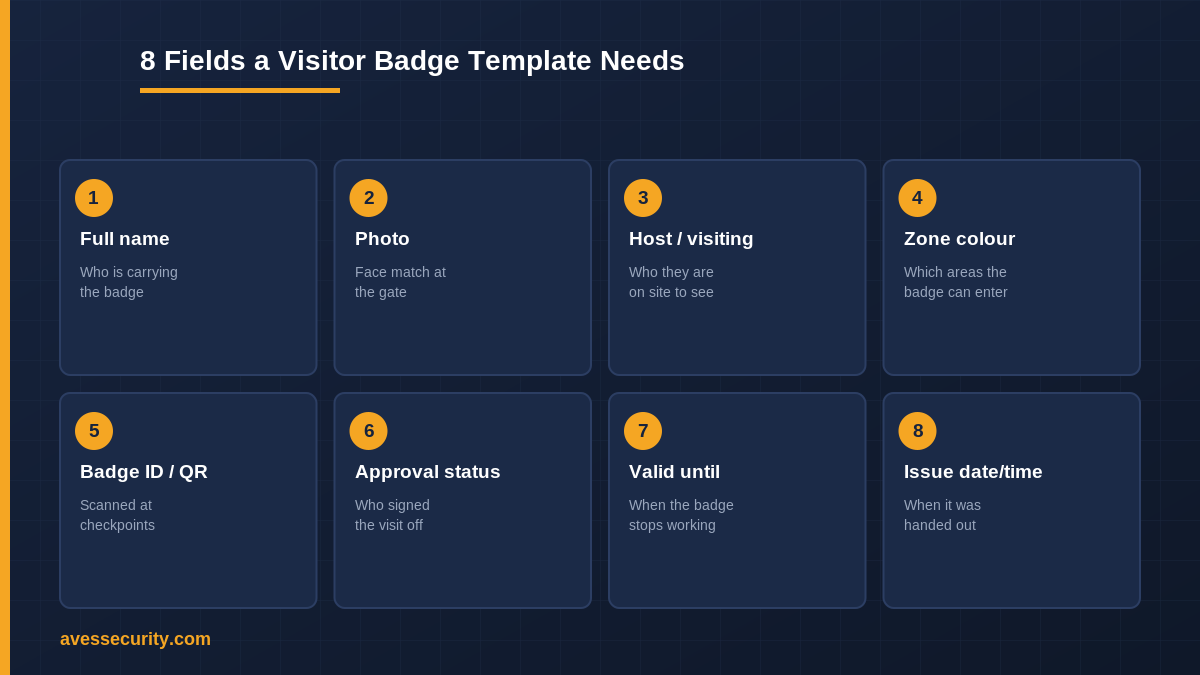
These are the fields that keep a visitor badge template useful rather than decorative.
- Full name. Printed large enough to read from a few metres away, not just on file somewhere behind the desk.
- Photo. A face match a guard can check against the person wearing the badge, captured at issue rather than reused.
- Host or reason for visit. Who they are on site to see, so a challenge at any point has an immediate answer.
- Zone or colour. Which areas the badge is cleared for, visible at a glance without needing to ask.
- Badge ID or QR code. Something a guard can scan at any checkpoint to pull the full record, not just read off the badge.
- Approval status. Who signed the visit off, so a badge in circulation always traces back to an approver.
- Valid until. A clear expiry, not an open-ended pass that is still technically live a week later.
- Issue date and time. When it was handed out, which is what makes a badge found later easy to place.
A visitor badge template built around those eight fields answers the three questions that actually get asked: who is this, where are they allowed and is the badge still good.
Common mistakes that make a visitor badge useless
The most common mistake is no expiry on the badge. Without one, a badge from last month looks exactly like a badge from this morning, and nobody at a glance can tell which is which.
The second is no photo. A badge with a name but no face match can be handed to anyone, which defeats the point of issuing it to one specific visitor in the first place.
The third is a badge nobody can scan or verify. If the only way to check a badge is to trust what is printed on it, a guard has no way to catch a badge that was never actually approved.
The fourth is treating every visitor the same. A contractor heading to a plant room and a guest heading to reception need different zone clearance, and a template with no colour or zone field cannot show the difference.
How AVES supports this, honestly
AVES does not print physical badges itself. What it does is manage the pass behind the badge: the approval step, the ID and profile photo capture, the QR code and the admin-configured colour set that a site prints or displays as the badge. Scanning the QR at a checkpoint always shows the live record rather than whatever is printed, which is what keeps an expired or unapproved badge from being trusted on sight.
There is no automatic door-lock integration tied to badge colour in AVES; zone clearance is something a guard checks against the badge and the scanned record, not something the badge itself enforces at a locked door. Sites that need that level of physical access control should treat the badge as the verification layer, not the lock.
FAQ
What is a visitor badge template?
It is the set of fields a site prints or displays on every visitor badge it issues, covering who the visitor is, who they are seeing, which areas they are cleared for and when the badge expires.
What fields should a visitor badge include?
Eight cover most sites: full name, photo, host or reason for visit, zone or colour, badge ID or QR code, approval status, valid until and issue date and time. Fewer than that and a badge usually cannot answer a challenge on its own.
Does a visitor badge need a photo?
Yes, for any site that wants the badge to mean something. Without a photo, a badge issued to one visitor can be worn by anyone, which removes the point of issuing it in the first place.
How is a visitor badge different from a visitor sign in sheet?
A sign in sheet is the record of who came and went. A badge is what that visitor wears while they are on site, so the two work together rather than replacing each other.
Does AVES support colour-coded visitor badges?
Yes. AVES supports admin-configured colour sets for passes, so a site can assign a colour per visitor type or zone and tell badges apart at a glance, alongside the QR scan that confirms the full record.
Related reading
- Visitor Management System: how AVES manages visitor access end to end
- Visitor Sign In Sheet: 7 columns your template needs
- Visitor Log Book: 10 essential fields to record
- Gate Pass Format
- Security Incident Log Template: 8 columns to include
See it in action
Book a 30-minute demo and we will show you how AVES issues, scans and verifies a visitor pass end to end. Book a demo or start a free trial.
Internal links: Visitor Management System · Visitor Sign In Sheet · Visitor Log Book · Gate Pass Format · Security Incident Log Template (Incident Management hub). External: AVES on Instagram (DoFollow).