
Author: Kaviarasan, AVES Security content team. Last updated: 13 October 2026.
A security incident log template is the running register a site uses for every incident it records over time, not a single report. Where an incident report form captures one event in full, the log is the chronological list that lets a supervisor see every entry at a glance: what happened, when, who responded and whether it is closed.
Most sites already have an incident report form. What a lot of them are missing is the log that sits above it: the single page, book or sheet that lists every incident a site has had this month, in order, so a supervisor does not have to open twenty separate report files to answer “how many incidents did we have in March, and which ones are still open.” That list is the security incident log, and the columns it uses decide whether it is useful six months from now or just a pile of entries nobody can search.
This guide covers the eight columns a security incident log template needs, the mistakes that turn a log into a liability instead of a record and how AVES replaces the paper version with entries that cannot be rewritten after the fact.
Why a security incident log matters
A single incident report answers “what happened in this one case.” A log answers a different question: “what has been happening on this site.” Without one, a supervisor handing over to a new shift, briefing a client or preparing for an insurance review has to reconstruct a timeline from loose paperwork, which is slow and easy to get wrong. This is exactly the gap a security incident log template is built to close.
A proper log also protects the site when something is disputed later. If a client asks whether a particular type of incident has happened before or how many are still open, the answer should be a quick look down one list, not a search through a filing cabinet. And because a log is chronological, it surfaces patterns a single report never will, for example the same location showing up three times in a month, which is a sign worth acting on before it becomes a fourth incident.
How a security incident log works
The log itself is simple: one row per incident, added as it happens, never removed. Each row is a short summary, not the full case file. The detail, the photos, the findings, live in the incident report behind it. The log is the index; the report is the record.
That split in a security incident log template is what makes it fast to scan. A supervisor reviewing a week’s incidents should not have to read eight full reports to get a sense of what happened. They should be able to run down eight rows, spot the one marked still open and go straight to that report. A log that tries to hold the full narrative in every row stops being a log and becomes a duplicate of the report file, which defeats the point.
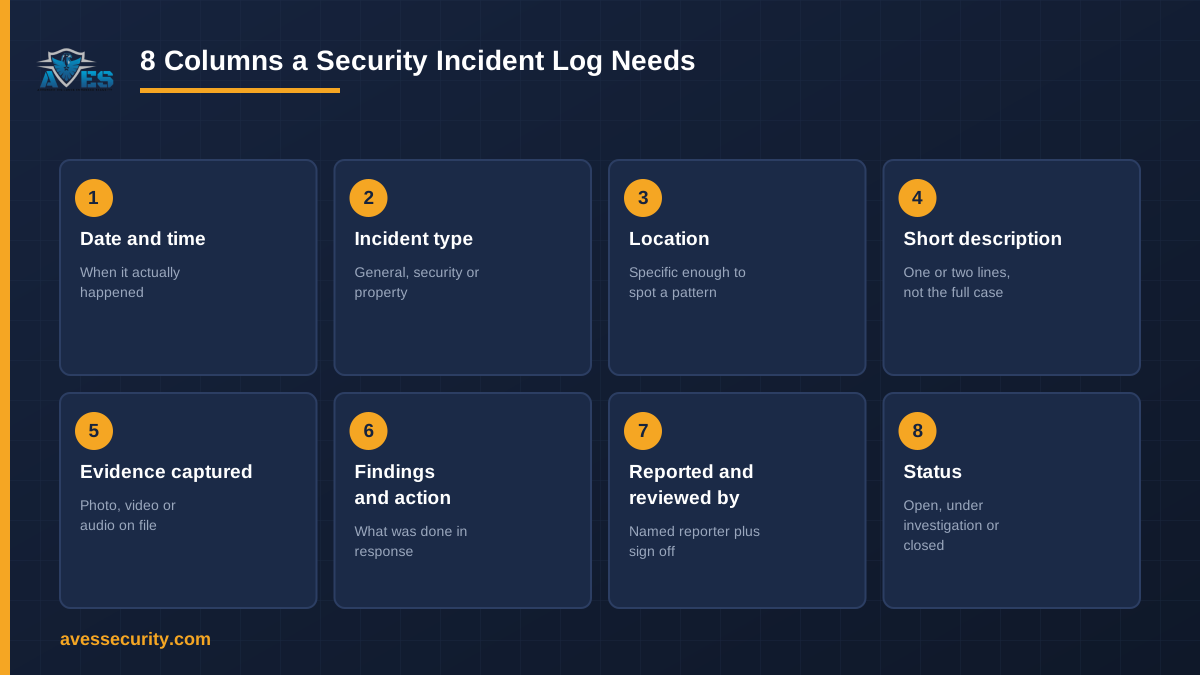
The 8 columns a security incident log template needs
These are the columns that keep a log useful rather than decorative, grounded in how AVES’s incident and safety modules already capture this information.
- Date and time. When the incident happened, not when it was written up. AVES timestamps every incident, safety and defect entry at the point of submission, so the log reflects the real sequence of events.
- Incident type. Whether the entry is a general incident, a security incident or a property/hotel-type event. AVES’s incident forms are split across these categories, which is what lets a log be filtered down to just one type when that is all a reviewer needs.
- Location. Where it happened, specific enough to spot a pattern. A log that just says “on site” cannot tell you that the same loading dock has come up three times this quarter.
- Short description. One or two lines, enough to know what kind of incident it was without opening the full report. This is the summary row, not the case file.
- Evidence captured. Whether photo, video or audio evidence exists for the entry. AVES’s incident forms use a six-sided photo capture alongside video and audio, so the log can show at a glance which entries have supporting evidence and which do not.
- Findings and action taken. What was done in response, even as a short note. AVES’s incident and defect/safety forms both carry a findings-and-actions field, which is what a log column should summarise rather than the signature line some paper sheets use instead.
- Reported by and reviewed by. Who raised it and who signed it off. AVES ties every incident, safety report and investigation entry to a named reporter, and investigation-type entries carry a separate approvedBy reviewer, so responsibility for both the report and the review is on record.
- Status, including whether a police report was filed. Open, under investigation or closed, plus a flag for cases that went to police. AVES’s incident forms carry a police-report field directly, so a log does not need a separate note to show which entries left the building.
Those eight columns are what turn a list of incidents into something a supervisor can actually use: a column for when, what kind, where, what happened, what evidence exists, what was done, who is accountable and where it stands now.
Common mistakes that make a security incident log useless
A security incident log template fails for a handful of predictable reasons. The most common mistake is no status column. Without one, every entry looks permanently unresolved, and a supervisor cannot tell an open case from one that was closed out weeks ago just by looking at the row.
The second is collapsing the log into the report. Some sites try to write the full narrative into every log row, which makes the log slow to scan and defeats its purpose. The log should point to the report, not replace it.
The third is no evidence flag. If a log cannot show which entries have supporting photo, video or audio evidence, a reviewer has to open every single report to find out, which is exactly the extra step a log is meant to save.
The fourth is a paper or shared-spreadsheet log that can be edited after the fact. A row that can be quietly changed is not a record, it is a draft. Entries need to be stamped with who logged them and when, and they need to stay that way once submitted.
How AVES supports the log, honestly
AVES does not ship a single standalone “incident log” screen separate from its incident, safety and investigation forms. What it does is capture every incident, defect and investigation entry as a timestamped, named record the moment it is submitted, through the six-sided photo and video and audio evidence capture, a findings-and-actions trail and a police-report field where relevant. Investigation-type entries add a separate approvedBy reviewer on top of the original reporter. That is what any security incident log template in AVES is actually built from.
That combination, taken together across a site’s incidents, is the log: a chronological, filterable list of every entry, each one backed by its own full report, with nothing in it that can be silently rewritten after submission. There is no signature-image field anywhere in AVES; sign-off is always a named accept, decline or submitted action with a date and time attached, which is a more searchable trail than a scrawl ever was.
FAQ
What is a security incident log template?
It is a running list of every incident a site records, one row per entry, covering when it happened, what kind it was, where, a short description, whether evidence exists, what was done, who is accountable and its current status. It sits above the full incident report rather than replacing it.
What is the difference between an incident log and an incident report?
A report captures one incident in full: the narrative, the evidence, the findings. A log is the index across every incident a site has had, built from short summary rows so a supervisor can scan a period at a glance.
How many columns should a security incident log have?
Eight is enough for most sites: date and time, incident type, location, short description, evidence flag, findings and action, reported by and reviewed by, plus status. Fewer than that and a log usually loses the ability to show what is still open.
Can a spreadsheet work as a security incident log?
It can for a single site with a low incident count, as long as someone actively maintains the status column. It breaks down once entries need to be tied to the original report, once more than one person edits it or once a client or an insurer needs a record that cannot be quietly altered after the fact.
Does AVES include a police-report field?
Yes. AVES’s incident forms carry a police-report field alongside the six-sided photo, video and audio evidence capture, so a security incident log template built from these entries can show which incidents went to police without a separate manual note.
Related reading
- Incident Reporting Software: how AVES captures incidents end to end
- Incident Report Form: the 8 fields every report must include
- Investigation Report Template: structuring a security investigation
- Near Miss Report Form: 8 fields every report must include
- Security Guard Logbook
See it in action
Book a 30-minute demo and we will show you how AVES timestamps and ties together incident, safety and investigation entries so a log always reflects the real record behind it. Book a demo or start a free trial.
Internal links: Incident Reporting Software · Incident Report Form · Investigation Report Template · Near Miss Report Form · Security Guard Logbook. External: AVES on Instagram (DoFollow).