
Security companies run on equipment: CCTV units, two-way radios, body cameras, access-control hardware, patrol devices. Asset tagging software is what stops that equipment from becoming a spreadsheet nobody trusts. It gives every item a unique ID, so the business always knows where a piece of equipment is, who has it and what condition it is in.
Asset tagging software is a system that gives every physical asset, from CCTV units and radios to access-control hardware, a unique ID so it can be scanned, located and tracked through its entire working life: onboarding, placement, transfer, custody and retirement.
The problem with tracking security equipment on a spreadsheet
Most security companies start with a spreadsheet: one row per radio or camera, a column for who has it. It works for a month. Then a guard swaps sites. A supervisor hands a radio to a replacement without logging it. A stocktake turns up three missing units nobody can explain. The spreadsheet does not update itself when equipment moves. Nobody scans anything, so the record and the reality drift apart.
For a company running serialised equipment such as CCTV units and radios across multiple sites, that drift is not a minor annoyance. It shows up as lost equipment, disputed handovers and a stocktake that takes a full day of manual counting instead of an hour of scanning.
Why asset tagging matters for a security company
A security contract depends on equipment being where it is supposed to be. A missing radio during a shift is a safety gap, not just a cost. Asset tagging software closes that gap by tying every physical item to a record that updates every time the item moves, changes hands or changes status.
It also protects the business side of the relationship. When equipment is tagged and its location and custodian are logged, a dispute over a lost or damaged item has an audit trail behind it rather than a guess.
How asset tagging software works
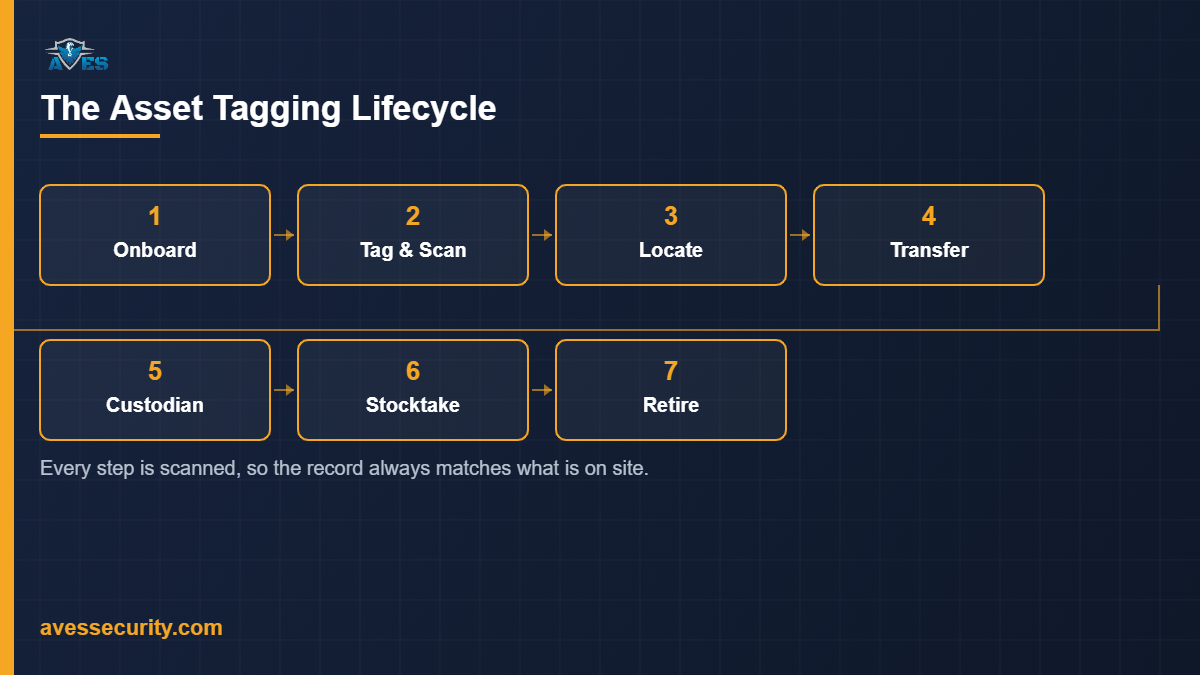
Each asset is given a unique ID at onboarding, tagged with an organisation-specific asset-code prefix so items from different sites or clients are never confused. From that point, the asset’s ID is scanned during checklists, inspections and stocktakes and every scan adds to a history trail: where the item was, who scanned it and when.
When an asset needs to change hands or sites, the system runs the move as a request: a transfer is requested, authorised, then confirmed, rejected or cancelled, rather than simply being noted after the fact. A custodian can be assigned to an asset and released when it is handed back, so “who has this right now” is always a lookup, not a phone call.
7 things asset tagging software must do
- Asset onboarding. New equipment is received into the system through a dedicated intake step, with an organisation-specific asset-code prefix applied so codes stay unique across sites and clients.
- A unique, scannable ID per asset. Every asset carries one ID that is scanned during checklists and inspections, building a history trail instead of a one-off note.
- Location placement. Each asset has a recorded location, so “which site is this radio actually at” is a lookup, not a guess.
- Transfers between sites or organisations. Moving an asset is a workflow: request, authorise, then confirm, reject or cancel, so a transfer cannot happen silently.
- Custodian assignment and release. An asset can be assigned to a named custodian and released when it is returned, keeping accountability with a person, not just a site.
- Physical stocktakes by scanning. A stocktake is run by scanning assets to reconcile what is recorded against what is actually on site, rather than counting by hand.
- Status changes, defect flagging and retirement. An asset’s status can be updated, a defect flagged against it and it can be retired from active use, with the change kept on its record. Asset data can also be exported for reporting.
Common mistakes when tagging security assets
- Tagging equipment but never scanning it again. A tag with no scanning discipline behind it is just a sticker. The value is in the history trail that builds up every time the asset is scanned during a checklist, inspection or stocktake.
- Letting transfers happen off the record. If a guard or supervisor can hand equipment to someone else without the system knowing, the custodian field stops meaning anything. Transfers need to go through request and authorisation, not a verbal handover.
- Treating a stocktake as an annual event. Scan-to-reconcile stocktakes are quick enough to run more often. Waiting a year to find out equipment is missing is waiting too long.
- Mixing asset codes across sites or clients. Without an organisation-specific prefix, the same-looking code can mean two different items at two different sites, which defeats the point of unique tagging.
- Not logging the custodian release. Assigning an asset to someone is only half the record. If it is not released when returned, the system still shows it as checked out.
Frequently asked questions
Is asset tagging software the same as an asset register?
No. A fixed asset register (see our fixed asset register guide) is primarily a financial record of what a company owns. Asset tagging software is operational: it tracks where each tagged item physically is, who holds it and its movement history, which then feeds into that register.
What counts as an asset worth tagging?
Serialised equipment that a security company issues and reissues is the clearest case: CCTV units, radios and similar hardware that need to be tracked individually rather than counted in bulk.
Does asset tagging cover a one-off equipment handover?
A single handover, such as issuing a radio for a shift, is better logged through a handover record (see our asset handover form guide). Asset tagging software is for the ongoing lifecycle of the asset across many handovers, transfers and stocktakes.
How does a stocktake actually work?
Assets are scanned against their recorded location, so the stocktake reconciles what should be on site with what is confirmed on site, flagging any mismatch instead of relying on a manual count.
What happens to an asset’s history when it is retired?
Retiring an asset updates its status rather than deleting its record, so the onboarding, transfer, custodian and inspection history stays available for later reference.
Where asset tagging fits in your wider security operations
Asset tagging software does not replace equipment handed out for a single shift (covered in our equipment sign out sheet guide) or the financial view of what the company owns (the fixed asset register). It sits alongside both, and alongside the wider platform described in our security guard management software overview, as the operational record for equipment that moves between people and sites. The same discipline of scanning and logging that works for assets is worth comparing with how AVES handles daily guard activity in the security guard logbook.
For product updates, follow AVES Security on Instagram.
If your business issues serialised equipment across more than one site, book a 30-minute demo and we will show you the actual asset tagging screen: onboarding, transfers and a scan-to-reconcile stocktake.