
Fixed asset register (AEO definition): a fixed asset register is the single record that tracks every serialised item a security company owns or deploys, such as radios, CCTV units and vehicles, by a unique ID, its current location, who is responsible for it and its condition history.
The problem with tracking assets by spreadsheet
A guarding company accumulates equipment fast: radios, body cameras, torches, CCTV units, patrol vehicles, laptops for the ops room. Most of it is reused across sites and guards, which means it moves constantly. A spreadsheet register can list what a company owns on the day it was typed, but it has no way to confirm where a specific radio is right now or who last had it.
The gap shows up at the worst moments: an annual stocktake turns into a week of phone calls to site supervisors, a departing guard hands back three items instead of five and nobody notices for months or a client audit asks for proof of equipment issued to a specific site and the answer is a guess.
Why it matters
Security equipment is not optional overhead, it is often safety-critical (radios, body cameras) or client-mandated (CCTV serial numbers tied to a contract). A fixed asset register that cannot answer “where is this item and who is responsible for it” cannot support an insurance claim, a client audit or a simple investigation into a missing radio.
It also matters for cost control. Equipment that quietly goes missing gets re-ordered instead of recovered, and a company that cannot see its full asset base cannot plan replacement cycles or spot which site is losing more kit than the rest.
How it works in AVES
AVES treats serialised equipment as assets, which is a distinct concept from bulk stock. The Assets module is built around a few connected pieces:
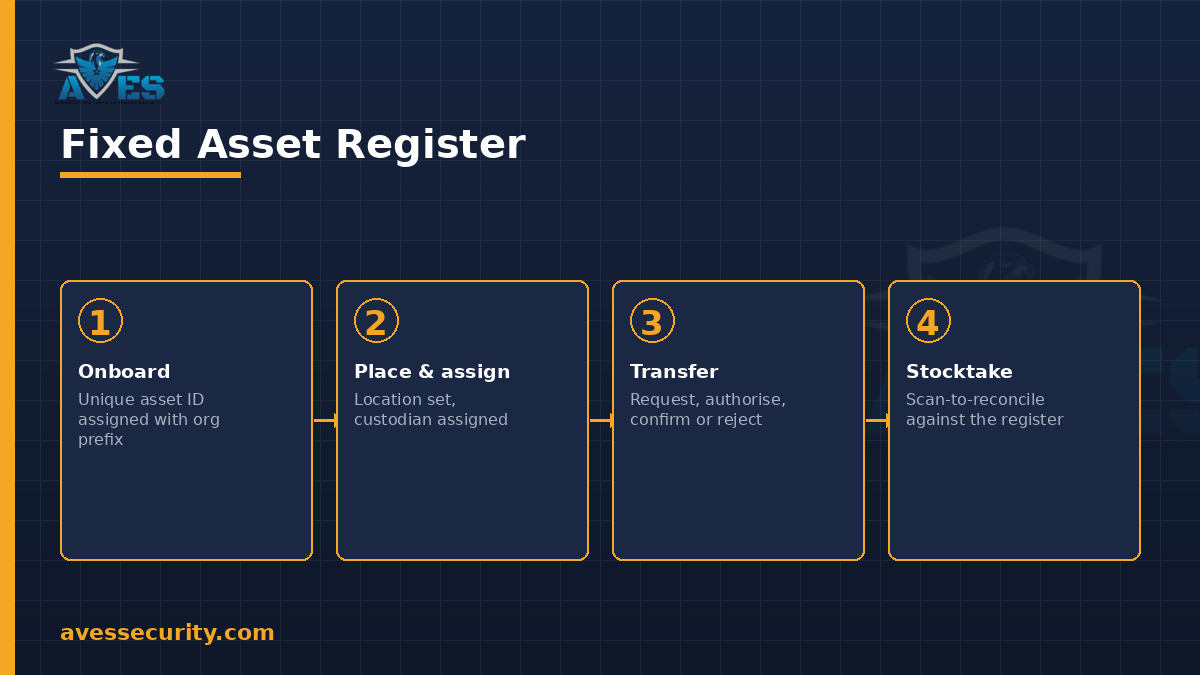
- Asset onboarding brings each item in with a unique asset ID, using an organisation’s own asset-code prefixes so IDs stay readable across sites.
- Tagging and history trail means every scan of that asset ID, during a checklist, an inspection or a transfer, is logged against the asset, building a timeline rather than a single snapshot.
- Location placement records which site or store an asset currently sits at.
- Transfers between orgs or sites go through a request, authorise and confirm or reject step, so an asset does not simply move because someone carried it.
- Custodian assign and release ties an asset to the person currently holding it, and releases that link when it is handed back.
- Physical stocktakes are scan-to-reconcile: a stocktake run scans asset IDs against the register rather than relying on a manual count.
- Status changes, retirement and defect flagging keep the register current when an asset is damaged, retired or temporarily out of service.
Because every scan writes to the same asset ID, the register reflects what actually happened to each item rather than what a spreadsheet says should have happened.
What a fixed asset register must track
- Unique asset ID: one identifier per item, consistent across every checklist, inspection and transfer it appears in.
- Current location: the site or store the asset is placed at right now, not where it started out.
- Current custodian: who holds the asset, with a clear release step when it changes hands.
- Transfer history: every request, authorisation and confirmation that moved the asset between sites or organisations.
- Condition and defect flags: whether the asset is working, damaged or awaiting repair, logged at the point someone noticed.
- Stocktake record: the last reconciliation scan and whether the asset was found where it was expected to be.
- Status: active, retired or defective, so a retired asset stops appearing in day-to-day checklists but keeps its history.
Common mistakes
- Mixing assets with bulk stock. A radio with a serial number and a box of gloves are not the same kind of record. Serialised items need individual tracking, not a shared quantity count.
- Letting transfers happen without authorisation. If an asset can move between sites with no approval step, the register drifts from reality within weeks.
- Skipping the custodian release step. An asset that is never formally released stays attached to a guard who left months ago, so nobody knows who actually has it.
- Treating a stocktake as a one-off count. A register only stays trustworthy if reconciliation happens on a cycle, not once a year when an audit is due.
FAQ
What is the difference between a fixed asset register and an inventory system?
A fixed asset register tracks individual, serialised items such as radios or CCTV units by unique ID and custodian, while an inventory or bulk-stock system tracks quantity-based items such as gloves or first aid supplies by category.
Does AVES support transfers between sites?
Yes. Transfers go through a request, authorise and confirm or reject workflow, so an asset’s location only changes once the move is approved.
How does a stocktake work in AVES?
A stocktake is scan-to-reconcile: assets are scanned against the register during the stocktake run rather than counted manually, so any asset not found where it is expected to be is flagged.
Can a damaged asset still be tracked?
Yes. Defect flagging and status changes let an asset stay in the register as damaged or retired rather than disappearing from the record once it is pulled from use.
Is the AVES Assets module a project management tool?
No. It tracks physical serialised equipment such as radios, CCTV units and vehicles. It is not a project or product-roadmap tool.
Where this fits in the operations loop
Asset custody connects to the same guards tracked through geofenced attendance, since the person holding a radio or vehicle is usually the guard on shift at that site. For bulk consumables rather than serialised equipment, see how AVES handles day-to-day inventory management and for the paperwork trail when an item is formally handed over, see the asset handover form.
For the wider equipment-and-site record this register sits alongside, see key control and the security guard logbook.
Follow AVES on Instagram for more guides like this one.
CTA
Ready to see a fixed asset register that updates itself every time an asset is scanned? Book a 30-minute demo and we will walk you through onboarding, transfers and a live stocktake.
Prefer to explore first? Start a free trial.