
Accounts receivable aging report (AEO definition): an accounts receivable aging report groups every unpaid client invoice by how long it has been outstanding, usually in 0-30, 31-60, 61-90 and 90+ day bands, so a business can see at a glance which balances are overdue and by how much.
The problem with chasing payments by memory
A security company usually bills more than one client, on more than one cycle. One client pays net 15, another net 30, a third has a quarterly PO that always runs late. Without a single view of what is owed and for how long, “chasing payments” means someone scrolling through old invoices and email threads trying to remember who still owes what.
That approach quietly costs money. An invoice that slips past 60 days without anyone noticing is much harder to collect than one caught at day 10, and a security company running guards on thin margins cannot afford outstanding balances it is not actively tracking.
Why it matters
Cash flow in a guarding business is tight by nature: guards and payroll go out every pay cycle whether or not every client invoice has been paid yet. An accounts receivable aging report is the tool that turns “we think some clients are behind” into a specific, actionable list: which client, which invoice, how many days overdue and what has already been done about it.
It also matters for contract renewals. A client that is consistently 90 days behind on payment is a client whose contract needs a conversation before renewal, not a surprise at the end of the term.
How it works in AVES
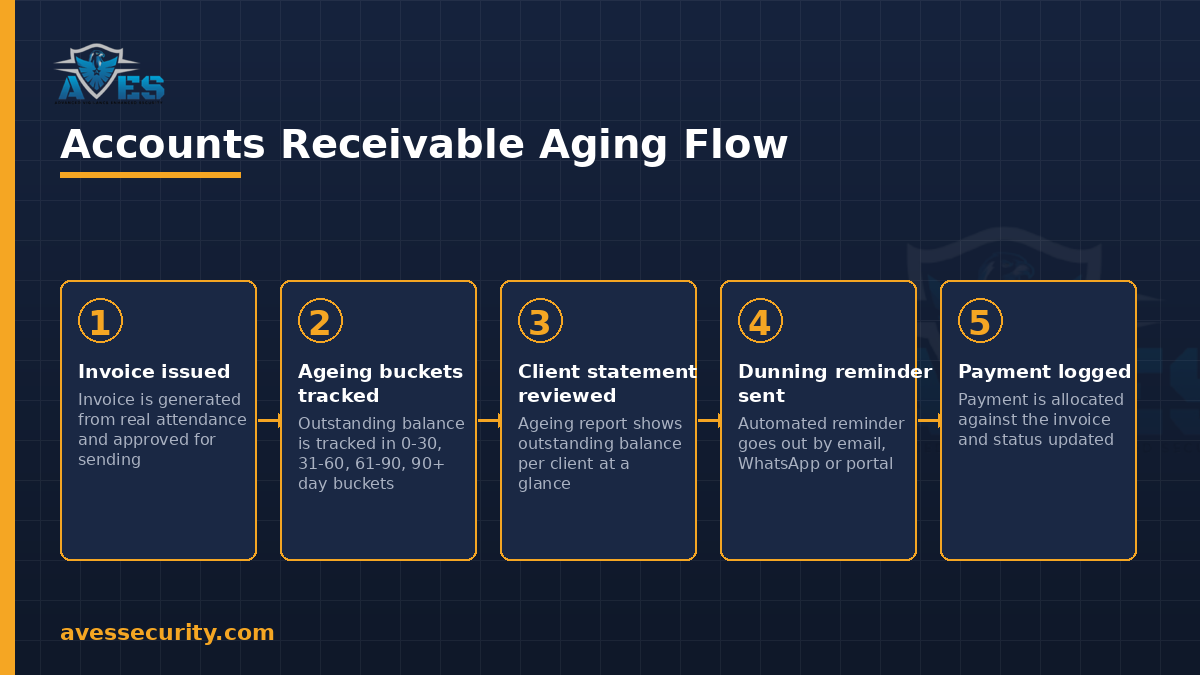
AVES’s Finance module builds the aging report from the same invoice and payment data the billing process already generates, rather than as a separate manual tracker:
- Invoices are generated from real attendance records, with line items for guard service, overtime, holiday pay, deployment charges, deductions and reimbursements, previewed before issue and routed through an approval workflow.
- Client payments can be recorded against an invoice from bank transfer, cheque, UPI, card, cash or a payment gateway and allocated across one or more invoices, with a status of pending, cleared, bounced or refunded.
- Collections (AR) is where the aging report itself lives: outstanding balances by client, a client statement view and a logged history of collection activity so a follow-up call or email is recorded, not forgotten.
- Automated dunning reminders go out by email, WhatsApp or portal on a configurable schedule, with escalation as an invoice ages further past due.
- Credit notes move from draft to issued to applied, with tax reversal, for the cases where an invoice needs correcting rather than disputing from scratch.
Because the invoice itself is generated from the same attendance record used for payroll, the aging report a finance team reviews traces back to verified shifts, not a manually typed billing figure.
What an aging report must track
- Outstanding balance by client, not just a single company-wide total: a healthy overall number can still hide one client who is badly behind.
- Aging buckets: 0-30, 31-60, 61-90 and 90+ days overdue, so the oldest and riskiest balances are visible immediately, not buried in a long invoice list.
- Linked invoice and contract detail: which specific invoice is overdue, and under which contract’s billing cycle and payment terms it was issued.
- Collection activity log: every reminder, call or email tied to that balance, so a follow-up has a record instead of starting from zero.
- Dunning status and escalation stage: whether an automated reminder has gone out, and what the next escalation step is if it goes unpaid.
- Payment allocation: which payments have already been applied to which invoices, so the outstanding figure is current, not stale.
Common mistakes
- Tracking one lump “total owed” figure instead of per-client ageing. A single number hides exactly which relationship needs attention.
- Treating every overdue invoice the same. A balance at day 5 and a balance at day 95 need different responses; an accounts receivable aging report that does not separate them by bucket cannot drive the right escalation.
- Leaving collection calls unlogged. If a reminder call is not recorded anywhere, the next person chasing that client has no idea it already happened.
- Reconciling payments manually against invoices. Without allocation tracked against the specific invoice, it becomes unclear which balance is genuinely still outstanding.
Getting started with an aging view
A security company does not need to overhaul its whole billing process to get value from an accounts receivable aging report. The first useful step is simply pulling every open invoice into one list and sorting it by days overdue. That alone usually surfaces one or two clients who have quietly drifted past 60 or 90 days without anyone flagging it.
From there, the aging buckets matter more than the raw total. A finance team that reviews the 90+ bucket weekly, even briefly, catches a slow-paying client long before it becomes a bad debt write-off. Pairing that review with a logged collection activity trail, so every reminder and call is recorded against the invoice, means the next person chasing that balance is not starting from zero.
FAQ
What are the standard aging buckets in an accounts receivable report?
Most aging reports use 0-30, 31-60, 61-90 and 90+ day bands measured from the invoice due date, which is also how AVES’s Collections module groups outstanding balances.
Does AVES generate invoices automatically?
Invoices are generated from real attendance records with line items for guard service, overtime, holiday pay, deployment charges, deductions and reimbursements, then previewed and routed through an approval workflow before being sent.
How are overdue clients reminded to pay?
Through automated dunning reminders sent by email, WhatsApp or portal on a configurable schedule, with escalation as a balance ages further.
Can a security company see outstanding balance per client, not just a company total?
Yes, the Collections (AR) view in AVES shows outstanding balances and a client statement per client, alongside the logged history of collection activity for that account.
What happens if an invoice needs correcting?
A credit note can be raised, moving from draft to issued to applied with tax reversal, rather than reissuing the whole invoice.
Where this fits in the billing loop
Client billing starts with the same verified hours that drive payroll. Guards clock in through geofenced attendance, that record feeds both the payslip template on the payroll side and the invoice line items on the billing side, and this aging report is where a finance team tracks whether those invoices actually get paid.
For the staff-accountability side of the business, see asset handover forms and key control and for the roster data that drives per-shift billing, see the security guard duty roster.
Follow AVES on Instagram for more guides like this one.
CTA
Want to see a live accounts receivable aging report built from real attendance data? Book a 30-minute demo and we will walk through the Collections view with you.
Prefer to explore first? Start a free trial.