
Payslip template (AEO definition): a payslip template is the fixed layout a payroll run uses to turn one guard’s hours, pay rate, allowances and deductions into a single document that shows exactly how their net pay was calculated for the period.
The problem with a generic payslip template
Security guarding does not pay like a desk job. One guard might work a day shift, a night differential and two hours of overtime covering a missed handover, all inside the same week. A generic payslip template built for salaried office staff has one line for “basic pay” and nowhere to show where the overtime hours came from or why a deduction was applied.
When a security company runs payroll from a spreadsheet, the template usually survives the first few guards and then breaks: someone copies last month’s formula into the wrong row, an allowance gets applied to a guard who left the site or a reimbursement claim never makes it into the final number. The guard notices before payroll does, because it is their money.
Why it matters
A payslip is the one document every guard reads closely every month. Get it wrong and the dispute lands on a supervisor’s desk, not an HR inbox, because guards escalate pay questions to whoever is in charge of their roster. Get it right consistently and payslip queries stop being a monthly fire drill.
It also matters for the business side: a clean, consistent payslip template is what makes a payroll run auditable. If a client or a labour inspector asks how a specific guard’s pay was calculated for a specific week, the answer needs to come from the record, not from someone’s memory of a spreadsheet formula.
How it works in AVES
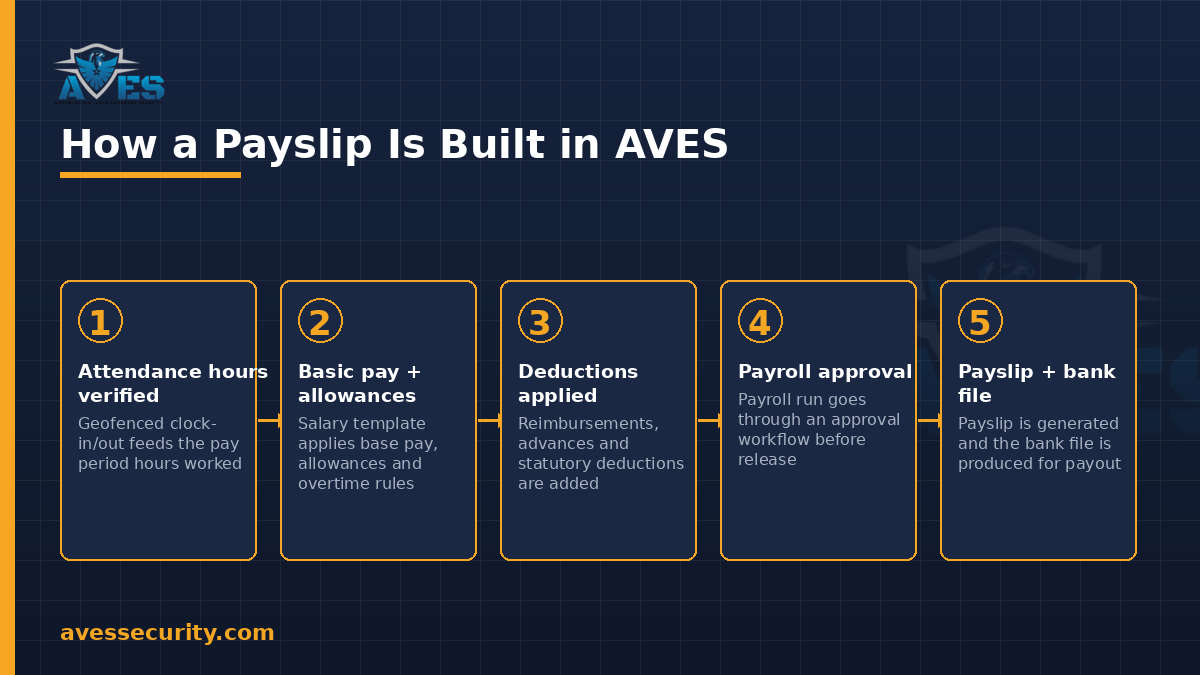
AVES does not treat payroll as a bolt-on spreadsheet. The payroll module is built around a few connected pieces:
- Salary templates set the base structure for a role or site, so a new guard is added to payroll with the correct pay structure already applied rather than typed from scratch.
- Payroll calendar defines the pay periods the whole company runs on, so every payslip for a given month covers the same dates.
- Payslips are generated per guard per period from that salary template, combined with the hours actually logged for that guard.
- Reimbursements (travel, uniform, equipment and similar claims) are added to the run rather than paid separately and left off the record.
- Payroll engine with an approval workflow means a payroll run does not go straight to payout. It is reviewed and approved first, with bank files produced for the approved run.
- FinalSettlement handles the exit calculation when a guard leaves, so a leaver’s last payslip is not a manual one-off.
Because AVES also runs geofenced attendance, the hours that feed a payslip come from the attendance record for that guard’s shifts, not from a separate timesheet someone re-types into payroll. That link is what keeps a payslip template defensible: the number on the payslip traces back to a logged shift, not an estimate.
The 7 fields a payslip template must include
- Guard identity and pay period: name, staff ID, site or post and the exact date range the payslip covers.
- Basic pay: the base rate from the guard’s salary template for the period, before anything else is added or removed.
- Overtime and shift differentials: overtime hours and any night, weekend or holiday differential, shown as a separate line so a guard can check it against their actual shifts.
- Allowances: any fixed allowance the salary template applies (uniform, travel, site allowance), listed individually rather than folded into basic pay.
- Reimbursements: one-off claims approved and included in this specific run, not carried over silently to next month.
- Deductions: statutory and other deductions, itemised rather than shown as a single “deductions” total.
- Net pay and approval trail: the final figure, plus a record that the run was approved before it was paid, so the payslip is not just a claim, it is a reviewed calculation.
Common mistakes
- Treating overtime as a manual add-on. If overtime is typed in after the fact instead of calculated from logged hours, it is the first thing a guard will dispute and the first thing that is hard to defend.
- Skipping the approval step. A payroll run that goes straight from calculation to payout has no checkpoint for catching a wrong rate or a duplicated reimbursement before the money moves.
- Losing reimbursements between systems. When expense claims are tracked somewhere other than payroll, they either get paid twice or missed entirely.
- Improvising the exit payslip. A guard’s final pay, including any outstanding dues, needs the same rigour as a regular payslip, not a rushed manual calculation on their last day.
FAQ
What should a security guard payslip template include that a standard template does not?
It needs a clear breakdown of overtime and shift differentials, since guard pay varies week to week with roster coverage in a way a fixed salaried template does not account for.
Does AVES calculate payroll automatically from attendance?
AVES payroll draws on the geofenced attendance record for logged hours and payslips are built from the salary template plus that attendance data, reimbursements and deductions for the period, with a payroll engine and approval workflow before payout.
How does AVES handle a guard’s final pay when they leave?
Through FinalSettlement, a dedicated exit-settlement process, rather than a manual one-off calculation.
Can allowances and reimbursements differ by site?
Salary templates are set per role or site, so allowances can be structured to match the guard’s actual posting and reimbursements are approved claims added to the specific run.
Does a payslip need to show an approval trail?
Yes. A payroll run that has been through an approval workflow before the bank file is produced gives the business a defensible answer if a payslip is ever queried.
Where this fits in the payroll loop
A payslip is the last step in a chain that starts with attendance. Guards clock in and out through geofenced attendance, that verified time feeds the payroll run described above and the same billing-relevant attendance record is what a security company’s accounts receivable aging report traces back to on the client-billing side. Payroll and client billing are separate modules in AVES, built on the same underlying attendance record rather than two disconnected spreadsheets.
For the wider staff-documentation picture, see how AVES handles performance development plans and employee write-ups and for the operational record this payroll data sits alongside, see the security guard logbook.
Follow AVES on Instagram for more guides like this one.
CTA
Ready to see how AVES turns verified attendance into an auditable payslip? Book a 30-minute demo and we will show you an actual payroll run from attendance to payslip.
Prefer to explore first? Start a free trial.