
Security scheduling: the process of assigning guards to shifts so that every post is covered, swap requests are approved through a visible trail rather than a text thread and the published roster can be checked against who is actually on site. Done well, it is a repeatable process, not a weekly scramble.
Why spreadsheet scheduling stops working
A spreadsheet or a shared chat works for scheduling a handful of guards across one site. It stops working the moment a guard needs to swap a shift at short notice, a supervisor is covering three sites or someone needs to prove, after the fact, who was actually supposed to be on duty at a given hour. Nothing in a spreadsheet or a WhatsApp thread survives as an audit trail, edits overwrite each other and a verbal “yes, that’s fine” to a swap request leaves no record of who approved what.
A security guard duty roster already covers the shift patterns (2-shift, 3-shift, 4-on-4-off, rotating nights) that a schedule is built from. Security scheduling is the process layer on top: how the roster actually gets built, published, changed and kept honest as reality moves around it.
Why it matters
An unverified schedule change is a coverage gap waiting to surface. If a swap gets agreed over a phone call and never makes it back into the official roster, the person checking “who’s on site right now” is working from a document that’s already wrong. For a security company billing by shift and answerable to a client’s SLA, that gap is not just an inconvenience, it’s the difference between a documented, defensible schedule and one nobody can stand behind if something goes wrong on an unstaffed post.
How to build a security schedule that holds up
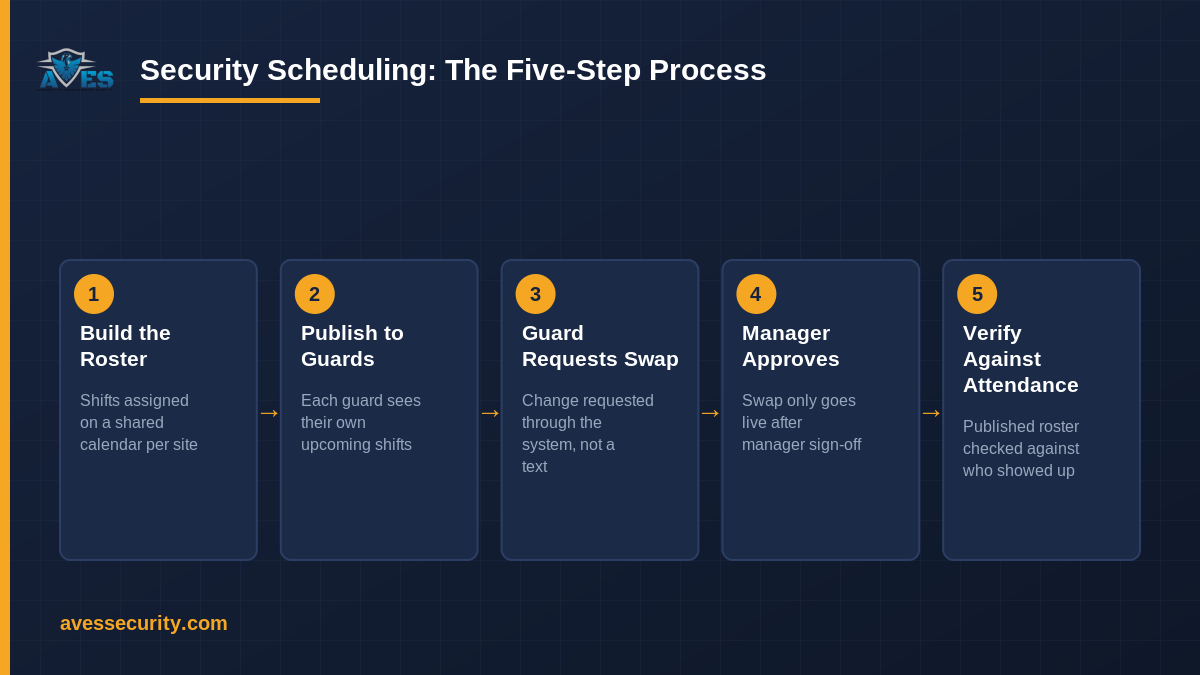
1. Build the roster on a shared calendar
Shift assignment starts on a calendar, not a spreadsheet, one place where every guard’s shift, for every site, is visible to whoever needs to see it. This is the rostering layer: shifts generated and assigned against real coverage needs, not re-typed from last week’s version.
2. Publish shifts so guards can see their own schedule
Once the roster is built, guards need to see their own upcoming shifts directly, rather than waiting for a supervisor to read them out or post a photo of a printed sheet.
3. Let guards request a swap, not just ask around
Shifts change. A guard requests a shift swap through the same system the roster lives in, rather than arranging it privately and hoping someone remembers to update the master sheet.
4. Route every swap through manager approval
A swap request only becomes real once a manager approves it. That approval step is what turns “two guards agreed between themselves” into a schedule change the business can actually stand behind, with a record of who requested it, who approved it and when.
5. Check the published roster against who’s actually there
The roster is a plan. It is only useful once it is checked against reality: who actually checked in, at which site, against what the schedule said should happen. That comparison is where scheduling and attendance meet.
Security scheduling checklist
- Does the schedule live in one shared place guards can check themselves, not a spreadsheet emailed around?
- Can a guard request a shift swap from their own phone, rather than arranging it off the books?
- Does every swap require manager approval before it changes the live roster?
- Is there a record of who requested a change, who approved it and when?
- Does the published schedule get checked against actual attendance, not assumed to be accurate?
- Does the schedule account for fatigue-aware shift patterns, not just filling slots?
Common mistakes in security scheduling
- Approving swaps verbally with nothing logged. A spoken “that’s fine” leaves no trail if the swap is later disputed or the post ends up uncovered.
- Treating the roster as fixed once published. A schedule that cannot absorb a same-day swap request just gets worked around off the books, which is worse than no schedule at all.
- Never checking the schedule against attendance. A roster nobody compares to who actually showed up is a plan, not a record. Pair it with geofenced attendance to close that loop.
- Ignoring the handover between shifts. A clean schedule still needs a clean handoff; see what belongs in a shift handover checklist.
Frequently asked questions
What is security scheduling?
Security scheduling is the process of assigning guards to shifts so every post is covered, letting guards request swaps, routing those swaps through manager approval and keeping the published roster checked against who is actually on site.
How is security scheduling different from a duty roster?
A duty roster is the output: the shift pattern and who’s assigned where. Security scheduling is the process that builds, publishes and maintains that roster, including how changes get requested and approved.
Can guards swap shifts themselves?
Guards can request a swap, but it should not take effect until a manager approves it. See the full process in a shift change request.
Does scheduling software replace a supervisor?
No. It replaces the spreadsheet and the unrecorded phone calls. A supervisor still approves swaps and makes the judgement calls; the system just gives that judgement a visible, auditable trail instead of relying on memory.
How do I know the schedule is actually being followed?
Compare it against attendance records rather than assuming the published roster and reality match. Geofence attendance confirms who was actually on site, against what the schedule said should happen.
For more rostering and compliance tips, follow AVES on Instagram.
See it on your own roster
AVES builds the schedule on a shared calendar, lets guards request swaps from their phone and routes every change through manager approval with a full audit trail, checked against real attendance, not assumptions. Book a 30-minute demo and we’ll show you the swap-approval screen a manager actually uses. Prefer to look around first? Start a free trial.