
You are asked for a monthly report and your stomach tightens a little. You know the numbers exist somewhere. You just do not know how long it will take to pull them together into something you can actually hand a client.
That scramble is the exact problem the right security reporting software is supposed to remove. If you have ever built a report by copying numbers into a spreadsheet at eleven at night, this article is for you.
Why This Feels Harder Than It Should
Most security companies do not lose client trust because guards fail to show up. They lose it because nobody can produce a clean, professional record fast enough when a client asks for one.
You already sense this, which is why you are reading about security reporting software instead of just accepting the status quo. You want something that produces a document you can hand over without apologizing for how it looks.
The quiet fear underneath this search is simple. What if the tool looks fine in a demo, then falls apart the first time you actually need a real report under a real deadline? That fear deserves a straight answer, not a sales pitch.
What Good Security Reporting Software Actually Does
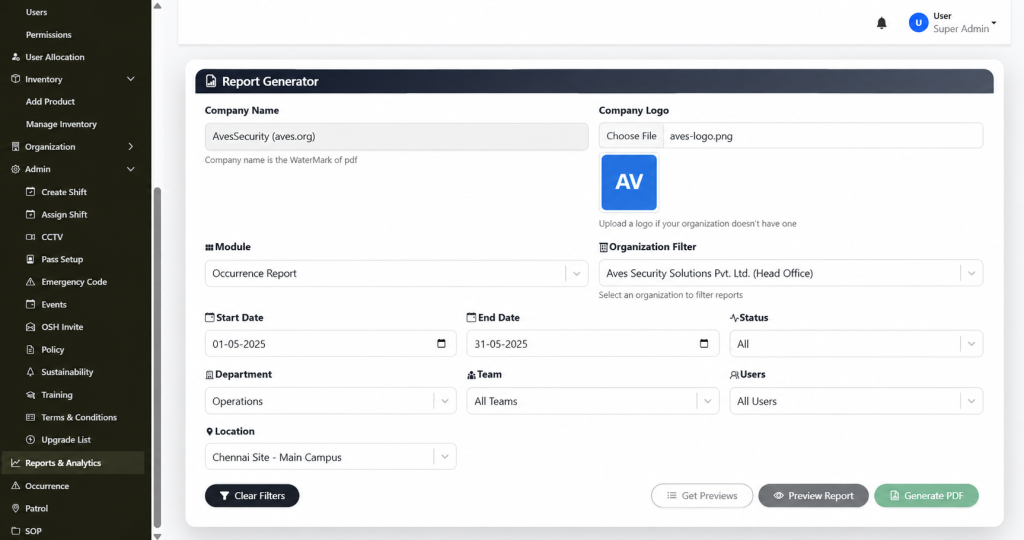
Strip away the marketing language and real security reporting software comes down to one core job. It needs to turn your operation’s activity into a branded, filterable document you can export and hand off, without you rebuilding it by hand every time.
A dedicated report generator is where this either works or falls apart. A real one lets you set your Company Name, which gets used as the watermark on the exported PDF. It lets you upload a Company Logo and falls back to a clean initials placeholder if you have not uploaded one yet. You pick a Module to define what the report covers. You apply an Organization Filter to scope it. You set a Start Date and End Date. You can narrow further by Status, Department, Team, Users and Location. Then you preview it and generate a branded PDF.
That is what functioning security reporting looks like when it is built around real filters instead of a vague “export” button that dumps raw data with no formatting.
The Mistake Most Buyers Make
Here is something most comparison articles will not tell you. A lot of vendors advertise security reporting software as a headline feature, then the actual export screen turns out to be a single button with no filters, no branding and no date range control.
The fix is to ask a blunt question before you commit to anything. Can I filter by module, department, team and date range and will the output actually carry my company name and logo? If the honest answer is no, that is not real security reporting software. That is a raw data dump with a nicer name attached.
Another mistake worth naming. Buyers often assume that once a Generate PDF button exists, the tool is done being evaluated. It is not. You still need to know what that PDF actually looks like once it lands in your hands, because a cluttered, unbranded export creates almost as much extra work as building the report yourself.
Being Honest About What Is Still Unproven
Trust gets built through honesty, not perfect promises, so here is the part worth saying plainly. A filter-rich report generator is a strong sign of serious security reporting software, but a few things still need to be confirmed before anyone should treat this as a finished picture.
It is not yet clear whether the Organization Filter supports comparing multiple organizations side by side in one report, or whether it is scoped to one organization at a time. It is not yet confirmed whether reports can be scheduled to run automatically, or whether every export has to be triggered manually. And the exact layout of the finished PDF, once generated, has not been reviewed yet.
None of that changes the core value of what is confirmed. It just means anyone evaluating security reporting should ask these specific questions directly, rather than assuming the answer based on what a filter panel implies.
What It Feels Like Once It Actually Works
Picture the next time a client asks for a report. Instead of opening a spreadsheet, you open Reports & Analytics. You pick the module, set your date range, apply the department and location filters you already know matter and click Preview Report. Your company name is already watermarked in. Your logo is already sitting in the corner. You click Generate PDF and you are done.
That is the practical payoff of choosing a tool built with real filtering and branding in mind, instead of treating export as an afterthought. The report stops being a task you dread and becomes something you produce in minutes.
Over time this compounds. Clients start associating your reports with a professional, consistent look. New admins on your team can generate the same report without you walking them through it. Compliance requests stop turning into fire drills.
Deciding If This Is Right For You
You do not need to take a vendor’s word for how well their security reporting software actually performs here. Ask for a live demo where they generate a real PDF in front of you, with a real module, a real date range and their own branding applied. Watch whether the filters actually narrow the data or just sit there decoratively.
If what comes out the other end is a clean, watermarked, properly filtered document, you are looking at security reporting software built around how reports actually get used, not just how they get advertised.
You already know your operation needs faster, cleaner reporting than a spreadsheet built at the last minute. The question now is simply finding a version of security reporting software honest enough to show you exactly what the export looks like before you commit to it.
Quick Answers Before You Move Forward
Is security reporting software the same as a full analytics suite? No and it is worth being clear about that difference. A login dashboard style of security reporting software gives you a real-time summary. A full analytics suite adds scheduled exports and cross-site comparisons on top of that. Many teams only need the first one to start.
How long does it take to see value from security reporting software? If the dashboard pulls from real activity already happening in your other modules, value shows up on day one. You are not waiting weeks for data to accumulate before the numbers mean anything.
What should disqualify a vendor during a demo? If their version of security reporting cannot show you a live login with real counts and instead relies on screenshots or a promise that “it will look like this,” treat that as a warning sign rather than a minor gap.
Ready to see it yourself? Book a live walkthrough and watch a branded report get generated in real time, filters and all.
CONTACT US
Website : https://www.avessecurity.com
Linkedin: https://www.linkedin.com/company/aves-security-management-system/
Instagram: https://www.instagram.com/avessecurity/
What is security reporting?
Security reporting software is a digital solution that helps security companies create, manage and export professional reports for incidents, patrols, attendance, audits and daily operations from a centralized platform.
Do I need to upload a company logo to generate a report?
No. The Company Logo field is optional reports still generate with the watermark from your Company Name even without a logo.
Can I filter a report by department or team specifically?
Yes. Department, Team and Users are all separate, optional filters, so you can narrow a report down to a specific group rather than pulling everything.
How does security reporting software improve reporting efficiency?
Security reporting software eliminates manual paperwork by allowing users to filter data, generate branded PDF reports and access records instantly, reducing reporting time from hours to minutes.
Who can benefit from security reporting software?
Security agencies, facility management companies, corporate security teams, hospitals, educational institutions, residential communities, manufacturing plants and commercial campuses can all benefit from security reporting software.
How secure is the data stored in security reporting software?
Reliable security reporting software protects data through user authentication, role-based permissions, encrypted storage and detailed activity logs to ensure only authorized users can access sensitive information.
Why should I replace spreadsheets with security reporting software?
Unlike spreadsheets, security reporting software automatically organizes data, reduces human errors, generates professional reports instantly and provides searchable digital records that improve productivity and client confidence.
Can reports be filtered before exporting?
Yes. Most advanced security reporting software lets users filter reports by module, date range, location, department, team, user, or report status before generating the final PDF.
Is security reporting software suitable for multi-site security operations?
Yes. Good security reporting software enables organizations to filter reports by location, department, team, or site, making it easier to manage multiple security operations from one platform.
Is security reporting software the same as a full analytics suite?
No and it is worth being clear about that difference. A login dashboard style of security reporting software gives you a real-time summary. A full analytics suite adds scheduled exports and cross-site comparisons on top of that. Many teams only need the first one to start.