

You know the feeling already. A guard walks onto post and within the first hour something goes wrong. Something a two-minute conversation could’ve prevented.
Maybe a contractor was on site and nobody said a word. Maybe an incident from yesterday was still open and nobody followed up on it. Not bad luck. A missing daily briefing, plain and simple.
If you manage a security team, you’re probably reading this because something already slipped through the cracks. Fair enough. You want to know how a daily briefing should actually work, what it prevents and how to stop losing information between shifts without dumping more paperwork on your guards.
What a Daily Briefing Actually Is
A daily briefing is the structured update a supervisor gives guards before their shift starts. Site conditions. Open follow ups. Anything that changed since the last shift.
Don’t mix it up with a shift handover. A handover happens between two guards, right at the moment one leaves and the other arrives. A briefing comes earlier, usually run by a supervisor and it covers the bigger picture across the whole site, not just one handoff between two people.
Think of it like a flight crew briefing before takeoff. The plane flew fine yesterday. Doesn’t mean today looks the same. Weather shifts. Traffic shifts. Crews change. Pilots brief before every single flight because assuming yesterday still applies is exactly how mistakes happen.
Security sites work no differently. Guards need today’s actual picture when they start, not yesterday’s leftover assumptions carried forward out of habit.
Why Most Sites Get This Wrong
Here’s the part nobody says out loud. Most sites don’t skip briefing on purpose. They just never build it into an actual process.
It turns into a quick chat in the parking lot. Someone mentions the important stuff or thinks they do and everyone heads to post. Nothing written down anywhere.
Works fine, until it doesn’t. The day a client asks what got communicated last Tuesday or a follow up item quietly vanishes for three weeks, that’s when you realize the verbal version was never a real system to begin with.
The fix isn’t more meetings. It’s turning the briefing into something you can actually go back and check.
What Should Be Inside Every Daily Briefing
A daily briefing that actually holds up covers five specific things. Skip even one and you’ve left a gap waiting to open up.
Date and shift. Every briefing needs a specific date and a specific shift attached, morning, evening or night. Skip this and you can’t search back later to confirm what got covered on any given day.
Who was actually present. Every guard in the briefing should be logged by name, role and department, with confirmation they showed up. A briefing nobody can confirm happened isn’t much different from one that never happened.
Current site conditions. The property specific update. What changed since yesterday. What needs attention today that didn’t before.
The actual topic covered. What got communicated. Sounds obvious, sure, but this is exactly the part most verbal briefings lose within a day, because it only ever existed as spoken words in the air.
Open follow up items. Anything raised in a previous briefing that’s still unresolved carries forward with a clear status attached. Not just a passing mention that fades out by the next shift.
Miss any one of these and the briefing turns into a formality. Not a working system.
The Fear Behind This and Why It Is Reasonable
Worried that fixing this means piling on more admin work? That fear makes sense. Nobody wants another form standing between guards and the job they’re actually there to do.
Here’s the honest tradeoff. A logged daily briefing takes a little longer than a hallway conversation. Two extra minutes, maybe.
What you get back is proof. A searchable record instead of a guess about what got said three weeks ago. For most supervisors, two minutes a day beats standing in front of a client with nothing to show.
Common Mistakes That Quietly Undermine a Daily Briefing
A handful of habits show up again and again on sites where briefing exists on paper but doesn’t really function.
The briefing happens while guards are already walking to post, so half of it gets lost because nobody’s fully listening.
Follow up items get mentioned once and never checked again. Weeks go by and nobody notices, because there was never a status attached forcing someone to close it out.
Site conditions get skipped because “nothing changed.” Which is exactly the assumption that causes problems the one day something actually did.
Briefings never get tied to specific dates, so when someone asks what got communicated on a particular day, there’s nothing to pull up. Just a memory of what probably happened.
None of this is complicated to fix. It just needs treating as a logged step, not a habit you hope holds up on its own.
How AVES Turns Daily Briefing Into a Real Record
Here’s where most manual systems fall apart. A notebook or a group chat message disappears into the noise within days. Nobody can search it. Nobody can prove it happened.
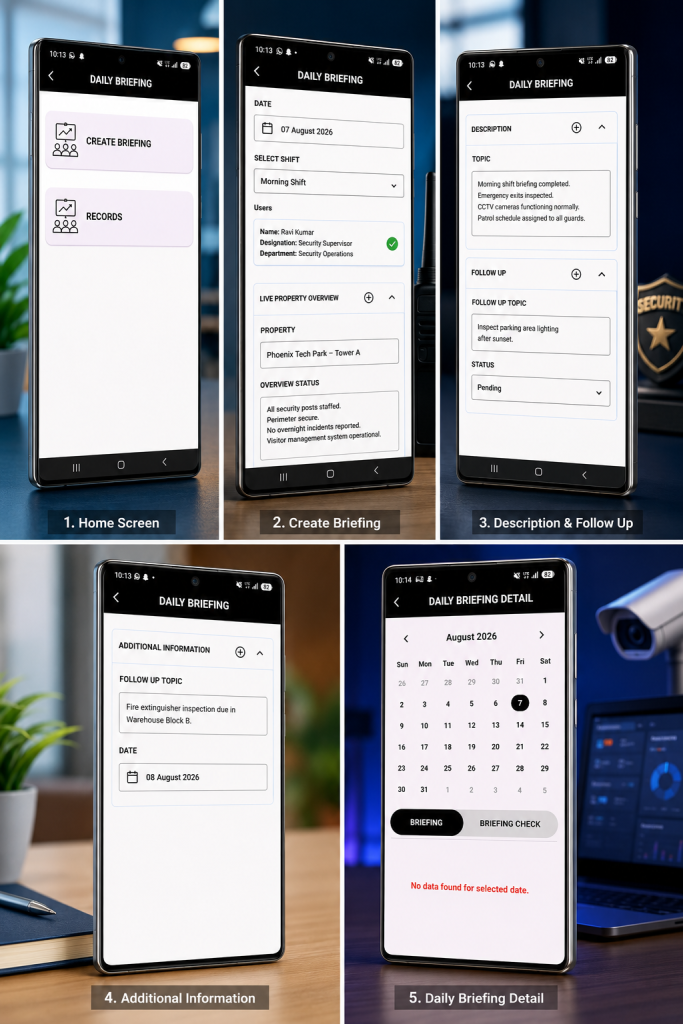
AVES handles this through its Daily Briefing module. A supervisor creates a briefing, picks the date and shift and pulls in the guards being briefed, role and department shown clearly right there.
The Live Property Overview section captures site conditions at the exact moment of briefing. The Topic and Description fields capture exactly what got communicated, not a rough memory of it weeks later.
Follow Up items carry their own status field, so something raised Monday can’t quietly disappear by Friday without anyone catching it. Every briefing logs against a calendar too, so a supervisor can pull up any date and see exactly what got covered,or spot right away when a briefing got missed.
That last part matters more than people expect. A missed daily briefing is often the first sign of a bigger accountability gap on a site. Catching it early costs a lot less than finding out after something’s already gone wrong.
What This Looks Like in Practice
Walk through an actual briefing and the process becomes obvious fast.
A supervisor opens the Daily Briefing screen and taps Create Briefing. They select today’s date and pick the shift, morning, evening, or night. The relevant guards get pulled in, each one shown with their name, designation, and department, so there is no confusion about who is actually being briefed.
Next comes the Live Property Overview. The supervisor types in the property, then logs the overview status in plain language, security posts staffed, perimeter secure, nothing unusual overnight. This is the part that replaces a rushed verbal summary with something searchable.
The Description and Topic fields capture exactly what was communicated that day. If anything needs following up, it goes into Follow Up with its own status, pending, in progress, or resolved, so it does not disappear the moment the shift starts.
Every entry lands on a calendar. A supervisor can jump back to any date and see exactly what was briefed, or immediately notice a date with no entry at all.
What Good Actually Looks Like
A site running a proper daily briefing doesn’t feel more complicated. Honestly, it feels calmer.
Supervisors stop repeating themselves because everything’s logged and searchable. Guards stop starting shifts blind because today’s conditions are already documented before they even arrive.
Clients stop asking questions you can’t answer, because you can pull up exactly what got briefed on any given day. That confidence is the real payoff here. Not the process for its own sake.
Frequently Asked Questions
What is a daily briefing in security operations?
A daily briefing is a structured update given to guards before a shift starts, covering site conditions, communication topics and any unresolved follow up items from previous shifts.
How is a daily briefing different from a shift handover?
A handover happens between two guards at the point one shift ends and another begins. A briefing happens earlier, usually led by a supervisor and covers the wider site picture rather than a single handoff.
Why does a daily briefing need to be logged instead of spoken?
Because a spoken briefing leaves nothing behind. If a follow up item gets missed or a client asks what got communicated on a specific date, there’s nothing to check against without a logged entry.
What happens to follow up items raised in a daily briefing?
They carry a status forward until resolved. Not just get mentioned once and forgotten. This is usually where verbal briefings fail the hardest.
Who is responsible for running the daily briefing?
Typically a supervisor or shift lead, though the real responsibility is confirming every guard present actually got briefed, not just assuming attendance because they were on site.
Where This Leaves You
A daily briefing isn’t another form standing between your guards and their job. It’s the reason guards start each shift knowing today’s actual conditions, instead of carrying yesterday’s assumptions forward out of habit.
Get it logged properly, tied to date, shift and follow up status and it stops being a hallway conversation nobody can verify. It becomes a record you can actually stand behind when it matters most.
If you want to see how AVES handles daily briefing, follow up tracking and shift records in one dashboard, visit avessecurity.com and request a demo.
CONTACT US
Website : https://www.avessecurity.com
Linkedin: https://www.linkedin.com/company/aves-security-management-system/
Instagram: https://www.instagram.com/avessecurity/