
Guard tour app: the mobile application a security guard uses during a patrol round to scan QR checkpoints, confirm GPS location, capture a selfie where required and record how long each stretch of the round took. It replaces a paper patrol sheet or a radio check-in with a timestamped, location-verified log a supervisor can check in real time.
Why a radio check-in is not proof of a patrol
“Did the round” and “can prove the round happened” are two different things. A guard who calls in from the gatehouse at the top of every hour has technically checked in, but a phone call carries no evidence of where the guard actually was. For a security company that has to answer to a client, an insurer or a court after something goes wrong, that gap matters.
A security patrol report already covers what a completed round needs to record. A guard tour app is the tool that captures that record automatically, on the guard’s own phone, while the round is happening, rather than reconstructed from memory afterwards.
Why it matters
Unverifiable patrols cost more than they save. Clients pay for coverage, not for a guard’s word that coverage happened. When a checkpoint is skipped, missed or rushed and nobody can show otherwise, the dispute becomes a matter of trust rather than data and trust is a weak position to argue from. A guard tour app turns “we patrolled the site” into a checkpoint-by-checkpoint, GPS-stamped record that either backs the claim or flags the gap before it becomes an incident.
How a guard tour app works on the phone
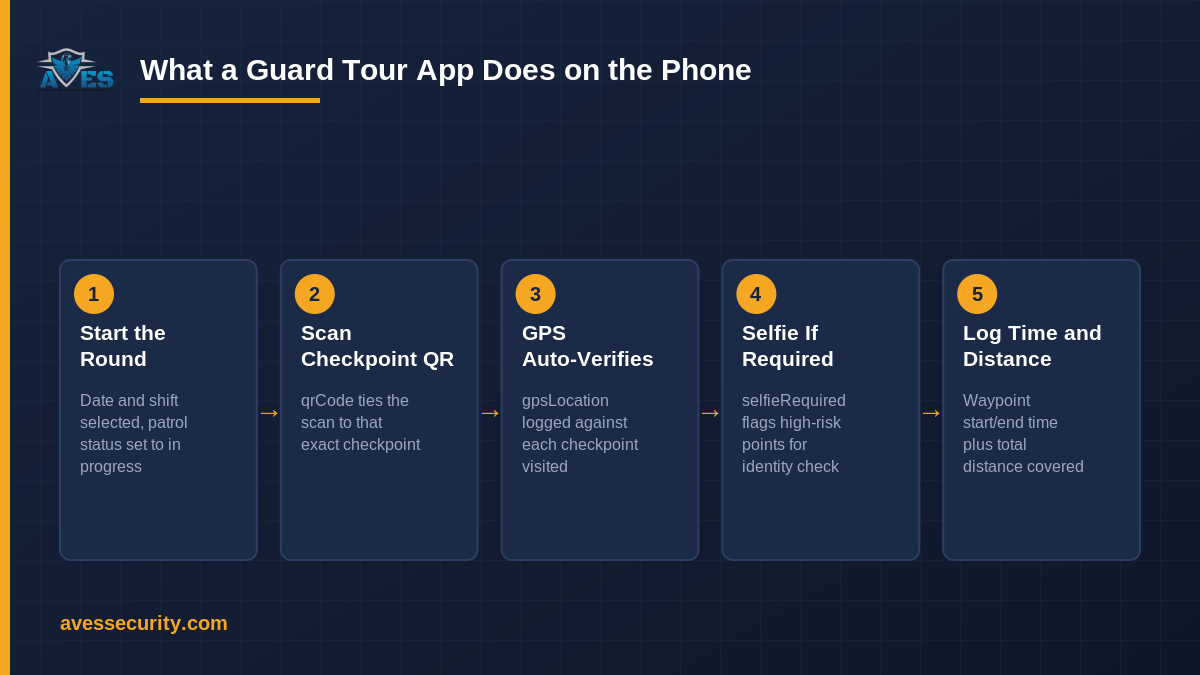
Strip away the marketing language and a guard tour app does five concrete things during a round:
1. Start the round
The guard opens the app, selects the date and shift and starts the round. Patrol status moves to in progress, so a supervisor watching the dashboard can see a round is underway before the first checkpoint is even scanned.
2. Scan the checkpoint QR code
At each stop, the guard scans a QR code fixed to that location. The scanned code ties the entry to that exact checkpoint, there is no way to log “checkpoint 4” from a QR code that lives at checkpoint 1.
3. GPS verifies the guard was actually there
Alongside the QR scan, the app records the phone’s GPS location at the moment of the scan. This is the step that separates a genuine tour from a guard scanning every code from a chair in the break room: the location data has to match the checkpoint, not just the code.
4. Selfie capture where the checkpoint demands it
For higher-risk or higher-value checkpoints, the app can require a selfie at the point of scanning. This adds an identity check on top of the location check, useful for checkpoints where “someone scanned this” is not a strong enough guarantee that the assigned guard did.
5. Waypoint timing and distance covered
The app logs a start and end time for each waypoint stretch and totals the distance covered across the round. A checkpoint reached in four seconds flat or a round that covers a fraction of the expected distance, is visible in the data rather than buried in a paper log nobody re-reads.
Every checkpoint visited through the round builds into a single record: status, GPS location and scan time, per checkpoint, for the full patrol.
Guard tour app checklist
Before you judge a guard tour app on its marketing page, check whether it actually does the following:
- Captures GPS location against every checkpoint scan, not just at login
- Ties each scan to a specific QR-coded checkpoint, so entries cannot be logged out of place
- Can require a selfie at selected checkpoints, configurable by site risk
- Records a status for every checkpoint in the round, not only the ones completed
- Logs start and end time per waypoint and totals distance covered for the round
- Gives a supervisor a live view of patrol status while the round is in progress
If an app cannot show GPS data per checkpoint, it is a scanning app, not a verification tool.
Common mistakes with guard tour apps
- Treating “app installed” as “patrol verified.” An app on a guard’s phone proves nothing by itself, the GPS and checkpoint data per round is what proves the patrol.
- Leaving selfieRequired off everywhere. Turning on the selfie check only for the handful of checkpoints that genuinely need an identity guarantee keeps the process fast without losing the control where it counts.
- Ignoring the timing data until something goes wrong. Waypoint time and distance covered are useful every shift, not just in an investigation, reviewing them regularly catches rushed rounds before they become a pattern.
- Relying on a radio check-in as a backup record. A verbal check-in has no location data behind it; it should supplement the app record, not replace it.
Guard tour app vs guard tour system
The two terms get used interchangeably, but they describe different layers. The app is the tool on the guard’s phone that scans checkpoints and captures the data. The guard tour system is the full platform: the app plus the supervisor dashboard, the stored records and the reporting that turns individual rounds into evidence a client or a court will accept. A guard tour app without the system behind it is just a scanner; the system is what makes the data usable afterwards.
Frequently asked questions
What is a guard tour app?
A guard tour app is the mobile application a security guard uses during a patrol to scan QR checkpoints, have GPS confirm their location, capture a selfie where required and log the time and distance covered for the round.
How does a guard tour app prove a patrol actually happened?
By recording GPS location against each QR checkpoint scan, with a timestamp. A round that shows the right checkpoints, in the right place, at plausible intervals, is verifiable in a way a paper sheet or a radio call-in is not.
Does a guard tour app need a selfie at every checkpoint?
No. Selfie capture is best reserved for higher-risk or higher-value checkpoints, configured per site. Requiring it everywhere slows the round down without adding much beyond what GPS and QR data already confirm.
What is the difference between a guard tour app and a guard tour system?
The app is the phone-side tool a guard uses on patrol. The guard tour system is the wider platform (app, supervisor dashboard and stored records) that turns the app’s data into a usable, reportable record over time.
What should I check before a round, not just during it?
A security guard logbook entry at shift start, alongside the round itself, gives a fuller record of what the guard observed beyond the checkpoints and if anything needs escalating during the round, it should feed into the same incident report form process rather than a separate note.
What happens if a checkpoint gets missed?
A missed checkpoint should show up in the round data as a gap, not a silent absence. See how AVES verifies a missed patrol against the expected route.
For more patrol and compliance tips, follow AVES on Instagram.
See the app in action
AVES includes a guard tour app with QR checkpoint scanning, GPS verification, configurable selfie capture and waypoint timing built in, alongside the supervisor dashboard that turns every round into a reportable record. Book a 30-minute demo and we’ll show you the checkpoint screen a guard actually uses on a round. Prefer to look around first? Start a free trial.