

A guard walks past a cracked window on Tuesday. Nobody writes it down. Three weeks later, a tenant claims the crack happened during a break-in that never occurred and there is no record proving otherwise.
This is the scenario that keeps security company owners up at night. Not the incident itself, but the complete absence of proof on the days before it.
If you are researching a defect and damage reporting tool right now, you already know this fear. You are not looking for a generic maintenance app. You are looking for a way to protect your company the next time someone tries to blame your guards for damage that was already there.
This guide is written for exactly that. No fluff, no recycled definitions. Just what a defect and damage reporting tool actually solves, what it costs to skip and how to choose a defect and damage reporting tool that holds up when a client or a lawyer starts asking questions.
What a Defect and Damage Reporting Tool Actually Means
A defect and damage reporting tool is how a security team documents the physical condition of a site, cracked glass, broken locks, damaged fencing, faulty equipment, before, during and after a shift. It exists to answer one question clearly: was this already broken, or did it happen on our watch?
Done on paper, this looks like a maintenance note scribbled at the end of a shift, if it gets written at all. Done properly through a defect and damage reporting tool, it becomes a timestamped, photo-backed record that either clears your guards or flags a real issue immediately.
The gap between those two versions is exactly where false damage claims against security companies come from.
Why Skipping This Quietly Costs You Later
Most security companies don’t decide to skip damage documentation. They simply never build a habit around it, so it only happens when someone remembers.
Here’s what nobody tells you until a claim lands on your desk.
No baseline means no defense. If nobody documented the site’s condition at shift start, you have no way to prove damage existed before your guard ever arrived.
Verbal reports disappear. A guard mentioning something to a supervisor in passing is not a record. By the time a claim surfaces weeks later, that conversation is gone.
Maintenance issues get discovered too late. A faulty gate or broken camera that never gets logged stays broken until it causes a bigger problem, often right when you need it working most.
Clients lose confidence fast. A client who receives a vague “we’ll look into it” instead of a documented defect and damage reporting tool response starts wondering what else isn’t being tracked.
The Real Cost of Getting This Wrong
Let’s talk about what this actually costs, not just the theory.
A single disputed damage claim without documentation can cost thousands in a settlement your company didn’t actually cause. A pattern of undocumented site conditions can cost you the entire contract when a client decides they can’t trust your reporting.
A defect and damage reporting tool is not a nice-to-have add-on. It is the record that stands between your company and a claim you cannot disprove. Treat a defect and damage reporting tool as optional paperwork and you are gambling with money you will eventually lose.
What Buyers Get Wrong When Choosing a Solution
If you are comparing options, here is where most first-time buyers get stuck.
Mistake one: assuming photos alone are enough. A photo without a timestamp, a location and a guard’s name attached is easy to dispute in a real conversation about liability. A proper defect and damage reporting tool captures all of it automatically, which is the whole point of using a defect and damage reporting tool instead of a plain camera roll.
Mistake two: treating this as a one-time inspection instead of an ongoing habit. Documenting site condition once at contract start is not the same as capturing it every shift. Damage happens over time and your records need to as well.
Mistake three: choosing damage claim reporting software with no searchable history. If you can’t pull up every defect logged at a site over the last six months in seconds, the tool isn’t actually protecting you when a dispute happens.
Mistake four: not connecting this to your broader operation. A standalone damage log that lives outside your guard’s daily workflow gets used inconsistently, which defeats the entire purpose.
Knowing these traps in advance puts you ahead of most buyers who learn them the hard way.
What a Properly Built System Looks Like
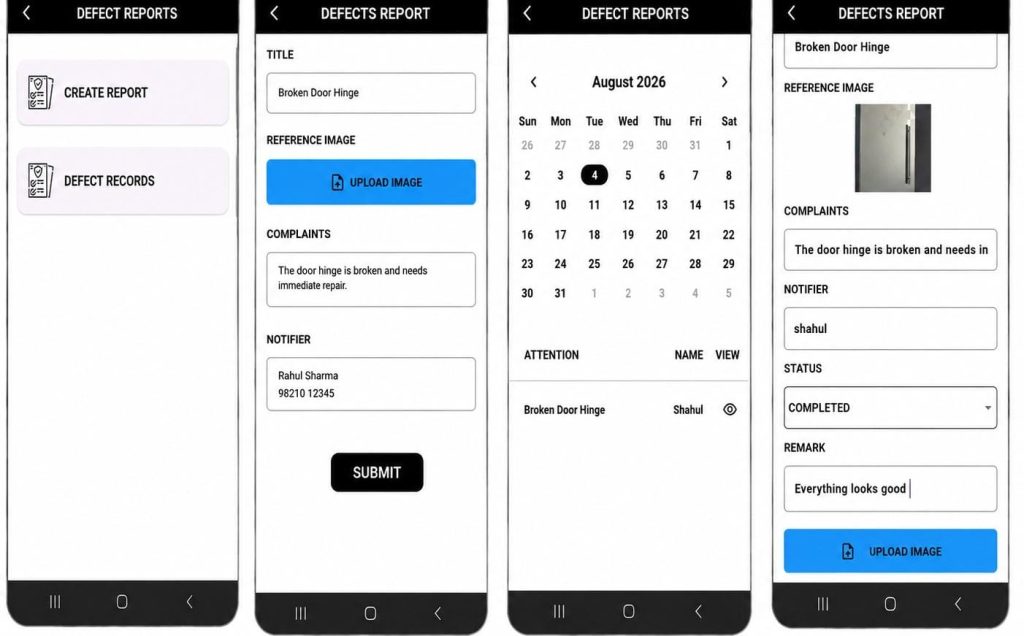
A modern defect and damage reporting tool, tied to a real security operation, handles the full picture in one place. The best defect and damage reporting tool makes logging a broken lock or a cracked window faster than ignoring it.
- Capture defects with photo evidence so every issue is documented with visual proof from the field.
- Record complete incident details including defect title, description and reporting officer in one place
- Monitor repair progress with status updates from reported to completed, ensuring nothing is overlooked.
- Maintain an audit trail that helps resolve disputes and proves when issues were reported and closed.
This is not about turning your guards into inspectors. It’s about making sure the condition of a site is never a matter of memory or opinion.
Why This Fits Inside a Bigger Security Guard Management System
A defect and damage reporting tool rarely works well as an isolated app. It needs to sit inside a complete security guard management system, alongside patrol verification, occurrence recording and incident reporting.
Here’s why that matters. A disputed damage claim is rarely answered by one piece of evidence alone. A logged defect, a patrol record showing who was on site and a timestamp from the same shift together tell a story that a single photo cannot.
When damage claim reporting software lives inside the same security guard management system as patrol tracking and occurrence logs, pulling together a full defense against a false claim takes minutes instead of a frantic search across disconnected tools.
This is the same reason established guard management software providers, from GuardsPro to Novagems to SGMS, build this kind of documentation directly into their core platform rather than leaving it as a separate purchase. Preventing fraudulent damage claims isn’t a side feature. For a lot of security companies, it’s the single most financially important thing the software does all year.
Honest Limitations to Expect
No system is magic and you deserve a straight answer here.
A defect and damage reporting tool still depends on guards actually taking the time to log what they see. It won’t catch damage nobody happened to notice and no defect and damage reporting tool replaces a genuine walk-through at shift start.
Offline coverage typically covers core actions, with photos and notes syncing once the device reconnects. Plan for a short delay in low-signal areas rather than assuming instant upload every time.
And building the habit takes a few weeks. Guards used to only reporting the big, obvious problems will need practice logging the smaller stuff before it becomes second nature.
Making the Decision With Confidence
If you’ve read this far, you already understand more about choosing a defect and damage reporting tool than most people evaluating a defect and damage reporting tool for the first time.
You know what it actually covers, why undocumented site conditions quietly become expensive claims, what mistakes to avoid and what a properly built system should include.
The next step is simple. Ask your current process one direct question. If a client disputed damage at one of your sites today, could you produce a timestamped record proving the condition beforehand? If the honest answer is no, that’s exactly where a real defect and damage reporting tool, connected to your broader security guard management system, earns its place. That single gap is what a defect and damage reporting tool exists to close.
Want to see how a defect gets logged, tracked and cleared in AVES? Book a live walkthrough →
CONTACT US
Website : https://www.avessecurity.com
Linkedin: https://www.linkedin.com/company/aves-security-management-system/
Instagram: https://www.instagram.com/avessecurity/
What exactly is defect and damage reporting?
It’s your guards keeping track of what a site actually looks like. Cracked glass, a busted lock, torn-up fencing, that kind of thing. Photo, timestamp, whoever’s name is on the shift. So nobody’s arguing later about when it happened.
Isn’t that basically incident reporting?
Different animal. Incident reports cover things that happen, a break-in, someone getting hurt. This is about the property itself, its condition. A cracked window might get its own quick entry, or it might show up as a line inside a bigger incident report if things escalate.
Can a photo by itself settle a dispute?
Not on its own, no. A photo with a timestamp and location stapled to it and a name attached, that’s what actually means something when a client pushes back or a lawyer gets involved.
Once it’s fixed, does the record just vanish?
No. You close it out, add a line about what got done and it stays in the history. First flagged, what happened, when it closed. All in one thread instead of getting wiped.