
An asset tagging sample is a worked example showing how a single serialised item, such as a two-way radio or CCTV unit, is recorded from the day it enters a security company’s system to the day it is retired, including the fields that change at each stage: onboarding, location, custodian, transfer, stocktake and retirement.
Most explanations of asset tagging describe the idea in the abstract. What is harder to find is a concrete example: one real asset, followed stage by stage, showing exactly what gets recorded and when. That is what this guide walks through.
Why a worked example matters more than a definition
Knowing that asset tagging gives an item a unique ID is one thing. Knowing what that ID actually tracks and when the record is supposed to change is another.
Most mismatches between a tagging system and reality happen at the transitions: the moment an asset moves site, changes hands or goes for repair. A definition will not show you what a transfer record looks like partway through approval, or what a stocktake flags when an item cannot be found. A good asset tagging sample will.
The asset tagging sample: one radio, tag to retirement
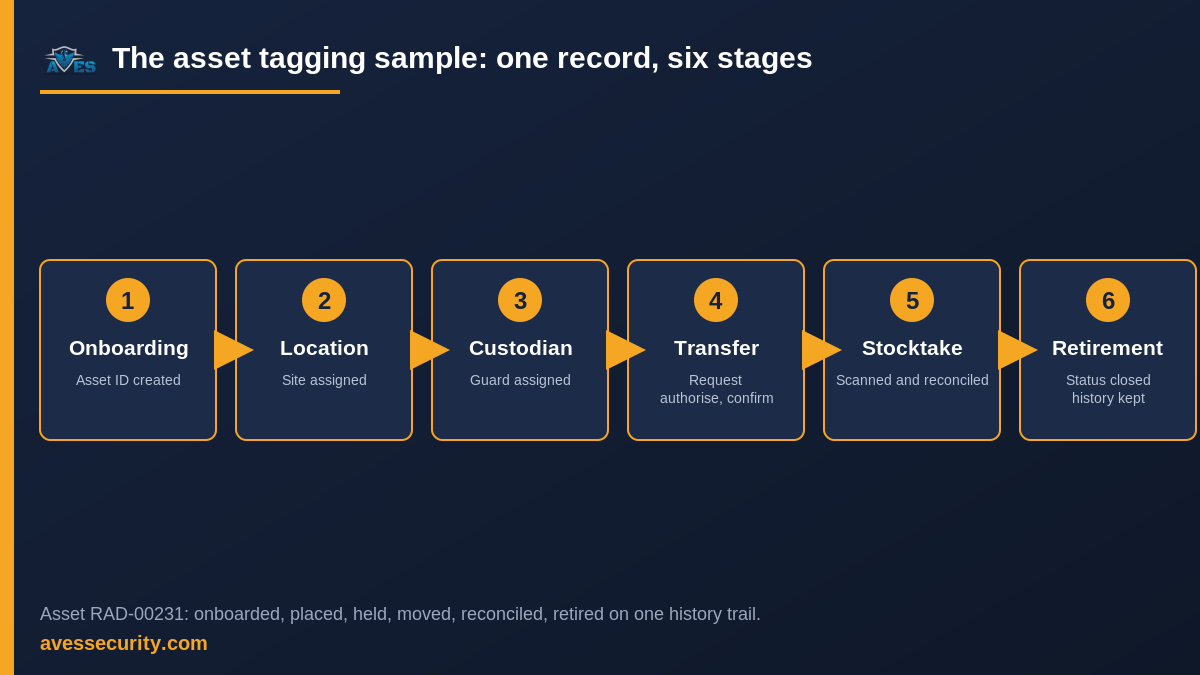
This asset tagging sample follows a single asset through six real stages, using the asset-code prefix, transfer workflow, custodian field and stocktake process a security company’s assets module actually runs on.
The asset: a two-way radio, asset code RAD-00231, issued to AVES Protective Services’ Riverside Mall site.
| Stage | What happens | Field or record updated |
|---|---|---|
| 1. Onboarding | The radio is received into the system under the organisation’s RAD- asset-code prefix and given a unique ID. |
Asset ID created, type and description logged |
| 2. Location placement | The radio is assigned to Riverside Mall as its home site. | Location field set |
| 3. Custodian assignment | The radio is handed to a named guard for the shift. | Custodian field set to that guard |
| 4. Transfer | The site needs an extra radio at a second location. A transfer is requested, authorised by a supervisor and confirmed received at the new site. | Transfer logged: requested, authorised, confirmed; location field updated |
| 5. Stocktake | At the next scheduled stocktake, the radio is scanned on site and reconciled against the system record, with no mismatch found. | Stocktake entry added, status confirmed |
| 6. Defect and retirement | Months later the radio develops a fault. It is flagged as defective, then moved to under-repair status. After repeated failures it is retired. | Status changed to defective, then retired; history trail kept |
Every row above changes a field on the same asset record, not a fresh entry. That is the point of tagging: one scannable ID carries the full history, rather than six disconnected notes in six different places.
That matters beyond the shift itself. When a client or an insurer later asks where RAD-00231 was on a given date, the full six-stage history can be exported from the one record rather than reconstructed from six separate logs. The same applies when an internal audit needs every asset that passed through a particular site.
What a good asset tagging sample should always show
A genuine asset tagging sample, not just a definition, should demonstrate:
- A unique asset ID tied to one physical item for its whole working life
- An onboarding step that assigns the ID and basic details at the point the asset is received
- A location field that updates whenever the asset moves site
- A named custodian, not just “the site” or “the team”
- A transfer step with request, authorisation and confirmation, not a single tap
- A stocktake that reconciles the system record against what is actually scanned
- A status field that reflects defects and retirement without deleting the asset’s history
Common mistakes a worked example exposes
Walking through a real asset tagging sample also exposes the mistakes a bare definition hides:
Treating the ID as the whole record. The asset code is just the key. The value is in what gets updated against it: location, custodian, status, each time something changes.
Skipping the authorise step on a transfer. A transfer that only records “requested” and “confirmed” with nothing in between loses the approval trail a dispute would need.
Letting custodian go stale. If the custodian field is only set once, at onboarding, it stops reflecting who actually has the asset after the first shift change.
Treating a stocktake as a one-off. A single stocktake catches mismatches that already happened. A scheduled one catches them early, before an item is genuinely lost.
Deleting a retired asset. Retirement should change the status, not remove the record. Deleting it erases the exact history a later audit would need.
FAQ
Is an asset tagging sample the same as an asset tagging template?
They overlap. A template is usually a blank table of the fields to track. A sample, like the one above, shows those same fields filled in and changing across a real sequence of events.
How many stages does a typical asset go through?
It depends on the item. A radio or camera that moves between sites will usually pass through onboarding, location, custodian, transfer and stocktake stages several times before an eventual retirement. The six stages above are the complete set, not a fixed count per asset.
What happens to the record once an asset is retired?
The record’s status changes to retired, but the history is not deleted. Keeping the trail intact is what lets a later audit confirm where the item was and who held it, right up to the point it was taken out of service.
Does every asset need a transfer record?
Only assets that move between sites or custodians. An item that stays at one location with one custodian for its whole life will show onboarding, custodian and stocktake entries, but no transfer.
Can a lost asset reappear in the record?
Yes. If a stocktake cannot locate an item, it is flagged, not deleted. If it is later found, the same record is updated rather than re-created, keeping one continuous history.
How this looks inside AVES
AVES’s asset tagging software runs the six-stage pattern above as a working system rather than a worked example: onboarding through the receive endpoint with an organisation’s own asset-code prefix, location placement, custodian assign and release, transfers that move through request, authorise and confirm or reject, scan-to-reconcile stocktakes and status changes through to retirement, all kept on a single asset history trail. For how the four tagging methods behind the ID itself compare, see what is asset tagging.
An asset tagging sample tracks operational history; it is distinct from the fixed asset register, which is the financial view of what a company owns and from the asset handover form, which logs a single handover event rather than a full lifecycle. The same discipline, tagging and logging every change rather than trusting memory, is also how AVES records daily guard activity in the security guard logbook.
If your business issues serialised equipment across more than one site, book a 30-minute demo and we will show you the asset tagging sample behind this exact example, onboarding, transfer and stocktake included.
Book a demo or start a free trial.
Follow AVES on Instagram for more security operations guidance.